

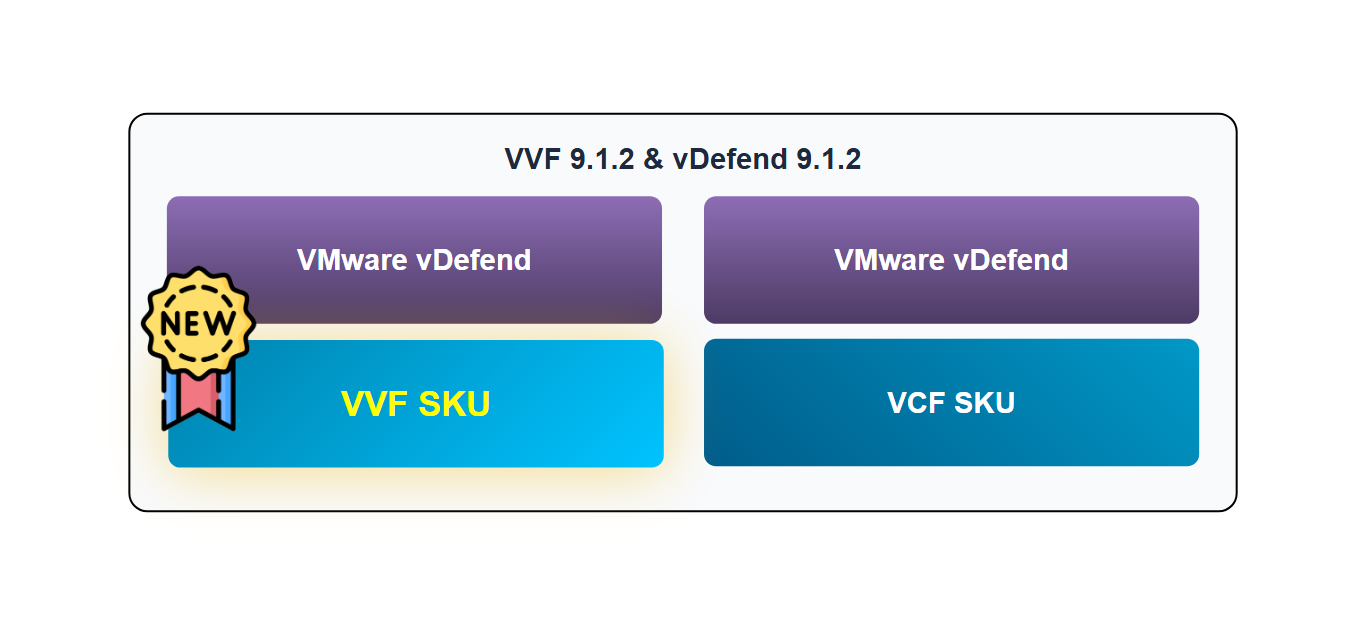
VMware vDefend is now available with VMware vSphere Foundation (VVF). Until now, VMware vDefend security capabilities, such as lateral segmentation and Advanced Threat Prevention (ATP), were available only on VMware Cloud Foundation (VCF). As a result, VVF customers lacked built-in Zero Trust lateral security, embedded in the hypervisor, to protect their workloads.
Perimeter-only defense is no longer enough to protect enterprise workloads on VVF. With the rise of AI-driven attacks, perimeter defenses are easily infiltrated, and once inside a data center, attackers move laterally to find high-value assets. Additionally, AI-driven attacks uncover workload software vulnerabilities faster than enterprises can patch, leaving these workloads highly exposed.
To address these challenges, starting with VVF 9.1.2 and vDefend 9.1.2, organizations using VVF can deploy comprehensive vDefend security capabilities across their virtualized infrastructure. Organizations can use the existing VMware vDefend add-on SKU for their VVF deployment.
 What Is Supported with VVF?
vDefend on VVF includes comprehensive vDefend capabilities that deliver Zero Trust lateral security and advanced threat prevention directly into the virtualized infrastructure. Supported capabilities include Distributed Firewall (DFW), Distributed Intrusion Detection and Prevention System (IDS/IPS), Malware Prevention Service (MPS), Network Traffic Analysis (NTA), and Network Detection and Response (NDR). The vDefend Security Services Platform (SSP) also provides Security Intelligence, Security Assessment Reports, policy recommendations, and built-in workflows to accelerate security operationalization across virtual infrastructure.
The following vDefend capabilities are not available with VVF and require the full VCF platform:
- Gateway Firewall: North-south edge and physical-to-virtual gateway firewalling is not supported on VVF.
- Federation: Multi-site federated policy management is not supported on VVF. However, a single vDefend management instance can connect to multiple vCenter servers to provide security policy enforcement across clusters.
- Multi-Tenancy or VPC Security: Virtual Private Cloud (VPC) security profiles and self-service tenant delegation require VCF.
- NSX Overlay Networks: vDefend Security for NSX overlay networks require VCF license.
Customers who need these capabilities can upgrade to the full VCF platform at any time with a license upgrade.
For the complete list of vDefend feature entitlements, refer to the vDefend Feature and Edition Guide.
Deploy vDefend on VVF
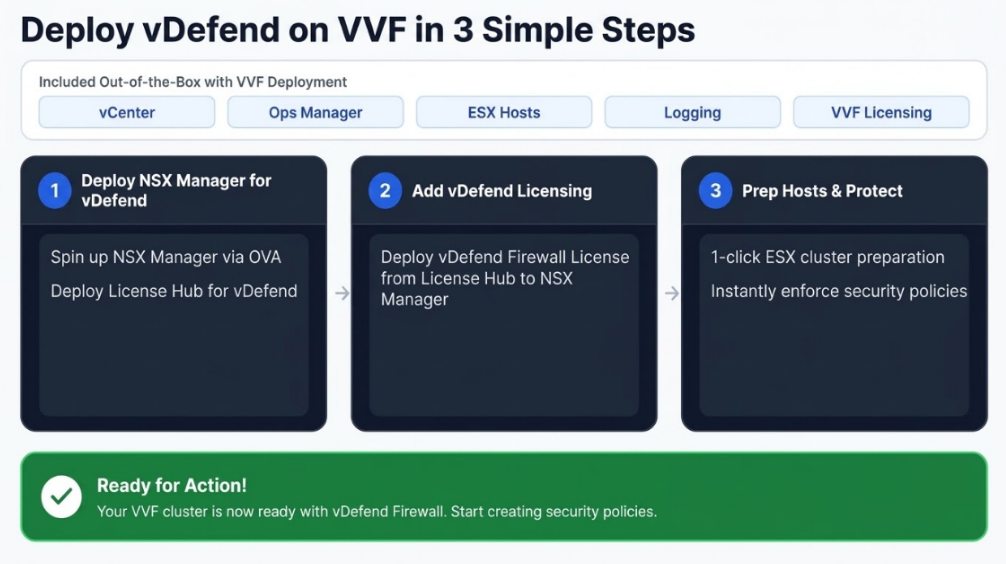
To get started, organizations can deploy vDefend on VVF in three simple steps. A standard VVF deployment already includes vCenter, ESX hosts, Ops Manager, VCF Operations for Logs, and VVF licensing. Adding vDefend requires only two additional components: NSX Manager for vDefend and License Hub. Deploying vDefend on VVF also does not require network redesigns, as vDefend secures workloads natively on existing Distributed Virtual Port Groups (DVPGs).
Organizations can enable vDefend on VVF in three straightforward steps:
- Deploy NSX Manager for vDefend. Spin up NSX Manager from an OVA and deploy License Hub. This streamlined NSX Manager is built specifically for vDefend and serves as the management and control plane for organizational security policies.
- Add vDefend licensing. Deploy the vDefend license from License Hub to NSX Manager.
- Prepare hosts and protect. Prepare the ESX cluster with one click. Organizations can start enforcing security policies right away.
Once these steps are completed, the VVF cluster is protected by vDefend, allowing organizations to immediately begin defining granular security policies.
Watch the video for a step-by-step walkthrough on deploying vDefend on VVF.
Key vDefend Use Cases for VVF Environments
By deploying vDefend on VVF, organizations can address their most pressing data center security needs immediately:
- Secure the Management Domain: Attackers frequently target core management tools like vCenter and operations servers to take over infrastructure. vDefend secures the management domain so unauthorized traffic cannot reach critical control planes.
- Protect Shared Infrastructure Services: Every workload connects to core services like Active Directory, DNS, DHCP, and NTP. vDefend discovers these services automatically and locks them down to guard against rogue connections.
- Implement Zone and Microsegmentation: Divide environments into clear zones such as Production, Development, and DMZ to ensure only authorized traffic crosses zones. This allows organizations to shrink the blast radius of any breach.
- Deploy Virtual Patching: Unpatched software vulnerabilities in workloads give attackers an easy path into the environment. Distributed IDS/IPS inspects traffic at the vNIC level and blocks exploit attempts immediately. This buys operations teams time to test and apply software patches during scheduled maintenance windows.
Watch the video to explore vDefend use cases for VVF deployments.
Accelerate security operationalization with the vDefend Security Services Platform
SSP serves as the data lake and orchestration engine for vDefend deployments. It collects network flows directly from the hypervisor and maps application communications. Organizations gain clear visibility into east-west traffic and receive automated security policy recommendations. For VVF environments, organizations can deploy SSP in a small, two-worker-node form factor, making it well suited for smaller environments.
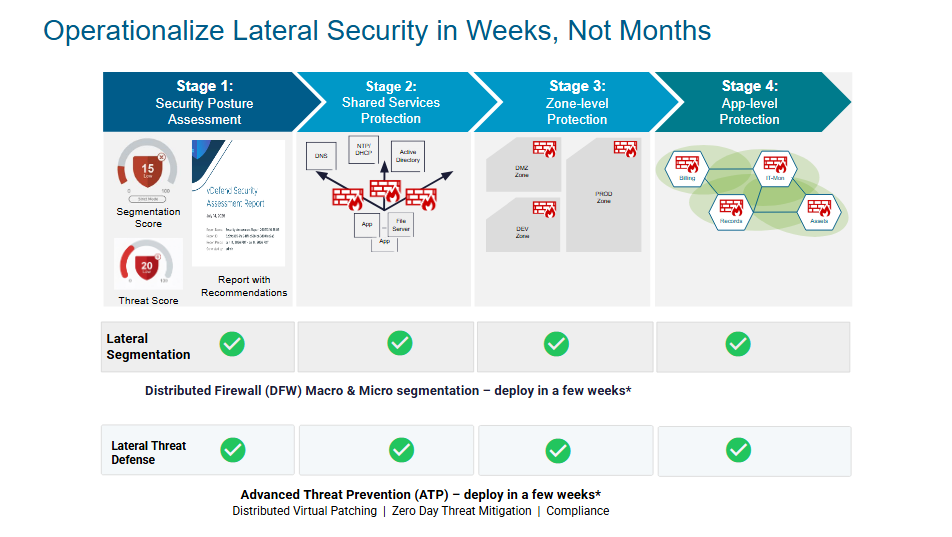
Built-in workflows in SSP help organizations accelerate security operationalization by enabling lean IT teams to implement security through a structured, four-stage journey:
- Stage 1: Security Posture Assessment: SSP evaluates the current environment and generates segmentation and threat scores. It then delivers an assessment report with actionable recommendations to resolve security gaps.
- Stage 2: Shared Services Protection: Every workload communicates with core IT services like DNS, DHCP, NTP, and Active Directory. SSP automatically discovers core shared services and recommends DFW rules alongside prescriptive ATP policies to secure them.
- Stage 3: Zone-Level Protection: IT teams define application-to-zone mappings, and SSP automatically tags workloads into these zones. It then generates DFW and ATP policies to isolate them, inspect inter-zone traffic, and apply virtual patching.
- Stage 4: App-Level Isolation: SSP maps application-to-application traffic and recommends granular microsegmentation policies. This allows organizations to ring-fence individual applications and block unauthorized lateral movement.
These guided workflows eliminate manual guesswork, enabling security teams to move from an initial assessment to zone-level protection in weeks rather than months.
Get Started
As AI-driven threats continue to rise, traditional perimeter defenses are no longer sufficient because they remain blind to internal lateral traffic. With vDefend now available on VVF, organizations can easily implement Zero Trust lateral security into their existing deployments to secure their workloads.