
Maximizing Performance, Efficiency, and Flexibility in Multi-tenant Environments
Introduction
VMware Cloud Foundation (VCF) provides the operational elasticity and resource efficiency required for modern, scalable AI environments and helps transform an AI hardware system into an enterprise-grade private, flexible, AI-ready infrastructure. With the sharp increase in costs for data center equipment over the last year, Enterprise CIOs are scrambling to maximize every component in their data center. VCF can help enterprises maximize utilization and optimize AI infrastructure.
VMware Cloud Foundation (VCF) recently achieved NVIDIA Hypervisor-Certification. VMware vSphere 9.1 (and all future vSphere 9.x releases) is now an NVIDIA-Certified Hypervisor, with near bare metal performance for AI workloads.
The Broadcom Performance team has completed extensive performance tests demonstrating VCF’s efficiency and flexibility for running AI workloads in various configurations. To explain our results, we have published a white paper and are publishing a series of four blog posts:
- Part 1 (this blog post): Maximizing Performance, Efficiency, and Flexibility in Multi-tenant Environments
- Part 2: Maximizing GPU Utilization for Best Total Cost of Ownership
- Part 3: Maximizing CPU and Memory Utilization for Best Total Cost of Ownership
- Part 4: Utilizing Time-Slicing to Optimize Inference Throughput
Today we are happy to share with you part 1 of this series.
In a multi-tenant environment, each tenant can be a department, a project, or an external customer and all tenants share the same hardware. VCF provides the essential isolation, resource optimization, and self-service capabilities needed to make AI more efficient and operationally secure.
Highlights:
- VCF enables many flexible deployments of AI cloud architectures to meet enterprise management needs and maximize the usage of cloud resources.
- For strict isolation and security, each tenant’s workloads can be deployed in a separate virtual machine (VM). Alternatively, they can share the same VM but be isolated in containers. GPUs can be allocated to VMs using either passthrough GPU, vGPU, or MIG vGPU, and any of these methods can be used whether tenants share a VM or are in separate VMs.
- We demonstrated that two different deployment architectures delivered highly comparable throughput and latency in our experiments with LLM inference.
Optimizing the deployment of AI workloads in multi-tenant environments
VCF supports many flexible deployment architectures for AI systems that can help to maximize GPU utilization and maintain high performance while helping ensure the isolation, security, and high availability of AI private clouds.
For high-demand AI workloads that fully consume a server’s compute and memory resources, IT admins can use VCF to provision dedicated physical servers, mirroring a bare-metal deployment while still benefiting from many of VCF’s features. In our previous blog, we demonstrated that VCF delivered industry-leading results in MLPerf Inference 5.1 benchmarks across different GPUs and CPUs, including NVIDIA H200 and B200, and Intel Xeon with AMX acceleration, and with different types of AI workloads including Speech-to-Text (Whisper), Text-to-Video (Stable Diffusion XL), LLMs (Llama3.1 405B, Llama2 70B, Llama3 8B), Graph Neural Networks (R-GAT), and Computer Vision (RetinaNet).
For many real-world use cases, the computing resources of enterprise private clouds are underutilized much of the time because their workloads are lightweight (for example, low inference request rates or small batch size). Provisioning dedicated hardware for these workloads creates significant inefficiencies and inflates operational costs. In these cases, consolidating multiple workloads to share the same hardware is critical for sustainable and cost-effective operation of AI private clouds.
In VCF multi-tenant environments, IT admins can choose to deploy or manage their tenants manually or through VCF Automation (see tenancy deployment models here). Depending on your enterprise’s security and isolation requirements, AI workloads can be managed in the following ways:
Tenant workloads in separated VMs (VM-based isolation):
- Security and Use Case: Best for strict security and isolation requirements.
- Configuration: Workloads for each tenant are deployed in separate VMs. GPUs are allocated to VMs using direct GPU passthrough or NVIDIA vGPU. With vGPU, a VM can be allocated full or partial (fractional) GPUs, enabling GPU resource sharing across tenant VMs. The right column in Figure 1 shows an example of this isolation. This configuration is fully supported by both VCF Automation and manual management.
Tenant workloads in the same VM (container-based isolation):
- Security and Use Case: Best for environments with lower security requirements where workload consolidation and simplified AI cloud management are prioritized.
- Configuration: Workloads for different tenants are consolidated into the same VMs, which can be assigned GPUs via direct GPU passthrough or vGPU. The left column in Figure 1 shows an example of this isolation. Co-locating workloads of multiple tenants within the same VM is supported only when managing tenancy manually. (VCF Automation requires each tenant to reside in a dedicated VM.)
Performance comparison of the two deployments
For illustration, we conducted an experiment in which a tenant’s workload is initially allocated to all four GPUs in the system, as shown in the first row in Figure 1 (“1 workload”). Assuming that this workload heavily underutilized GPUs, like the GPU Streaming Multiprocessor utilization shown in Figure 2, we can place more workloads on the server to increase the GPU utilization, as shown in the second row (“2 workloads”) and third row (“4 workloads”) in Figure 1. The left column shows the test cases where workloads of all tenants are in the same VM; the right column shows workloads of each tenant in a separate VM.
To simulate a tenant’s AI workload we ran MLPerf Inference with the Llama3.1 8B workload at 35 inference queries/sec on the system with Dell PowerEdge XE7745, 2x AMD EPYC 9555 64-core processors, 256 total logical cores, 768 GB memory, and four NVIDIA RTX Pro 6000 96 GB GPUs . Each of these inference workloads runs inside a container. Because this workload underutilized GPUs with its lightweight inference load, we could host up to four similar workloads in this same server, as shown in Figure 1. When all four workloads run concurrently, the total load on the servers will be 140 queries/sec. The details of the experimental setup, including software, hardware, VM configuration and workloads, can be found in our white paper.
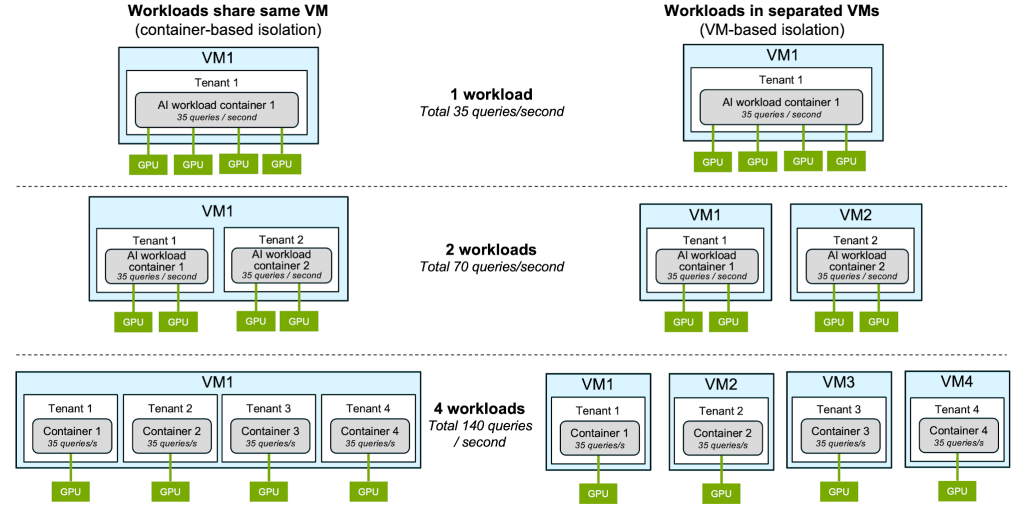
Figure 1: Test cases of workloads sharing the same VM vs. workloads in separated VMs. GPUs assigned to VM in both cases using either passthrough GPU or vGPU.
We conducted our experiments with both passthrough GPU (shown in Figure 2) and vGPU (shown in Figure 3) to showcase that VCF supports both for multi-tenant deployments.
Some of the key results of our experiments:
- By increasing the number of concurrent workloads on the same server from 1 to 4, we increased the inference throughput of the system almost four times (from ~4500 to ~18000 tokens/second), as shown in Figure 2 and Figure 3. The load is defined by the number of concurrent requests to the inference engine.
- GPU Streaming Multiprocessor utilization increased to 71% with four tenants instead of being underutilized at 36%-38% when only one tenant was deployed.
- There was almost no difference in throughput between the two methods of workload isolation (VM-based isolation vs. container-based isolation).
Performance comparison when deployed with passthrough GPU
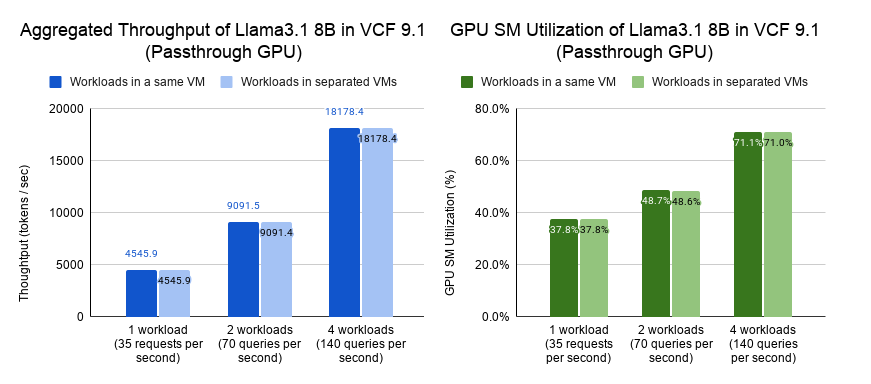
Figure 2: Performance of tenants in separate VMs vs. tenants sharing the same VM with passthrough GPU.
Performance comparison when deployed with vGPU
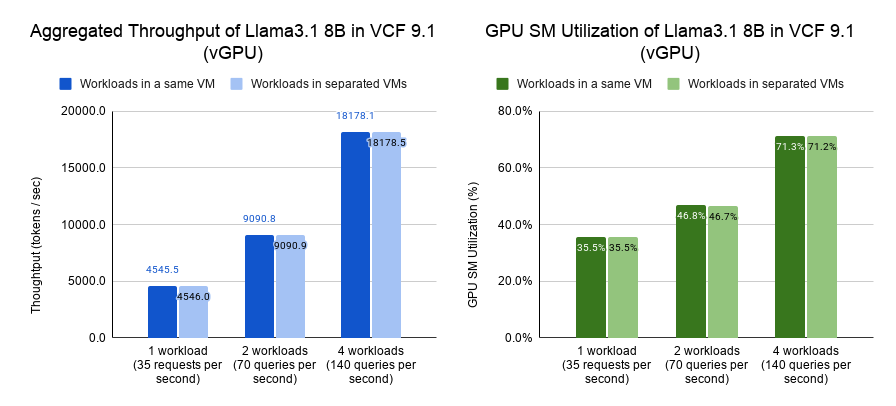
Figure 3: Performance of tenants in separate VMs vs. tenants sharing the same VM with vGPU
Conclusion
VCF is a highly flexible, efficient, and secure platform for managing Private AI within multi-tenant enterprise environments. By giving IT administrators the ability to choose between VM-based isolation for strict security requirements and container-based isolation within a shared VM for simplified management, VCF addresses diverse operational and infrastructure needs. The experimental findings clearly demonstrate that consolidating multiple lightweight, underutilized workloads onto shared hardware addresses the common issue of resource underutilization while delivering virtually no performance penalty, whether tenants were distributed across separate VMs or aggregated into a single VM. VCF empowers enterprises to optimize their AI infrastructure, helping ensure high availability, robust security, and maximum GPU efficiency. This helps enterprises control the cost of their AI infrastructure.
Please reach out to the VMware Performance Engineering team at vcf.ai.performance.pdl@broadcom.com with any questions regarding the performance of AI workloads in VCF.
Discover more from VMware Cloud Foundation (VCF) Blog
Subscribe to get the latest posts sent to your email.