Maximizing GPU Utilization for Best Total Cost of Ownership
Introduction
VMware Cloud Foundation (VCF) can help enterprises maximize utilization and optimize AI infrastructure. To demonstrate VCF’s efficiency and flexibility for running AI workloads in various configurations, the Broadcom Performance team has completed extensive performance tests. We present these results in our white paper and are publishing a series of four blogs posts:
- Part 1: Maximizing Performance, Efficiency, and Flexibility in Multi-tenant Environments
- Part 2 (this blog post): Maximizing GPU Utilization for Best Total Cost of Ownership
- Part 3: Maximizing CPU and Memory Utilization for Best Total Cost of Ownership
- Part 4: Utilizing Time-Slicing to Optimize Inference Throughput
Today we are happy to share with you part 2 of this series.
Low GPU utilization may cost enterprises millions to billions of dollars annually in wasted compute resources. Because of the large investment in AI, it’s important for organizations to optimize the usage of their AI infrastructure. This blog presents various methods of maximizing GPU utilization to drive the efficiency of VCF-based AI cloud environments.
In this blog, we discuss a variety of options for assigning GPU resources to VMs in order to optimize the performance of AI applications in VCF and maximize GPU utilization for highest return on investment (ROI).
Highlights:
- In VCF, DirectPath I/O (passthrough) and NVIDIA vGPU technologies are used to allocate GPU resources to virtual machines (VMs). This provides flexibility to deploy AI workloads in ways that best fit the diverse needs of enterprises, flexibility not available with bare-metal deployments.
- Enterprises frequently underutilize their GPU resources. GPU utilization can be significantly improved by properly allocating the GPU resources for each workload, consolidating more GPU workloads per server, and consolidating more load per VM.
VCF supports GPU technologies that help ensure the best AI workload performance, including NVIDIA NVLink, NVIDIA NVLink Switch, InfiniBand / RDMA over Converged Ethernet (RoCE), and NVIDIA GPUDirect Storage (GDS). In the simplest deployments, IT admins can have a single VM that owns the entire hardware resources of a server — similar to a bare metal deployment, but with the added management, reliability, flexibility, and security benefits of VCF. Virtualization technologies supported by VCF offer many other flexible options for AI cloud deployment that help to meet the diverse needs of enterprises and optimize the usage of hardware, thus minimizing total cost of ownership (TCO).
Methods of allocating GPUs to VMs in VCF
In VCF we can use DirectPath I/O (passthrough) and NVIDIA vGPU technologies to allocate GPU resources to virtual machines running AI applications. Figure 1 highlights some key differences between these two methods. Using passthrough, a GPU can be assigned to just one VM, and a VM can use multiple GPUs. Using vGPU, a single physical GPU can be fully allocated to a VM or can be partitioned among multiple VMs into virtual instances, where each VM receives a dedicated portion of GPU memory. vGPU includes two very different technologies: time-sliced vGPU and MIG vGPU.
For a detailed comparison of passthrough GPU vs. vGPU (including time-sliced vGPU vs. MIG vGPU), and to learn which option would be best for your deployment, refer to our white paper.
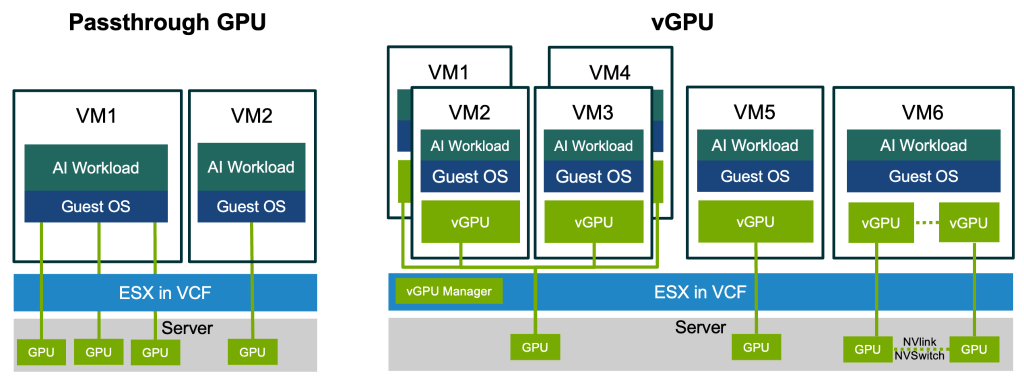
Figure 1: Methods of allocating GPUs to virtual machines in VCF 9.1
Maximizing GPU utilization by consolidating GPU workloads and sharing GPUs
GPUs in enterprise and data center environments are frequently underutilized, with average utilization often hovering at or below 50% [1]. VCF provides a variety of flexible ways to deploy enterprise workloads that help to meet many real-world use cases and more fully utilize cloud resources. When IT admins find that their AI workloads heavily underutilize GPU resources, they have multiple options in VCF to maximize GPU utilization of the system, thus reducing the TCO and achieving the best ROI on expensive AI Infrastructure. The following experiments are an illustration.
For example, suppose an enterprise has four workloads, each running on its own bare-metal server, and all underutilizing GPU resources. We modeled this in VCF as four ESX servers, as shown in Config 1 in Figure 2. To simulate a workload that underutilizes the GPU, we ran Llama3.1 8B (FP4) inference in VMs using Config 1 at only 18 queries per second per VM. In this case, four servers with four GPUs each had about ~34-38% GPU SM utilization. The details of the experimental setups, including software, hardware, and VM configuration and workloads, can be found in our white paper.
To increase GPU utilization, the four workloads can be consolidated onto fewer servers. However, in some cases the enterprise prefers to keep these workloads isolated on four machines for security and management reasons rather than co-locating them on the same machine. This causes severe resource waste when deployed on bare metal.
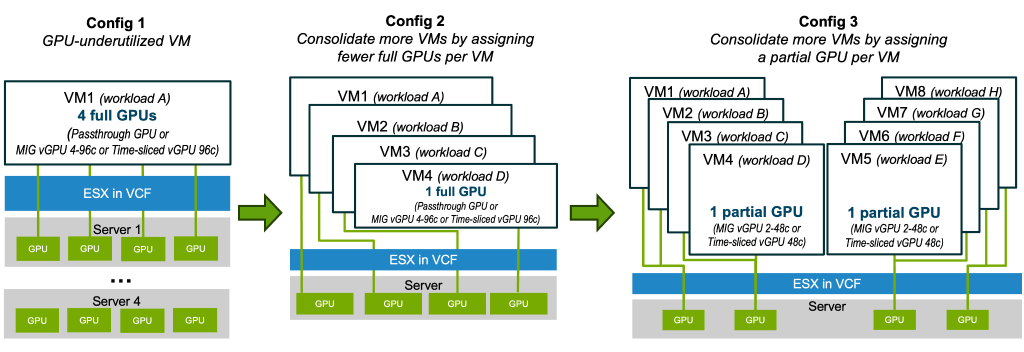
Figure 2: Test configurations on servers with four RTX 6000 Pro GPUs
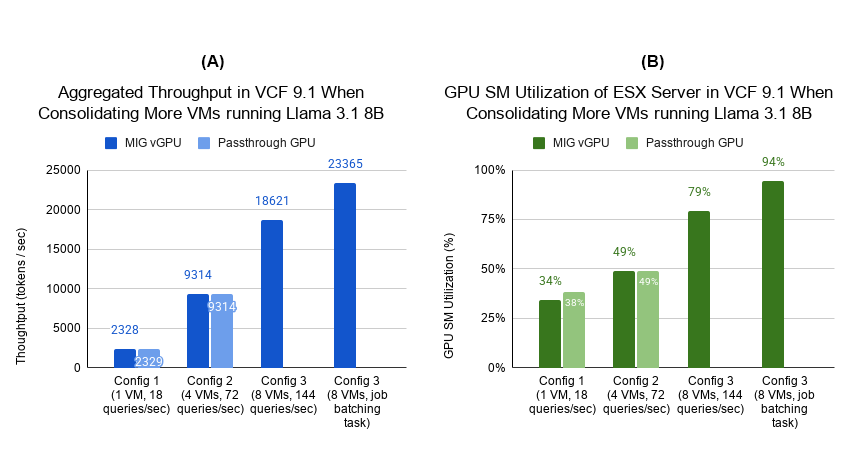
Figure 3: Inference throughput and GPU SM utilization when consolidating more VMs per server
(GPU SM utilization is the percentage of time that SMs are actively occupied by CUDA kernels)
In VCF, IT admins can use the following techniques to maximize GPU utilization.
Assign fewer full GPUs per VM and more AI workload VMs per server.
For example, we can change the deployment from Config 1 to Config 2 in Figure 2 so that each workload in a VM uses one GPU and all VMs can share a server. The unused GPU servers can be used for other GPU-based workloads. The system inference throughput quadrupled from 2328 tokens/second to 9314 tokens/second, as shown in the Config 2 results in Figure 3-A. GPU SM (Streaming Multiprocessor) utilization for the same Llama3.1 8B workloads increased to 49%, as shown in the Config 2 results in Figure 3-B. Loading and running some workloads that use large AI models might require multiple GPUs, so reducing the number of GPUs per VM also needs to meet this constraint. The inference loads presented in the charts were the combined loads of all VMs of each test config in which each VM did 18 queries per second.
Assign a partial GPU per VM so multiple VMs share a single GPU.
For some AI models (like Llama3.1 8B in our experiments) that require less than 50% of a GPU’s available memory, multiple VMs running these workloads can share physical GPUs using either time-sliced vGPU or MIG vGPU. This helps to increase the number of VMs with access to a GPU in a server and further reduce cost. We illustrated this by assigning the VMs a MIG vGPU 2-48c profile (or a half of GPU compute and memory) and adding eight VMs with eight workloads running Llama3.1 8B to the server, as shown in Config 3 in Figure 2. This configuration is not available for passthrough GPU, so our test results of eight VMs are for MIG vGPU only. Figure 3 shows that doubling the number of VMs increases the inference throughput from 9314 to 18621 tokens/second as well as increasing the GPU SM utilization from 49% to 79%.
Increase AI workloads per VM.
If workloads are not required to be isolated in a separated VM, GPU utilization can also be increased by adding more workloads to each VM. We showed this in our part 1 of this blog series, where we host multiple workloads in a single VM.
Another way is to consolidate workloads that have loose or no latency requirements, which can improve GPU utilization as we can batch the inference requests into fewer queries to enhance the system throughput. To demonstrate, we ran Llama3.1 8B inference using the Offline test of MLperf Inference in Config 3 in Figure 2 to simulate job batching AI tasks without latency requirements. The results, in Figure 3-A and 3-B, show the best throughput (23365 tokens/second) and GPU SM utilization (94%) in our experiment.
Maximizing GPU utilization can also be achieved by using time-sliced vGPU to share GPUs between day/night distinguished workloads. Please see our white paper for a demonstration of the difference between MIG vGPU and time-sliced vGPU, as well as use cases showing how to choose between the two technologies, and how to further optimize the latency, throughput, and system utilization of your AI infrastructure in VCF.
Conclusion
AI infrastructure, especially GPUs, are expensive and frequently underutilized. VCF optimizes AI workloads and maximizes GPU utilization by supporting multiple options to efficiently manage GPU resources. Assigning GPU resources to VMs can be done with DirectPath I/O (passthrough) or NVIDIA vGPU. When individual AI workloads underutilize a GPU and require a fraction of its memory, enterprises can consolidate multiple VMs onto a single server by having them share GPUs. This significantly increases overall system throughput and GPU utilization and drastically lowers TCO.
References
[1] Gao, Y., at al (2024). An Empirical Study on Low GPU Utilization of Deep Learning Jobs. Proceedings of the IEEE/ACM 46th International Conference on Software Engineering, 1–13. https://doi.org/10.1145/3597503.3639232
Discover more from VMware Cloud Foundation (VCF) Blog
Subscribe to get the latest posts sent to your email.