
Maximizing CPU and Memory Utilization for Best TCO
Introduction
VMware Cloud Foundation (VCF) can help enterprises maximize utilization and optimize AI infrastructure. To demonstrate VCF’s efficiency and flexibility for running AI workloads in various configurations, the Broadcom Performance team has completed extensive performance tests. We present these results in our white paper and are publishing a series of four blogs posts:
- Part 1: Maximizing Performance, Efficiency and Flexibility in a Multi-tenant Environments
- Part 2: Maximizing GPU Utilization for Best Total Cost of Ownership
- Part 3 (this blog post): Maximizing CPU and Memory Utilization for Best Total Cost of Ownership
- Part 4: Utilizing Time-Slicing to Optimize Inference Throughput
Today we are happy to share with you part 3 of this series.
Many GPU-accelerated AI inference workloads don’t require a server’s full CPU and memory capacity to perform optimally. In many cases, CPU and system memory utilization are very low. With VCF, IT administrators can optimize resource allocation by reducing the vCPU and memory assigned to these AI virtual machines (VMs), freeing up valuable capacity to consolidate more CPU-intensive workload VMs on the same host and reduce the total cost of ownership (TCO). In this blog, we demonstrate that CPU-intensive and GPU-heavy AI VMs can coexist on the same ESX host without degrading the performance of either workload.
Maximizing CPU and Memory Utilization by Consolidating CPU and GPU Workloads to Reduce Cost in VCF
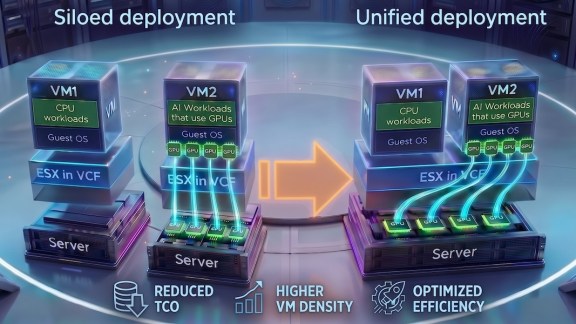
VCF streamlines data center management through workload consolidation, increasing density on existing hardware and reducing the costs of cloud infrastructure. According to our performance study using various MLPerf inference workloads, most GPU-accelerated AI inference workloads have low CPU utilization. Even when we allocated only 25%-50% of available CPU cores to the VM, the inference performance is on par with bare metal. This creates a significant opportunity to leverage the remaining CPU and memory resources to run CPU-intensive workloads, such as agentic AI and databases. Disparate workloads, even those running on different operating systems, such as Windows and Linux, can run in separate VMs on the same host and ensure full isolation, enhanced security, and simplified management. This helps to save the cost of having two separate sets of hardware for different types of workloads, as illustrated in Figure 1.
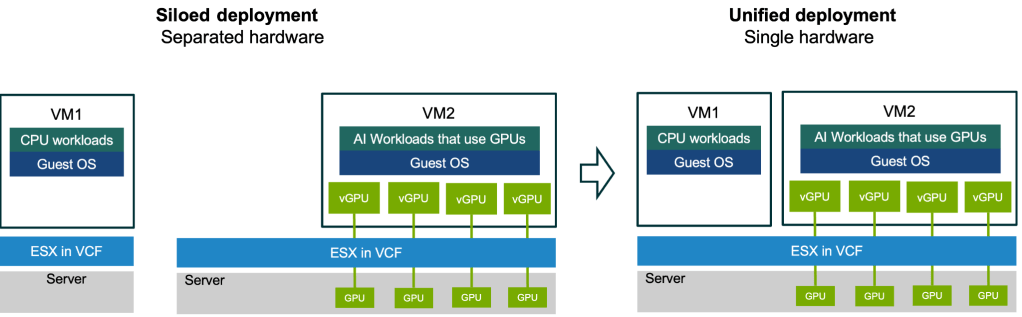
Figure 1: Consolidating workloads for cost saving
In VCF, CPU-intensive and GPU-intensive workload VMs can coexist on the same platform, simplifying cloud management and optimizing the usage of cloud resources, including AI private cloud. For example, suppose an enterprise has some new CPU-intensive workloads. Instead of buying new hardware for these workloads, IT admins can:
- Monitor the servers running GPU-accelerated AI workloads to identify the VMs that heavily underutilize CPUs and memory.
- Reduce the vCPU and memory resources allocated to these VMs.
- Allocate the newly available vCPUs and memory to the new CPU-intensive workload VMs.
We demonstrate this in the next section by analyzing the performance of GPU-based AI inference workloads running in VMs with various CPU and memory configurations. Then, in the following section, we showcase that GPU-intensive AI workloads can co-locate with CPU workloads while still delivering excellent performance for both.
Impact of CPU and Memory on AI Inference Performance
To illustrate that many GPU-accelerated AI inference workloads require only minimal CPU and memory resources to achieve maximum performance, we did an experiment where we varied the number of CPU cores and amount of system memory allocated to a VM running LLM inference with Llama3.1 8B and measured their throughput and latency performance.
We ran Llama3.1 8B of MLPerf Inference 5.1 (Interactive mode) in VCF 9.1 on the system with a Dell PowerEdge XE7745 with two AMD EPYC 9555 64-core processors, 256 total logical cores, 768 GB memory, and four NVIDIA RTX 6000 Blackwell 96 GB GPUs.
Our tests include two scenarios: memory sizing tests and vCPU sizing tests.
- In our memory sizing tests, we configured the VM with 64 vCPUs and varied the VM memory from 32 GB to 512 GB.
- In the vCPU sizing tests, we configured the VM with 128 GB of memory and varied the number of vCPUs from 16 to 128.
The results of both scenarios in Figure 2 and Figure 3 show that changing the number of vCPUs while fixing the memory size, and changing the memory size while fixing the number of vCPUs, had little or no impact on the performance of AI workloads that use GPUs for acceleration.
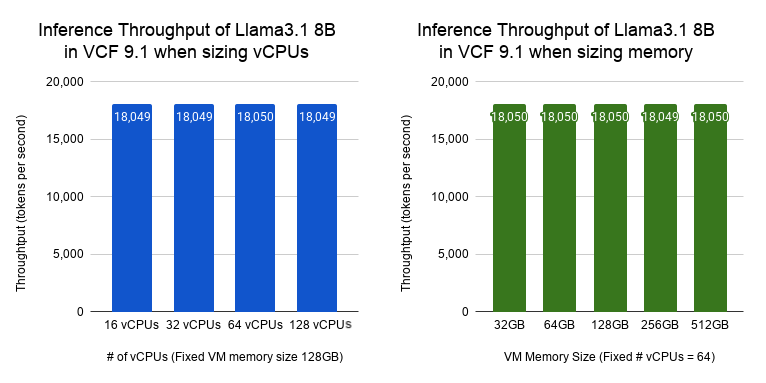
Figure 2. Throughput of Llama3.1 8B for various vCPUs and memory size in VCF 9.1
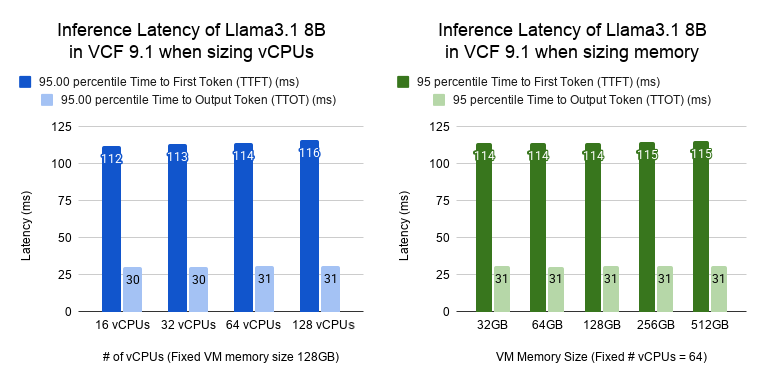
Figure 3. Latency of of Llama3.1 8B for different vCPUs and memory size in VCF 9.1
As long as the VM is allocated enough vCPUs and memory to perform the inference task, the inference throughput and latency remain the same. These tests show that we don’t need to allocate more vCPUs and memory than a workload uses. These resources can then be used to consolidate more CPU-based workloads/VMs onto the same server, as demonstrated later below.
No More Silos: Consolidating CPU and GPU Workloads to Maximize Resource Utilization
Many enterprises prefer co-locating both AI (including autonomous, agentic workflows) and non-AI workloads on the same infrastructure for better resource utilization and simpler private cloud management. Agentic AI, often involving RAG and tool use, acts like a specialized microservice requiring efficient GPU-CPU coordination, as CPU resources are heavily utilized for orchestration, RAG, and state management, while GPUs handle reasoning.
VCF optimizes this mix by allowing flexible sizing of VM CPU and memory resources based on agent orchestration intensity. VCF’s ability to co-locate GPU-accelerated and CPU-intensive applications on the same servers offers superior flexibility compared to bare metal or separate systems, reducing deployment and operational costs for next-generation agentic systems. In this section, we demonstrate that co-locating AI and non-AI workloads does not have any measurable performance impact on either workload.
The left panel in Figure 4 compares the normalized TPM for the HammerDB TPC-C driven workload running by itself to the normalized TPM while running concurrently with LLM-inference (using the Llama3 70B model compiled using NVIDIA TRT-LLM with tensor-parallelism of 4). We can clearly see that the database workload shows no measurable impact due to sharing the server with LLM-inference.
The right panel in Figure 4 compares the normalized throughput for LLM-inference alone (using the same model as above) with the throughput for LLM-inference while sharing the server with the database application. From the data we can see that LLM-inference suffers no measurable performance impact due to sharing the server with the database workload.
These results show that enterprises can run multiple workloads on the same server with no performance impact, thus obtaining much higher resource utilization than if the workloads ran on separate servers. The CPU-based workloads can be traditional non-AI workloads, like the databases in our experiment, or can be CPU-based AI workloads, including agentic AI.
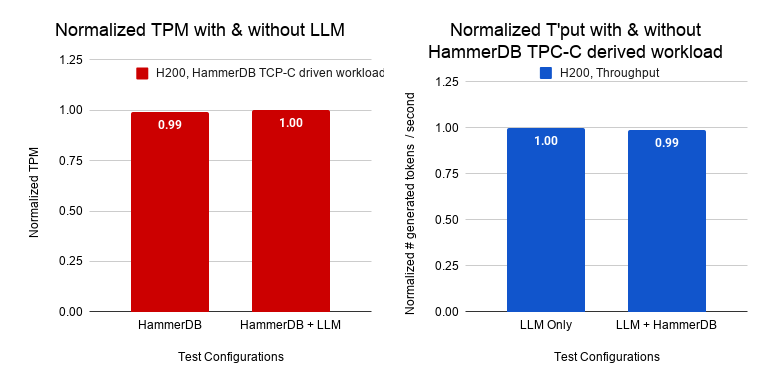
Figure 4: Results running a database workload concurrently with LLM-inference on the same server.
(Both HammerBD TPC-C driven workload and Llama3 70B inference co-exist on a single server with no measurable impact on each other.)
For LLM-inference, we chose the input sequence length (ISL), output sequence length (OSL), and batch size so that it would run at the highest token generation rate with tensor-parallelism of 4 on four H200 GPUs. The HammerDB workload runs at 1.8 million TPM, which represents a heavy enterprise-level load. The database server VM runs at 75% utilization on 12 vCPUs. The LLM-inference uses 1 vCPU. The results show that neither workload experiences a measurable performance impact.
Because many enterprises run database workloads that are accessed by numerous agents, we selected the HammerDB TPC-C driven workload as our benchmarking tool. We ran our experiments with a Dell PowerEdge XE7745 with two AMD EPYC 9555 64-core processors, 256 total logical cores, 1.5 TB memory, and four NVIDIA H200 GPUs with NVLink. The details of experimental configurations including software, hardware, and VM configuration and workload details can be found in our white paper.
Conclusion
VCF transcends virtualization to maximize ROI and reduce TCO for enterprise AI private cloud management by allowing enterprises to consolidate more workloads/VMs per server while maintaining the strictest isolation, security, and flexibility of workload deployment. Our performance studies show that most common servers used for AI inference workloads have extra capacity to host non-AI CPU workloads alongside AI workloads. In this blog, we demonstrated that co-locating an LLM inference workload with a HammerDB workload on the same server does not impact the performance of either one. In the future, we will demonstrate with agentic workloads.
Please reach out to the VMware Performance Engineering team at vcf.ai.performance.pdl@broadcom.com with any questions regarding the performance of AI workloads in VCF.
Discover more from VMware Cloud Foundation (VCF) Blog
Subscribe to get the latest posts sent to your email.

