
Since the recent series of blog posts on VMware vSAN networking came out earlier this year, one of the more common questions received has been “What should I use as a Top of Rack (ToR) network switch in my vSAN environment?” Our Broadcom Compatibility Guide (BCG) for vSAN details compatibility and requirements for the hosts that make up a vSAN cluster, but it does not address network switches.
Almost any network switch will work with vSAN, but that does not mean they all meet your data center requirements. There are characteristics of modern network switches that you should consider when moving forward with your latest hardware refresh, or new cluster build. Let’s look at what warrants attention, and why these specifications are so important.
Why Network Switches Are so Important for vSAN
vSAN is a distributed storage solution. It stores data across hosts in a cluster to ensure data resilience and availability. The hosts that make up a vSAN cluster depend on fast, reliable networking to provide consistent, low latency storage.
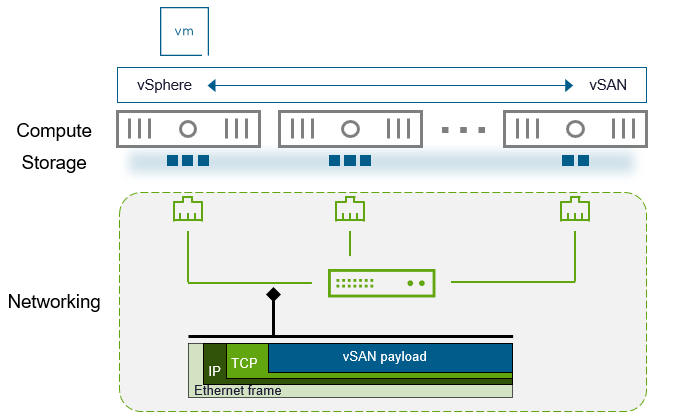
Figure 1. vSAN’s distributed storage model and its reliance on networking.
The dramatic increase in hardware capabilities found in servers over the past two decades is stunning. CPU cores have increased anywhere between 32-128 times of what they were 20 years ago. The same goes for RAM. The performance capabilities of a modern NVMe storage improved by over 2,500 times in that same period. The magnitude of these improvements are almost hard to believe, but they have quickly been absorbed by an ever-increasing demand by applications. Administrators have increased virtual resources assigned to these VMs in an attempt to exploit the power of this new hardware, and to keep up with business requirements.
Networking has also made massive improvements, but perceptions on the need for faster networking are sorely outdated. For example, the 10GbE over copper standard was ratified in the mid-2000s, and became more readily available just a few years later. While server hardware has improved by extraordinary levels since that time, it is not uncommon for customers to insist that 10Gb is still good enough, even though its practical use in the data center began nearly two decades prior. Even today, there is the occasional reluctance to move to 25Gb, and even more hesitance on moving to 100Gb. This is typically due to unfounded claims that 4-10x performance improvements in networking is not needed even though other hardware has increased by 20, 40 or even 100 times more in that same time period. To the surprise of many, the costs of modern 25/100Gb switching are quite low, especially when looking at non-incumbent alternatives. In fact, these switches are often a very small percentage (single digit) of the total cost of the hosts in each rack, yet those hosts depend heavily on the capabilities of the switches. In other words, your ToR switches are not the place to cut costs.
A complacent network design will make the network the bottleneck. This can be a problem for any type of environment, but may show up most when you use a distributed storage system like vSAN. What happens when the network is the bottleneck? Instead of relying on the incredible schedulers found in vSphere and vSAN to share resources, it must wait on the primitive congestion control mechanisms for TCP.
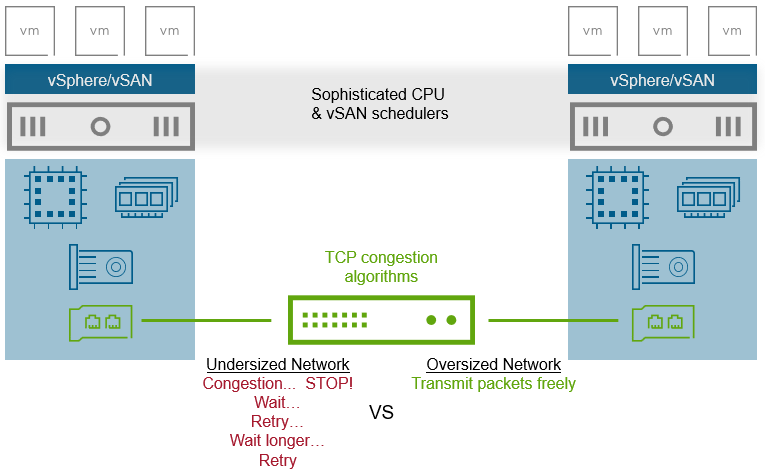
Figure 2. Comparing an undersized network to an oversized network.
Why is this so bad? The impact of relying on network congestion control is severe. When network links are saturated, packets drop, and must be retransmitted.
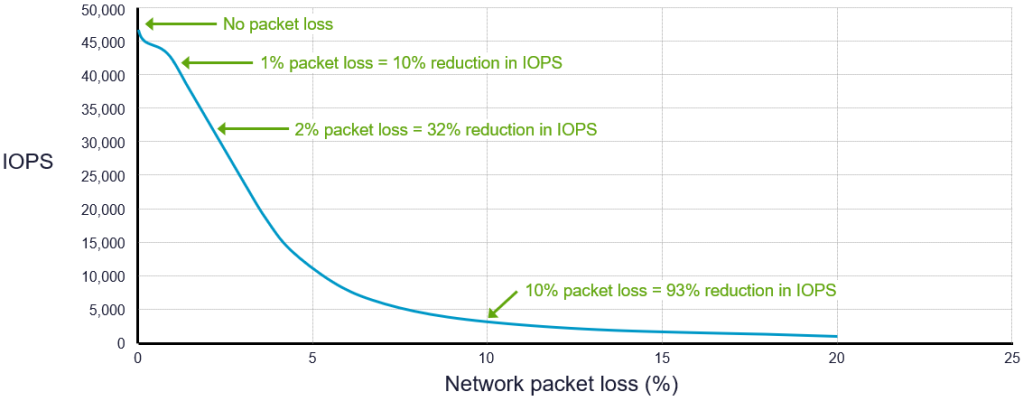
Figure 3. The impact of network packet loss on storage performance.
Not only do you get poor, or inconsistent VM storage performance, but you end up underutilizing resources like CPU and memory that you already invested in your hosts. An undersized network may also experience increased repair times during outages, and may be much more difficult to troubleshoot.
Recommendations for ToR Switches Used with vSAN
Choosing the correct ToR switches for vSAN will provide the proper conduit for consistent, high performance, low latency storage. Discerning one switch from another can be difficult as most are referred to simply by the theoretical bandwidth a single downlink port to a server can provide. This shorthand notation of “10Gb switches” “25Gb switches” and “100Gb switches” makes for easy reference, but it dismisses other considerations lurking behind the scenes that have a material impact on their performance capabilities. Let’s look at a few of the characteristics that really matter.
With a few exceptions, the information below does not state recommended minimums with switches. This approach helps you identify what to look at in order to compare one switch to another, while accounting for the ever-changing hardware specifications with new switches.
Downlink Port Count and Speed
The downlink port count and speed represent the number of ports and their respective native wire speed of each port to be used for hosts in a rack. These are typically expressed as [port count x wire speed], such as “32x25Gb.” For modern 25Gb and 100Gb switches, the ports will generally be either SFP28 or QSFP28. A higher port speed will be the most beneficial for cluster traffic such as vSAN and vMotion that remains within the ToR switches. A higher port count offers more flexibility and efficiency for servers. For example, a pair of 32 port ToR switches will support 16 hosts per rack with a maximum of 4 ports per host. Whereas a pair of 48 port ToR switches will support 16 hosts per rack with a maximum of 6 ports per host. Note that with the increased number of ports used, one will need to be mindful of the total bandwidth the switches provide to the spine to ensure proper oversubscription ratios. See the post “vSAN Networking – Network Oversubscription” for more information.
While 10Gb networking is supported on the smallest ReadyNode profile, we highly recommend 25Gb or higher networking for vSAN ReadyNodes in all greenfield environments. See the post “Driving Down Storage Costs with Lower Hardware Requirements for vSAN” for more information.
Uplink Port Count and Speed
The uplink port count and speed represents the number of ports as uplinks to the spine, and their native wire speed. They are expressed in the same manner as downlink port counts and speeds. A higher aggregate uplink bandwidth to the spine will ensure a reduced level of over subscription, which will improve storage performance, especially if it traverses across racks. While switches with less than ideal levels of aggregate bandwidth to the spine are not ideal, one can limit the impact by ensuring vSAN hosts are placed in racks in an optimal way. See the post “vSAN Networking – Optimal Placement of Hosts in Racks” for more information. This concern can also be addressed with the new network traffic separation feature introduced in vSAN for VCF 9.0.
Switch Capacity
The switch capacity indicates the highest data rate the switch is capable of providing. Expressed in Gigabits per second (Gbps), or Terabits per second (Tbps), a higher number indicates it can accommodate a higher volume, or throughput of traffic. Lower performing switches tend to have a switch capacity well below the aggregate theoretical bandwidth (line rate) of all of the downlink ports on the switch, while higher performing switches may meet or exceed this bandwidth. This is sometimes known as a “non-blocking” switch. A higher switch capacity may also help packets spend less time in port buffers, which can reduce discarded packets and retransmits due to contention.
Packets Per Second
Packets per second (PPS) represents the maximum number of packets the switch’s ASICs can process per second. Expressed as either millions (Mpps), or billions (Gpps), a higher number indicates a higher rate of packets that can be processed and forwarded. The effective PPS of a switch is often tied to the ASICs used, and the advertised switch capacity.
Port Buffers
Port buffers represent the amount of memory in a switch that is used for incoming packets. It is expressed in Gigabytes (GB). A larger value helps reduce dropped packets if there is contention during processing or forwarding. It can reduce effective latency on storage only if network traffic is being dropped due to an unusually small port buffer. Typically a switch with an “ultradeep” buffer (4GB or higher) is most appropriate for vSAN traffic. For more information, see the post: “25Gb Networking vs 100Gb Networking with VMware vSAN.”
Recommendation: Be sure to run the latest recommended updates on your switches, and ensure that your NIC adapters on your hosts are all running the latest recommended firmware.
This post is a part of a multi-part series on network topics related to vSAN, which can be found in the links below:
- vSAN Networking – Network Topologies
- vSAN Networking – Network Oversubscription
- vSAN Networking – Optimal Placement of Hosts in Racks
- vSAN Networking – Teaming for Performance
- vSAN Networking – Teaming for Redundancy
- vSAN Networking – Is RDMA Right for You?
- What to Look for in Network Switches for VMware vSAN
- 25Gb Networking vs 100Gb Networking with VMware vSAN
Summary
Modern high speed network switches are not only widely available at an affordable price, but will allow you to exploit the full performance potential of your clusters running vSAN ESA, and avoid relying on the primitive congestion control with networking. Not all switches are created equal, but your choice of the proper ToR switches for your environment will pay dividends for years to come.
Discover more from VMware Cloud Foundation (VCF) Blog
Subscribe to get the latest posts sent to your email.