
With the release of VMware Cloud Foundation (VCF) 9.1, we are introducing significant enhancements to vSAN Protection and Recovery (formerly known as vSAN Data Protection). These updates focus on three core areas of the solution: architectural flexibility, sovereign cyber resilience, and operational scale.
Multi-Source Replication
In VCF 9.0, we introduced vSAN-to-vSAN replication. It was the first logical step in providing remote protection for workloads running on vSAN. While powerful, many of our customers operate heterogeneous environments where data resides on a mix of storage platforms. VCF 9.1 breaks these silos by introducing multi-source replication capabilities.
What does this mean? You can now protect VMs from multiple types of storage, including vSAN, VMFS and NFS datastores to a vSAN ESA cluster as the target. Not only does it provide the ability to have multiple sources, but it also allows for a “fan-in” architecture that gives you the ability to protect multiple source clusters to a single, centralized recovery site.
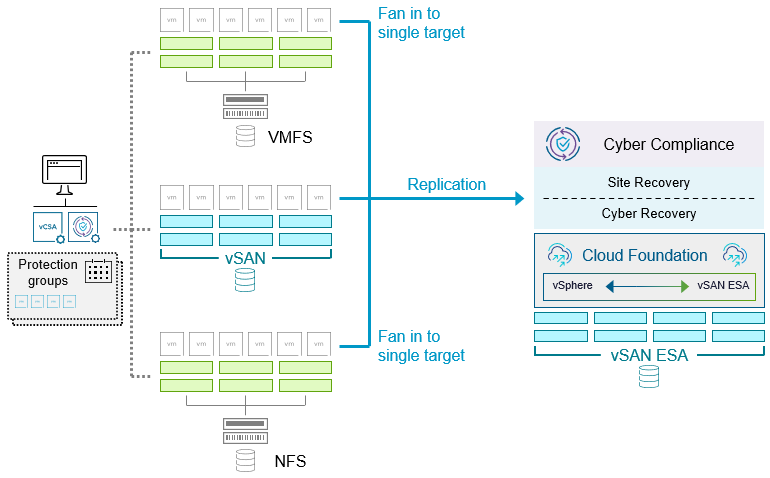
Figure 1. Multi-source replication to a shared recovery site in vSAN Protection and Recovery.
In this type of topology, both the source site and the shared recovery site must have their own respective vCenter Server, as well as a Protection and Recovery appliance. The relationship between the two sites is established by site pairing. Protection Groups can then be configured for local protection at the source site (vSAN only), or remote protection (vSAN, VMFS, or NFS at the source site) to the vSAN ESA cluster in the shared recovery site.
While vSAN Protection and Recovery can protect workloads on a vSAN cluster locally, any of the replication capabilities described here are available through Site Recovery Manager (SRM) which provides site recovery capabilities, or the VMware Advanced Cyber Compliance (ACC) add-on, which provides both site recovery and comprehensive cyber recovery capabilities.
Aside from the conventional use cases of disaster recovery and ransomware recovery, multi-source replication can also assist with data migration efforts, where migrating off of VMFS and/or NFS has been a challenge due to the existing topology.
On-Premises Cyber Recovery: Your Private Clean Room
The ability to perform cyber recovery without a dependency on the public cloud has been a frequent feature request. While cloud-based recovery offers flexibility for environments that do not have another site, many organizations have strict compliance or sovereignty requirements that demand a customer-owned, on-premises Isolated Recovery Environment (IRE).
VCF 9.1, paired with the VMware Advanced Cyber Compliance (ACC) add-on, allows you to build a fully customer-owned and managed clean room. This eliminates the need for cloud-based recovery sites while providing the same push-button isolation and EDR integration.
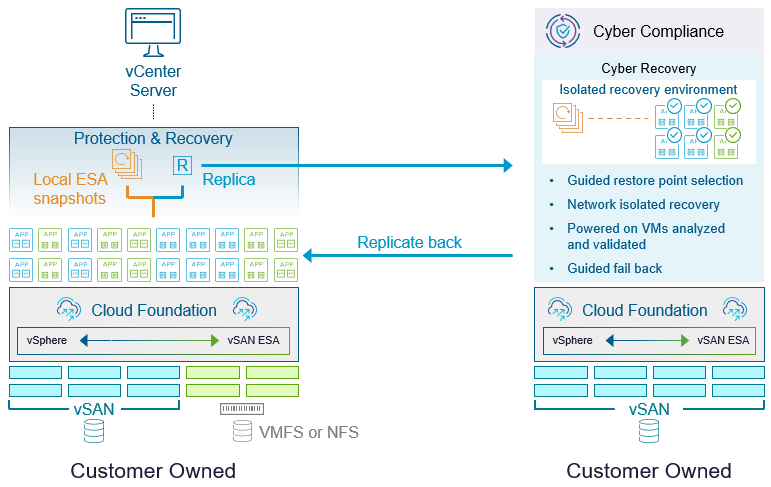
Figure 2. Cyber recovery using an on-premises clean room.
With a customer-owned recovery site, ransomware protection and recovery processes are built into the SRM workflows. This takes advantage of logic already in place for disaster recovery, but adapts them to accommodate ransomware recovery workflows. Upon detection of a ransomware event, protected VMs are first placed in a validation state within an Isolated Recovery Environment (IRE), where snapshots are scanned and cleaned using EDR sensors. Once verified, they move to a staging state to create a clean replica, followed by a recovered state to resume operations in the secondary site. Finally, the process concludes by reprotecting and failing back the VMs to the primary site, restoring them to their original production environment and steady-state protection.
Combine this new capability with the recent announcement of new ReadyNodes certified for Cyber Recovery, and you can now build out a high value, high-capacity recovery site.
Scaling Operations: Retention, Tags, and Seeding
Sometimes it is the smaller features that mean the most to day-to-day operations. We’ve added a trio of enhancements designed to make protection of VMs easier.
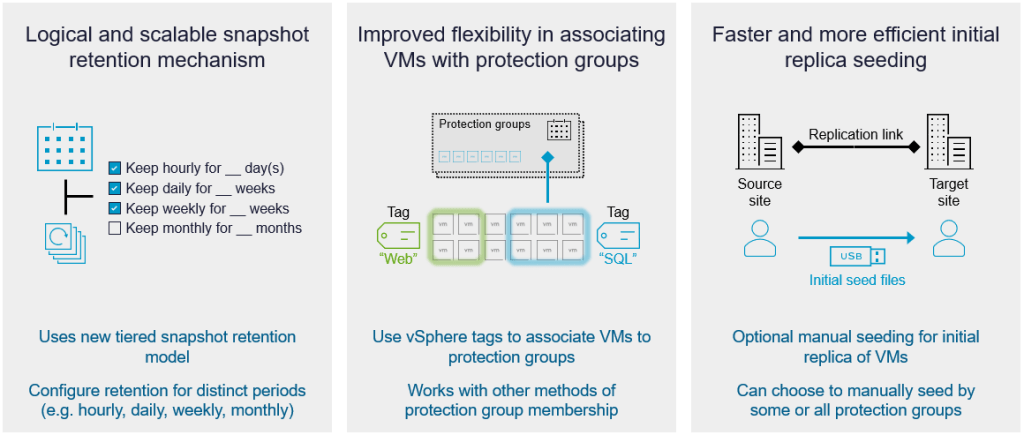
Figure 3. Snapshot Retention, protection group tagging, and replica seeding in vSAN Protection and Recovery.
Hierarchical Snapshot Retention
Moving beyond simple First-In-First-Out (FIFO) snapshot retention methods, vSAN Protection and Recovery now supports tiered retention schedules. Sometimes known as a “Grandfather-Father-Son” (GFS) approach, it allows for sophisticated scheduling (Hourly, Daily, Weekly, Monthly) to provide much greater and more efficient recovery depth.
Not sure what retention periods to choose? We’ve even included quick-selection templates to get you started, including:
- Default. Will automatically select an RPO of 1 hour, keeping the last 12 snapshots, while keeping daily snapshots for 2 weeks. Estimated snapshot count: 26
- Ransomware recovery. Will automatically select an RPO of 1 hour, keeping the last 1 snapshot, while keeping hourly snapshots for 1 day, daily snapshots for 1 week, weekly snapshots for 1 month, and monthly snapshots for 6 months.
- Short-term retention. Will automatically select an RPO of 1 hour, keeping the last 1 snapshot, while keeping hourly snapshots for 1 day, keeping daily snapshots for 1 week, and keeping weekly snapshots for 1 month.
Protection Group Memberships using vSphere Tags
Managing protection at scale is now easier, as Protection and Recovery supports the use of vSphere tags for assignments to protection groups. VMs can now be assigned to protection groups using their static names, a dynamic name using wild cards, or now, through tags. You can even use logic like “match all” or “match any” tags to ensure dynamic workloads are protected the moment they are provisioned. Any new VMs that have the associated tag assignment will be protected.
Manual Replica Seeding
For environments with massive datasets or limited bandwidth, the initial “full sync” over the WAN can be a bottleneck. VCF 9.1 introduces Manual Seeding. You can now manually move data (e.g., via a physical shipping device) to the target site to act as a seed. Once the seed is in place, vSAN performs a differential sync to catch up, significantly reducing initial deployment times. Seeding will be a flexible option that can be used for a variety of other scenarios, including the migration to another target site.
Do you have more questions on vSAN as well as vSAN Protection and Recovery? Check out the extensive list of frequently asked questions on the vSAN FAQs document.
Summary
These enhancements in VCF 9.1 represent a major leap forward in making vSAN the most flexible and resilient platform for your mission-critical data. Whether you are protecting legacy VMFS and NFS volumes, or building a sovereign cyber vault, vSAN Protection and Recovery has the tools to keep your business running.
Discover more from VMware Cloud Foundation (VCF) Blog
Subscribe to get the latest posts sent to your email.