Related VCF 9.1 Networking Posts:
- Network Services
- Simpler VPC Connectivity Control
- Precision Workload Placement with VPC Network Span
- Transit Gateway Connectivity Options
- Integration with Infoblox
VMware Cloud Foundation (VCF) delivers the compute, storage, and networking services required to power modern cloud environments. In this blog, we focus specifically on the network services available within VCF 9.1 Virtual Private Clouds (VPCs).
Note: For a refresh into the fundamentals of VCF VPCs, check out our previous posts:
Self-service networking with Virtual Private Clouds.
The VPC Networking Toolkit
Whether you are deploying simple web apps or complex, multi-tiered architectures, VCF 9.1 equips your VPCs with a complete suite of self-service network tools:
- Core Connectivity: Switching and Routing to keep your workload traffic flowing seamlessly.
- IP Management: Native DHCP Server or integration with 3rd-party IPAM Server (Infoblox)
- Traffic Control: Comprehensive NAT options including 1:1 External-IP, N:1 Outbound-NAT, and custom SNAT/DNAT
- Performance & Scale: Application delivery via load balancing (LB), with the flexibility to use either Native NSX or the Advanced Load Balancer (AVI) plugin.
- Secure Access: VPN services (Note: VPN is exclusive to the Centralized design)
Connecting Your VPCs: Distributed vs. Centralized Designs
When it comes to connecting your VPCs to the physical data center network, VCF 9.1 offers two distinct architectural modes: Distributed and Centralized.
Choosing the right mode depends on your underlying infrastructure and service requirements.
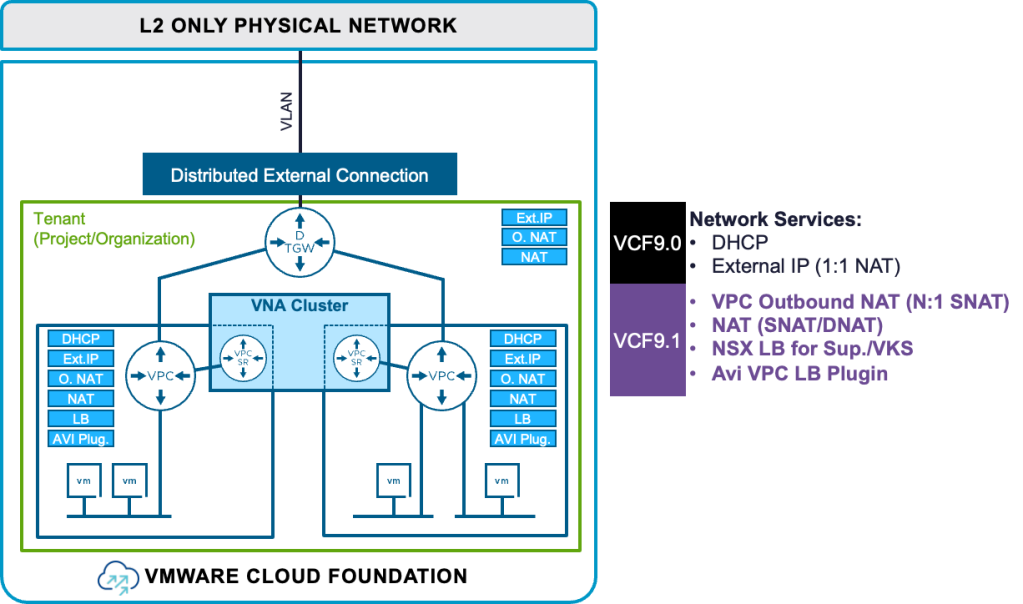
1. The Distributed Mode
The Distributed mode is built for simplicity and streamlined operations.
While it offers nearly all standard network services (with the exception of VPNs), it drastically reduces architectural overhead.
- Simplified Architecture: Requires no edge nodes, no Tier-0 Gateways, and zero BGP configuration.
- Deployment Constraint: This streamlined design can only be implemented if all ESX hosts are connected to the same Layer 2 network.
2. The Centralized Mode
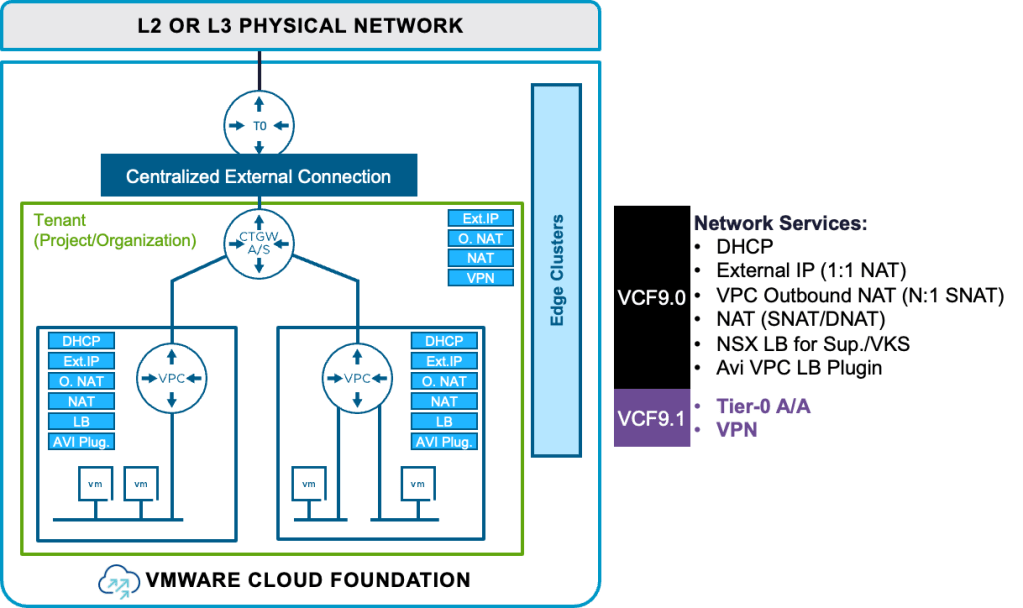
The Centralized mode is designed for maximum flexibility and comprehensive feature support, making it adaptable to more complex environments.
- Full Service Availability: Delivers all available network services, including full VPN capabilities.
- Flexible Architecture: Highly adaptable and can be seamlessly deployed across any Layer 2 or Layer 3 physical data center network topology.
VCF 9.1 Network Services Demo
Ready to see these capabilities in action?
Check out our quick demo for a look at provisioning and managing these network services within VCF 9.1.
We will walk you through exactly how easy it is to equip your VPCs with the network services they need to power your applications.
Discover more from VMware Cloud Foundation (VCF) Blog
Subscribe to get the latest posts sent to your email.