
Related VCF 9.1 Networking Posts:
- Network Services
- Simpler VPC Connectivity Control
- Precision Workload Placement with VPC Network Span
- Transit Gateway Connectivity Options
- Integration with Infoblox
Transit Gateway Connectivity Options in VCF 9.1: Recorded Demo
VMware Cloud Foundation (VCF) delivers a public cloud-like experience in a private cloud environment. In VCF, virtual networking responsibilities are split between two roles categories: provider and tenant.
Tenants consume virtual networking services without needing deep networking expertise. The provider connect VCF to the physical network and configure the virtual networking components that interact with the underlying infrastructure. This provider role typically requires networking expertise and is usually involved during the initial platform setup.
- Provider: Enterprise Admin
The provider defines External Connections, such as centralized or distributed VLAN/VXLAN connectivity. These external connections represent abstracted paths to the physical network.
Once created, external connections are made available to tenants. Tenants can then use them to connect their transit gateways without needing to understand the underlying physical network design. - Tenant: Project Admin and VPC Admin
Tenants operate within the virtual networking layer. They manage objects such as Transit Gateways, VPC Gateways, and subnets. For tenants, the physical network remains hidden. They can focus on connecting workloads and services without needing advanced knowledge of the data center network.
The enhancements described below add flexibility to how transit gateways connect to external networks. These are advanced configuration options. In many environments, VPC users will not need to interact with them directly, and the provider may only use them for specific designs.
Additional External Connection Options in VCF 9.1
The screenshot below highlights in red the new fields added to External Connections in VCF 9.1.
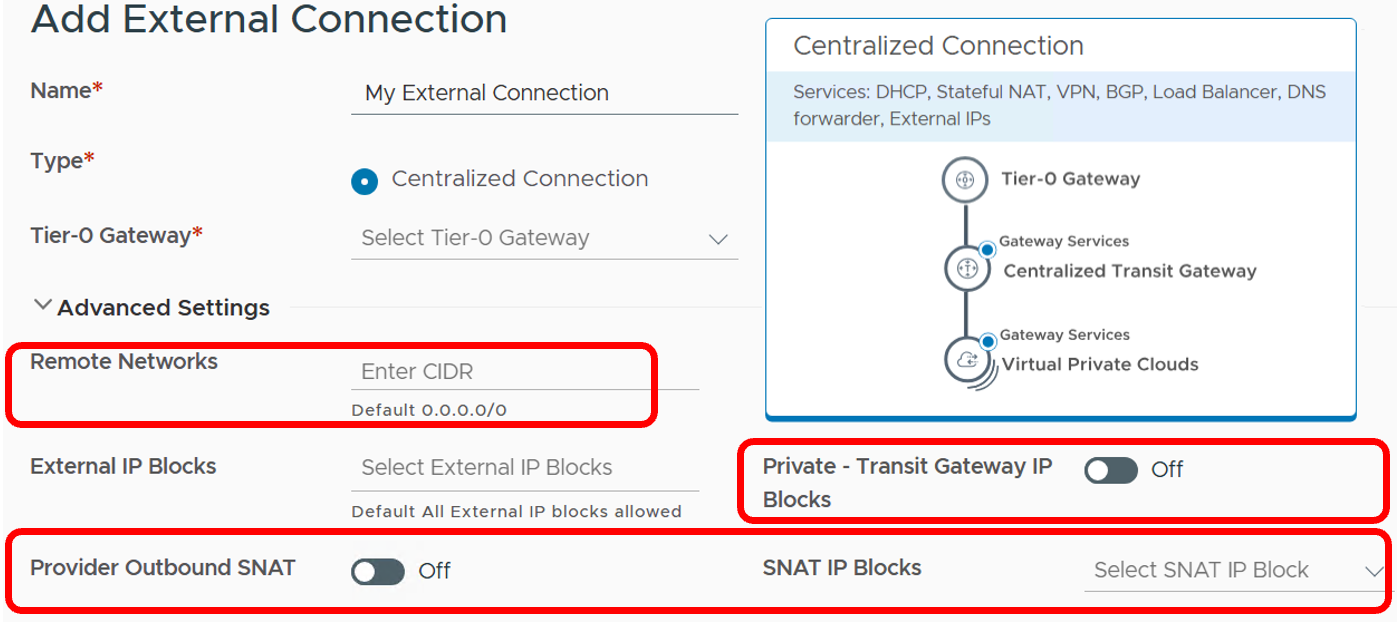
We will review these options one by one.
Remote Networks: Steer traffic toward an external connection
In VCF 9.1, tenants can attach a transit gateway to multiple external connections. The Remote Networks field determines which traffic is routed through each external connection.
When no remote network is specified, the external connection provides a default route. This was the only option available before VCF 9.1.
Any additional external connection must include more specific routes in the Remote Networks field. These routes allow the transit gateway to determine which traffic should use that external connection.
The following example shows a simple use case for multiple external connections.
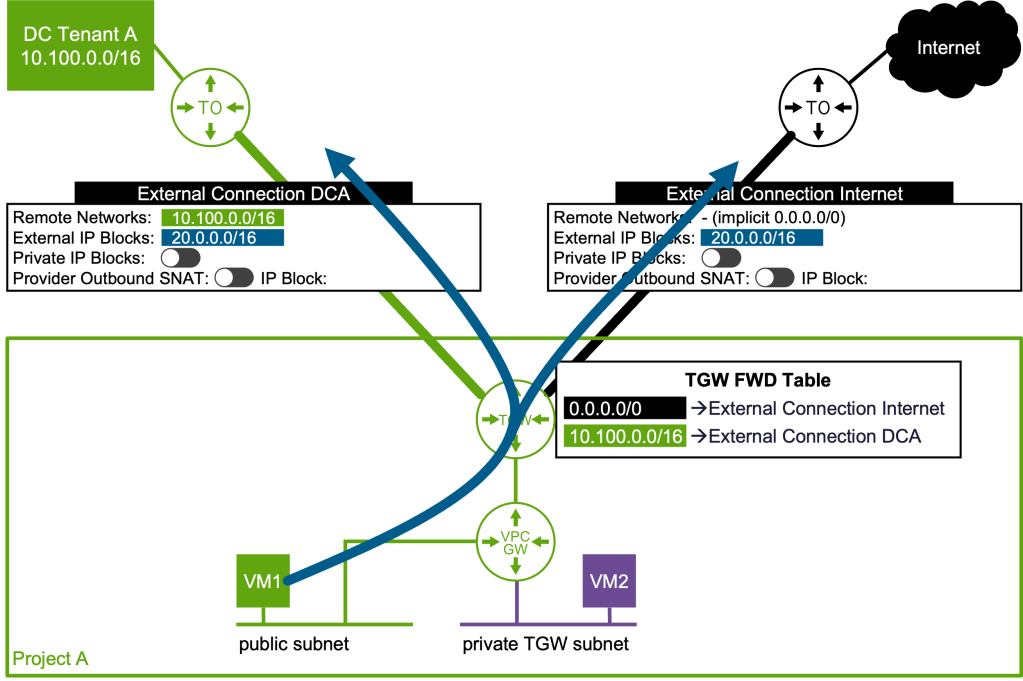
Tenant A, in Project A, has a dedicated physical data center named DCA. We want to connect tenant A’s virtual infrastructure to:
- its dedicated physical data center DCA through the DCA external connection
- the internet through the Internet external connection
The internet connection could also be shared with other tenants.
Assume that all networks in the DCA data center are covered by the supernet 10.100.0.0/16. When the DCA external connection is configured with the remote network 10.100.0.0/16, VCF adds a static route to the transit gateway. This route points to the Tier-0 gateway associated with the DCA external connection. Outbound traffic from Tenant A is sent to DCA when the destination IP address falls within 10.100.0.0/16. All other traffic is forwarded to the Internet external connection.
In the example above, a VM attached to a public subnet can directly reach destinations on the internet or in DCA. However, as shown below, a VM in a private transit gateway (TGW) subnet must have its IP address translated to an external IP address (part of the external IP block 20.0.0.0/16) before leaving Project A, whether the destination is DCA or the internet.
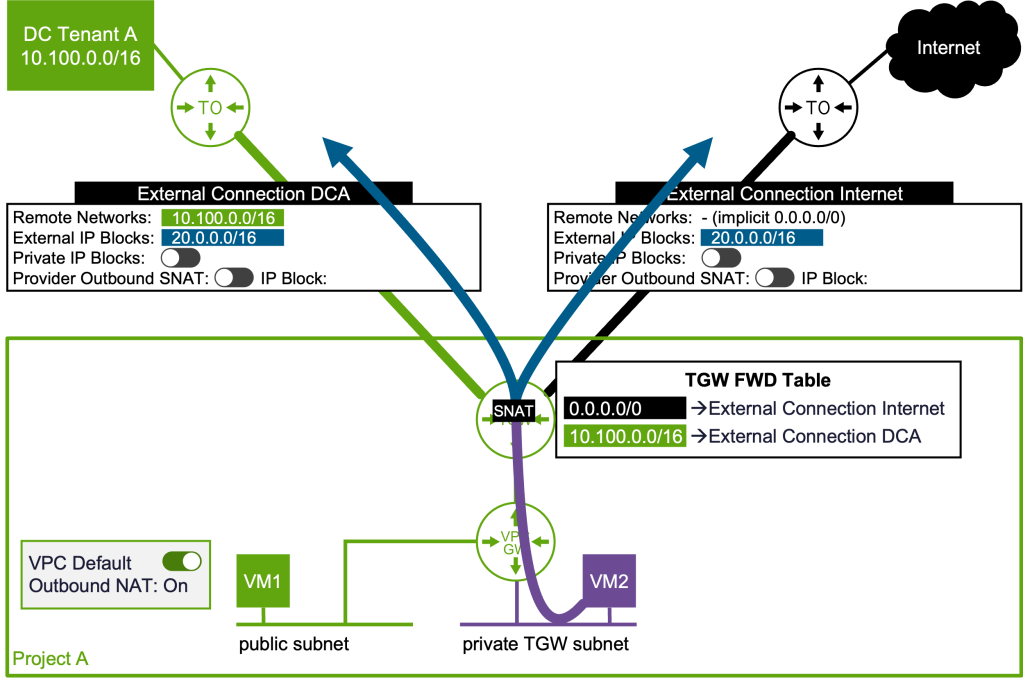
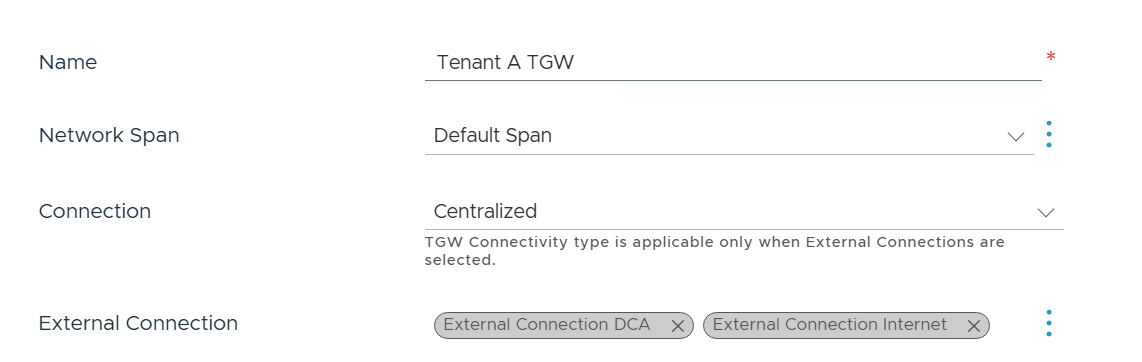
This makes it possible to build designs where different destination networks use different external paths, while keeping the tenant configuration simple. The following screenshot represents the part of Tenant A transit gateway configuration. The external connections DCA and Internet are simply selected from a list exposed by the provider, nothing else is exposed to the tenant:
Private TGW IP Blocks: Extend Private TGW Subnets
By design, the scope of private transit gateway subnet is limited to a transit gateway and it cannot communicate through external connections.
In VCF 9.1, the provider can enable a feature that allows private transit gateway subnets to be extended through an external connection. This is controlled by the Private IP Blocks switch in the UI. When this feature is enabled, virtual machines on private TGW subnets can communicate with data center networks using their native private IP addresses. In practice, for that external connection, the private TGW subnet behaves more like a public subnet.
Going back to the previous example, Tenant A has a local data center with physical servers. In this case, it may make sense to extend Tenant A’s private TGW subnets from the virtual infrastructure to the DCA physical infrastructure:
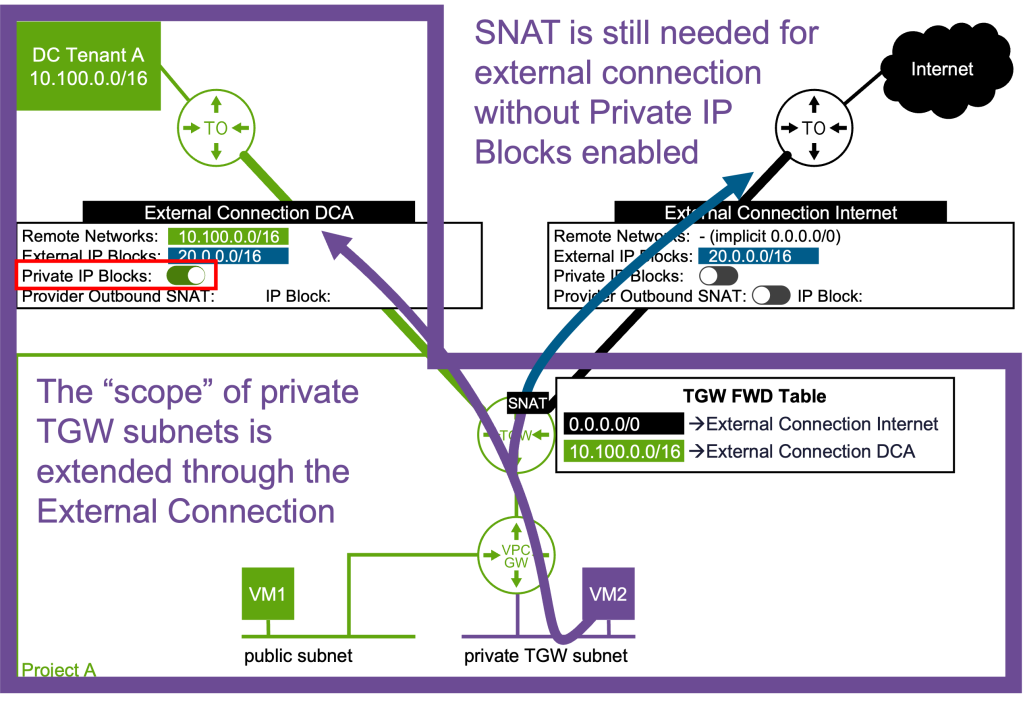
With Private IP Blocks enabled, VMs on private TGW subnets can communicate directly with DCA without SNAT. However, they still require SNAT when communicating through the Internet external connection.
Provider-Managed Outbound SNAT
In some environments, it is preferable to manage Source Network Address Translation (SNAT), at the provider level instead of requiring each tenant to configure it separately. This is especially useful when tenants need access to shared services or external resources through provider-controlled IP addresses. The following use case shows an external connection that the provider exposes to multiple tenants to give them access to common services.
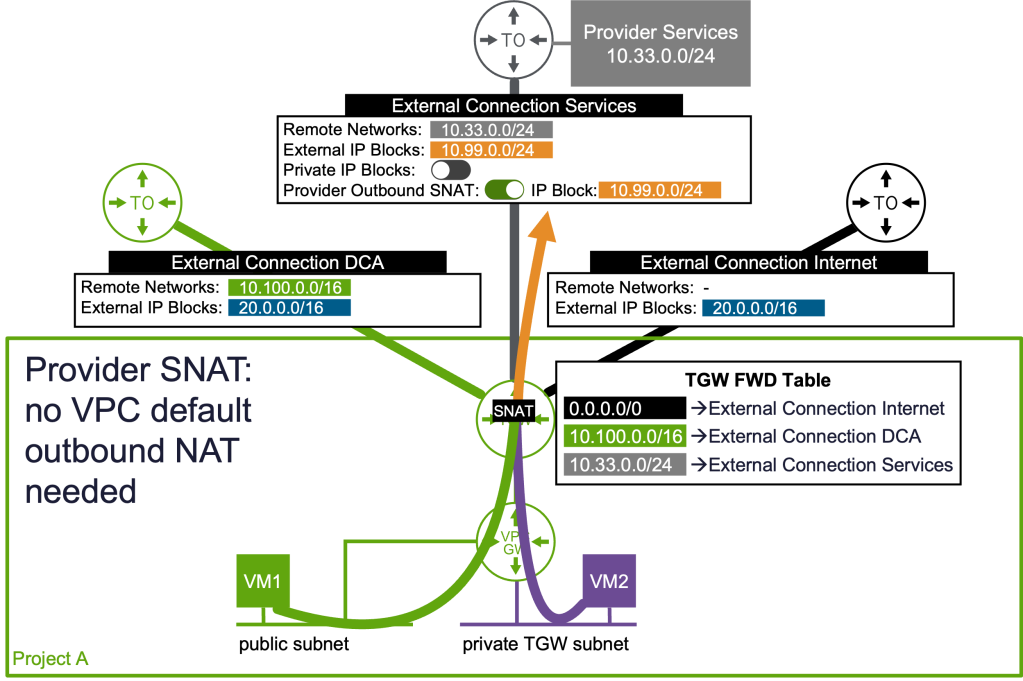
The Provider Outbound SNAT feature ensures that any transit gateway can reach those shared services, regardless of the tenant’s own SNAT configuration. The provider defines the IP blocks used for SNAT.
With provider-managed outbound SNAT, the Enterprise Admin defines how tenant VM traffic is translated before it leaves the virtual network. This simplifies tenant configuration and provides centralized control over outbound connectivity.
Summary
VCF 9.1 extends the networking model with advanced options for external connectivity, route selection, private subnet extension, and provider-managed SNAT.
These features are mainly intended for providers and advanced tenant administrators. They enable more flexible network architectures while keeping the day-to-day VPC experience simple for application teams.
Discover more from VMware Cloud Foundation (VCF) Blog
Subscribe to get the latest posts sent to your email.