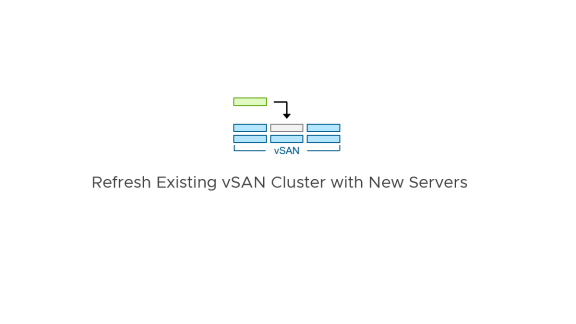

Refreshing hardware is an inevitable task of lifecycle management in a data center. Existing vSAN clusters may have servers that are nearing the end of life by the manufacturer, or simply may no longer meet the technical requirements of an organization.
The most common strategy for replacing servers is to provision an entirely new cluster, and migrate workloads from one cluster to another using vMotion. But there may occasionally be a desire to replace the older servers with new hardware while preserving the existing cluster to maintain configurations or data services. With the latter option, this can lead to the question of, “Should I add and decommission servers in the cluster one-by-one, or should I add all of the new servers, followed by decommissioning the old servers?”
Understanding the Options for In-Place Server Refreshes in a vSAN Cluster
vSAN offers a lot of flexibility with hardware refreshes of nearly any type. When replacing aging servers with new servers while keeping the existing cluster, the options generally fall into three categories.
- Bulk addition and incremental removal. Add all new servers to the existing cluster sequentially, and decommission one old host at a time.
- Incremental addition and incremental removal – repeating until completion. Add one new server to the existing cluster, and decommission one old host at a time. Repeat the process until complete.
- Group addition and incremental removal, repeating until completion. Add a group of new servers to an existing cluster, and decommission the same number of hosts added, one old host at a time. Repeat the process until complete.
By “decommission” we mean that one of the older hosts would be entered into maintenance mode and forcing the data to be reconstructed elsewhere to regain the prescribed level of resilience. Once complete, clicking on “Remove from inventory” in the vSphere Client will remove that host from the cluster.
What makes the most sense? The answer depends a bit on your environment, so let’s walk through these options.
Understanding How vSAN Distributes Data Across a Cluster
Before we look at the options in more detail, let’s revisit vSAN’s approach to distributing data in a resilient way across a cluster. With the following examples we’ll assume a standard, single site vSAN cluster.
vSAN’s object manager determines data placement for provisioning, evacuations, and rebalancing based on these criteria:
- Eligible hosts for placement of data. vSAN will use anti-affinity logic of redundant data to ensure that object components that provide data resilience (mirrored data, or parity data from an erasure code) never reside on the same host.
- Available capacity of a host within a vSAN cluster. vSAN will give preference to hosts with more free capacity over hosts with less free capacity.
As shown in Figure 1, vSAN’s anti-affinity logic ensures that no components that make the data resilient within a RAID-6 object reside on the same host. When the host is evacuated, vSAN will place most of the evacuated data on the new host that is relatively empty. But as capacity consumption begins to even out across hosts, vSAN may place some evacuated components on other eligible hosts that may still need to be decommissioned. This is the reason why adding just one host followed by the removal of an old host may occasionally create unnecessary resynchronization traffic in subsequent decommissioning. Adding two or more hosts at a time will reduce the chance of this occurring.
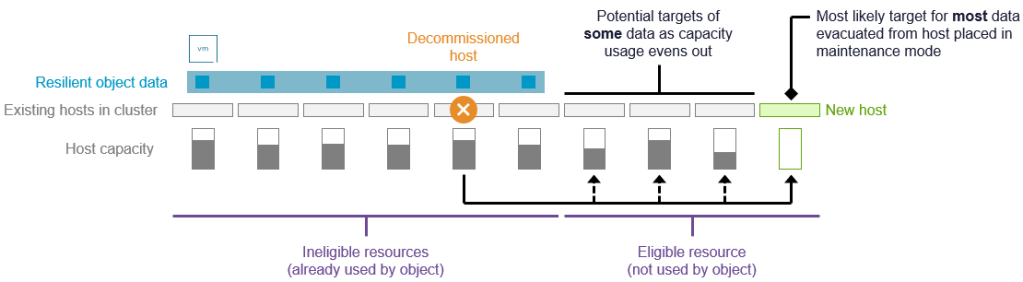
Figure 1. vSAN’s approach to redistributing data when a host is decommissioned.
This criteria and supporting example helps us better understand how different approaches may impact the placement and movement of data as hardware is refreshed.
Option 1: Bulk Addition and Incremental Removal
In this scenario, all new servers would be added to the cluster prior to the removal of the older hosts, one at a time.
Advantages: This approach works if you have the physical resources available. vSAN’s data placement rules treat this in a very simple way. When a host is permanently decommissioned, the data will be reconstructed on one of the new hosts, because: 1) The new hosts are eligible for the migrated data because it adheres to anti-affinity rules to ensure the data remains resilient and available. 2) The new hosts have more free capacity than the old hosts. It will reduce the chance of the same data already moved to be moved again on subsequent host decommissioning.
Disadvantages: This may be a difficult approach to take with larger clusters, where adding all of the new hosts at once may exceed the available rack space, network ports, or power requirements. One could even exceed the maximum number of hosts for a given cluster topology (64 hosts for standard cluster, and 40 hosts for a stretched cluster)
When to use: The requirements make this option less desirable with anything other than hardware refreshes with small clusters that have sufficient free rack space, power, and network connectivity to perform in this manner.
Option 2: Incremental Addition and Incremental Removal
In this scenario, after a single new host is added to the cluster, an older host is decommissioned from the cluster. The cycle is repeated until the refresh is complete.
Advantages: This option allows you to perform a cluster refresh under severe physical constraints, such as racks with little room to provision new servers, or ToR switches with limited free ports.
Disadvantages: Depending on the circumstances, this approach may increase the chance of the same data already moved to be moved again on subsequent host decommissioning, as shown in Figure 1. vSAN handles the redistribution of data automatically, but adding and removing a single host at a time may generate additional data movement.
When to use: This may be the only, or best option available for environments under severe physical constraints. Its potential inefficiencies in data movement make it less desirable under typical conditions.
Option 3: Group Addition and Incremental Removal
This approach uses a blend of the two options above, where a group of hosts (two or more hosts depending on the host count of the cluster) are added followed by a decommissioning of hosts equal to the number of new hosts added. The cycle is repeated until the refresh is complete.
Advantages: Adding a group of hosts allows the permanently decommissioned host several new host targets with ample free capacity, and adhere to its anti-affinity logic to ensure data resilience. This will minimize the likelihood of any secondary movement of data due to subsequent decommissioning.
Disadvantages: It will require more physical resources (rack space, power, and network ports) than option 2, but not nearly as much as option 1.
When to use: This is the best option for most environments. It blends the benefits of a bulk addition of hosts while not needing the physical resources to do so. It also minimizes the chance that migrated data will land on older hosts that may need to be migrated again at some point.
Recommendations
Regardless of the approach you choose, the following recommendations will help this process be smooth and predictable.
Add between two and six hosts at a time prior to decommissioning older hosts. For smaller clusters with perhaps just three hosts, add two hosts prior to decommissioning any of the older hosts. For Auto-RAID enabled clusters, this will preserve its use of RAID-5 erasure coding instead of an automatic (but temporary) reconfiguration to RAID-6 while the refresh is occurring. For clusters with six or more hosts, adding two to three hosts prior to decommissioning any of the older hosts can be an effective way to minimize any unnecessary reshuffling of data when refreshing the rest of the cluster. Adding six hosts at a time will allow provisioning activities such as new VMs or persistent volumes to house the entire object across the new hosts versus some of the hosts that have yet to be decommissioned.
Know what to expect with Auto-RAID on small clusters. With Auto-RAID in vSAN for VMware Cloud Foundation (VCF) 9.1, adding hosts to a small cluster that uses RAID-5 erasure coding may increase the host count to a level that eventually reconfigures the data for RAID-6 erasure coding (e.g. Adding two hosts to a 4-host cluster). Simply proceed as planned by decommissioning the older hosts after the new hosts are added. Depending on your circumstances, you may wish to add new hosts in small increments, or simply let vSAN handle the reconfiguration automatically.
Choose your physical placement of new hosts wisely. Refrain from hosts in a vSAN cluster being arbitrarily placed across multiple racks. This may produce more network traffic than desired. For more information, see the post: “vSAN Networking – Optimal Placement of Hosts in Racks.”
Temporarily disable “Automatic Rebalance” feature in vSAN. If enabled (it is disabled by default), temporarily disable “Automatic Rebalance” during the refresh to prevent premature data movement. The Automatic Rebalance feature can be turned back on after the refresh is complete
Recognize when scenarios favor a host decommission prior to host additions. Flipping the steps so that one or more hosts are removed from inventory before adding the new hosts is an option for clusters in racks with no physical space or networking resources. This will only work if the space utilization is low enough to absorb the temporarily reduced capacity, and may generate more data movement than the other options described. It also may not be ideal for clusters with 6 or more hosts, as it could temporarily change the automatically prescribed level of resilience by Auto-RAID.
Use “Full data migration” for host decommissioning. When decommissioning a host, select “Full data migration” when entering host into maintenance mode to immediately reconstruct data and maintain resilience. Choosing “Ensure accessibility” will also work, but data reconstruction will often be delayed by an hour.
Be deliberate with host decommissioning. Wait until all resynchronizations are complete before decommissioning the next host. This will limit the amount of data being resynchronized.
If you are still using vSAN OSA, recognize the opportunity to transition to ESA. Hardware refreshes are an ideal time to transition from vSAN OSA to ESA, but transitioning to ESA will require the deployment of a new cluster, and a migration of the workloads using typical approaches such as vMotion. But don’t let the lack of new hardware stop you from transitioning to vSAN ESA. Many older vSphere servers can be easily repurposed as vSAN ESA hosts with little more than adding NVMe storage devices. See: “Repurposing ESX Servers for VMware vSAN” and “The 2026 Structural Supply Crisis: Why VMware Cloud Foundation Is The Answer to the 2026 Hardware Crunch” for more details.
Summary
In most cases, creating a new vSAN cluster to introduce new servers into an environment is a simple and predictable path to a hardware refresh. But there can be times where replacing servers in an existing cluster makes sense. Now you have the information and the options to make the right decision for your environment.
Discover more from VMware Cloud Foundation (VCF) Blog
Subscribe to get the latest posts sent to your email.