
The use of extra hardware has been a common element in migrations and upgrades. Extra servers would be provisioned as a new vSphere or vSAN cluster, and workloads would be moved over using vMotion and storage vMotion. It was the de facto approach for migrating from vSAN OSA to vSAN ESA, since no classic in-place migration between the two architectures exist.
But the pricing and availability of hardware in the data center has demanded a more prudent approach. Customers have shared with us that they clearly understand the benefit that vSAN ESA delivers, but are now looking for a leaner, minimalist path to transition their workloads and data to ESA. New capabilities within vSAN now make migrations from OSA to ESA easier and more cost efficient!
A Classic Swing Migration
Our telemetry data shows a large percentage of VMware customers running vSphere or vSAN OSA have servers that fully support vSAN ESA. Many of these servers running OSA already use NVMe storage devices in place—one of the primary requirements for ESA. Other servers often have the appropriate NVMe backplane, and just need NVMe storage devices to be ready for ESA.
The primary migration method used in the scenario described above was a classic swing migration. As shown in “Scenario 2 > Migration Option 2” in the post “Migrating to the Express Storage Architecture in vSAN,” three to six extra hosts were used to create a new cluster followed by a vMotion and storage vMotion migration of the workloads off of the old cluster to the new cluster. When sufficient resources were free on the old cluster, the remaining hosts would be decommissioned and reprovisioned as hosts in the new vSAN ESA cluster.

Figure 1. Classic swing migration from vSAN OSA to ESA
While this strategy is very simple, some found its inherent limitations difficult to overcome, including:
- A lack of extra swing hosts to perform this migration. The cost and availability of hardware has meant that for many customers, there are no eligible extra hosts available for this task.
- Insufficient swing hosts to maintain required levels of resilience. Some organizations have a strict requirement on higher levels of resilience, which means they must start with a cluster of six hosts instead of just three.
- Insufficient rack space and network uplinks to accommodate swing hosts. Rack space and network uplinks can also be at a premium, especially when trying to place hosts in the appropriate leaf of a spine-leaf network.
- Logistics of moving VM instances and data at the same time. This type of migration previously required the VM instance and the storage must be migrated at the same time. This could be a heavy lift depending on the circumstances.
A New Decoupled Swing Migration
vSAN in VMware Cloud Foundation (VCF) 9.1 introduced more flexibility with mounting remote datastores, where vSAN OSA clusters can mount the datastore of vSAN ESA clusters, and vice versa. One can use this capability to perform a decoupled swing migration, where workloads can be migrated from one cluster to another with minimal spare resources. Depending on the circumstances, this decoupled swing migration requires no extra hardware using swing hosts, and is very close in principle to an in-place upgrade of a cluster from OSA to ESA.
Not only will this migration method allow you to potentially avoid the use of swing hosts, but it will also maintain full data resilience of your workloads. Traditional swing migrations were more susceptible to temporary degradations in resilience as cluster host counts changed.
What the Workflow Looks Like
In this example, we will use a vSAN OSA cluster consisting of 20 hosts, with a high amount of CPU utilization, and ~40% storage capacity used. The hosts are fully compatible with ESA, but are running vSAN OSA. This particular example will not use any extra hardware as swing hosts, and have a maximum of only one host’s worth of compute resources offline (N-1) at any given time.
- Enter one host into maintenance mode, remove any disk claiming for that host, and remove it from the OSA cluster.
- Create a new vSAN ESA cluster, and move this “host 1” into a new vSAN ESA cluster. For the first eight hosts, do not claim any of the disks in yet, as it will only be providing compute resources initially.
- Mount the OSA cluster’s datastore to the new vSAN ESA cluster using the datastore sharing feature in 9.1.
- Perform a vMotion (compute only) of running VMs onto this first host. This allows the data to remain fully resilient on the new cluster as it is initially being provisioned.
- Repeat the process above, one host at a time, until 8 hosts have been moved to the new vSAN ESA cluster. At this point, the OSA cluster will be consuming about 67% of the available cluster capacity.
- Claim all of the appropriate storage devices for the hosts in the 8-host vSAN ESA cluster. Auto-RAID in vSAN for VCF 9.1 will automatically set the highest level of data resilience for you. Mount the ESA cluster’s datastore to the vSAN OSA cluster using the datastore sharing feature in 9.1.
- From the ESA cluster, perform a storage vMotion of all VM objects from the OSA cluster to the ESA cluster.
- For the ninth host in the OSA cluster, enter the host into maintenance mode, remove any disk claiming for that host, and remove it from the OSA cluster. Add this host to the new ESA cluster and claim the appropriate storage devices.
- Perform a vMotion (compute only) of one host’s worth of VM workloads.
- Repeat steps 8 and 9, until all of the remaining hosts in the OSA cluster have been migrated to the ESA cluster.
- Enable the Automatic Rebalance capability in the new vSAN ESA cluster.
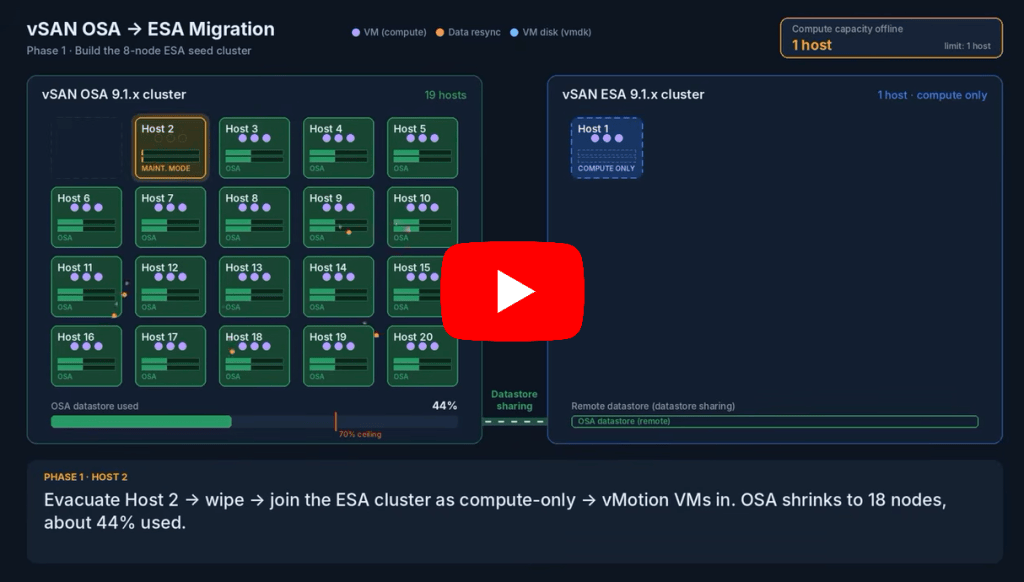
Figure 2. Decoupled swing migration from vSAN OSA to ESA without using extra hardware (video)
In this particular scenario, there was never more than one host’s worth of compute capacity offline at any point. The initial 20-host OSA cluster required a substantial amount of free capacity because the cluster capacity decreased significantly during the initial 8-host cluster provisioning process, as shown in step 5, above. The initial capacity utilization, the overall cluster host count, and other variables will impact what is possible using this type of migration that does not use any extra swing hosts.
Who Can Benefit
A decoupled swing migration of workloads to a new vSAN ESA cluster using existing hardware is ideal for customers who:
- Currently have vSAN OSA clusters using server hardware compatible with vSAN ESA.
- Currently have vSAN OSA clusters with high workload CPU utilization, but relatively low storage capacity utilization.
- Currently have little to no extra server hardware or rack space to help with migration from vSAN OSA to ESA.
- Prefer to decouple the migration of VM instances (via vMotion) from VM storage (via storage vMotion).
- Must maintain the prescribed levels of resilience during the migration.
Requirements and Caveats
While this more granular method of migration can minimize the need for spare hardware resources, it can introduce additional steps and other considerations, including, but not limited to:
- Cluster host count. This decoupled swing migration is ideal for larger cluster sizes similar to the example shown above. Larger cluster host counts help keep the percentage of resources absent to a minimum while the migration process takes place.
- Storage capacity utilization in cluster. A decoupled swing migration requires sufficient free storage capacity on the cluster. This is because several hosts that contribute storage capacity must first be removed from the cluster.
- vSAN version. This decoupled swing migration uses a feature introduced in vSAN for VCF 9.1.
- Hardware. The server hardware must be compatible with vSAN ESA. For some environments where the hardware is not already compatible, this may be as little as replacing the storage devices to NVMe storage devices during the decoupled swing migration.
Much like the traditional swing migration, the decoupled swing migration does not apply to first class disks (CNS persistent volumes for Kubernetes), vSAN file services shares, and vSAN iSCSI volumes. This data will need to be migrated independent from this migration prior to the OSA cluster being retired. The vSAN Performance Service on the OSA cluster must also be turned off before the OSA cluster can be fully decommissioned.
Recommendation: On the new ESA cluster, do not enable the “Automatic Rebalance” service until the migration has been completed. This will minimize any unnecessary rebalancing until after the migration procedure is complete.
Let’s Hear from You!
The vSAN Product Team is interested if streamlining this process would be useful for your environment. Please take this brief survey to help us better understand your specific environment, and how we can help you accomplish these types of OSA-to-ESA migrations easier.
Summary
There is a good chance that your server hardware running vSAN OSA can run vSAN ESA as well. Thanks to new capabilities in vSAN for VCF 9.1, a decoupled swing migration can make this transition easier and more cost-efficient than ever before. For more information on migrating to vSAN, see the vSAN Migration Guide.
Discover more from VMware Cloud Foundation (VCF) Blog
Subscribe to get the latest posts sent to your email.