
With every new release comes new features and enhancements. Some capabilities and their benefits are obvious, but target specific challenges and situations. Other enhancements seem subtle and perhaps easy to overlook, but impact multiple features, and benefit nearly every customer in their day-to-day tasks. The new Auto-RAID feature of vSAN in VMware Cloud Foundation (VCF) 9.1 falls in the latter category and represents a profound improvement in managing data resilience for vSAN clusters.
Let’s look at what Auto-RAID is, what it does, and how it changes the management of data resilience in vSAN.
Background
Storage policies have played a critical role in vSAN data management, as they define the desired state or outcome for one or more VMs. Unlike traditional storage using a cluster file system like VMFS, vSAN enables customers to granularly assign levels of resilience and other settings to their VMs depending on their needs. This was particularly helpful with the vSAN Original Storage Architecture (OSA) because there were performance and efficiency tradeoffs in choosing different resilience levels and data placement types. While flexible, storage policies often left customers wondering what was the best storage policy to set for their cluster.
The vSAN Express Storage Architecture (ESA) eliminated the technical tradeoffs between data mirroring and erasure coding, and reduced the need for multiple customized policies. “Auto-Policy Management,” introduced in vSAN 8 U1, made policy management easier in vSAN ESA by automatically creating a cluster-specific default storage policy for every vSAN cluster, based on the characteristics of the cluster. While it was a step in the right direction, it was more of a recommendation engine built around a classic approach to storage policies.
Introducing Auto-RAID
Auto-RAID in vSAN for VCF 9.1 provides a fully system-managed approach to store your data in the most resilient and space efficient way possible. It does so in an elegant manner that was not possible with Auto-Policy Management. Let’s look at some of the key traits that make Auto-RAID so compelling.
Scalable, Single Storage Policy Approach
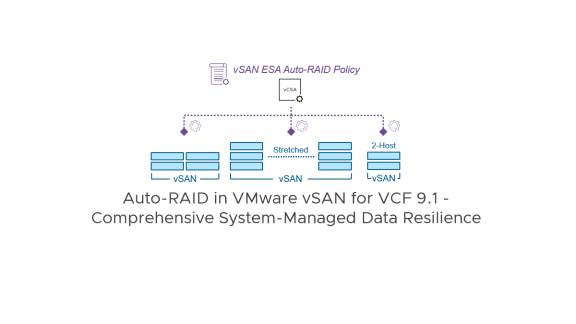
For VCF 9.1, there will be a single “vSAN ESA Auto RAID Policy” stored on the vCenter Server that will control all vSAN 9.1 clusters, regardless of their cluster size and type. This policy does not have explicit resilience settings within the policy, but senses and applies the ideal resilience settings for each cluster based on its characteristics, such as cluster type, host count, etc. This approach helps reduce the clutter of dozens or hundreds of storage policies to accommodate different types of clusters and conditions.
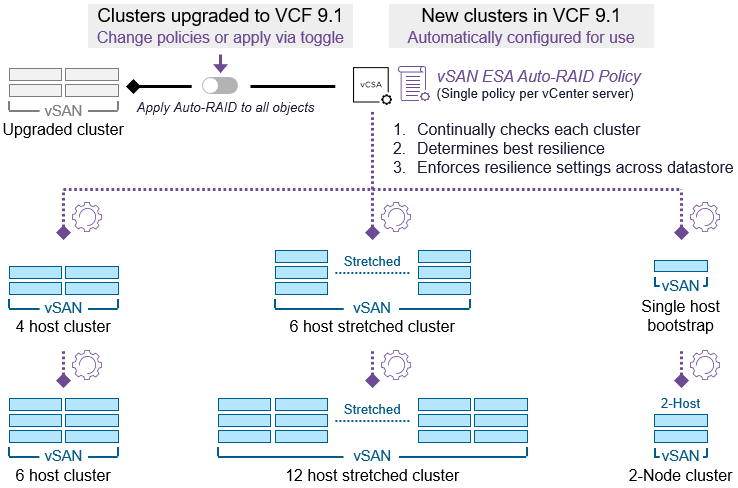
Figure 1. A single storage policy driving multiple cluster types and configurations
Accommodates Cluster Changes Dynamically
Changes to a cluster such as adding or removing hosts will be automatically adjusted to the optimal data resilience for the new configuration. Imagine a scenario where you are creating a new cluster, bootstrapping a single host for the initial build-up. vSAN Auto-RAID will let you automatically create new VMs without using a “Force provisioning” rule previously required, so that you can start building up the cluster easily. As you add hosts, it will automatically use the appropriate erasure code to achieve the maximum amount of data resilience.
Simplified Policy Settings
With data resilience handled automatically, the available policy rules will focus on VM-specific settings. These policy rules include:
- IOPS limits. Used to throttle storage I/O for specified VMs.
- Object Space Reservations (OSR). Guarantees free capacity for specified VMs.
- Stretched Cluster Site Locality. Accommodates conditions where you may have some workloads in a stretched cluster that only reside on one site, and should not have the data mirrored to the other site.
If any of the above are needed, you can create a new storage policy, enable the “vSAN ESA Auto-RAID” toggle, and set the desired setting, then apply it to the specific VMs you desire.
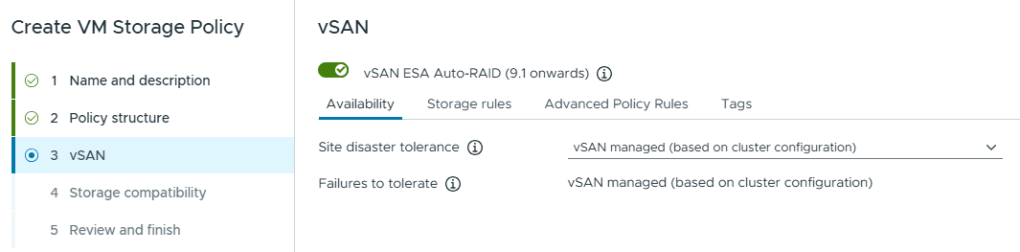
Figure 2. A storage policy powered by Auto-RAID
For Auto-RAID enabled clusters, other storage policy rules that are no longer applicable to vSAN ESA will not be displayed within the policy. These include:
- Force provisioning (now automatically handled)
- Number of disk stripes per object (not applicable)
- Flash read cache reservation (not applicable)
- Disable checksum (not applicable)
- Compression (Now an always-on cluster service in vSAN for VCF 9.1)
Resilience Settings of Auto-RAID
The logic Auto-RAID uses for resilience settings is noticeably different from past versions of vSAN ESA. When resilience is possible, it will always default to space-efficient erasure coding for everything except site resilience for stretched clusters, and host resilience for 2-Node topologies. In those cases, the Site Disaster Tolerance will be set to a mirror.
Standard single site clusters:
- 6 or more hosts in a cluster – Auto-RAID will use FTT=2 using RAID-6 resulting in a 1.5x object capacity overhead.
- 3-5 hosts in a cluster – Auto-RAID will use FTT=1 using RAID-5 resulting in a 1.5x object capacity overhead.
- Fewer than 3 hosts in a cluster – Auto-RAID will use FTT=0 resulting in a 1.0x object capacity overhead.
Stretched clusters:
- 6 or more hosts per site/fault domain – Auto-RAID will use a site disaster tolerance of a RAID-1 mirror, plus FTT=2 using RAID-6 resulting in a 3.0x object capacity overhead.
- 3-5 hosts per site/fault domain – Auto-RAID will use a site disaster tolerance of a RAID-1 mirror, plus FTT=1 using RAID-5 resulting in a 3.0x object capacity overhead.
- Fewer than 3 hosts per site/fault domain – Auto-RAID will use a site disaster tolerance of a RAID-1 mirror, plus FTT=0 resulting in a 2.0x object capacity overhead.
2-node clusters:
- 6 or more storage devices per host – Auto-RAID will use a site disaster tolerance of a RAID-1 mirror, plus FTT=0 resulting in a 2.0x object capacity overhead. (Secondary levels of resilience are not currently available for 2-Node clusters using Auto-RAID in 9.1.)
- 3-5 storage devices per host – Auto-RAID will use a site disaster tolerance of a RAID-1 mirror, plus FTT=0 resulting in a 2.0x object capacity overhead. (Secondary levels of resilience are not currently available for 2-Node clusters using Auto-RAID in 9.1.)
- Fewer than 3 devices per host – Auto-RAID will use a site disaster tolerance of a RAID-1 mirror, plus FTT=0 resulting in a 2.0x object capacity overhead.
This means that the standard overhead for standard clusters will be 1.5x, stretched clusters will be 3x, and 2-node clusters will be 2x. This capacity overhead is prior to savings from compression and deduplication.
One noteworthy item is that when Auto-RAID assigns FTT=1 using RAID-5, it will always use the 2+1 scheme. The optional 4+1 RAID-5 erasure code in previous versions of vSAN ESA is not used.
Simplified Overheads using Enforcement Across the Cluster
Auto-RAID assumes responsibility for the optimal level of resilience for data in the cluster, and enforces that across the entire datastore. One of the benefits of that approach is the consistent capacity overheads within a cluster. It is one of the main drivers behind (and a requirement of) the new “Effectivity Capacity” view in vSAN for VCF 9.1 that renders storage capacity usage in actual effective capacity, much like traditional storage. More on this feature soon! This standardization of overheads will also make capacity estimations much easier for design and sizing exercises.
Auto-RAID on New Versus Existing Clusters
Whether you are starting fresh or upgrading, the path to using Auto-RAID is designed to be flexible and non-disruptive. All new clusters will be configured to use Auto-RAID by default. Existing clusters will keep their existing self-managed storage policies or their Auto-Policy Management configured policy. However, there will be a health alert that will recommend the use of Auto-RAID.
There are two ways to transition to using Auto-RAID with clusters upgraded to VCF 9.1.
- Option 1: Change all objects to the “vSAN ESA Auto RAID Policy” and the datastore default policy to “vSAN ESA Auto-RAID Policy.” This ensures that all objects use the single policy that prescribes the optimal level of resilience for the cluster. This can be achieved in the vSphere Client by clicking on “Datastores” and selecting the vSAN datastore, followed by clicking on Configure > General > Edit and choosing “vSAN ESA Auto-RAID Policy.” This is the cleaner way to make the migration, as it will allow you to eventually remove unused storage policies from vCenter Server.
- Option 2: Enable “Apply Auto-RAID to all objects.” This is a simple, catch-all mechanism to ensure that all objects are using Auto-RAID regardless of the previous, self-managed storage policies applied. Found by highlighting the cluster, clicking on Configure > vSAN > Services > Storage > Edit, it helps accommodate legacy workflows and custom policies already in place. While this method is quick and easy, old storage policy names may continue to be tied to some of your clusters. It also means that toggling off the setting may reconfigure objects back to their old storage policy setting. The approach described in “Option 1” makes the toggle meaningless.
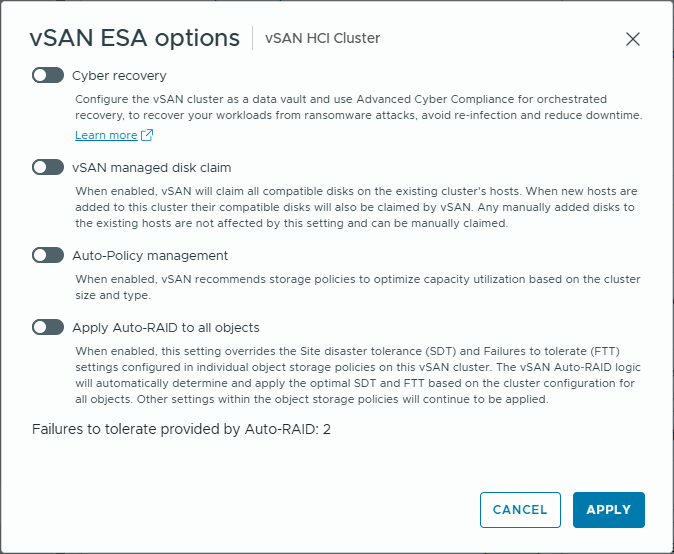
Figure 3. Cluster options with a vSAN ESA cluster in VCF 9.1
Recommendation: If you have enabled the “Apply Auto-RAID to all objects” toggle for upgraded clusters, leave it turned on. Turning it off may initiate reconfigurations of objects on the cluster, and will disable your ability to use the new “Effective Capacity” view in vSAN for VCF 9.1.
To prevent performance spikes during these transitions, vSAN intelligently throttles the reconfiguration of existing objects, ensuring that your production workloads maintain their performance levels while the data is moved to its new, optimal state.
In most cases, this type of change will not generate much resynchronization traffic. For example, a vSAN ESA cluster with six or more hosts is likely using some type of RAID-6 storage policy anyway. In that case, changing it to Auto-RAID will not generate any resynchronization traffic. Only a small metadata change will occur that associates those objects with the new Auto-RAID policy.
You may notice in the figure above that “Auto-Policy Management” still exists as a configuration option. Should this be used in a VCF 9.1 environment? No. It remains for compatibility purposes with upgraded clusters that were using the feature prior to an upgrade. Existing clusters can be moved to using Auto-RAID by using one of the two options described above.
For more information on vSAN Auto-RAID in vSAN for VCF 9.1, see the vSAN Availability Technologies, vSAN Space Efficiency Technologies, and vSAN FAQs documents.
Summary
While there are some current limitations such as secondary resilience in 2-node clusters and specific stretched-to-standard conversion workflows, Auto-RAID is the future for self-managed data resilience in vSAN. It simplifies the user experience, reduces human error, and ensures that “optimal resilience” isn’t just a goal, but a permanent state.
Discover more from VMware Cloud Foundation (VCF) Blog
Subscribe to get the latest posts sent to your email.