
Enabling the vSphere Supervisor in VMware Cloud Foundation (VCF) involves choosing a network stack for workloads running on vSphere Kubernetes Service (VKS), KubeVM Service, or Container Service – VCF Networking with Virtual Private Cloud (VPC), or the vSphere Distributed Switch. VCF Networking with VPC is the recommended, default option. It keeps Kubernetes nodes off the routable network, scales load balancing across up to ten appliance nodes instead of one active/standby pair, and opens up self-service networking, multi-tenancy, and third-party fabric integration that the vSphere Distributed Switch path can’t match [1][2].
For network decision makers planning VCF 9.1 deployments, VPC-based networking is the architecture built to scale with Kubernetes adoption.
Network stack choices
VCF 9.1 supports two different network stacks for the vSphere Supervisor. One is the vSphere Distributed Switch with a Foundation Load Balancer appliance. The other is VCF Networking with VPC, built on VMware VPCs behind a Transit Gateway[3]. Both stacks run virtual machines and VKS clusters side by side; the differences show up in exposure, scale, and how much room each one leaves to grow.
The vSphere Distributed Switch model connects Kubernetes cluster nodes directly to an existing VLAN, and a single Foundation Load Balancer appliance pair, running active/standby, handles every virtual IP address (VIP) in the environment [1][4]. VCF Networking with VPC takes a different approach: it places VKS cluster nodes on private networks with no direct external access, and distributes load-balancing and network address translation (NAT) services across a cluster of up to ten Virtual Network Appliance nodes running active/active [1][2]. A Transit Gateway connects those VPCs, either through a VLAN in a Distributed connection or through an NSX Edge cluster in a Centralized connection [3].
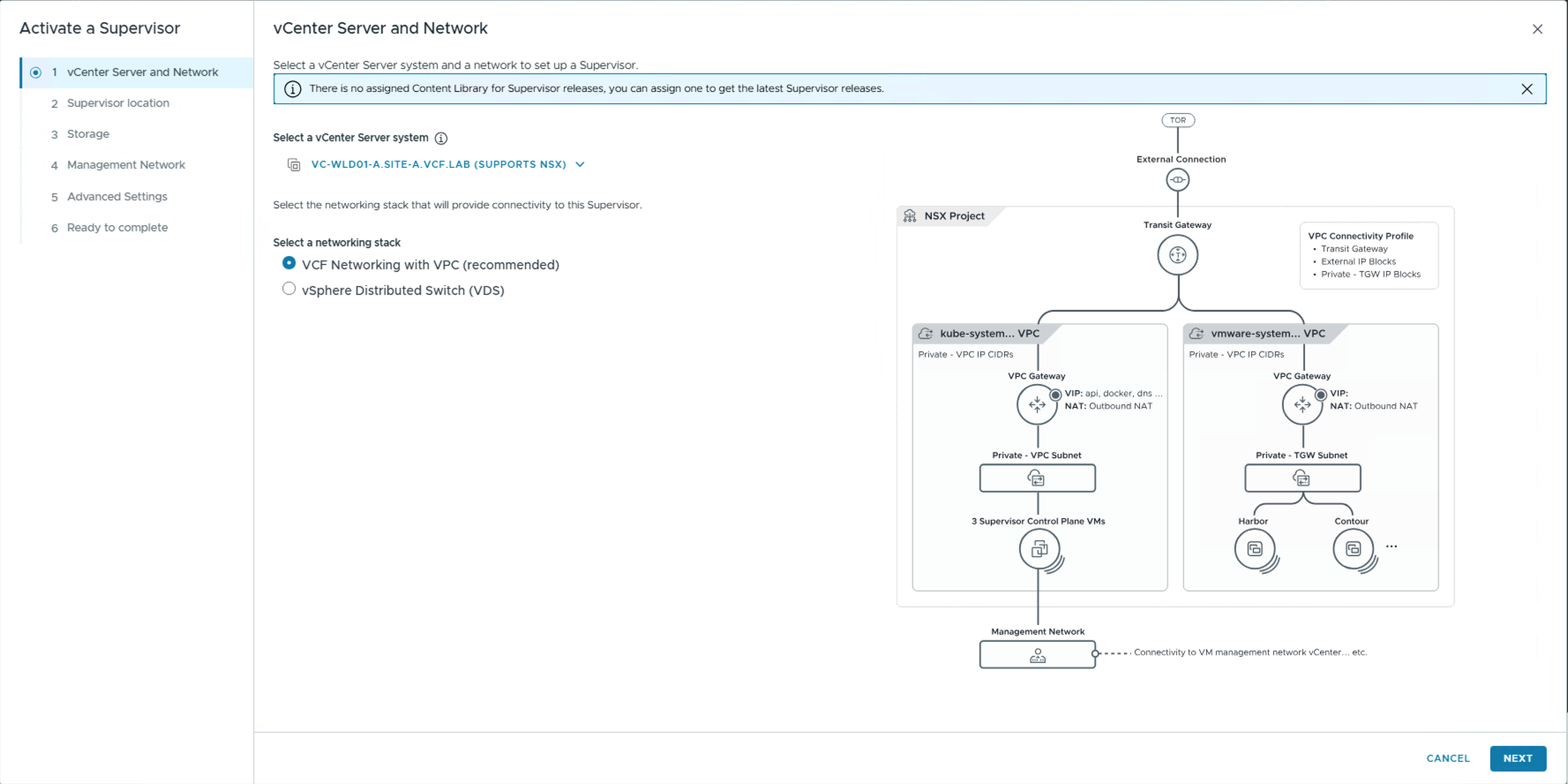
Let’s take a closer look at these options and see why VPC is the recommended network stack for VMware Cloud Foundation (VCF), and the required network stack for VCF Automation environments.
Important Considerations for Network Decision Makers
1. Private networks limit exposure and preserve IP space
With VPC-based networking, Kubernetes cluster nodes have no direct external access. They sit on private subnets and expose only the application endpoints that need to be reachable, through the load balancer. That matters for two practical reasons. It shrinks the attack surface, because nodes running workloads are frequent exploit targets, and keeping them off directly routable networks limits what an attacker can reach [9]. It also removes a scaling constraint: clusters on the vSphere Distributed Switch path are limited by how the physical VLAN was pre-provisioned, while VPC subnets auto-scale and use outbound NAT to reach outside resources without consuming routable address space for every node.
This follows best practices for running a Kubernetes service on any cloud – start with private nodes and add public exposure “only when the workload requires it,” paired with NAT for outbound access. The Kubernetes project’s own security checklist calls for the Kubernetes API server, kubelet API, and etcd to stay unexposed on the public internet [5][6]. Any workload sharing a physical network with cluster nodes gains access to the kubelet and control plane components, and VPC-based networking builds that segmentation by default instead of leaving it to manual firewall rules layered on top of a shared VLAN.
2. Network services and Load balancing scale natively
Under the vSphere Distributed Switch stack, every VIP in the environment runs through a single Foundation Load Balancer appliance pair in active/standby mode [4]. That’s a single point of scale for the whole Supervisor. VCF Networking with VPC distributes that load differently. A Virtual Network Appliance cluster can scale to up to ten nodes, running active/active, splitting VIPs, NAT, and other network services across the cluster instead of funneling them through one pair. A single network appliance can also host services for multiple VPCs, so the model scales both up, with more nodes, and out, with more tenants per node.
Organizations that need more load-balancing depth, or autoscaling tied to application metrics, can add VMware Avi Load Balancer. It integrates natively with both Supervisor networking stacks, and adds to the VPC benefits.
3. VPC networking, Connectivity, and Traceflow – all in vCenter
Every VPC workflow lives inside the vCenter networking tab, including diagnostics. Administrators view VPCs and their networks, configure the Virtual Network Appliance, and define Connectivity Policies that decide which VPCs can talk to each other and which stay isolated, all without leaving the tool they already use to run the rest of the environment [1]. Traceflow, also built into vCenter, lets an administrator trace a packet’s actual path between two VPC-connected workloads, or between a workload and an external IP address [1].
For a Network Decision Maker, that consolidation matters as much as any single feature. A separate networking console for Kubernetes traffic means a separate tool to license, a separate skill set to staff for, and a separate audit surface to secure. VPC networking folds Kubernetes connectivity, VM connectivity, policy, and diagnostics into one plane that the existing vSphere team already runs.
4. Easy onboarding and connectivity
VPC networking can be instantiated with just one VLAN, without requiring advanced network configurations in the network fabric[7]. Workload domain deployment in VCF is VPC-ready by default. The vmkernel interfaces needed for virtual networking are already configured, and the Virtual Network Appliance is already in place, so administrators typically only need to supply the VLAN and the external IP addresses. No Border Gateway Protocol (BGP) configuration and no NSX Edge cluster are required to get started.
From there, the architecture can grow without a redesign. Teams that need to avoid stretching a single VLAN across every host can move to a Centralized connection through an Edge cluster with static routing or BGP, or integrate directly with Cisco and Arista Ethernet Virtual Private Network (EVPN) and Virtual Extensible LAN (VXLAN) fabrics for distributed connectivity [10][11]. VCF 9.1 formalized this path, adding native EVPN interoperability with Arista Networks and expanded Cisco integration built for exactly this kind of growth.
5. VPCs unlock private cloud and ecosystem capabilities VLANs cannot
The gap between the two stacks widens once an organization wants to run Kubernetes and VMs as a self-service private cloud rather than a set of manually provisioned environments. VPC networking supports a full private cloud experience through VCF Automation, including multi-tenancy, blueprints, and self-service networking. The vSphere Distributed Switch path has no namespace create-read-update-delete capability from VCF Automation.
That private cloud foundation carries three adjacent capabilities with it. Broadcom is working directly with Cisco and Arista to deliver EVPN/VXLAN fabric integration, so VPC networks connect through one optimized fabric instead of a collection of manually managed VLANs [11]. VPC networking also integrates natively with Infoblox for DNS, DHCP, and IP address management, automating IP block allocation and DNS registration instead of requiring manual tracking]. And vDefend firewalling is fully VPC-aware, letting a security administrator define policy per VPC or between VPCs, with integration into the Antrea container network interface (CNI) and consumption directly from VCF Automation. A Supervisor running on the vSphere Distributed Switch stack can’t reach any of these, because that stack lacks the per-tenant, software-defined construct VPC provides.
Comparison of networking approaches
| Network Stack | vSphere Distributed Switch | VPC Networking |
|---|---|---|
| External access to K8s nodes | Directly accessible through existing VLANs | No direct access (nodes stay private) |
| VIP scale & external IP consumption | Single Foundation Load Balancer, active/standby — higher external IP usage | Up to 10 Virtual Network Appliance nodes, active/active — lower external IP usage |
| Auto-scaling | Limited by physical VLAN pre-configuration | Auto-scales via VPC Subnets |
| Network services | Load balancing only | Subnets, static routes, NAT, external IPs, load balancers, VPC Connectivity Policies |
| VCF Automation | Limited – no namespace CRUD capability | Full self-service support |
| Connectivity options | VLAN only | VLAN (Distributed), Centralized, EVPN/VXLAN with Cisco, Arista, SONiC |
| Fabric requirement | Multiple VLANs (e.g. management, workload, load-balancer front-end), each stretched across every host in the cluster | Interconnection VLAN spanning hosts for Distributed connectivity. Full Stack VPC: VCF environment with vmkernel interfaces for virtual networking at MTU ≥1700 |
One nuance worth noting for planning purposes: as of VCF 9.1.1, administrators can also build a purely VLAN-backed VPC. It keeps the same operational model and vCenter workflow as a full-stack VPC, but consumes classless inter-domain routing (CIDR) blocks directly from the physical fabric instead of from an internal address space, which removes the ability to create private networks [1]. That option exists for environments that need the VPC operational model without an overlay network. It’s a configuration choice, not a limitation of VPC as an architecture.
The case for VPC networking
For decision makers evaluating or planning VCF 9.1 environments, the technical case for VPCs holds up across key attributes at scale: security exposure, load-balancing headroom, operational simplicity, and ecosystem integration. The practical case is just as strong for VCF and Kubernetes administrators handling the hands-on configuration. The VPC path starts as simply as a single VLAN and grows into Centralized connections, EVPN fabric integration, and full private cloud automation, all without requiring a redesign along the way [8][9[10].
The vSphere Distributed Switch stack still has a place. It suits VMware vSphere Foundation deployments and smaller or lab environments. But for any organization planning to run vSphere Kubernetes Service workloads at production scale, inside a private cloud model, VPC-based networking is the stack built for that destination, and VCF 9.1 marks it as recommended for exactly that reason.
Next Steps
Teams planning a Supervisor deployment can find the full technical reference, including packet walks, deployment procedures, and troubleshooting guides, in the VCF Networking Encyclopedia, maintained by Dimitri Desmidt [7]. For hands-on configuration guidance, VMware’s documentation on configuring Supervisor with VPC and the Distributed Transit Gateway walks through the vCenter workflow step by step.
References
- “Supervisor Architecture with VCF Networking with VPC.” Broadcom TechDocs, VMware Cloud Foundation 9.1.
- “Deploying Supervisor with VCF Networking with VPC.” Broadcom TechDocs, VMware Cloud Foundation 9.1, July 27, 2026.
- “Distributed VLAN Connectivity Model.” Broadcom TechDocs, VMware Cloud Foundation 9.1 Design Library, June 30, 2026.
- “vSphere Supervisor.” Broadcom TechDocs, vDefend Design Library, July 2, 2026.
- “Security Checklist.” The Kubernetes Project.
- “A Closer Look at NSA/CISA Kubernetes Hardening Guidance.” The Kubernetes Project, October 5, 2021.
- VCF Networking Encyclopedia — Supervisor: network options and detailed architecture pros & cons by Dimitri Desmidt.
- VCF 9.1 Networking: Exploring Network Services for Virtual Private Clouds by Dimitri Desmidt.
- VCF 9.1 Networking: Simpler VPC Connectivity Control by Dimitri Desmidt.
- VCF 9.1 Networking: Seamless DDI Integration with Infoblox by Dimitri Desmidt.
- Announcing EVPN Interoperability with Arista Networks (VCF 9.1) by Varun Santosh and Andre Vasquez.
- Unlocking Agile Innovation: Delivering on VMware’s Open Networking Approach with Cisco by Varun Santosh and Andre Vasquez.
Discover more from VMware Cloud Foundation (VCF) Blog
Subscribe to get the latest posts sent to your email.