

The rapid proliferation of applications is reshaping cloud infrastructure. Enterprises are increasingly seeking open standards-based solutions that provide a consistent and cohesive experience for operating network infrastructure and services.
In a push for greater interoperability between application environments and the network, VMware announced an open, extensible networking ecosystem for VMware Cloud Foundation (VCF). This open standards approach delivers a unified network fabric experience by simplifying workload connectivity and network consumption while preserving existing investments.
This blog recaps recent networking enhancements in VMware Cloud Foundation (VCF) and presents an overview of how the unified network fabric solution interoperates with Cisco Nexus One.
The Unified Network Fabric with VCF Networking
VCF Networking enables the cloud operating model in VCF through VPC-driven network consumption, increased compute density, workload mobility, and a scale-out network architecture. Virtual Private Clouds (VPCs) help enterprises build isolated network environments that have consistent policies and self-service access for application teams, much like public cloud. Transit Gateways simplify how VPCs connect to each other and to external networks. Traffic flow is further optimized with the Distributed Transit Gateway that enables direct host to network fabric connectivity for optimized scale and reduced costs and infrastructure footprint.
The unified network fabric strategy further strengthens interoperability between the virtual and physical domain using industry standard protocols such as VXLAN and BGP EVPN. This end-to-end network fabric architecture drives non-disruptive interoperability between VCF Networking and the network fabric.
For the network admin, this means:
- Standards-based interoperability between VCF Networking and Cisco Nexus One simplifies the control plane and enables consistent network configuration, troubleshooting, and workload mobility.
- Optimized data plane architecture with efficient traffic flow between ESX hosts and the Nexus One fabric avoiding scaling bottlenecks.
- Simpler operations without the operational overhead of managing edge node connectivity and tools sprawl for end-to-end visibility and multi-tenant operations.
For the cloud admin, this means:
- Faster connectivity for VCF Workloads with direct connectivity from ESX hosts to the fabric maximizing the use of high-performance physical NICs.
- CapEx savings from increased workload density and lower network footprint.
- Workload mobility across the private cloud without network changes such as VLANs or IP addressing, simplifying modern cloud-native strategies and business continuity.
How Interoperability Works
This section outlines how VMware Cloud Foundation and Cisco Nexus One interoperate seamlessly — across control plane and data plane — to allow network administrators to quickly and reliably deploy, operate, and monitor the network fabric end-to-end.
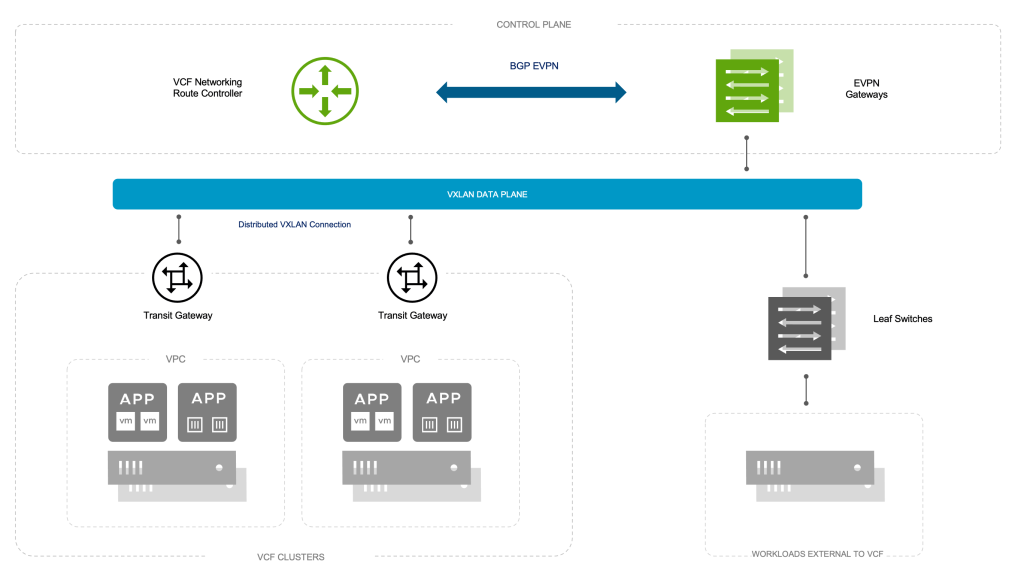
Step 1: Establishing a common control plane
Interoperability is initiated through alignment of control planes. The VCF Networking Route Controller (RC) peers directly with the EVPN Gateway using the industry-standard MP-BGP EVPN protocol.
This setup allows both environments to advertise and learn workload routes dynamically — ensuring that VCF workloads and other endpoints connected to the network fabric coexist in one cohesive routing domain. The result is an always-updated, synchronized view of the entire network topology.
Step 2: Aligning tenant connectivity
In an EVPN VXLAN fabric, every tenant or VRF operates within its own Layer-3 VNI (L3VNI) — the logical VXLAN segment that carries inter-subnet routing information (EVPN Type-5 routes). Within VCF, the Transit Gateway (TGW) plays a similar role providing routed connectivity between Virtual Private Clouds (VPCs) and external networks.
By mapping each VCF Transit Gateway to the corresponding L3VNI in the fabric, the two environments share a common tenant routing domain.
This 1:1 mapping ensures isolation, scalability, and operational simplicity — tenants gain full connectivity across VCF and the EVPN VXLAN fabric without sacrificing segmentation or policy control.
Step 3: Dynamic route exchange
Once control and tenant associations are established, EVPN Route-Type 5 routes are exchanged automatically:
- From VCF to the EVPN fabric:
- The Route Controller advertises per-workload /32 prefixes, identifying each workload and its ESX host VTEP location (tunnel endpoint)
- These routes can be optionally summarized at the fabric Border Gateway to optimize the fabric’s routing tables, ensuring that VCF workloads and other endpoints connected to the network fabric coexist in one cohesive routing domain.
- From the EVPN fabric to VCF:
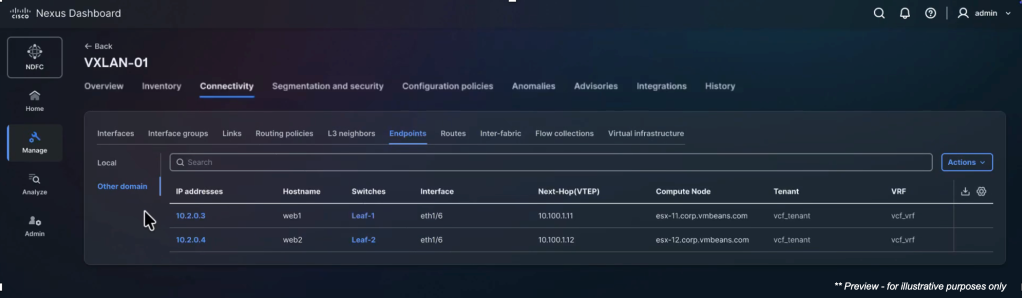
This dynamic, standards-based route exchange removes the need for static and manual configurations and enables cloud-scale mobility across both domains.
Step 4: Establish end-to-end VXLAN data path
In the data plane, end-to-end traffic flows are established over VXLAN encapsulation, extending Layer-3 reachability across the two environments:
- VCF workloads forward traffic through their ESX TEP towards the EVPN Border Gateways.
- The Border Gateway routes packets through the appropriate L3VNI and towards the destination VTEP (leaf switch) in the EVPN VXLAN fabric.
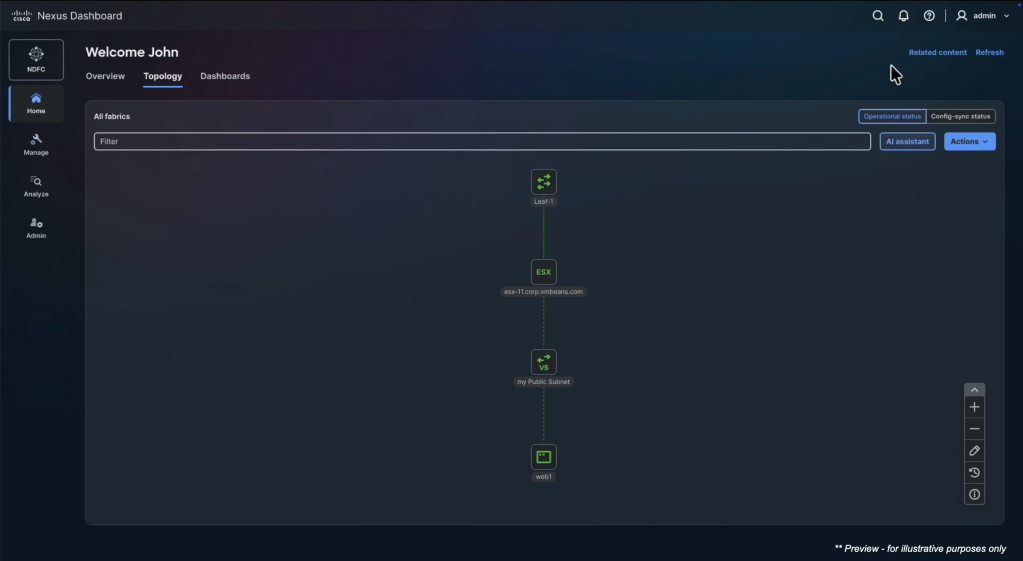
This symmetric model ensures consistent routing behavior — no matter where the workloads are — and delivers line-rate forwarding between VCF, the EVPN VXLAN fabric, and external resources.
Looking Ahead
The Unified Network Fabric approach is designed and architected to work with any existing network fabric that supports standards-based VXLAN and BGP EVPN. VMware is excited to continue working with networking industry leaders to further enhance interoperability and integration, helping customers optimize their private cloud architecture and reduce costs while continuing to deliver the reliability, flexibility, and innovation they expect.
The future is unified, automated, and open.
Discover more from VMware Cloud Foundation (VCF) Blog
Subscribe to get the latest posts sent to your email.