
Capacity planning in VMware Cloud Foundation (VCF) has always been about striking the right balance: giving IT teams the foresight needed to prevent resource exhaustion while maximizing hardware utilization. Over the years, the VCF capacity engine has been a reliable workhorse, powering solid rightsizing, reclamation, and time-remaining recommendations across countless data centers.
As workloads grow and infrastructure requirements become more dynamic, operational teams increasingly need forecasting models that are not only accurate, but also easy to interpret and explain to executive stakeholders.
In VCF 9.1.1, the capacity engine receives an exciting refresh. The updated engine focuses on clarity, predictability, and actionable context, giving administrators greater visibility into how forecasts are derived and how policy settings directly shape capacity projections.
Here is a look at what’s new, how the engine has evolved, and what you can expect when adopting the update.
Why the Forecasting Engine Evolved
Historically, the VCF capacity engine relied on a multi-model approach, running several statistical methods in parallel to determine capacity trends. While this approach provided comprehensive analysis, comparing multiple algorithms behind the scenes could occasionally make it challenging to explain why two similar workloads yielded slightly different long-term trendlines.
The updated engine streamlines this experience into a unified, highly transparent algorithm based on time-decay weighted linear regression. By standardizing on a single, well-understood modeling approach, administrators get consistent, easily explainable forecasts without sacrificing the depth of analysis required for enterprise planning.
Key objectives of the new engine include:
- Intuitive and Explainable Metrics: Easily understand and communicate how capacity trendlines and timelines are calculated.
- Direct Settings Impact: Ensure capacity policy adjustments visibly and predictably influence your environment’s forecast bounds.
- Context-Rich Recommendations: Provide clear context for rightsizing and workload placement decisions.
How the Streamlined Model Works
At a high level, the new engine fits a trendline to historical metric data (CPU, memory, storage) and projects that trend forward. By applying a “time-decay” factor, recent data carries greater weight than older history, ensuring your forecasts reflect current operational realities rather than outdated behavior.
The engine adapts its lookback window depending on the goal:
- Capacity Forecasts: Analyze up to 90 days of historical data for robust long-term planning.
- Workload Placement (WLP): Look at short-horizon trends (the past 7 days projected roughly 2 hours ahead) to inform optimal placement decisions.
Asymmetric Bounds for Real-World Workloads
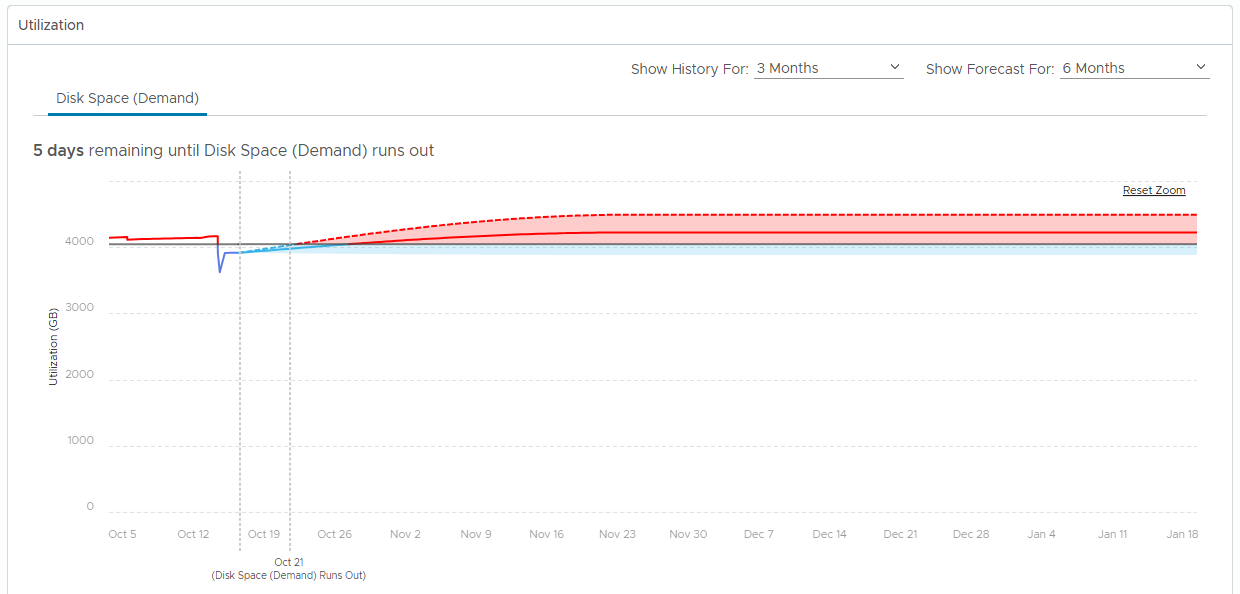
A major highlight of the update is how upper and lower risk bounds are calculated. Rather than applying uniform symmetric bands around a trendline, the new engine evaluates upper and lower bounds independently using asymmetric quantile distribution.
In practical terms, the forecast bands hug actual data patterns far more closely. Temporary dips or spikes in usage are accurately accounted for without expanding the forecast boundaries so far that they trigger premature capacity alerts.
Predictable Risk Levels
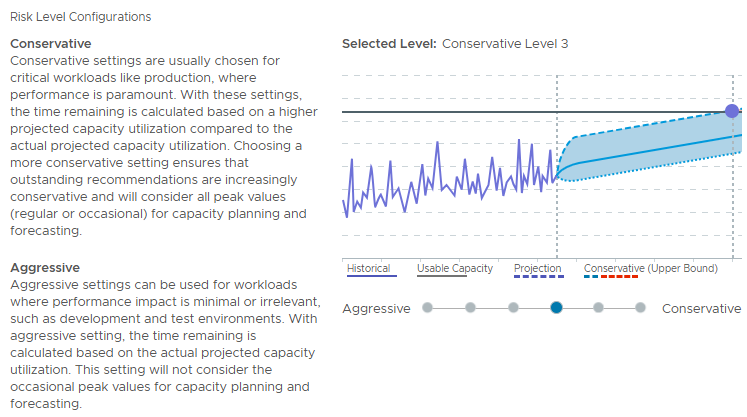
Configuring risk levels in your capacity policy is now clearer than ever. Risk settings directly map to defined upper and lower data percentiles, allowing you to fine-tune how aggressively or conservatively capacity limits are set:
- Most Aggressive: Tightens bounds around the mean line for maximum resource density.
- Standard / Default (Conservative Level 3): Captures typical operational variance while shielding against unexpected spikes.
- Most Conservative: Expands bounds to account for extreme historical peak usage.
This updated structure takes the guesswork out of policy tuning: adjusting a slider gives you an immediate, predictable sense of how your capacity runway will be calculated.
Built-In Safety Controls
To maintain accuracy, the engine intentionally stabilizes trendlines when historical data is insufficient or inconsistent. The engine defaults to a safe, flat baseline under three specific conditions:
- Limited History: Less than 7 days of collection history is available.
- Low Statistical Correlation: Data pattern variability is too high for a standard linear trend to represent accurately.
- Negative Trends: Downward trends are leveled out rather than projecting zero resource usage, preventing false assumptions about long-term capacity requirements.
What to Expect During an Upgrade
If you are upgrading an existing environment to VCF 9.1.1, your transition will be seamless:
- Validation and Comparison: Following an upgrade, the system generates a comparison file highlighting any differences between previous and updated capacity calculations, allowing you to review changes with complete visibility.
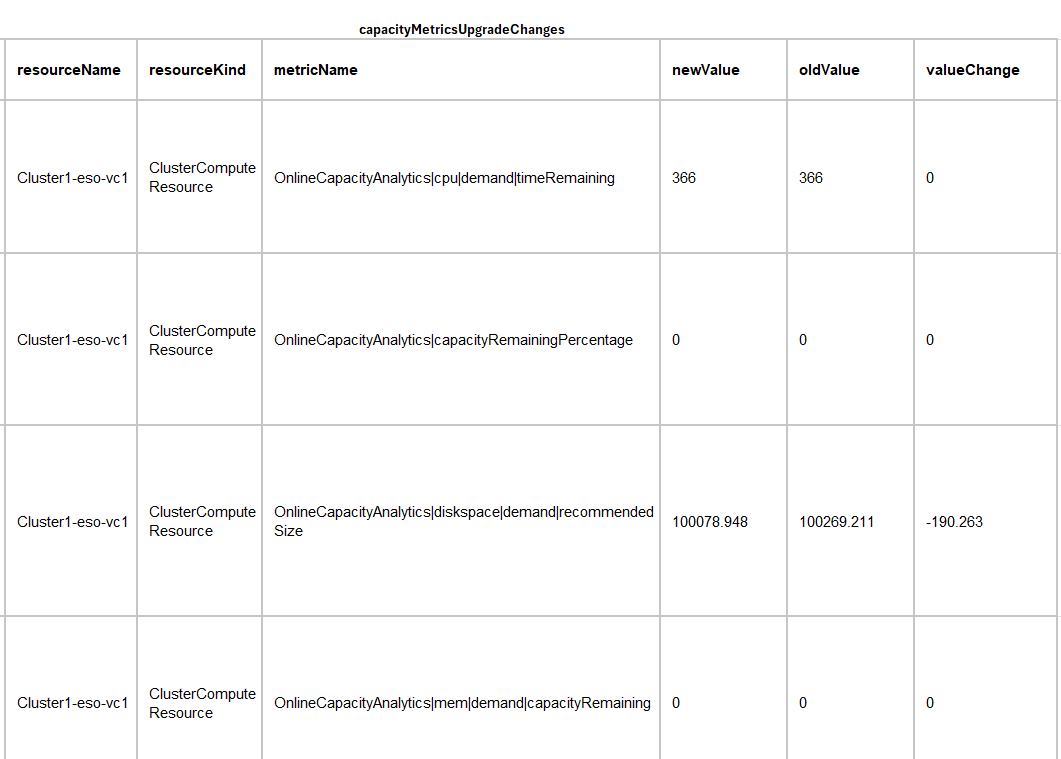
Note: After upgrading, admins cans can access the comparison file in this directory: /storage/log/vcops/log/capacityMetricsUpgradeChanges.csv
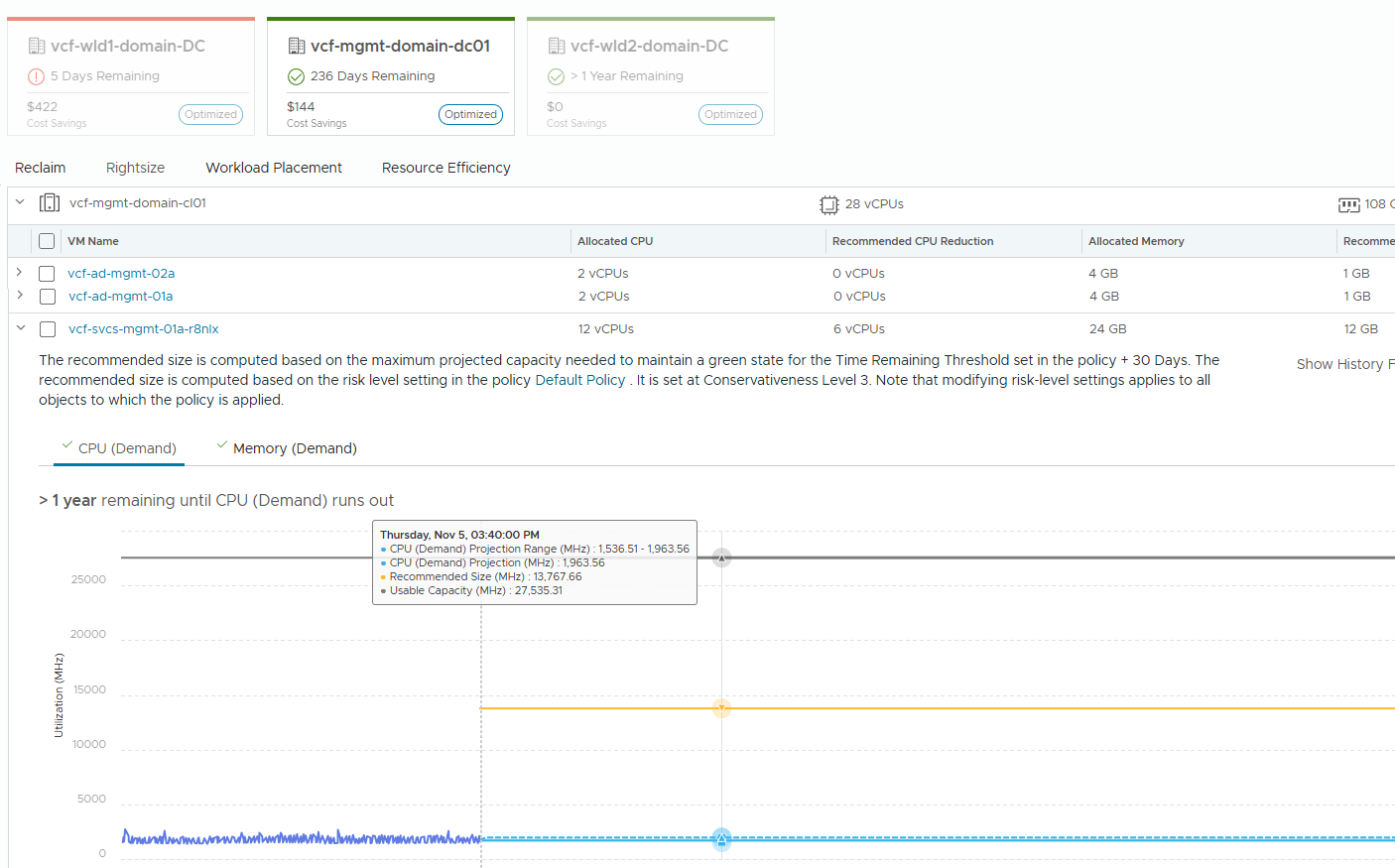
- Refined Rightsizing: Based on the comparisons, you may notice slight refinements in your rightsizing or time remaining recommendations. In most cases, these reflect improved precision aligned with current workload trends.
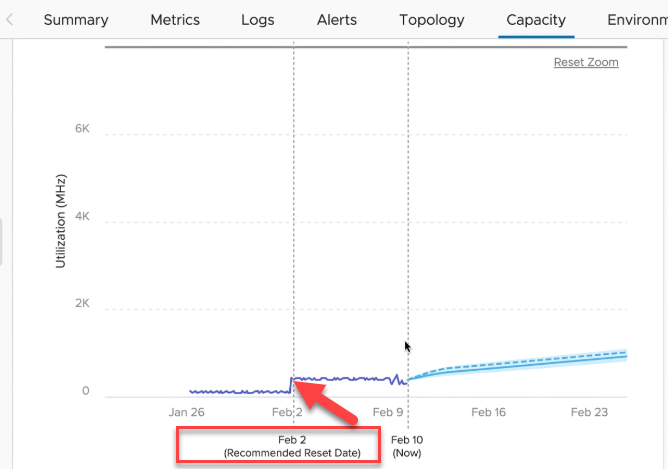
- Handling Behavioral Jumps: For workloads experiencing sudden step-level changes (such as major migrations or configuration updates), new jump point detection lets you easily reset the historical baseline to a new Recommended Reset Date, helping ensure your projections stay accurate.
Looking Ahead
The updated capacity engine in VCF 9.1.1 combines the reliability you’ve built your operations around with simpler, more transparent forecasting. By making trendlines intuitive and directly tied to policy settings, VCF 9.1.1 gives infrastructure teams the confidence and clarity needed to plan, rightsize, and scale effectively.
Discover more from VMware Cloud Foundation (VCF) Blog
Subscribe to get the latest posts sent to your email.