
A practical guide for virtualization and cloud admins exploring a seat at the platform table
Somewhere in your organization, a platform team is deciding how developers will get infrastructure for the next five years. There’s a decent chance you weren’t invited to that meeting. There’s an even better chance they’re building on top of something you run.
I spend many working hours with enterprise teams adopting VMware Cloud Foundation (VCF), and I see the same split everywhere. The platform team owns the roadmap, the Git repos, the developer portal, and the budget conversation. The infrastructure team owns capacity, uptime, and the 2 a.m. fire drills. One group gets invited to give conference talks. The other gets the helpdesk tickets.
This post is for the second group: the cloud and virtualization admins (“vAdmins”) who have quietly kept the lights on for years and are wondering where they fit now.
You’ve reinvented yourself before
If you’ve been in this game since the early days, indulge me for a minute.
Some of you remember the first time a running VM seemingly teleported between physical hosts with vMotion (capital V back then) and nobody on the application team noticed. Some of you spent weekends on P2V conversions and came back Monday to a data center with a third of its racks empty, instantly earning hero status. You learned VirtualCenter before it was vCenter, argued about ESX versus ESXi, and could recite your hardware compatibility list from memory. Virtualization rewrote the economics of IT, and it rewrote your job along with it. You went from racking servers to designing clusters and trying to explain why physical CPUs ≠ vCPUs.
Then came the cloud management era. VMware’s Cloud Management Platform grew into the vRealize suite in 2014: vRealize Automation (the product formerly known as vCloud Automation Center), vRealize Operations, Log Insight, Network Insight, and Orchestrator underneath it all. That suite taught a generation of admins to think in blueprints, catalogs, approval policies, and capacity models. In 2022 the portfolio was rebranded as Aria, and when the current platform came together in VCF, that lineage became VCF Operations and VCF Automation, the operations, cost, tenancy, and self-service layers this post will keep pointing you toward.
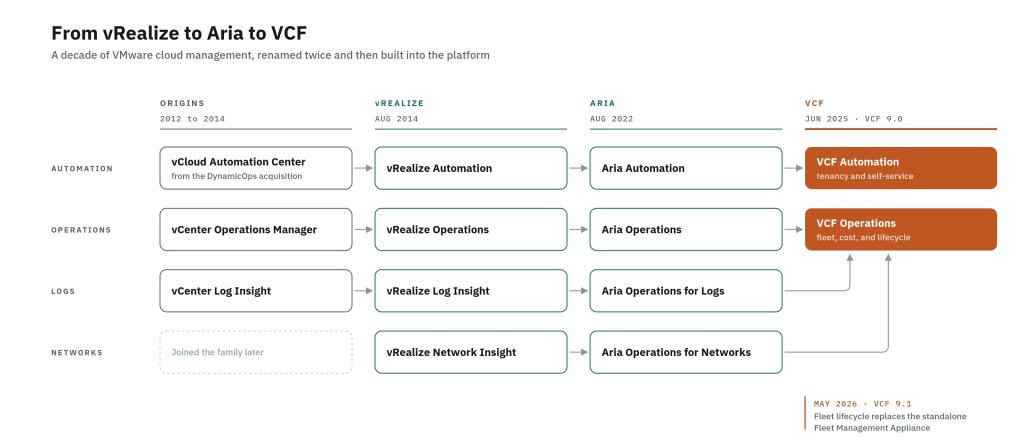
I lived in that world for a long time. vRealize Automation was my home turf, from the early vCAC days through the SaaS / 8.x rearchitecture, and the rest of the Cloud Management Platform came along for the ride. If you built blueprints or tuned vROps dashboards in any of those eras, you were practicing platform engineering years before anyone added it to their LinkedIn profile.
And then there was the community. The local VMUG meeting where someone from the company down the road showed you exactly how they solved the problem you’d been stuck on for a month. The first VMworld in San Diego in 2004, and the Las Vegas and San Francisco years that followed, where the hallway track and the Hands-on Labs were worth as much as any keynote. VMworld became VMware Explore in 2022, and the community kept showing up. A lot of careers in our industry were built one VMUG talk and one expo hall at a time. I’ve been at every VMworld / Explore in the US since 2008, and in Barcelona since its beginnings, and I have left each one with a conversation that shifted how I think about something.


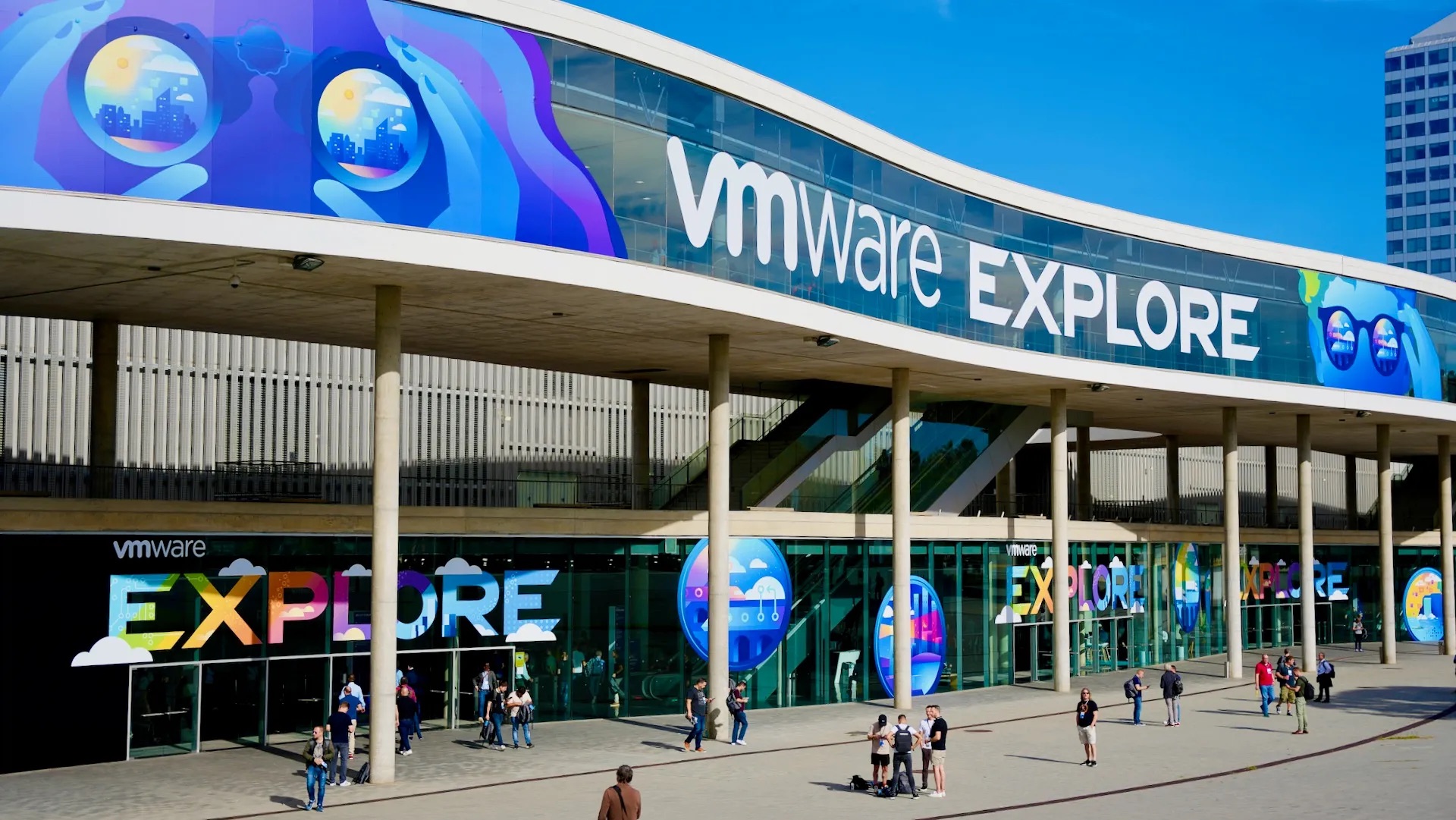
Here’s why I bring any of this up. Every one of those shifts asked you to trade a skill you were proud of for one you didn’t have yet, and you came out the other side more valuable every time. Platform engineering is the next shift in that sequence. Even the vSphere Supervisor you’ll meet later in this post has roots in that history: it was unveiled as Project Pacific at VMworld 2019.
The community that taught you virtualization
is the same one that can carry you through this.
Why you’re not at the PE table yet
Now the uncomfortable part. Most vAdmins are kept out of platform engineering by posture. Technical depth is the expensive part of this job, and you already paid for it.
Here’s what I mean. The traditional infrastructure model runs like a service desk: a request arrives -> you fulfill it -> you close the ticket. Platform engineering runs infrastructure as a product. It has consumers, an interface, a roadmap, versioned releases, and adoption metrics. When a platform team looks at the VI team, they often see a fulfillment function. That perception is unfair but it’s fixable. Because the fix is a set of habits you can build. And the timing has never been better.
Why this matters now
Platform engineering is now the default operating model: the 2025 DORA report found that roughly 90% of organizations have an internal platform and about three-quarters have a dedicated platform team. DORA also found that platform quality decides whether AI productivity gains reach the organization at all. Weak platforms diminish the gains. Strong ones amplify them.
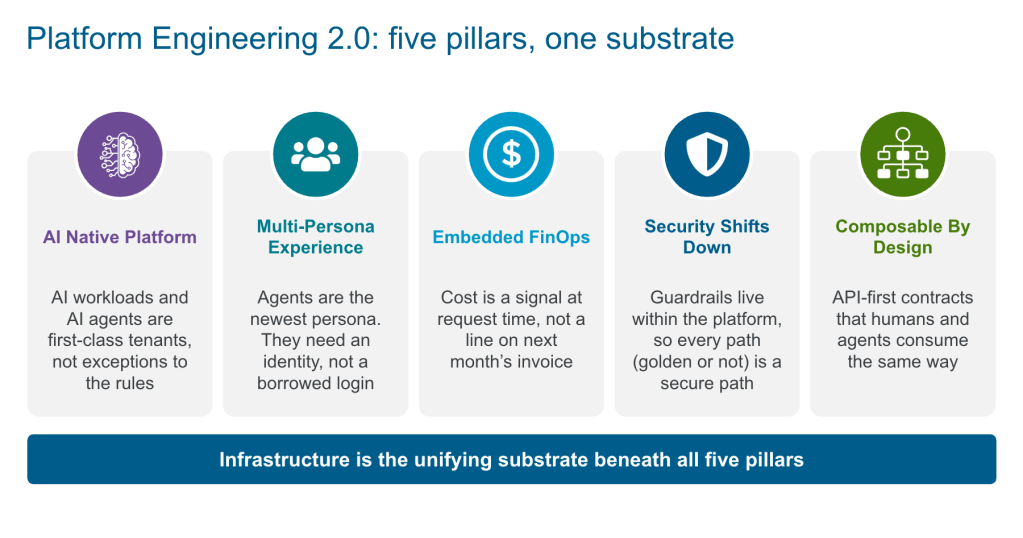
Meanwhile, the hard problems in what we call Platform Engineering 2.0 have moved down the stack. PE 1.0 was about golden paths and self-service for application developers, the solo persona. PE 2.0 widens the audience to security teams, FinOps, data and ML engineers, and increasingly to the non-human consumers (AI agents) calling infrastructure APIs directly.
Serving all of them at once is a question of multi-tenancy, isolation, failure domains, GPU capacity, lifecycle, and cost attribution.
Those are already your problems. You’ve been solving them for years, usually without anyone calling it platform engineering, and as automation increasingly acts on infrastructure without a human clicking the button, your deep knowledge of identity, scope, and blast radius only gets more valuable.
What you already know is a head start
The fastest way to feel less like an outsider is to learn the vocabulary for skills you already have. Here’s the mapping I walk through with vAdmins most often.
| What you do today | What PE 2.0 calls it (and where it lives in VCF 9.1) |
|---|---|
| Resource pools, reservations, shares, permissions | Tenancy and quota design. VCF Automation Organizations, Projects, and Namespaces, with delegation from Org Admins to Project Admins |
| DRS, HA, admission control, stretched clusters | Platform SLOs and failure domains. vSphere Zones as the availability construct your consumers target |
| Templates, Content Library, customization specs | Golden paths and image lifecycle. VM Service images and VM classes, consumed declaratively |
| NSX segments, DFW rules, micro-segmentation | Isolation as the tenancy substrate. Virtual Private Clouds (VPCs) and vDefend behind namespace boundaries |
| Upgrade sequencing, maintenance windows, HCL checks | Fleet lifecycle workflows. vSphere Supervisor and vSphere Kubernetes Service (VKS) cluster upgrades sequenced as a release process |
| Capacity planning and chargeback spreadsheets | Embedded FinOps. Cost and showback across VKS nodes, clusters, namespaces, Projects, and Organizations in VCF Operations |
When a platform team debates whether a Kubernetes namespace is a hard enough boundary for two business units, I’d want a vAdmin in that room to own the answer. You know what a noisy neighbor does to a cluster at utilization peaks. You know which isolation promises hold up under an audit. That knowledge is scarce on teams that grew up on managed cloud services, where someone else absorbed those problems for them.
The gaps, stated plainly
Data that only flatters you is useless ?, so here are the four transition gaps we see most often. None requires a new degree. All of them require practice.
- Git is the source of truth. In a platform organization, a change that lives only in the vSphere Client effectively didn’t happen, because nobody else can review, reproduce, or roll it back. Put your own work in Git first (host profiles, NSX policy, VM classes, even runbooks) and ship changes as pull requests.
- A Kubernetes mental model. Skip the Kubernetes developer track; what you need is desired state and reconciliation in your bones. The vSphere Supervisor is a Kubernetes control plane built into vSphere, and a VM there is a declarative VirtualMachine object that a controller keeps driving toward the desired state. Once that clicks, the platform team’s conversations start making sense. (You’ll also need to learn YAML indentation rules…because everyone suffers equally!)
- Writing for developers. Templates, READMEs, error messages, and deprecation notices are how consumers experience your platform. Practice explaining a quota to someone who only wants their deployment to succeed.
- Product thinking. This is the big one. You are no longer providing a service. You’re delivering a product. Deciding what to build, iterating/versioning what you ship, deprecating on a published schedule, measuring adoption, and answering a ticket with a supported path. That last habit is hardest for anyone whose career rewarded never saying no.
Choose your adventure
The desire to “get into platform engineering” is too vague to act on. In practice, vAdmins can earn their way in through one of four doors. Pick (at least) one that best aligns with your skillset. Trying all four at once is how people end up with four half-finished labs and no credibility (ask me how I know ?).
| Door | Your existing leverage | First thing to ship | Skills to add | Who you’ll work with |
|---|---|---|---|---|
| Tenancy and blast-radius owner | Resource pools, NSX, RBAC, identity federation | Tenant onboarding as a pull request: Project, namespace, quota, VPC, and RBAC from one PR | GitOps, VCF Automation APIs or its Terraform provider | Security, platform leads |
| VM golden-path author | Templates, guest OS expertise, trust from app owners | One VM-based app delivered through VM Service by the same GitOps flow the container teams use | VirtualMachine manifests, cloud-init, Argo CD basics | Application teams |
| FinOps and showback owner | Capacity planning, chargeback history | A per-Project showback view with a rate card your tenants can actually read | FinOps vocabulary, pricing policies | Finance, engineering leadership |
| Fleet and runtime lifecycle owner | Upgrades, patching, interoperability checks | A written upgrade choreography for Supervisor plus a VKS cluster fleet, with a consumer-facing SLO | Kubernetes versioning, release channels | Platform team, SRE |
If you’re unsure, start with the VM golden path. Most enterprises still run the bulk of their workloads in VMs, and most Kubernetes-native platform teams would gladly hand that problem to someone who understands it. VCF 9.1 widens this door further: the vSphere Supervisor now supports non-disruptive import of existing vSphere VMs into a vSphere Namespace for VM Service (KubeVM) to manage, with batching and rollback. Your existing estate becomes a platform onboarding story, and you’re the best person to tell it.
A 30/60/90 plan
Days 1 to 30: build the muscle privately
- Create a Git repository for your own infrastructure changes and use pull requests even when you’re the only reviewer.
- Deploy a VM from a VirtualMachine manifest in a lab namespace with kubectl. Then delete it and redo it from Git.
- Read the CNCF Platforms white paper and your platform team’s backlog, noting every item that touches tenancy, isolation, lifecycle, or cost.
Days 31 to 60: ship one thing from your door
- Build the first artifact from the table above, small enough to finish.
- Ask someone on the platform team to review it as a pull request. This is the moment the relationship starts.
- Measure something before and after, ideally time-to-first-deploy or ticket volume for that request type.
Days 61 to 90: make it visible
- Present the result at the platform team’s review with the numbers, the limits, and what you’d do next.
- Propose owning that capability going forward, with a version number and a deprecation policy.
- Write it up internally (the person who documents the capability usually ends up owning it).
- Present this journey at your local VMUG! It’s the friendliest audience you’ll ever have for a first platform talk, and the platform engineers in the room will remember who gave it.
TIP: If you’re still in the “how?” stage, see the resources at the end of this post and dig in. If you’re already on VCF 9.x, I highly recommend starting with the VCF Automation 9.1 video series by my friend Maher Al-Asfar.
Getting invited into platform decisions
Influence on a platform team comes from three things: data, ownership, and candor.
- Data means showing up with measurements. “Tenant onboarding took nine days and now takes one PR” ends debates that opinions can’t.
- Ownership means volunteering for the capability nobody wants. Upgrades, quotas, and cost reporting are unglamorous, and they’re exactly where platform teams feel the most pain.
- Candor means saying clearly what the substrate can and can’t do. Whoever understands the infrastructure layer best tends to shape what gets built on it. Platform teams without that depth default to the abstraction they learned last (like a managed public cloud service), then spend a year rebuilding tenancy, isolation, and cost controls that already exist one layer down.
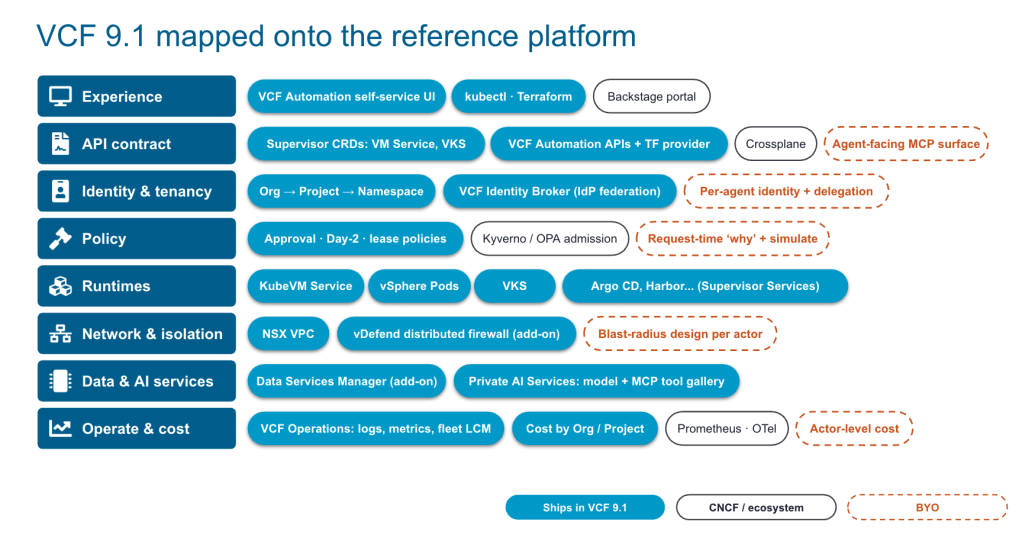
When you can show them, in their language, that the vSphere Supervisor exposes one declarative API for VMs, Containers, and VKS clusters behind a real tenancy model, the architecture conversation changes. When you also tell them plainly where they’ll still need Backstage or a secrets manager, they start trusting your recommendations.That trust is the seat at the table.
What VCF gives you, and what it doesn’t (on purpose)
| What VCF 9.1+ Provides | What PEs still build |
|---|---|
| A declarative API for VMs (VM Service), Containers (vSphere Pods), and VKS clusters | A developer portal, typically Backstage, if your consumers need one |
| Tenancy through VCF Automation Organizations, Projects, and Namespaces, with delegated self-service | Secrets management, typically External Secrets Operator plus a KMS |
| Network isolation through VPCs and vDefend | App-level observability with Prometheus, Grafana, and OpenTelemetry |
| Fleet lifecycle, cost, showback, and reclamation in VCF Operations, including VKS cost across nodes, clusters, namespaces, Projects, and Organizations | CI and image build, plus your GitOps repository topology |
| Non-disruptive import of existing VMs onto the Supervisor | The product discipline: golden-path ownership, versioning, deprecation, and adoption metrics |
Your Challenge: if your platform team redesigned the infrastructure layer tomorrow, would anyone think to call you first? What could you ship in the next 90 days to change that answer?
Further reading, docs, and media
Platform Engineering 2.0 and VCF 9.1
- What is Platform Engineering: VMware topic pages
- Platform Engineering 2.0: The Evolution the AI Era Demands: the five pillars and why PE 1.0 hit its ceiling
- Platform Engineering 2.0 whitepaper: the full paper, developed with PlatformEngineering.org
- Announcing VCF 9.1: Modern Private Cloud Built for Efficiency and Resilience: the release overview with links to feature blogs
- VCF 9.1: The Secure, Cost-Effective Private Cloud Platform for Production AI: the one-platform story for VMs, containers, AI, and data services
- VCF 9.1 What’s New: highlights of the VCF 9.1 release. Also see the VCF 9.1.1 Release Notes
Tenancy, self-service, and the vSphere Supervisor
- Accelerate, Streamline, and Control Your Self-Service Private Cloud with VCF 9.1: namespace delegation with guardrails, plus cost in Org and Project dashboards
- Self-service Infrastructure with VCF Automation 9.1: Virtually Speaking Podcast with Maher Al-Asfar
- What’s New in VCF Automation 9.1: release notes, namespace day-2 actions, project content libraries, shared subnets
- Managing Organizations in VCF Automation: how Organizations, Projects, and Namespaces divide quota
- vSphere Supervisor overview: the unified declarative API for VMs, vSphere Pods, and VKS
- Configuring and Managing vSphere Namespaces: quotas, permissions, VM classes, and storage policies, in terms a vAdmin already knows
Your 30/60/90 resources
- vSphere Supervisor Release Notes (9.1): non-disruptive VM import and the Argo CD Supervisor Service support matrix
- VM import API (vcenter/namespaces/mobility): for scripting imports of existing VMs onto the Supervisor
- Driving GitOps Workflows with Argo CD on VKS: namespaces, VKS clusters, and VM Service instances managed from Git
- Scale, Simplify, and Secure Your Private Cloud Operations with VCF 9.1: VKS cost details for showback and chargeback
- Using Reclaim to Free Up Resources: the reclamation workflow behind a credible FinOps story
Hands-on Labs
- VCF 9.1 Is Available: Explore the New Features in Hands-on Labs: free labs, including HOL-2702-01 on Kubernetes in VCF 9.1, to run your first 30 days without a home lab
Discover more from VMware Cloud Foundation (VCF) Blog
Subscribe to get the latest posts sent to your email.