
(Day 2 of 22 in our Cybersecurity Awareness Month series. See the whole month’s schedule below.)
Security is about three things: confidentiality, integrity, and availability. Delivering these ideas to workloads requires building security atop a long string of connected dependencies, starting in hardware. Discrete hardware choices, as well as settings within the BIOS/UEFI help the hypervisor deliver a reliable and secure computing environment.
Hardware selection and configuration decisions
Before turning on the services, identifying which hardware choices deliver specific features is one of the first things to look at.
TPMs are simple inexpensive devices that are critical to proving server identity, measuring the integrity of firmware, and helping with survivability of key access for features like vSAN Data-at-Rest Encryption.
Boot devices: M.2 SSDs have become a popular choice for boot devices, as they boot quickly, are more durable than legacy SD and USB device options, and provide durable storage for configuration and logs. VMware ESX boot configuration is encrypted by default. The TPM is used to enhance this and seal the encryption in a way that separates the process entirely from the boot device so if separated from the host the configuration will remain unrecoverable. For customers seeking to encrypt the logs partition as well, choosing boot devices and controllers that support self encryption can close this gap. While previously this required discrete raid controllers and full sized drives, Current generation M.2 boot devices support this by configuring it in the out of band management portals.
Network interface cards – Some customers force segmentation of specific networks like DMZs at a physical layer and require dedicated physical interfaces for this. Others commonly leverage overlays, VLANs and other technologies to segment traffic. Still one security reason may remain for segmenting certain traffic like storage and vMotion to discrete physical networking paths. Availability. Segmenting this traffic at a physical layer can avoid contention that might undermine availability or performance of specific services. Beyond the quantity of NICs and paths, look for NICs that support the Enhanced Data path. Starting in VCF 9.1 Smart NICs such as NVIDIA ConnectX®-6 DX, ConnectX-7 join DPUs in being able to offload IPSEC VPN traffic. Line rate offloads that avoid the CPU help push workload density up.
CPU Encryption offload – AES-NI has been supported for some time, but subsequent generations of Intel AND AMD processors have increased the throughput it can support, while reducing the CPU overhead consumed. Software library encryption like VM encryption, and vSAN® encryption are effectively hardware accelerated encryption, where the CPU has significant hardware assistance.
Intel® QAT™ – Offloading vMotion encryption to dedicated QAT cores, helps keep security high, and compute overhead low. Previously QAT required a discrete add-on card to deploy. Now it is an embedded option in some Intel CPUs (generally starting with 4th generation Sapphire Rapids). Intel QAT needs to be enabled in the BIOS.
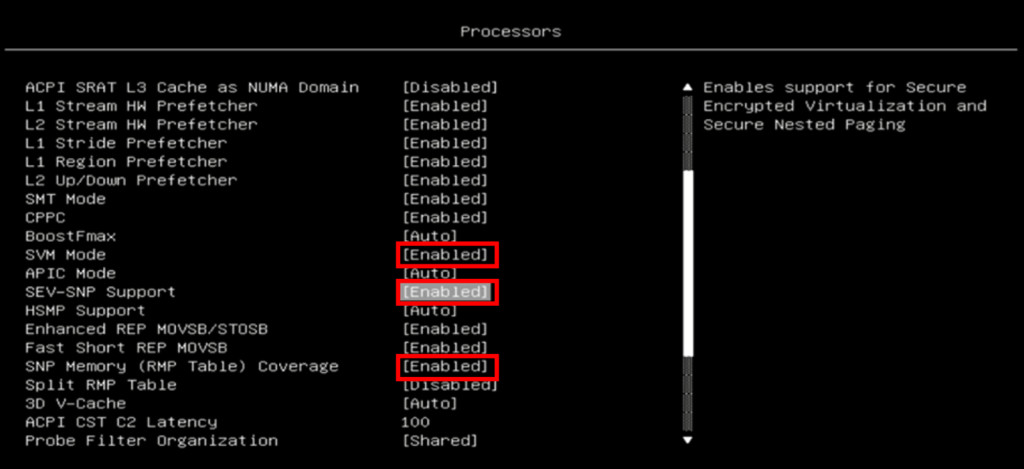
Confidential computing – AMD introduced confidential compute with Secure Encrypted Virtualization (SEV) on Naples, added Encrypted State (SEV-ES) on Rome, and introduced Secure Encrypted Virtualization–Secure Nested Paging (SEV-SNP) on Milan. Intel on 4th generation Xeons® introduced Trust Domain Extensions (TDX). This came initially to a subset of SKUs for 4th generation and is available more broadly on later Xeon generations. These technologies allow for encrypted memory, memory integrity and protects workload memory from malicious hypervisor activity. Enabling these mode often requires a number of bios specific flags be set specific to SEV-SNP or TDX directly. Consult with your OEMs specific bios guide, but in general AMD requires SVM mode, SEV-SNP be enabled, as well as the SNP Memory RMP table (that secures the memory table from manipulation) be enabled.
For Intel TDX here’s a guide for setting this up step by step.
Redundant components – Availability is often an underappreciated element of security. An outage caused by failure of a power supply, switches, or PDU taking offline critical logging or authentication software yields the same impact as a traditional denial of service attack. Infrastructure that will host Authentication or audit related infrastructure should start with designing appropriate uptime SLAs and working backwards from the requirements to deliver it.
Securing and Verifying the Management Controllers
When architecting a private cloud on VMware Cloud Foundation™ (VCF), security and performance discussions typically focus on the software stack: distributed firewalls, micro-segmentation, identity federation, and encrypted storage policies. However, the security boundary of a modern hypervisor does not begin at the VMkernel. it starts lower down at the UEFI platform firmware, CPU silicon and the baseboard management controller that sits on top of it. Commonly known for various vendor specific implementations (HPE iLO®, Dell iDRAC™, Cisco CIMC™, Supermicro BMC) these controllers are miniature computers inside the server that can be accessed often via a 1Gbps ethernet port. Many common security features consumed by the ESX Hypervisor are enabled (or disabled) here.
An unhardened BMC or misconfigured BIOS represents a backdoor that operates completely below the hypervisor. NIST publishes a general protection guideline for this found here: NIST SP 800-147B: BIOS Protection Guidelines for Servers
In addition server vendors provide bespoke hardening guidance for their platforms, that often include the specific control names and UI click throughs to find the controls:
Lenovo ThinkSystem Server Hardening Guide (LP1260)
Cisco Standalone CIMC Security Hardening Guide
HPE iLO 6 Security Recommended Settings
Dell iDRAC9 SCG — BIOS System Security (v7.x Series)
To help simplify the steps of auditing these BIOS VCF Readiness can be used to audit the posture of the BIOS settings, and BMC configuration using Redfish APIs. Some sample configuration items and security implications include over 50 built in BMC Hardware Security Audit Findings, as well as additional conditional controls based on specific posture requirements.
TPM and Secure boot
Making sure that a TPM 2.0 is deployed, enabled, and hosts are configured for secure boot.
Time
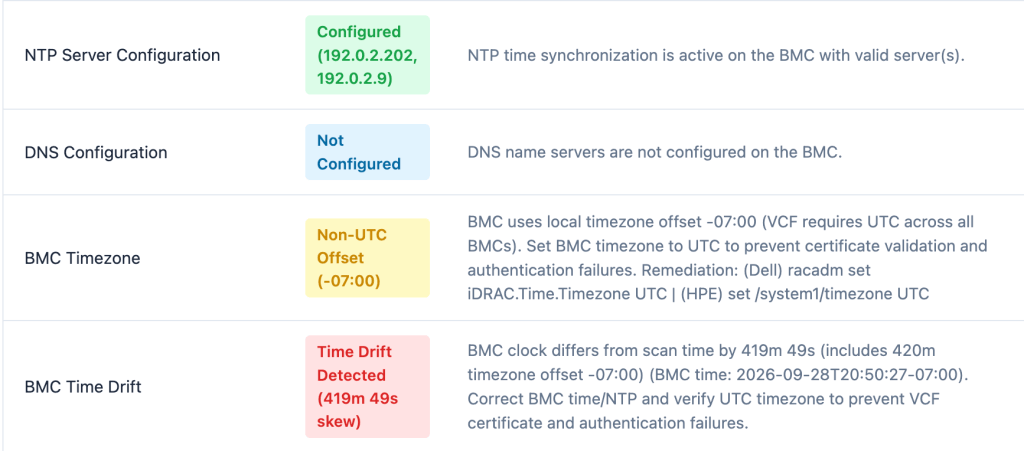
NTP, and DNS are properly configured. DNS, and PTR records are required for certificates to be used for proper authentication to the BMC interfaces. NTP is important as proper time is required for certificates, kerberos authentication, prevention of back in time attacks, and making sure logs can be correlated for incident response.
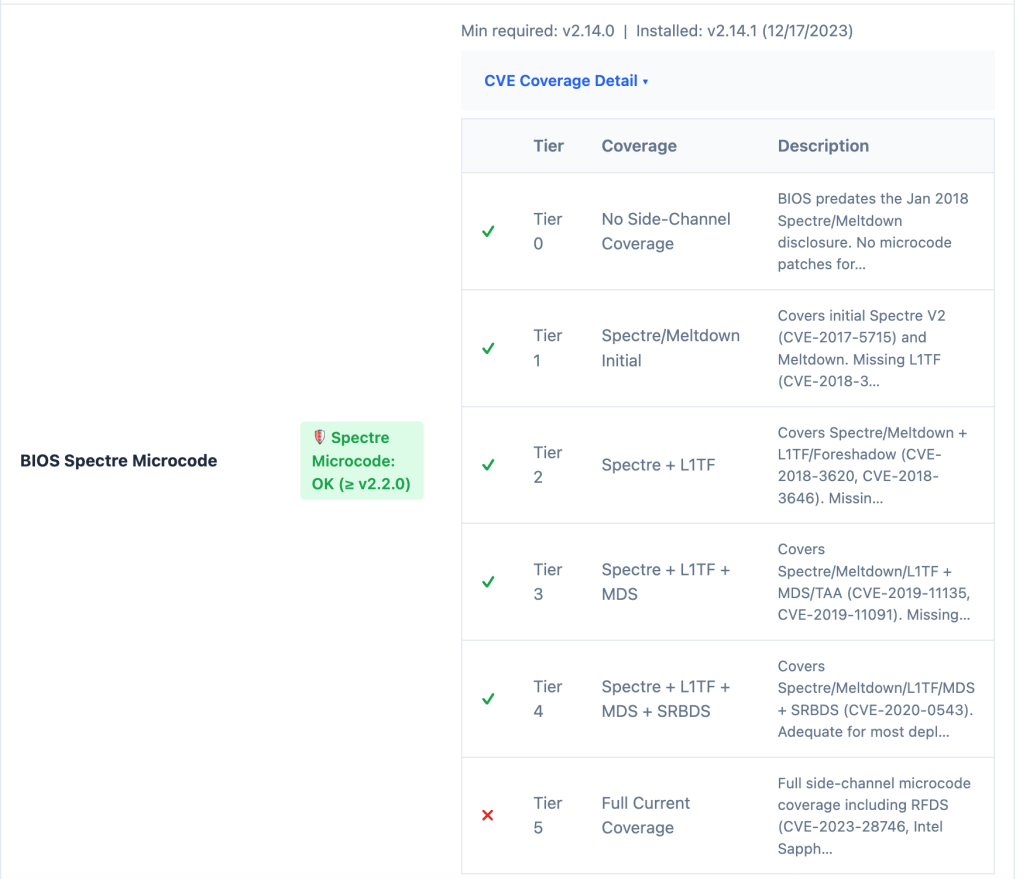
BIOS patches have been applied. Beyond general security of the BMC itself requiring patching, BIOS patches commonly include CPU microcode patches. A number of speculative compute attacks mitigation and performance overhead mitigation required that BIOSs be applied.
Supply Chain Verification – Allows verification that the hardware has not been tampered with. Dell’s version of this is SCV, but HPE has HPE Platform Certificate Verification Tool (PCVT), and other OEMs have similar capabilities that can be verified.
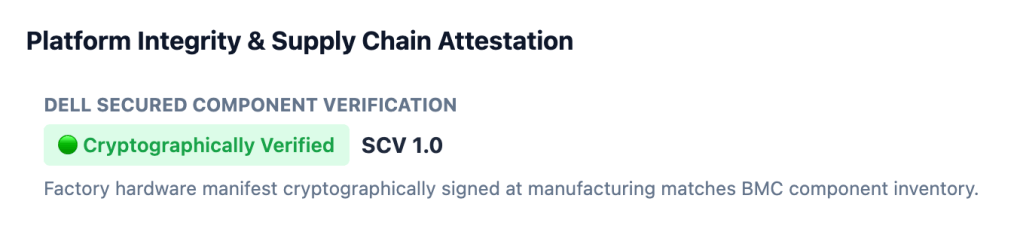
Verify Intel TDX and AMD SEV-SNP have been enabled in the BIOS to be used.

Verification of an additional 55+ BMC security audit controls, as well as conditional controls.
Next steps
While the innovation of security for the VMware Cloud Foundation platform continues to evolve, it builds upon the security and trust layer that is built first in the hardware and server configuration layer beneath it.
For Cyber Security Awareness month, a few actions we can start with:
- Patch the server firmware, bios and BMCs (perhaps using vLCM + a Hardware Support Manager to push those patches!).
Make sure any new server purchases planned will include TPMs, NICs, and CPUs with the necessary security feature support.
Audit your server configurations using VCF Readiness.
Discover more from VMware Cloud Foundation (VCF) Blog
Subscribe to get the latest posts sent to your email.