

AI-assisted attackers can discover, exploit, and chain infrastructure vulnerabilities faster than ever, and operational security can no longer be treated as an annual or quarterly event. Malicious actors use automated tooling to weaponize zero-days and newly disclosed security flaws within hours of disclosure. To keep a private cloud resilient, infrastructure teams need to move from slow, disruptive patch cycles to a strategy of continuous, low-friction lifecycle management.
In our recent VMware Cloud Foundation (VCF) technical webinar, we walked through how VCF 9.1 and the new Express Patching model change cloud operations, letting organizations upgrade existing environments safely and apply monthly security updates with little or no downtime.
This blog summarizes the key insights, architecture updates, and live demos covered during the webinar. Watch our webinar replay now.
Webinar Highlights
1. The Evolving Threat Environment: Why Frequent Updates Matter
Traditional infrastructure patching often involves long change-window approvals, maintenance scheduling, virtual machine migrations, and host reboots. Because maintenance windows are costly and disruptive, enterprise IT teams have historically deferred minor security updates.
Modern threat actors, however, use generative AI and automated scanning engines to perform vulnerability chaining, combining minor, low-severity flaws into full-system compromise chains.
To address this elevated risk profile:
- Patch frequency needs to increase: Security fixes should be deployed as soon as practical after they are disclosed.
- Operational friction needs to decrease: Patching should not disrupt running workloads or require extended downtime.
- Architecture needs to support modular updates: Component maintenance should be decoupled to limit blast radius.
VCF 9.1 addresses these needs directly by combining modernized platform management with streamlined patch mechanisms, including Live Patching for ESX and Quick Patching for vCenter. These mechanisms shorten the time it takes to apply patches and keep components current with the latest Express Patch releases.
2. Transitioning to VCF 9.1: Architecture and Migration Planning
Upgrading to VCF 9.1 is a major modernization milestone for private cloud deployments. Beyond security enhancements, VCF 9.1 introduces updated core architecture components, including the new VCF Management Services cluster.
There are three paths to VCF 9.1. You can:
- Converge a vSphere environment into a VCF Fleet. This uses the infrastructure you already have deployed as the starting point for a new VCF Instance.
- Upgrade an existing VCF deployment. This is the standard VCF lifecycle workflow, taking an existing VCF environment to VCF 9.1.
- Deploy a new VCF Fleet and migrate VMs to it. This builds a fresh VCF 9.1 fleet, but requires new or repurposed hardware and the time to migrate workloads to the new cluster.
Before starting any of these, pre-flight validation helps confirm interoperability and operational stability:
- Health and Pre-check Assessment: Run automated health checks in VCF Operations to identify stale snapshots, disconnected hosts, or broken certificate chains.
- Interoperability Validation: Use the VMware Product Interoperability Matrix to verify compatibility across ESX, vCenter, NSX, and storage components.
- Upgrade Planning: Use the VCF Upgrade Planner to map out topology-specific upgrade sequences and dependency order.
In this portion of the webinar we discussed each of the three methods, then demonstrated the hands-on process of transitioning to VCF 9.1, including deployment of the VCF Management Services, which are new in VCF 9.1 and change the upgrade workflow slightly.
This modernized deployment pipeline helps keep administrative services isolated and resilient, setting the baseline for fast, reliable patch execution.
3. Express Patching in Action: Live Patching and Quick Patching
Once an environment is on VCF 9.1, routine maintenance becomes a streamlined process. Express Patches are released monthly and are downloaded and applied through VCF Operations.
Express Patches are modular, targeted updates that address critical CVEs and bug fixes between major rollups. Rather than waiting for full-stack bundle updates, administrators can ingest and apply targeted patches as soon as they are released.
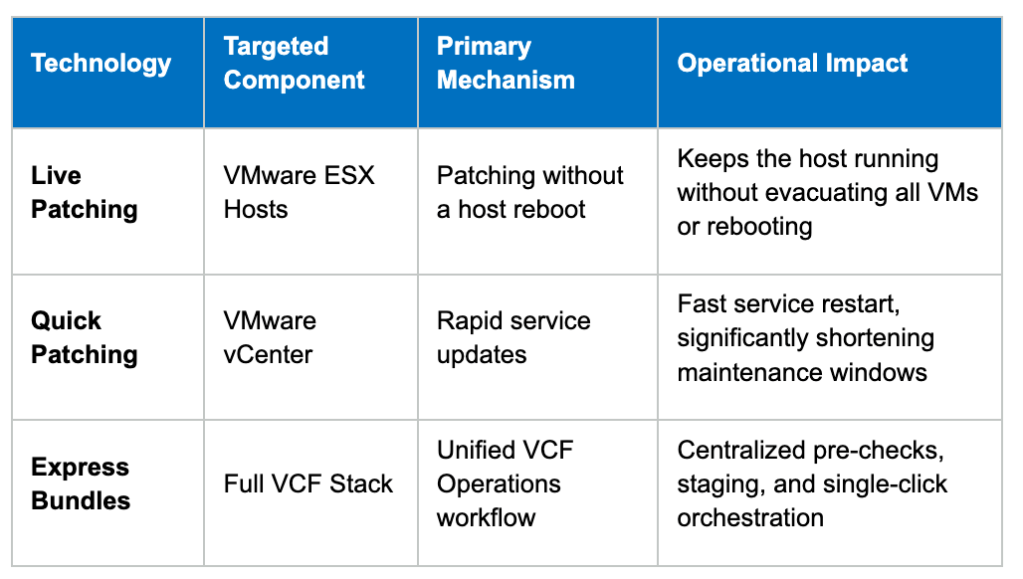
In the second demonstration, we showed the operational workflow when an Express Patch is released and applied:
- Downloading Patches: Detecting and downloading Express Patches through VCF Operations.
- Pre-checks: The system runs validation checks across the target cluster to confirm host readiness, resource capacity, and storage state.
- Applying Patches: We then walked through applying patches to each component:
- VCF Management Services: Updating the management services components.
- VMware NSX: NSX patches are applied in two parts, which we demonstrated in a live environment.
- Quick Patching for vCenter: vCenter can be patched using either the reduced downtime method or the standard update method, depending on the administrator’s needs.
- Live Patching for ESX: The host applies eligible patches without a reboot. Avoiding full host reboots reduces or removes the need to migrate workloads across ESX hosts.
- Validation and Verification: The dashboard updates after installation to confirm that all nodes are compliant with the latest security baseline.
Key Takeaways for IT Leadership and Operations
- Proactive Security Posture: Relying on quarterly maintenance windows leaves environments exposed to automated exploits. Monthly Express Patching provides a sustainable cadence for rapid mitigation.
- Operational Efficiency: Live and Quick Patching reduce the labor hours required for patching by cutting host evacuation cycles and long reboots.
- Simplified Upgrade Paths: VCF 9.1 offers convergence and import paths, giving existing VMware environments a direct route to modern private cloud architecture.
Resources and Next Steps
To go deeper on the tools, documentation, and configuration standards discussed during the webinar, consult the following resources:
- Official Documentation: Explore the Broadcom TechDocs for VCF 9.1 Upgrade, Converge, and Import guides.
- Planning Tools: Use the VCF Upgrade Planner to evaluate target upgrade paths.
- Security Baselines: Review the VCF Security Configuration and Hardening Guidelines to align guest VMs, hosts, and virtual management with hardened baselines.
Need help upgrading and preparing your environment to take advantage of Express Patching? Contact your Broadcom Account Manager to learn how VCF Professional Services can help. If you missed it, watch our webinar replay now.
Discover more from VMware Cloud Foundation (VCF) Blog
Subscribe to get the latest posts sent to your email.