For years, VMware administrators scaling out private clouds by deploying multiple workload domains have relied on Enhanced Linked Mode (ELM) to stitch together their vCenter Server instances into a single vSphere Client view. However, as environments have scaled, the operational burden of maintaining this architecture has become a well-known pain point for Day 2 operations.
With the release of VMware Cloud Foundation (VCF) 9.x, the industry is officially saying goodbye to ELM for VCF deployments. The introduction of vCenter Linking via VCF Operations represents a fundamental shift in how we approach multi-vCenter management. Let’s dive into the technical realities of this transition and explore why moving to VCF 9.x is a necessary step for infrastructure modernization.
The Evolution of the Replication Ring
Many administrators are familiar with managing Enhanced Linked Mode (ELM) environments, where up to 15 vCenter Server appliances can be joined within a single vSphere Single Sign-On (SSO) domain. This replication-based architecture has been widely adopted and supports centralized management across environments. As deployments scale and operational needs evolve, Broadcom is introducing new architectural approaches such as VCF Linking in VCF 9.x to further simplify management and enhance flexibility. ELM has long served as a key capability for centralized management in vSphere environments, enabling multiple vCenter instances to operate within a shared SSO domain. As environments scale, certain architectural characteristics such as multi-master replication dependencies, sensitivity to network conditions, and the need for coordinated snapshot and restore operations can introduce operational considerations. Building on these foundations, VCF Linking introduces a more flexible and decoupled approach designed to better support modern infrastructure and lifecycle management requirements.
In legacy environments, ELM utilizes backend database replication (via vmdir/LDAP) to synchronize metadata across vCenter instances. This architecture necessitates highly coordinated lifecycle operations, upgrading, patching, and backups must be executed simultaneously across all linked nodes to maintain data integrity.
A primary operational challenge is the requirement for synchronized snapshots, restoring a single vCenter from an uncoordinated backup can trigger replication inconsistencies or USN (Update Sequence Number) rollbacks, potentially compromising the entire SSO domain. Furthermore, this configuration mandates strict version parity across all vCenter instances to ensure replication health.
In ELM, the architecture is based on a shared state model, where backend database replication ensures that each vCenter maintains awareness of others within the same SSO domain. While this approach enables a unified management experience, it also introduces dependencies related to maintaining consistent state across systems.
VCF 9.x vCenter Linking Architectural Deep-Dive: From Integrated to Decoupled Design
VCF 9.x introduces an updated approach to Single Sign-On (SSO) that provides a unified vSphere Client experience. In this model, VCF Operations serves as the central management plane. By integrating with a common identity provider, the platform dynamically aggregates views across vCenter instances. This design shifts from synchronized database state to a more loosely coupled model, leveraging identity integration and API-driven aggregation to support flexibility and scalability.
Advantages of vCenter Linking
This shift from legacy database replication to brokered identity unlocks massive operational benefits for cloud architects and administrators.
- Version Independence and Flexibility: By moving away from replication-based dependencies, vCenter Linking removes the requirement for all linked vCenter instances to run the exact same builds. The primary prerequisite is vCenter 9.0 or later. This provides greater flexibility to upgrade individual workload domains independently while maintaining centralized visibility.
- Reduced Administrative Overhead: In VCF 9, this process is streamlined through a centralized interface. Administrators can navigate to Infrastructure Operations > Configurations > vCenter Linking in VCF Operations, and use a guided workflow to link systems.
- Modern Security and Identity Brokerage: VCF 9 integrates with modern external OIDC and SAML identity providers (such as Okta, Ping Identity, and Microsoft Entra ID). By leveraging a common identity source, administrators can implement more granular access controls across environments, reducing reliance on shared local credentials.
- Centralized Management with Flexible Architecture: VCF 9 adopts a more centralized management approach. Through VCF Operations, vCenter instances are linked using API-driven integration. By integrating with a common identity provider via standard security protocols like SAML and OIDC, VCF SSO enables seamless, centralized authentication across the entire environment. This allows each vCenter to operate more independently while still delivering a unified management and access experience.
The VCF Ops Solution
The new vCenter Linking architecture allows users to configure a group of vCenters from the VCF Ops console and manage them from a single vSphere UI. Crucially, it does not require topology-wide downtime for backups, nor does it impact the independent lifecycle management (LCM) of the individual vCenter Server systems.
Architecture Deep Dive: How the Components Interact
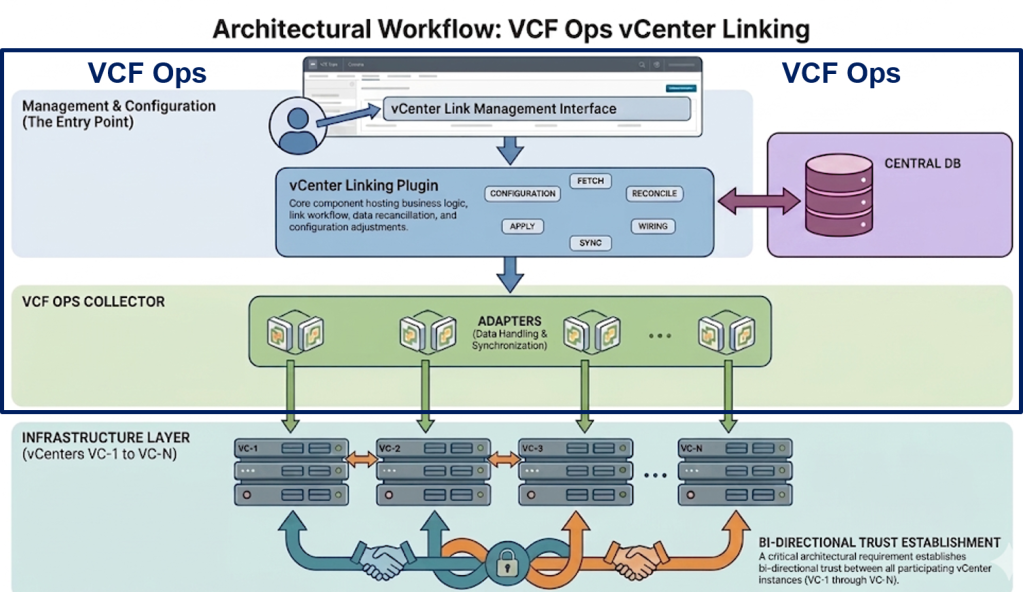
The VCF Ops vCenter Linking architecture operates through a well-defined flow of data between several core components:
1. VCF Ops Console and vCenter Linking Plugin: The workflow begins when a user enables linking for a group of vCenters from the VCF Ops Console. This console communicates down to the vCenter Linking Plugin, which hosts the core business logic. The Plugin is responsible for executing the establishment workflow, managing the group’s sync data, and maintaining sync metadata (like high watermarks and offsets) to allow for incremental data fetching. It persists all configuration and shared data in the Central DB residing within the VCF operations appliance.
2. The Adapters (Collector): Operating underneath the Plugin are the Adapters. The Plugin does not communicate with vCenters directly; instead, it sends notifications down to the Adapters. The Adapters host the logic to interface with individual vCenter Server systems via Suite APIs and gRPC. They are responsible for tasks like fetching vCenter identities, establishing trust, and performing the actual “Watch” (fetch) and “Apply” data operations.
3. VC Linking Sync Framework: On the vCenter side, each instance runs a VC Linking Sync Framework. This framework exposes gRPC endpoints that the Adapters subscribe to via a long-lived HTTP/2 server stream. A direct lateral bi-directional trust is established between the VC Linking Sync Frameworks of the joined vCenters (VC-1 to VC-N).
The Linking Workflow: Step-by-Step
When you create a vCenter Group and enable linking, the system executes a precise orchestration behind the scenes:
- Validate: The Adapter first validates that all vCenters in the group are ready for linking (checking ELM status, user permissions, and supported versions).
- Fetch Identity: The system invokes vCenter APIs to retrieve the SSO Domain ID and Security Token Service (STS) information from each vCenter.
- Establish Trust: Trust is established between the vCenters, creating a “Trusted Pool” of multiple vCenter SSO domains. This allows a token generated on one vCenter to be exchanged for a token on another, even if they have different SSO domain names (e.g., vsphere.local and nsx.local can be grouped). Trusted root certificates and Lookup Service registrations are also exchanged.
- Fetch (Watch) Data: The Adapter subscribes to the vCenter for shoulder tap notifications. An asynchronous “Watch” notification is invoked to fetch data changes in batches from the vCenters, which is then uploaded back to the Plugin.
Apply Data: Once the “Fetch” operation completes across all vCenters, an “Apply” notification is sent to push the reconciled data from the Plugin down to the vCenter Server systems. Finally, the vCenter status is marked as “Active”.
Watch the demo on YouTube:
Log Location for vCenter Linking
- /storage/log/vcops/log/vrops-vcenter-linking.log
- /storage/vcops/log/adapters/ManagementAdapter/ManagementAdapter_xx.log
Conclusion: Infrastructure Modernization and Fleet Management
The transition from vSphere 8.0 ELM to VCF 9.0 vCenter Linking should not be viewed merely as a feature upgrade; it is a critical step in infrastructure modernization. VCF 9 combined with centralized vCenter Linking empowers you to embrace true fleet management. It delivers a scalable, secure, and resilient cloud operating model that finally lets Day 2 operations teams sleep through the night.
____________________________________________________________________________
Special thanks to Ajay Sharma, Todor Raykov, Feidhlim O’Leary, and Sandeep Byreddy, Product Management team.
Discover more from VMware Cloud Foundation (VCF) Blog
Subscribe to get the latest posts sent to your email.