
The release of VMware Cloud Foundation (VCF) 9.1 introduces plenty of new enhancements and updates. I previously outlined the idea of a fully programmable infrastructure and how we achieved this milestone with the VCF 9.1 release. If you are new to the concept of programmable infrastructure, I highly recommend checking out my previous blog post: Unlocking the Full Potential of Programmable Infrastructure with VMware Cloud Foundation 9.1: New Features and Capabilities.
In this blog post, I will detail the steps required to establish OAuth 2.0 authentication using VCF SSO.
Passwordless Authentication
Historically, developers were assigned service accounts or often used their own credentials to programmatically authenticate VCF components. While this isn’t an issue during interactive authentication via a CLI prompt, it becomes a major security concern when passwords are saved in plain text files or hardcoded into scripts. If those scripts are compromised, you jeopardize the security of your critical infrastructure, leaving your cloud environment vulnerable to misuse by bad actors.
The ideal alternative is to implement token-based authentication within your automation scripts and workflows. The core concept is straightforward:
- Token Management: Provide the ability to easily generate and manage API tokens.
- Scoped and Short-Lived API Access Tokens: Ensure API tokens are scoped to specific permissions and are short-lived with strict expiration limits.
- Administrative Control: Give VCF Administrators the ability to revoke API tokens at any time.
- Authentication: Allow users and scripts to authenticate seamlessly using API token.
The Workflow
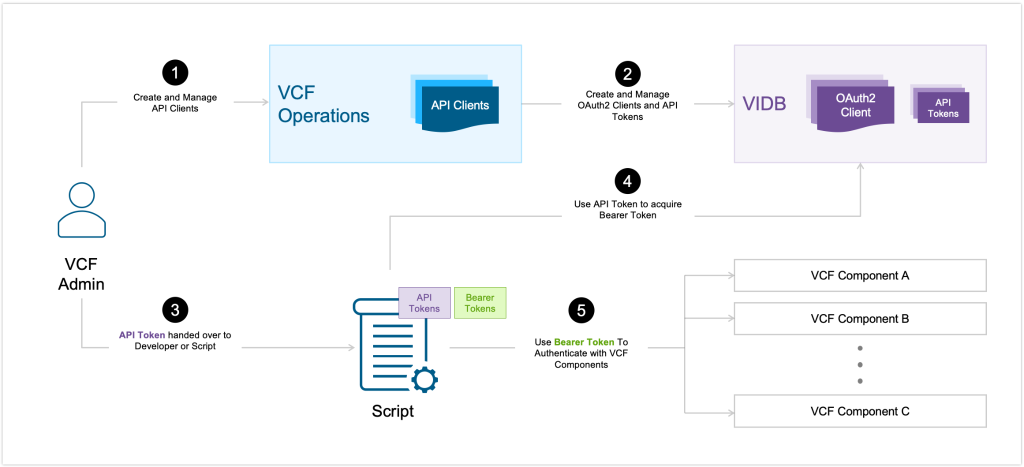
Implementing OAuth 2.0 authentication with VCF SSO follows a straightforward, four-step process to transition your environment from risky plain-text passwords to secure, token-based automation.
1. Register the API Client
First, the VCF Administrator creates an API client. The credentials for this client are securely recorded and managed within the VMware Identity Broker (VIDB). This is a one-time administrative setup. Once created developers can generate the API tokens via API Clients.
2. Generate the API Token
Next, the administrator requests a long-lived API token directly from the VCF Operations UI. This token acts as the secure, long-term credential that developers or automation workflows will use, eliminating the need for hardcoded user passwords.
3. Exchange for a Bearer Access Token
When an automation script runs, it passes this long-lived API token to VIDB. VIDB validates the token and, in return, issues a short-lived bearer access token.
4. Authenticate with VCF Components
Finally, the automation script uses this bearer access token to authenticate against your various VCF components, including VCF Automation, VCF Operations, vSphere, and VCF NSX. The same bearer access token can be reused across all of the components.
Note: To maintain a strict security posture, the resulting bearer access token is short-lived (typically expiring after 30 minutes). Once it expires, the developers can request for a new refresh token (bearer access token)
Using OAuth 2.0 Authentication Token in VCF PowerCLI
- Log in to VCF Operations to generate API token
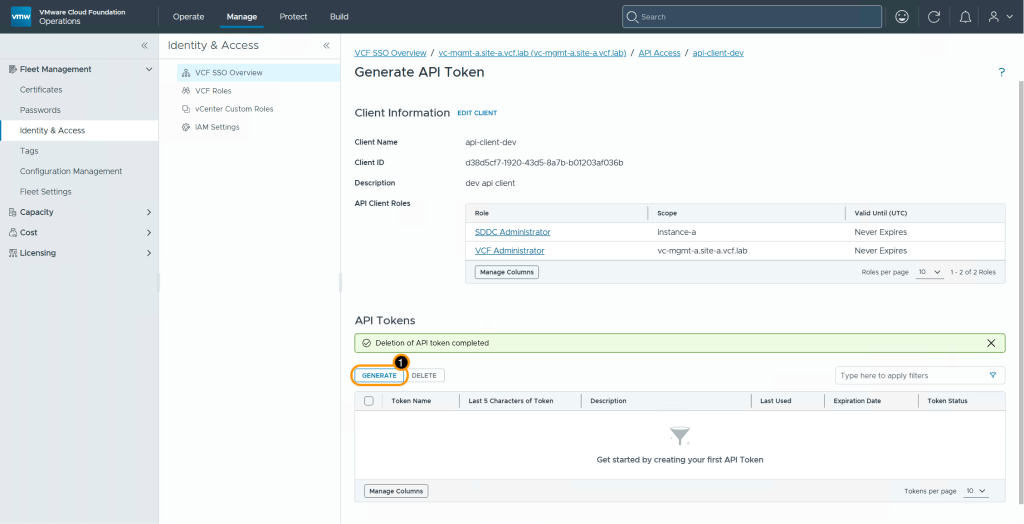
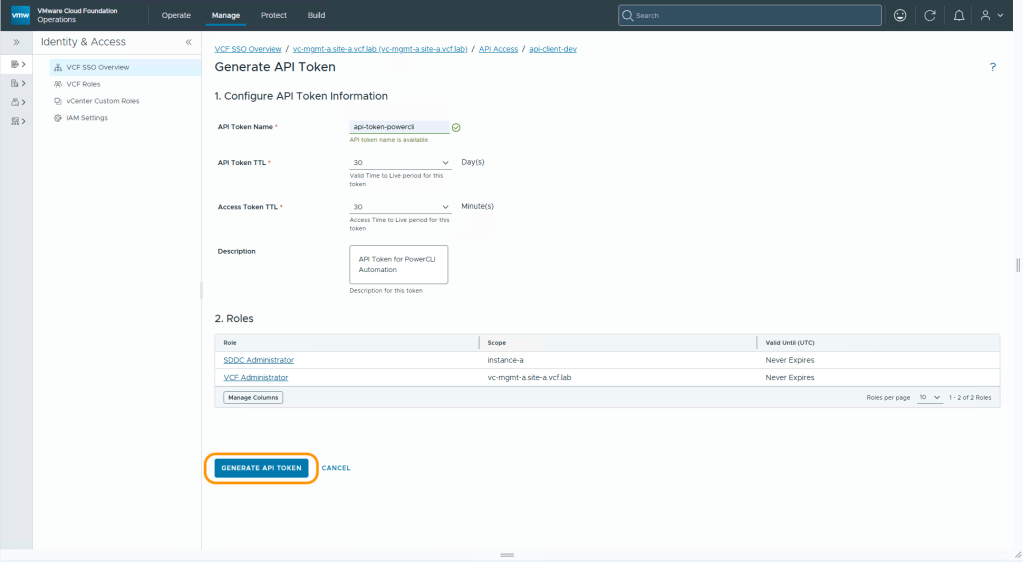
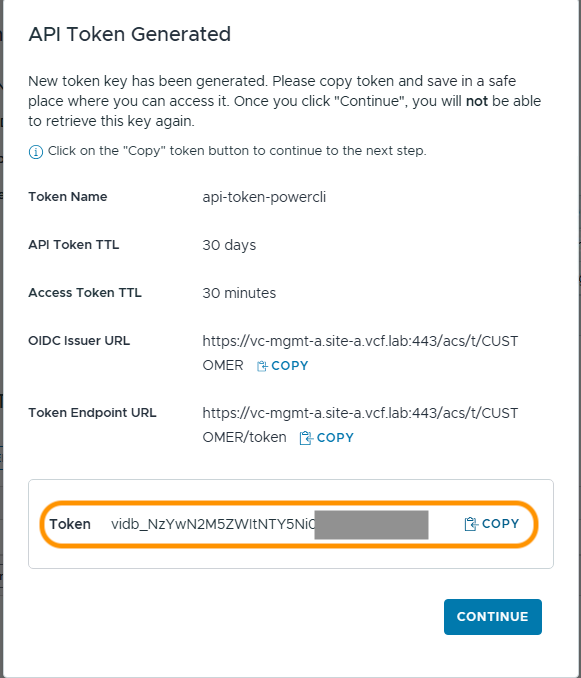
Copy the API token.
- Use API Token to generate bearer token using New-VcfOAuthSecurityContext
- Pass the bearer token to Connect-VIServer cmdlet
- Similarly, you can connect to NSX Manager and VCF Operations as well
For greater flexibility, PowerCLI provides an alternative method that bypasses the creation of a bearer access token via New-VcfOAuthSecurityContext. You can instead provide the API token directly to your commands. It is important to note the difference in longevity: while standard API tokens remain valid for up to 30 days, the generated bearer tokens are strictly short-lived, typically reaching expiration after only 30 minutes.
To authenticate your VCF components using this direct method, simply utilize the -VcfApiToken parameter within your PowerCLI session.
Example
- Copy VIDB API token
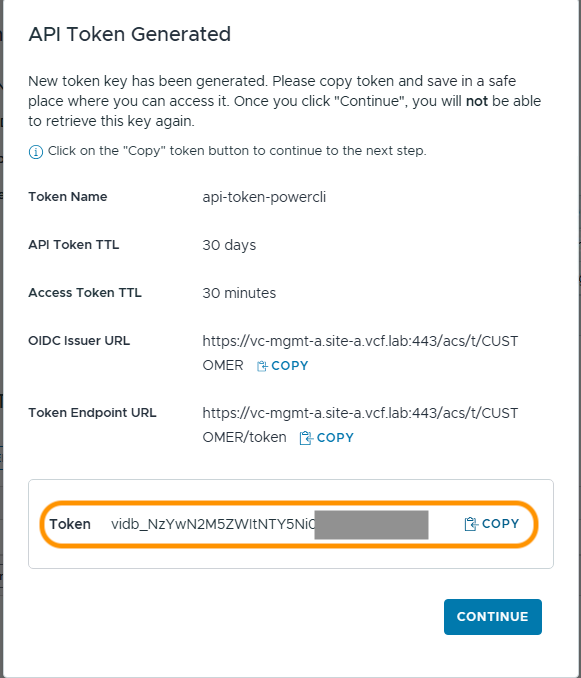
- Use API token to connect to vCenter Server or NSX Manager
Conclusion
Utilizing the VcfSecurityContext simplifies the integration of OAuth 2.0 via VCF SSO into your automation workflows. I strongly encourage our PowerCLI community to transition to this modern authentication approach, keeping your infrastructure secure by eliminating the risks associated with storing plain-text passwords. To learn more about it, please refer to the official documentation below.
Resources
OAuth Token Support for API and CLI Access
Discover more from VMware Cloud Foundation (VCF) Blog
Subscribe to get the latest posts sent to your email.