
VMware Cloud Foundation (VCF) is widely recognized as the foundation for enterprise-grade private clouds in centralized data centers. VMware Cloud Foundation Edge (VCF Edge) expands upon this architecture, providing a unified platform specifically engineered for distributed environments. VCF Edge enables enterprises to host traditional virtual machines, containerized applications via VMware vSphere Kubernetes Services (VKS), and AI workloads across thousands of remote edge sites operating entirely independently of onsite IT expertise.
We are excited to introduce Edge Automation 1.0.3. Building on our previous single-host vSphere Supervisor with Argo CD automation release, this version significantly broadens the edge deployment options that we offer. We have optimized the core framework to support a wider array of edge topologies and introduced local container registries to minimize WAN bottlenecks. Alongside these core optimizations, we are rolling out a suite of operational enhancements designed to make edge deployments faster, more resilient, and highly flexible.
Support for Diverse Edge Topologies
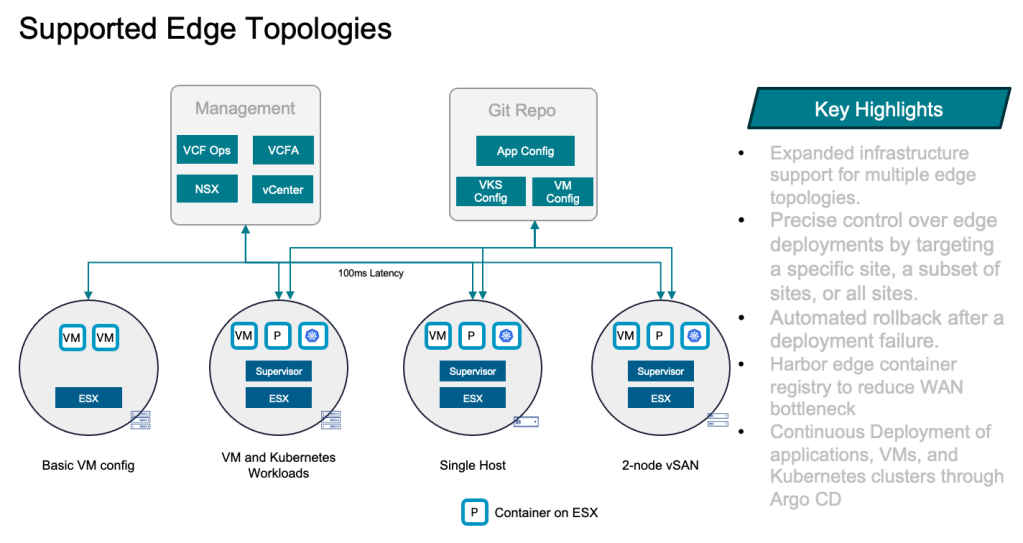
No two edge locations are identical. We’ve added deployment options to support the expanded topologies most commonly deployed at the edge. For edge locations requiring high availability on a minimal hardware footprint, we have introduced robust vSAN 2-node support. This includes full compatibility with both Express Storage Architecture (ESA) and Original Storage Architecture (OSA) utilizing a remote witness. We have automated the disk claiming process to simplify datastore creation and added comprehensive vSAN cluster validation alongside flexible health checks. To help ensure your storage runs at peak efficiency, the system also automatically configures optimization settings, such as data distribution warnings and auto-rebalance functionality.
As part of the vSAN enhancement, traffic must be properly tagged and separated across VMkernel adapters and different uplinks. We have enhanced our Virtual Distributed Switch (vDS) support and added the ability to deploy multiple distributed switches based on vSphere cluster features and NIC configuration. See Table 1 for supported edge cluster vSphere
Table 1: Edge Cluster Details:
| 1 node | 2 node with vSAN | |
| vSphere Cluster | DRS: Fully Automated HA: Admission control disabled | DRS: Fully Automated HA: Slot, reservation based or disabled admission control |
| Networking | NIC: Multiple of two for link redundancy | NIC: Multiple of two for link redundancy |
| Single vDS | Single or multiple vDS based on NIC configuration | |
| portgroups for edge services and application | Multiple VMkernel and portgroups for edge services and application | |
| Storage Type | Virtual Machine File System (VMFS) | vSAN OSA or ESA |
| Auto Disk Claim for DS Creation | Based on the largest disk | Based on storage architecture |
Modular Architecture: Compute-First, VKS Later
We understand that many of our edge customers are currently running VM-only workloads and are actively working to add VMware vSphere Kubernetes Service (VKS) to meet next-generation application modernization needs. In response to a large number of requests, we have modularized our automation. You can now start deployments with vSphere compute only, and add supervisor services later once internal processes are ready for a mass VKS rollout.
With Edge Automation 1.0.3, you can deploy vSphere compute cluster-only configurations for traditional VM workloads and seamlessly add supervisor services later without impacting previously deployed VM. Additionally, you can choose to deploy the Supervisor with default services or add-ons such as Harbor or Argo CD. Finally, you can rely on new automatic and manual rollback features that safely revert your environment in the event of any deployment failure or change of edge topology
Key Automation Flexibility:
- Customizable Add-ons: Choose to deploy the Supervisor with default services or include critical add-ons such as Harbor or Argo CD.
- Smart Rollbacks: Rely on new automatic and manual rollback features that safely revert your environment in the event of a deployment failure or edge topology change.
Mitigating WAN Bottlenecks via Local Container Registries
WAN bottlenecks are one of the most difficult challenges facing edge customers. In the 1.0.2 release, a local Content Library (CL) at every edge site was created by default to store VM images locally. As edge VKS adoption grows, extending content caching at the edge to Kubernetes has become a necessity.
Edge Automation 1.0.3. introduces localized container registry support. You can now automatically deploy a Harbor container registry at each edge location. Administrators can replicate trusted images or configure Harbor as a proxy cache to store only edge-specific runtime images. This prevents large downloads from causing bandwidth contention or disrupting critical business data transfers. Combined with automated certificate onboarding, this enables more secure, rapid, and localized image access.
Table 2: Edge Automation 1.0.3 Feature Matrix
| Configuration Options and Features | Details |
| vSphere Only | – Edge vSphere cluster only (1 or 2 nodes based on Table 1) – Content Library hosted on local edge storage (VMFS or vSAN) |
| Supervisor Only | – Includes all vSphere-only features – Supervisor and FLB in Simple mode – Supervisor Services: VM Operator, VKS and Velero |
| Supervisor with Argo CD | – Includes all Supervisor-only features – Broadcom Argo CD Operator as part of the Edge Supervisor Service – Dedicated instance of Argo CD for each edge location |
| Supervisor with Harbor | – Includes all Supervisor-only features – Dedicated instance of Harbor for each edge location, registered directly to the edge location Supervisor |
| Full Stack | Combines all features: vSphere + Supervisor + Argo CD + Harbor |
| Local Cache | Content Library for VM: – One CL instance per edge site – Created at deployment time, can not be disabled – VM image synchronization performed by administrator based on site requirement |
| Container image registry for Containers and Kubernetes: – Deploys optional component Harbor Registry – Registration with Edge Supervisor – Container OCI image synchronization performed by administrator based on replication rule or Proxy Cache | |
| Supervisor | Single or HA (3) |
| Foundational Load Balancer | Single or HA (Active/Passive) |
Under-the-Hood Operational Updates
To dramatically reduce manual setup and speed up provisioning times, we have introduced several under-the-hood operational updates. The system now features automatic claiming of disks for both VMFS and vSAN. This eliminates the need to manually query the ESXi host for disks and populate disk identifiers to direct the storage automation.
Edge Automation 1.0.3. streamlines the entire setup process securely and efficiently by including automatic supervisor upgrade, targeted vLCM image for cluster creation, and non-interactive authentication. The automation offers precise control over edge deployments. You can target a specific site, a subset of sites, or all sites registered to a vCenter. This flexibility lets you run highly targeted deployments. You can also isolate specific edge clusters for troubleshooting or run incremental rollouts in any order. Finally, easy sign-on links to Supervisor add-on services will get you up and running quickly.
Get Started
Ready to deploy? Head over to the official Broadcom GitHub Repository to access detailed step-by-step instructions, deployment automation scripts, and the comprehensive Administrator Guide.
To install the latest version of the VCF Edge at Scale module from PowerShell Gallery:
Install-Module -Name VcfEdgeAtScale
or offline Install from Github.
We look forward to your feedback. For bugs or enhancement requests with this script, please open a GitHub Issue.
Discover more from VMware Cloud Foundation (VCF) Blog
Subscribe to get the latest posts sent to your email.