
VMware Cloud Foundation (VCF) 9.1.2 introduces several enhancements to VCF Operations to improve fleet management, security, and everyday operations, making it easier for our customers to adopt private cloud. These capabilities have been engineered to improve private cloud deployment, patching processes, and troubleshooting by removing many manual steps. For example, there is a new observability capability for Kubernetes containers that now matches the VM observability experience. This release also improves patching visibility which helps IT teams keep pace with the latest software versions. Each enhancement in this release addresses specific customer needs, and together they make operating a private cloud a more streamlined management experience.
VMware Cloud Foundation Operations is the management layer of VMware Cloud Foundation. It gives IT teams unified visibility across the workload and infrastructure stack so they can build, manage, operate, and secure their private cloud from a single centralized console. Since VCF 9.0, VCF Operations has evolved from a monitoring tool into a full management and observability plane. VCF Operations consolidates compute, network, storage, diagnostics, logging, and lifecycle tasks that used to require separate consoles.
The VCF 9.1.2 release includes several private cloud operations improvements across multiple areas.
VMware vSphere Kubernetes Service Observability
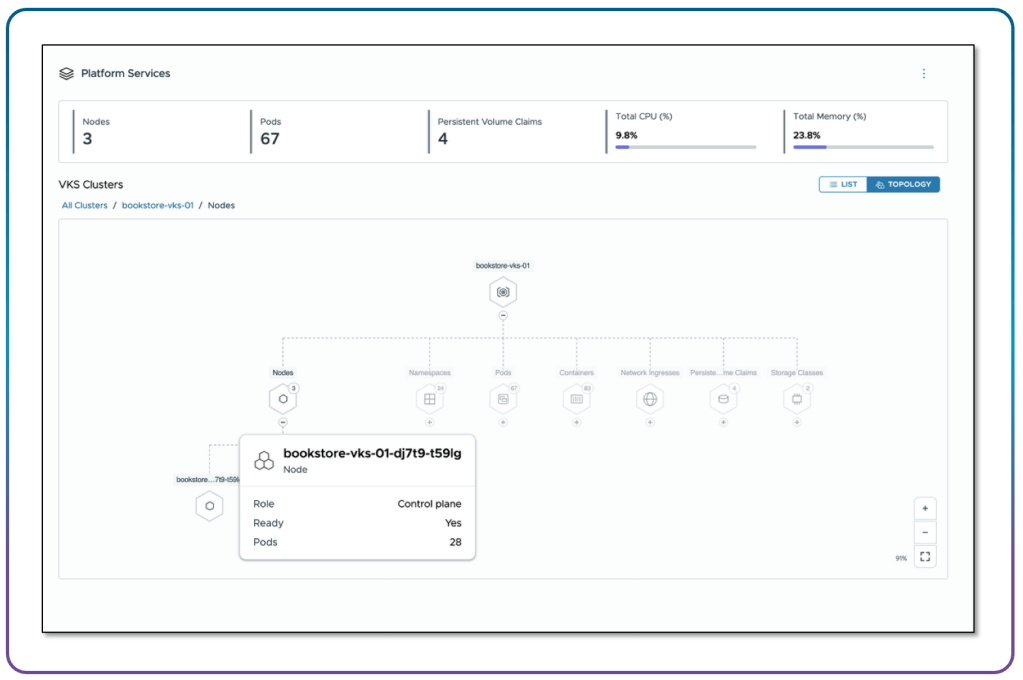
Figure 1. A sample map of VKS Clusters vSphere Kubernetes Service Observability.
VCF 9.1.2 introduces VMware vSphere Kubernetes Service (VKS) Observability, giving container workloads the same level of visibility already available for VMs. VCF 9.1.2 makes monitoring containerized applications much simpler by correlating Kubernetes workloads directly to the physical servers running beneath them. VCF Operations uses the OpenTelemetry (OTel observability framework for the cluster. Interactive cluster maps highlight active issues with clear glow and pulse cues, letting teams zoom from high-level cluster overviews straight down into specific pods and microservices. It also tracks key application signals—such as request rates, errors, and latency—and links them directly to host CPU and memory health on a single screen. By keeping logs, events, and metrics together in unified side panels, VCF Operations removes tool-hopping and helps resolve issues much faster.
VKS monitoring depth has been expanded so that ingresses, network policies, Kubernetes storage classes, and Kubernetes services now appear in the VKS Observability views. Administrators can inspect object specifications within their active view without losing context. Health-driven topologies provide visual maps that remain quiet when healthy, using glow and pulse cues to highlight active issues only. Administrators can navigate metrics from cluster maps to pods and containers, or microservices. VKS Observability provides dependency views and RED metrics, covering rate, error, and duration. Machine learning for observations condenses multi-source telemetry spikes into a structured incident narrative. Full view context and evidence bundling maps correlated signals into a single view that details symptoms, probable cause, and blast radius, paired directly with pre-filtered logs and events.
VCF 9.1.2 advances our embedded Grafana Dashboard Integration. Beyond importing dashboards, administrators can now leverage full panel editing, PromQL auto-completion, and a live assisted query builder.
Better Visibility of Available Patches
Staying up-to-date with software patches and releases is important, so we are committed to making the lifecycle management process as simple as possible.
VCF 9.1.2 shows when new patches for VCF management services components become available through the VCF Operations console. This includes patches for VCF Operations, VCF Automation, the Identity Broker, real-time, compliance, and lifecycle components. With this capability, admins no longer lose track of available patches.
VCF Operations uses a streamlined lifecycle process. Administrators define a target version, and can orchestrate the upgrade or patch for workload domains that include vCenter, VCF Networking, vCenter, and ESX.
The unified visibility allows administrators to quickly identify components which need attention without having to open the VCF software depot.
Integrated Windows Authentication Support for VCF Single Sign-on
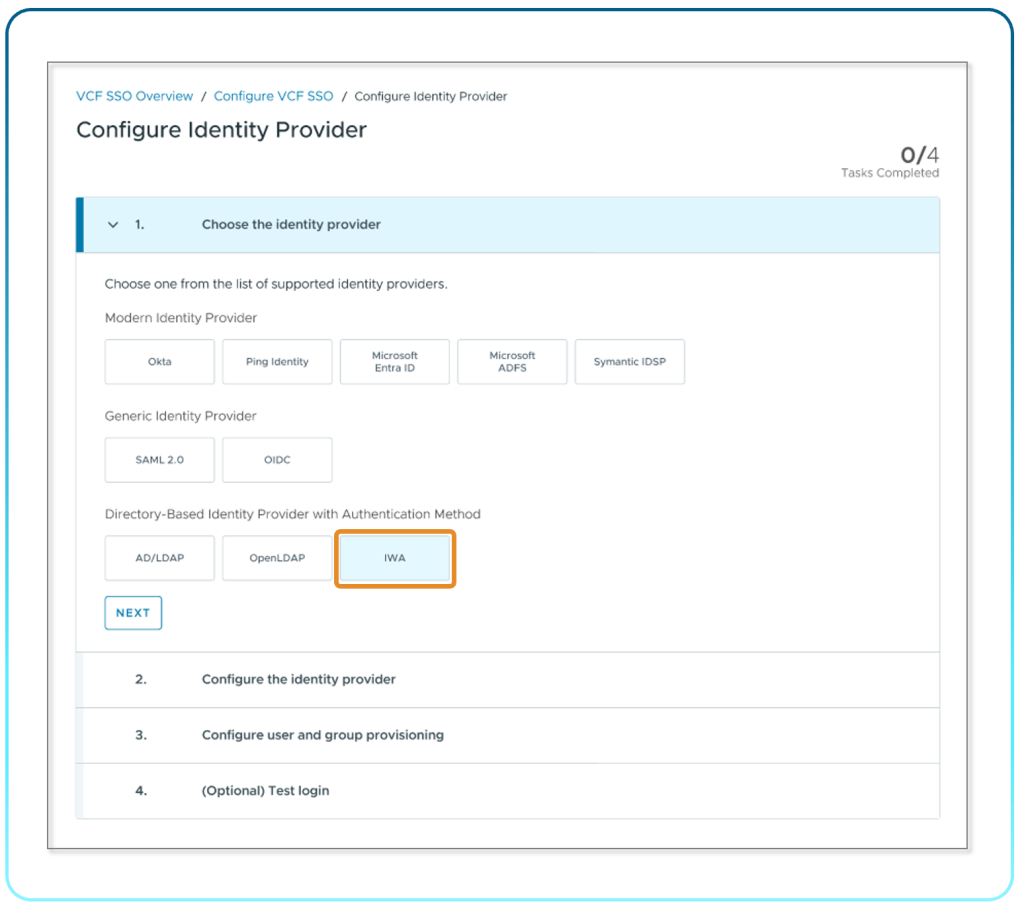
Figure 2. Configuring an identity provider (idp) using the built-in VCF Operations workflow IN VCF 9.1.2.
As part of the VCF 9.1.2 release, VCF Operations fleet management also improves and now supports the option to use Integrated Windows Authentication (IWA) when setting-up single sign-on. Joining our existing lineup of SAML, OIDC, and standard form-based LDAP/AD, IWA is designed to eliminate login friction for Active Directory users.
When configuring IWA with VCF, permitted users can sign into VCF components automatically using their existing windows domain credentials, without being prompted to re-enter a username or password.
IWA uses Kerberos/NTLM to verify a user’s identity through Active Directory, delivering a seamless single sign-on (SSO) experience. Passwords are never transmitted in plain text, reducing password fatigue and simplifying administration through existing AD accounts and policies.
When configuring IWA, admins can enable failback authentication as a secondary measure in the event that Kerberos authentication fails.
Authentication Choice for Microsoft Certificate Authority
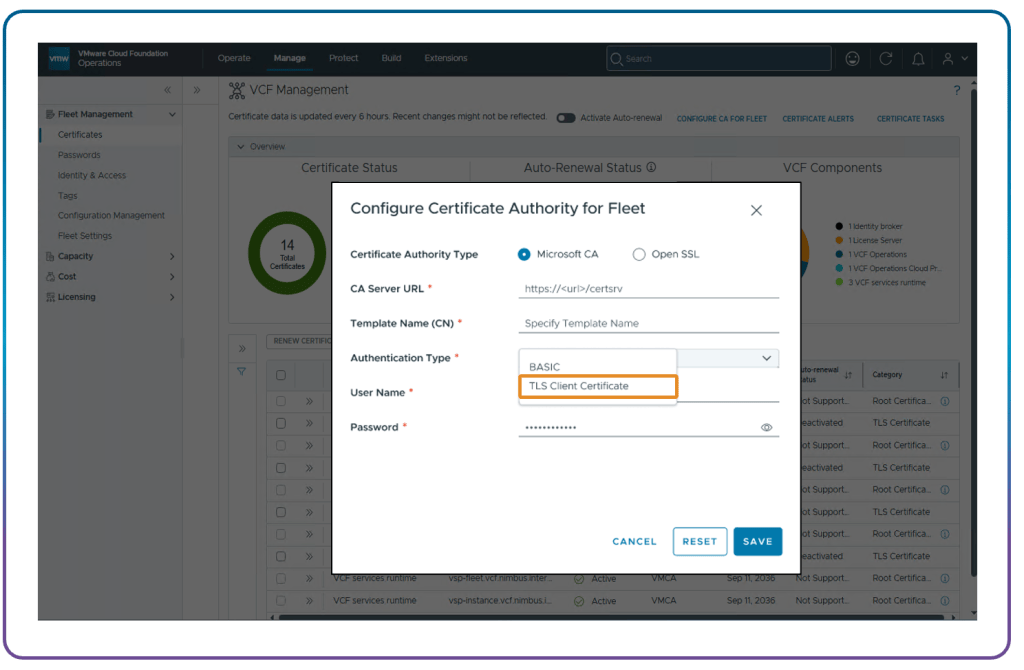
Figure 3. Authentication options when integrating a Microsoft Certificate Authority in VCF 9.1.2.
VCF continues to deliver fleet management improvements to help ensure that configuration and setup of certificates in your private cloud is as secure as possible. VCF Operations in VCF 9.1.2 now provides two authentication options when integrating a Microsoft Certificate Authority (MSCA).
Admins can connect with the MSCA using Basic authentication by entering a username or password that has explicitly been given permission to issue and manage certificates. This has been the approach used in prior VCF releases.
The VCF 9.1.2 release now also includes a second authentication option allowing admins to authenticate to a MSCA using a TLS Client Certificate.
Using a TLS client certificate provides a more secure alternative to username/password-based integration and negates the need to connect using a dedicated Active Directory service account.
AI-Assisted Troubleshooting [Tech Preview]
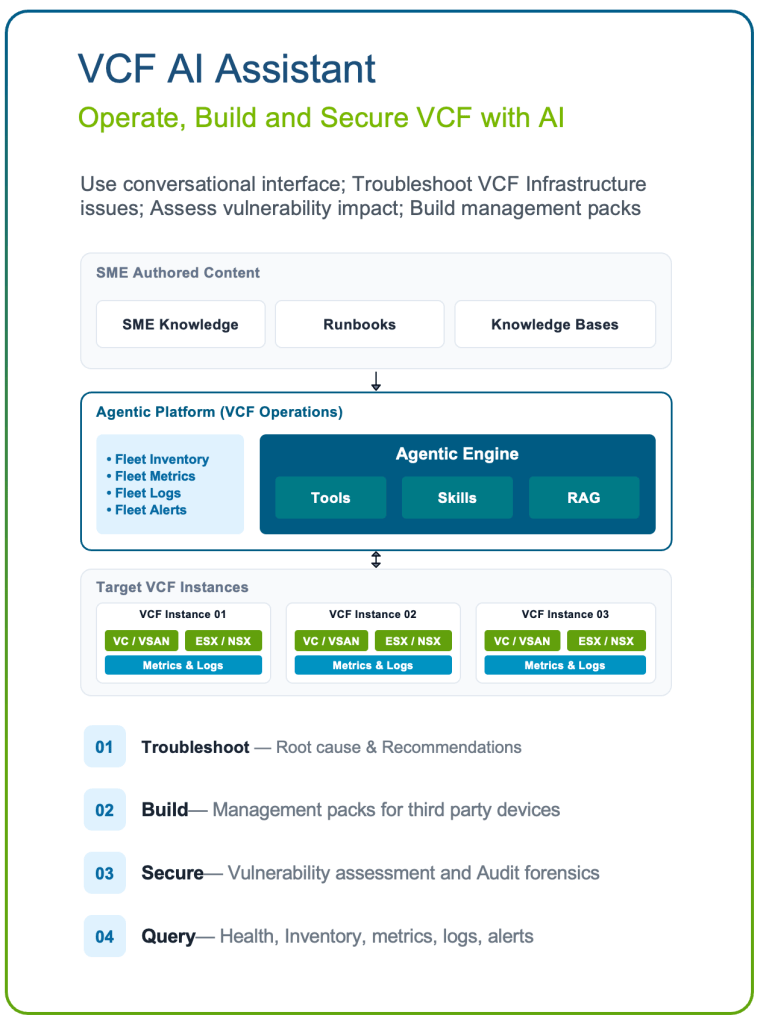
Figure 4. VCF AI Assistant for VCF 9.1.2 [Tech Preview].
The VCF AI Assistant was first introduced in VCF 9.1.1 and integrates agentic AI to help users investigate, diagnose, and resolve infrastructure issues using natural language.
Enhancements for VCF 9.1.2 include a refined chat interface supporting multiple concurrent conversations and the ability to switch models within a session.
Admins can leverage the assistant to correlate proactive health alerts, configuration, and logs, and isolate root causes faster. Access to historical environmental data including system and audit logs has also been added. New security capabilities evaluate security posture, VMware security advisory exposure, and certificate health.
Expanded Controls with the VMware Salt for VCF Components API
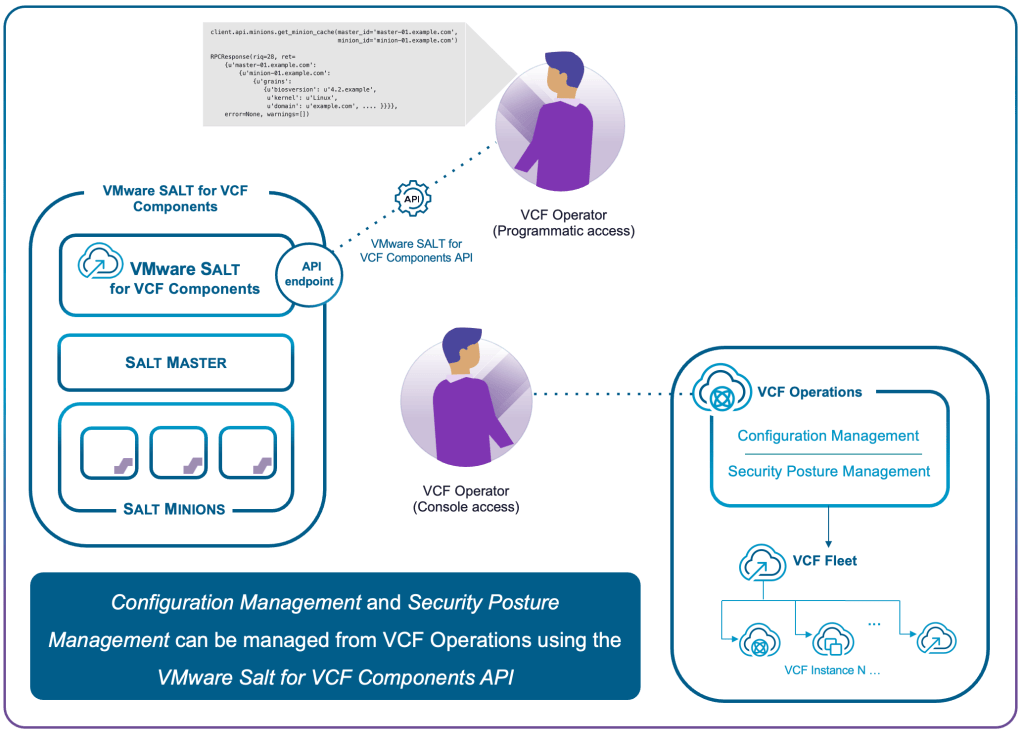
Figure 5. The VMware Salt for VCF Components API includes 30+ new controls in VCF 9.1.2.
VMware Salt for VCF Components API enables teams to programmatically manage VMware Cloud Foundation infrastructure today without waiting for new VCF releases.
The VCF 9.1.2 release adds 30+ new controls with a cumulative total of almost 300 controls, letting you leverage the APIs to build custom content and automate your own configurations.
Keep in mind that this capability is strictly focused on underlying infrastructure of the VCF components rather than workloads. Separate from VCF component infrastructure, workloads running on Linux or Windows require the new VMware Compliance and Configuration Management Advanced Service (add-on) license.
Enhanced Orchestration
The VMware Cloud Foundation Operations orchestrator has been enhanced for VCF 9.1.2. Admin-only repository control transfers polyglot runtime repository management for administrators. White-listed dependency governance restricts standard polyglot users strictly to administrator-approved private repositories. The VCF Operations orchestrator has a polyglot multiple languages capability which expands its original JavaScript-only environment into a versatile, multi-language scripting hub. Developers can now build custom workflows and actions using their preferred coding languages, with full support for modern versions of Python, Node.js, and PowerShell. An administrator can use these environments to create, update, or delete orchestrator objects using the REST API. This added flexibility empowers teams to seamlessly create, update, or delete orchestrator objects via the REST API using the tools they already know best.
A native capability embeds an integrated load-balancing service directly into the VCF Operations orchestrator appliance. Out-of-the-box high availability (HA) delivers turnkey HA cluster deployment across nodes without external appliance dependencies. Customers can choose from multiple load balancing options, including VMware Avi Load Balancer, third-party solutions, or the internal load balancer, with flexibility in how they configure the orchestrator.
Summary
VCF 9.1.2 helps our customers accelerate private cloud adoption and simplify day-to-day tasks with capabilities that scale fleet management. Kubernetes in private cloud becomes easier to adopt with VKS Observability. Patching availability of the VCF management services is now visible for ease of use. Troubleshooting gets VCF AI assistance [Tech Preview] drawing on real-world experience and knowledge from Broadcom global support services. In the resources list below, you will find assets to help you move from a vSphere 8 environment to a VCF 9.1.2 environment. In VCF 9.1.2 you will find more capabilities in orchestration to make your job easier. Each improvement is a direct response to customer feedback, and together they move VCF Operations closer to the north star of unified operations for the private cloud.
Resources
Blog: Announcing General Availability of VMware Cloud Foundation 9.1.2
Your Central Hub for VCF Adoption & Infrastructure Security
Upgrading to VMware Cloud Foundation 9.1.x
VMware External Vulnerability Response and Remediation Policy
API Returns supported by VCF Operations Orchestrator Polyglot Runtimes
Datasheet for VCF Operations in VCF 9.1.2
Solution Brief for VCF Operations in VCF 9.1.2
Discover more from VMware Cloud Foundation (VCF) Blog
Subscribe to get the latest posts sent to your email.