

As a TAM, I’ve noticed a recurring theme in almost every customer conversation lately: the critical need to balance rigorous information security with operational simplification. While teams still demand robust, enterprise-grade capabilities (especially to defend their infrastructure), they’re looking for ways to cut through the noise – removing the friction from how they adopt, manage, secure, and scale their solutions.
That’s exactly what inspired VMware Cloud Foundation’s most recent release, which is particularly relevant as part of our Cybersecurity Month Blog series. In my previous blogs, I’ve covered how VCF 9 is modernizing the private cloud and simplifying Day 2 operations. Today, let’s look at the practical aspects of upgrading to VCF 9.1.1.
Let’s walk through the newest, highly requested “quality of life” improvements and architectural capabilities designed specifically to accelerate your adoption journey, reduce your footprint, and make upgrading to a hardened, protected environment easier than ever.
Phase 1: Plan with Confidence – The Upgrade Prep
The first step to a successful upgrade is removing the guesswork and the historical roadblocks. VCF 9.1.1 delivers massive wins on both fronts.
Consult the VCF Upgrade Planning Tool
Before you touch a single binary or schedule a maintenance window, your very first stop should be the VCF Upgrade Planner. We first published this tool earlier this year when we released 9.1 to help customers better understand their own, customized path forward into VCF 9.1.
If you aren’t using this tool yet, you are missing out on one of the most powerful pre-flight checks available. The VCF Upgrade Planner, now upgraded for VCF 9.1.1, takes the complexity out of lifecycle management by allowing you to map your exact current state to your desired VCF 9.1.1 end state. It identifies specific upgrade prerequisites based on your exact configuration, highlights any potential interoperability considerations, and provides a customized, step-by-step roadmap for your environment. Below is an example of the information necessary to customize your upgrade plan within the tool.

The tool clearly outlines where safe stopping points are during the process so you can spread the process over multiple change windows if necessary. You can even export the entire upgrade plan in various formats to easily include in your internal change management tools such as Jira or ServiceNow. The screenshot below shows the process output for an example environment.
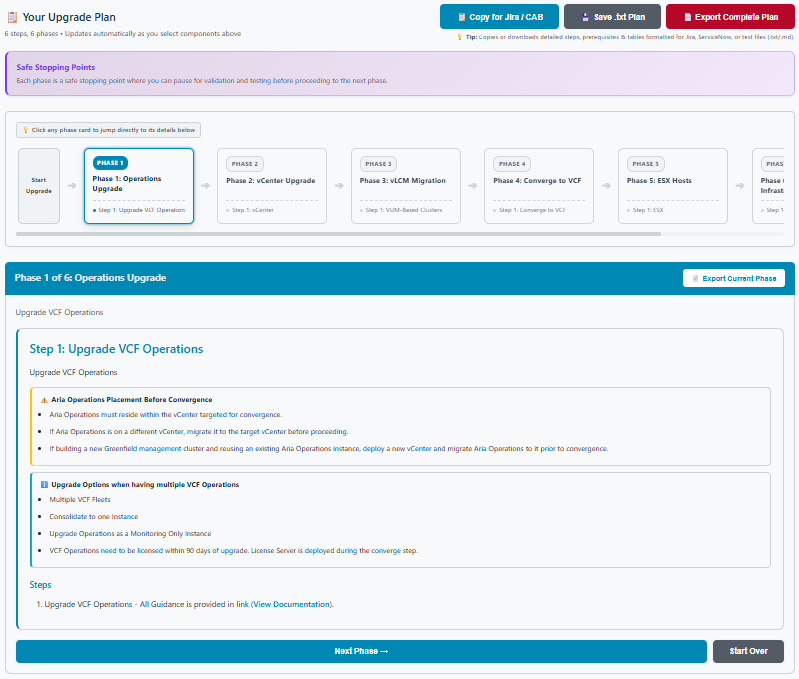
You no longer need to guess your steps or consult multiple documentation sources to ensure a successful upgrade – the VCF Upgrade Planner plans and documents it comprehensively.
Celebrate: The “Back-in-Time” Upgrade Restriction is Lifted
While back-in-time upgrade restrictions are a reality of parallel release cycles and patch management, I am thrilled to share that VCF 9.1.1 specifically clears the most recent hurdles blocking your upgrade path.
For context, a back-in-time scenario occurs when you apply a critical security patch to your environment, and that patched product version contains newer code than the target major release code. Earlier this year, administrators had to make a tough choice: apply the critical security fixes in vSphere 8.0 Update 3k or VCF 5.2.4 to patch vulnerabilities but temporarily lose the ability to upgrade directly to VCF 9.1.0 or keep your VCF 9.1 upgrade path open but leave critical vulnerabilities unpatched.
With the release of VCF 9.1.1, that restriction is officially resolved. If you are currently running vSphere 8.0U3j, vSphere 8.0U3k, VCF 9.0.2 EP2, or VCF 5.2.4, your forward upgrade path is restored. You no longer have to choose between keeping your environment secure with the latest asynchronous patches and advancing to the newest VCF architecture.
However, a word to the wise: the nature of software lifecycles means this open window is not guaranteed to last. While your path to 9.1.1 is clear today, a future zero-day vulnerability could force you to apply a new out-of-band patch to your current environment, potentially introducing a brand-new back-in-time restriction. You can always check the validity of your upgrade path using the Product Interoperability Matrix.
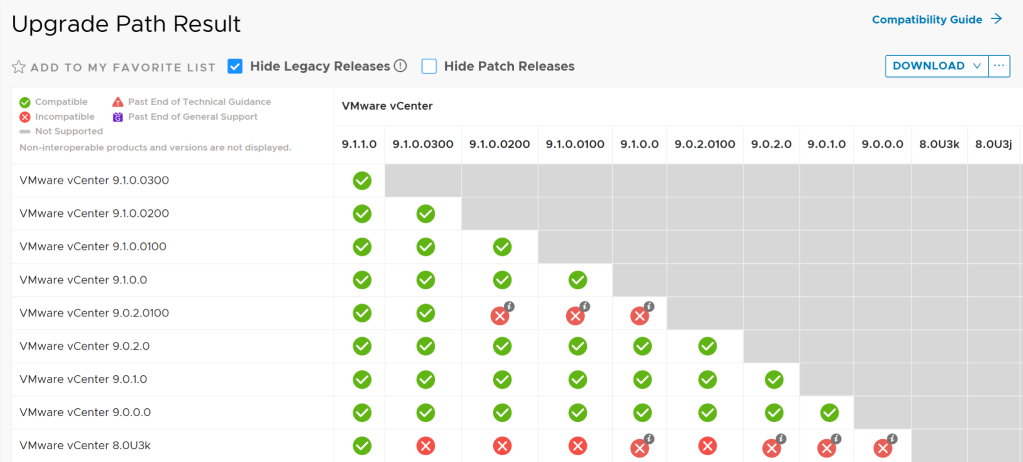
The takeaway here is simple: strike while the iron is hot. If you have been sitting in a holding pattern waiting for the green light to upgrade, this is it. Capitalize on this cleared path and make your move to 9.1.1 before the next unpredictable security advisory changes the equation again.
Phase 2: Test and Validate – The Sandbox Experience
You want to get your hands on the new code, test your automation, and train your team – but you shouldn’t have to rack a mountain of servers just to build a sandbox. 9.1.1 gives you two brilliant ways to kick the tires.
Spin Up a Single ESXi Host Deployment (Directly from the UI)
Building a proof-of-concept (PoC) or a lab environment used to be a hardware-heavy endeavor that required strict minimums. With VCF 9.1.1, we have introduced official support for a Single ESX Host Deployment directly within the VCF Installer UI. Previously, deploying VCF on a single node for lab purposes required specialized API calls, JSON manipulation, and your comfort with going outside a documented process. Now, it is a native, click-through option in the Installer.
This is absolutely perfect for administrators and architects who want to validate API scripts, test integrations, or simply familiarize themselves with the 9.1.1 interface with the absolute minimal hardware investment. Keep in mind that while the VCF Installer UI does allow for single node deployments, production deployments must still adhere to the published host minimums to remain supported.
Explore the New Hands-on Labs
What if you want to test drive VCF 9.1.1 but have zero hardware available? We’ve got you covered.
Freshly updated and showcased for the first time at VMware Explore 2026, the new catalog of VCF 9.1 Hands-on Labs (HOLs) are now live and available globally. These labs are the fastest, most risk-free way to experience the new capabilities immediately. Whether you want to test the new lifecycle management workflows, explore the updated UI, or walk through a simulated deployment, the HOLs provide a pristine, pre-configured environment right in your browser. Send the link to your entire operations team – it’s the best free training available.
Phase 3: Deploy with Unprecedented Flexibility – The Architectural Wins
Once you are ready to architect your 9.1.1 environment, you’ll find that we’ve made some serious optimizations to how VCF consumes resources, allowing you to do much more with less.
Reclaim Resources with a Reduced Management Services Footprint
Introduced in VCF 9.1, the VCF Management Services consolidated previously fragmented administrative appliances into a modern, unified, containerized control plane. In VCF 9.1.1, our engineering teams have heavily optimized that architecture, resulting in a significantly reduced VCF Management Services footprint. You can see the specific decrease in the chart below, but we’re talking about a ~40% reduction for each deployment type when compared to 9.1!
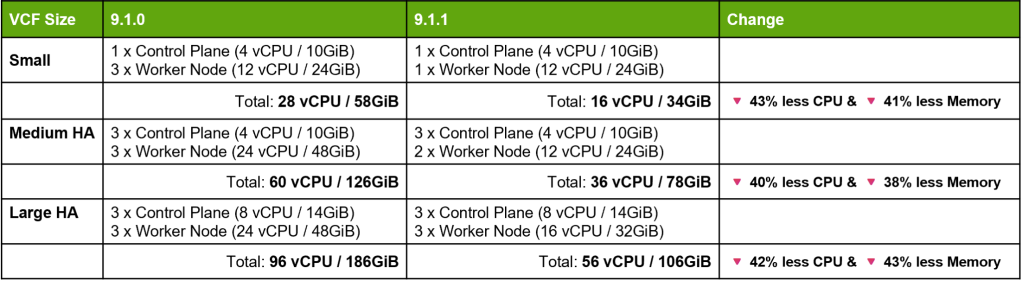
By streamlining the backend services and reducing overhead, we are giving those resources back to you. This means you can reclaim valuable CPU and Memory and reallocate it to your actual revenue-generating tenant workloads, driving a much better Return on Investment for your existing private cloud hardware.
Already deployed a 9.1 environment with the original sizing? Use the script provided in our Knowledge Base article to adjust your existing deployment to the new, smaller footprint.
Deploy Anywhere with the New “Small HA” Option
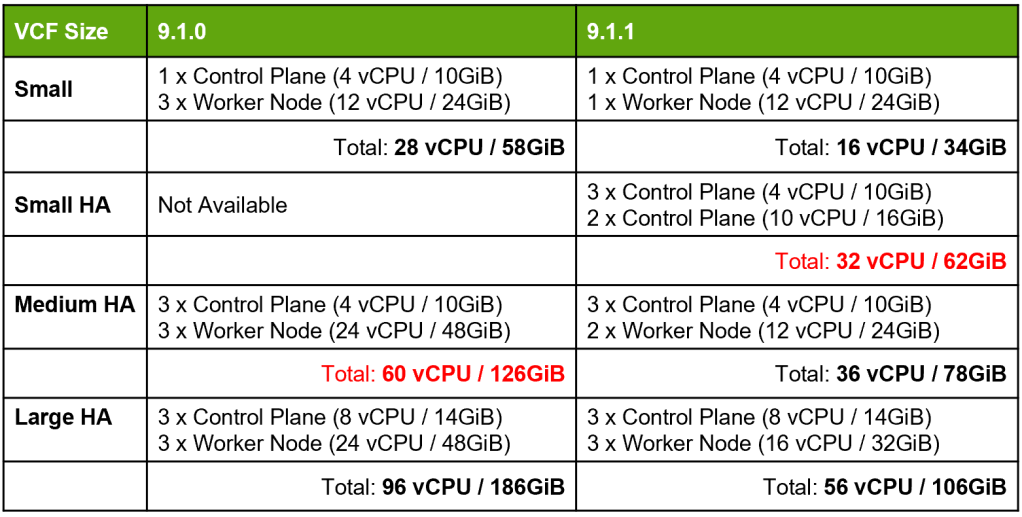
For many customers High Availability (HA) is a non-negotiable requirement for modern businesses, but previously choosing a HA architecture required moving to a medium size deployment with a significant (over double) CPU/Memory requirement. Enter the Small HA deployment option. This brand-new profile bridges the gap for customers who need enterprise-grade resilience but operate in constrained environments. This new deployment option reduces the resource requirements for the minimal HA deployment by nearly 50%. The chart below highlights in red the resource requirements for the smallest supported HA deployment in 9.1 compared to 9.1.1.
The time to act is now
The journey to modernizing your private cloud doesn’t have to be a grind. VCF 9.1.1 was built directly around your feedback – removing historical upgrade blockers, shrinking the management footprint, and providing simple and lightweight ways to test and deploy.
Beyond the architectural wins, there is a calendar reality we all need to prepare for: vSphere 8.0 and the VCF 5.x stack reach the End of General Support (EOGS) on October 11, 2027. If you were planning to simply step up to the initial VCF 9.0 release to buy more time, be aware of the new VCF support model and release cadence. End of General Support for 9.0 occurs on September 17, 2027. Let that sink in: landing on 9.0 doesn’t extend your runway past the October 2027 deadline; it actually arrives a few weeks earlier.
This is why aiming directly for VCF 9.1.1 is so critical. Getting to 9.1.1 not only unlocks the footprint reductions and HA options we’ve discussed, but it fundamentally resets your support runway, extending your general support lifecycle to August 2028.
Don’t delay – start your checklist today. Open up the VCF Upgrade Planner, map out your environment, and see just how fast you can accelerate your adoption of VMware Cloud Foundation 9.1.1.
Discover more from VMware Cloud Foundation (VCF) Blog
Subscribe to get the latest posts sent to your email.


