
Managing identity across a distributed cloud infrastructure has become one of the most critical responsibilities for IT teams. As organizations scale their VMware Cloud Foundation (VCF) environments, privileged access must be governed with precision, not only to streamline day-to-day operations, but to protect against the rising risk of identity-based threats. In our earlier blog, we discussed configuring an identity provider with VCF 9.0. In this post, we build on Identity & Access Management and explore the capabilities that have been added and enhanced with recent releases VCF 9.1 and VCF 9.1.1.
The Benefits of Single Sign-On in VCF
Administrators can grant privileged users and groups access to manage VCF components by configuring single sign-on (SSO) with a choice of identity provider and directory services. Single sign-on reuses the authentication from the organization’s identity provider, so there’s no need to repeatedly re-login when moving between management tools. This streamlines day-to-day management while strengthening security by centralizing identity control across the VCF environment.
How Single Sign-On Is Configured in VCF
Single sign-on is configured post-deployment under Identity & Access within Fleet Management. VCF Operations a component of VCF includes built-in workflows that streamline SSO configuration across other VCF components and VCF instances.
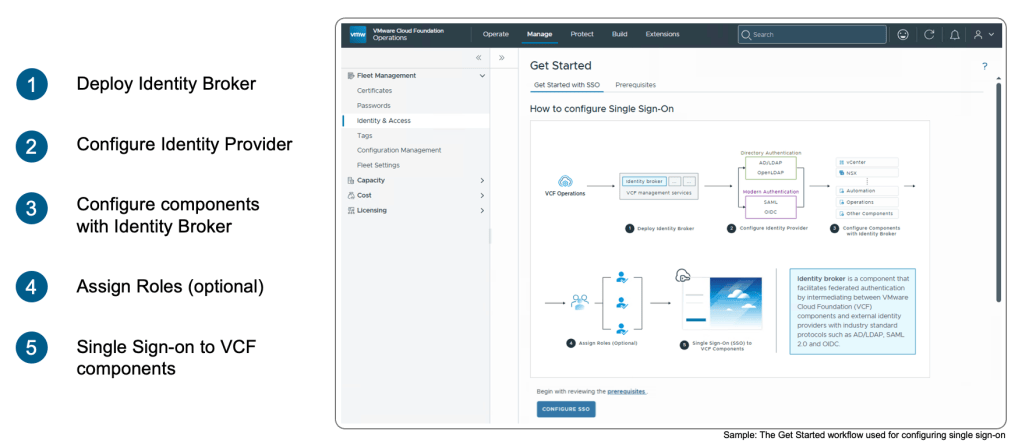
Identity & Access Management can be configured end-to-end for VCF instance components (vCenter and NSX) and VCF management components (VCF Operations, VCF Automation, VCF Operations for Logs, VCF Operations for networks, VCF Operations workload mobility (HCX), and VCF Operations orchestrator).
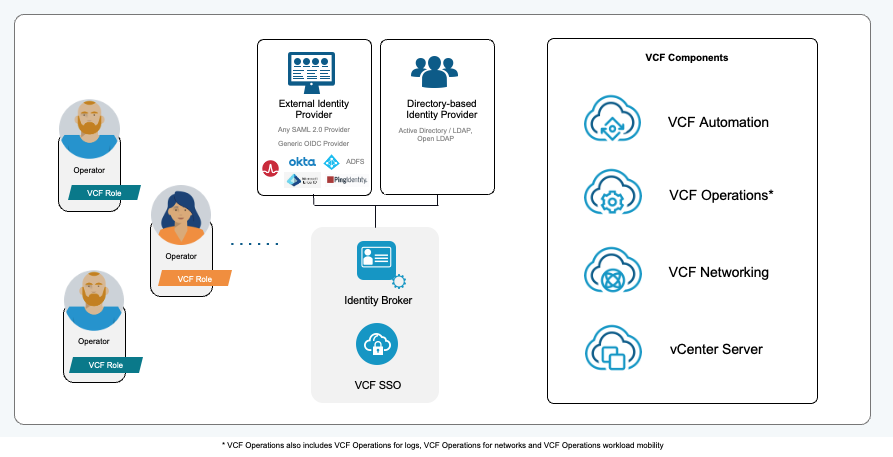
The Identity Broker is configured as part of the workflow and is the intermediary which connects VCF components to an externally managed Identity Provider or Directory Service.
- Identity providers include Symantec Identity Security for VCF (IDSP)*, Okta, Microsoft Active Directory Federation Services (AD FS), Microsoft Entra ID, Ping, or any (generic) OIDC or SAML 2.0 provider.
- Directory-based services can be configured using either Active Directory/LDAP or OpenLDAP.
- Users and groups can also be provisioned using JIT, SCIM, and Active Directory (AD)/LDAP (Lightweight Directory Access Protocol).
*Symantec Identity Security for VCF was introduced and supported from VCF Operations in VCF 9.1.
Admins can follow the workflow to assign access to SSO users and groups to each VCF management component. From VCF Operations in VCF 9.1 we introduced the ability for users and groups to be assigned VCF-specific roles or VCF custom roles and granted management access.
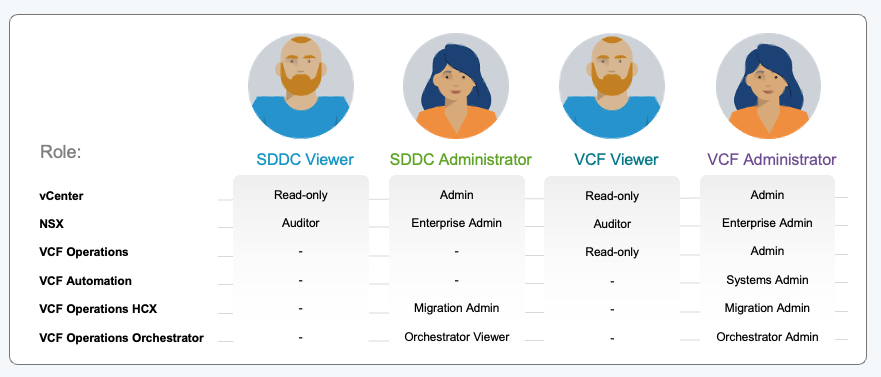
By assigning user and group access, admins can ensure VCF components are secure and compliant. From VCF Operations in VCF 9.1, Admins can create and manage API clients and API tokens from VCF Operations to be used for programmatic access or automation.
Active Directory and OpenLDAP
The most prevalent directory services used with existing VCF environments today are Microsoft Active Directory and OpenLDAP.
Up until now, the process for configuring VCF SSO for Active Directory/OpenLDAP requires users and groups to be pre-provisioned. The Identity Broker stores a local copy of the pre-provisioned users and groups from the directory for authorization. Authorization relies upon these local copies.
For many customers, pre-provisioning users and groups is a desirable approach for environments that don’t require regular changes to user and group membership. In the case that a change does need to be made, a sync can be performed.
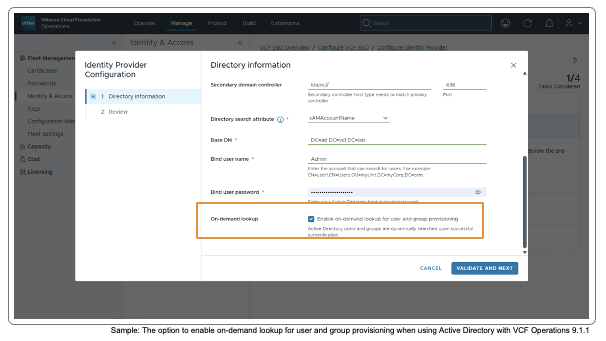
What Has Changed in VCF 9.1.1 for Active Directory and OpenLDAP
VCF Operations in VCF 9.1.1 introduces an option for administrators to enable On-Demand Lookup for Active Directory and OpenLDAP accounts.
This approach is best suited for environments which require a dynamic real-time approach to identity and access management and removes the hurdle of managing frequent changes to user access and role assignment.
When enabled, the Identity Broker queries the users directly from the directory for authentication. On-demand Lookup doesn’t require user and groups to be pre-provisioned – authorization is based upon a user’s current group membership in the directory at the time of login.
On-Demand Lookup for Active Directory and OpenLDAP users and groups provides operational flexibility to IT admins to enable temporary access for users based on their group membership while also hardening infrastructure security.
Admins can enable On-Demand Lookup via a simple checkbox, retain the pre-provisioning model, or run a hybrid configuration with multiple directories to suit different user groups across the organization.
Operational Simplicity
On-Demand Lookup for Active Directory and OpenLDAP changes the way we think about identity synchronization in VCF. By querying the directory directly at login, we remove the dependency on scheduled syncs and the discrepancies they can introduce. This means access decisions are always based on the current state of the directory — not a snapshot from the last sync window.
For example, a user in an Active Directory security group called “vcf-admins” can be granted Administrator access to a specific vCenter using the VCF Administrator role, valid for 48 hours.
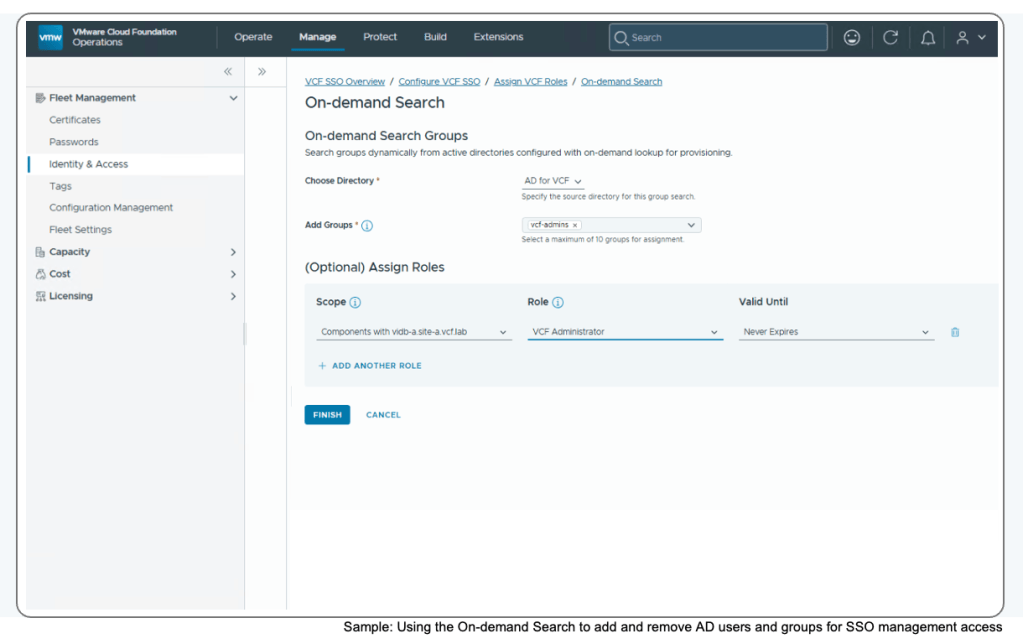
For teams managing large or dynamic environments, the impact is tangible. Temporary access for contractors, auditors, or cross-team contributors can be granted and revoked through directory group membership alone, with changes reflected at the next login. There’s no need to wait for a sync cycle or manually reconcile local copies. Admins retain full control over which user groups use On-Demand Lookup, which keep the pre-provisioning model, and which run a hybrid approach — giving organizations the flexibility to align access strategy with their security and operational goals.
Summary
- VCF makes it easier to maintain modern security infrastructure because VCF Operations in VCF 9.1.1 supports configuring On-Demand Lookup for Active Directory and OpenLDAP
- Enabling On-Demand Lookup for Active Directory and OpenLDAP users and groups allows IT admins the flexibility to provide temporary SSO access for users based on their group membership while also hardening infrastructure security.
Next Steps
If you’re running VCF Operations in VCF 9.1.1, and are using Active Directory or OpenLDAP, explore On-Demand Lookup in your lab or non-production environment to see how it fits in with your identity strategy. Review your directory group structure and identify the user groups that would benefit from real-time authorization. To go deeper, refer to the VCF documentation for further information on VCF Operations Identity & Access Management.
Resources
Blog: Bringing “Out-of-the-Box” Modern Identity to Your Infrastructure with VMware Cloud Foundation 9.0
Documentation: VCF Operations identity & Access Management Documentation
Discover more from VMware Cloud Foundation (VCF) Blog
Subscribe to get the latest posts sent to your email.