
Memory Tiering is a great way to get more out of your ESX hosts, and managing it from the command line just got a whole lot easier. Let me explain why that matters.
In VMware Cloud Foundation (VCF) 9.0, working with Memory Tiering from the CLI meant using two namespaces: esxcli system tierdevice for device operations and esxcli system settings kernel for kernel-level tuning. It got the job done. With the 9.1 release, we made it even better.
Memory Tiering gets a home of its own
Starting in VCF 9.1 (and VMware vSphere Foundation 9.1, and vSphere 9.1), all Memory Tiering operations live under a single, dedicated namespace: esxcli memtier.
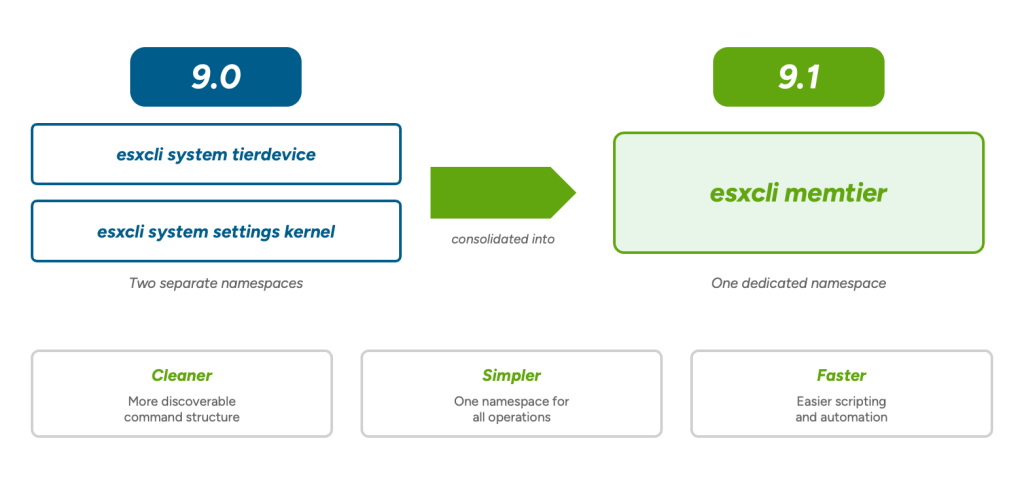
This is a real consolidation. Think of it like moving every tool you need into one well-organized toolbox instead of two. Everything you need to enable, disable, configure, inspect, and list devices for Memory Tiering now hangs off one root command. The structure is cleaner, the commands are more discoverable, and scripting and automation get noticeably faster because everything is in one place.
So how does that look in practice? Let’s walk through it.
What the new namespace looks like
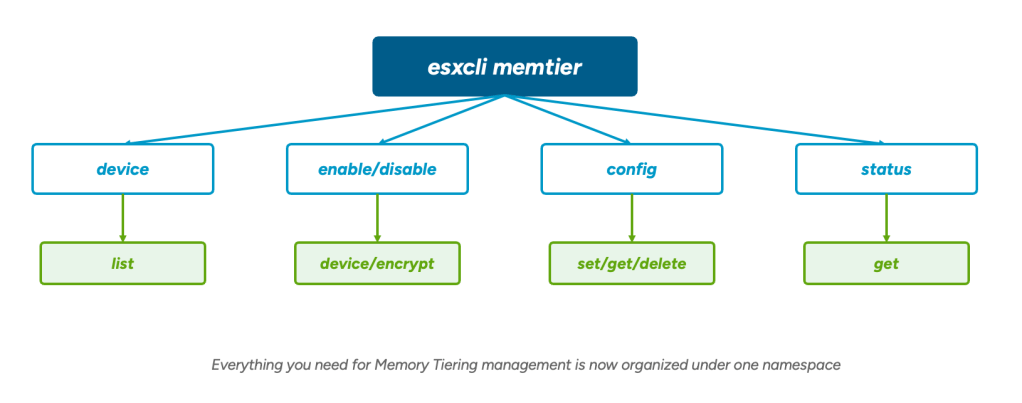
Here is the command tree under esxcli memtier:
- memtier device list – List memory tiering devices. Use –available to see devices available for tiering, or –configured to see what is already configured.
- memtier enable – Enable memory tiering. Options include –devices for the first tiering device, –encryption to turn on encryption on the host, and –tier-size-pct to set the maximum tiering size as a percentage of DRAM (between 1 and 400).
- memtier disable – Disable memory tiering. The –delete-devices flag removes the devices when you turn it off.
- memtier config set – Set the memory tiering configuration: devices, encryption, and tier size percentage.
- memtier config get – Get the current configuration values, with flags to pull individual settings like –devices, –enable, –encryption, and –tier-size-pct.
- memtier config delete – Delete the memory tiering configuration.
- memtier status get – Show the currently deployed Memory Tiering configuration.
That is the full set. One namespace, four logical areas (device, enable/disable, config, status), and a clear path to exactly the operation you need.
Want a quick example? Say you want to check what tiering devices are available on a host. It is as simple as:
|
1 |
esxcli memtier device list --available |
That single command replaces the kind of lookup that used to require knowing which namespace to reach for. The same goes for checking your current configuration with esxcli memtier status get, or enabling tiering with esxcli memtier enable –devices <device>. Everything starts with esxcli memtier, and tab-completion takes care of the rest. Easy enough, right?
So what’s the real win here?
I’m glad you asked, because the benefits really come down to three words that are worth repeating:
- Cleaner – A more discoverable command structure. When you type esxcli memtier and tab-complete, the options that come back all relate to Memory Tiering. No more scanning a long list of unrelated system commands.
- Simpler – One namespace for all operations. Your scripts, your runbooks, and your muscle memory all point to the same place.
- Faster – Easier scripting and automation. Everything under one namespace means less boilerplate and a smoother path from idea to working script.
For anyone building automation around Memory Tiering, this is the kind of change that quietly makes your day a little better.
A note on versions
This new namespace is for VCF 9.1, vSphere Foundation 9.1, and vSphere 9.1 and later. Don’t worry, if you are still on VCF 9.0, you will continue using the existing two-namespace approach (esxcli system tierdevice and esxcli system settings kernel). You can plan your upgrade path and your scripts accordingly, and the new esxcli memtier namespace is waiting for you on the other side.
You can find the full command reference for the new namespace on the Broadcom developer site, which covers every option and flag in detail.
Discover more from VMware Cloud Foundation (VCF) Blog
Subscribe to get the latest posts sent to your email.