
VMware Cloud Foundation (VCF) 9.0’s unified SSO has streamlined the authentication process by eliminating the need to manage individual components. This proven capability continues to reduce administrative overhead while providing a more seamless experience for admins. Admins log in just once and gain seamless access to manage VCF components based upon their permissions.
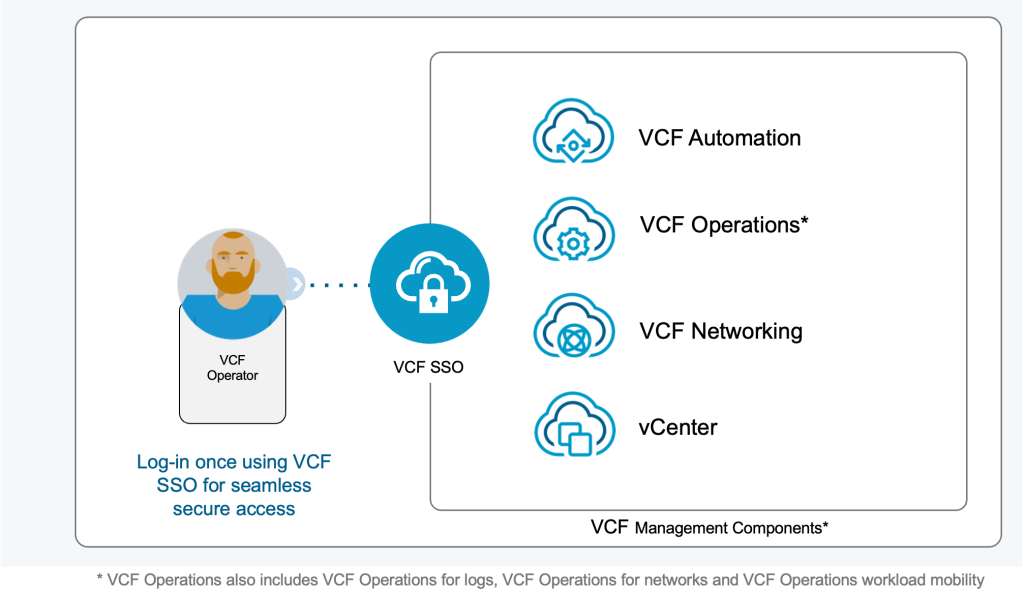
Single Sign-on (SSO) for VCF can be configured after VCF is deployed to strengthen security and streamline user access. VCF Operations provides a built-in workflow to enable VCF Single Sign-on. Identity is part of fleet management within VCF Operations.
Integration of SSO with an Identity Provider (IDP)
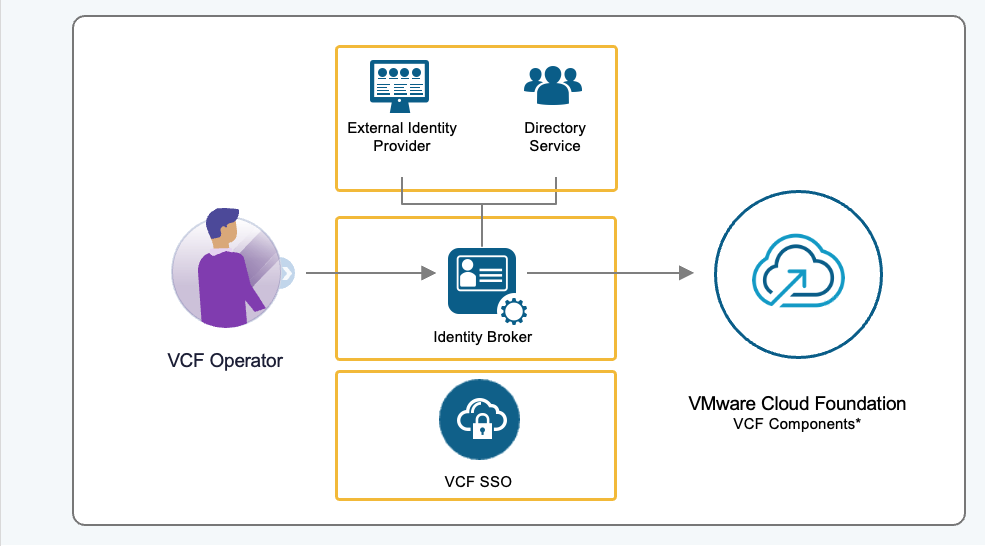
VCF 9.0 supports the Identity Broker, a completely modern authentication service that provides authentication across the VCF stack. Identity Broker was previously known as VIDB.
After VCF SSO is configured, the Identity Broker manages the connection between VCF components and an Identity Provider (IDP) or Directory Service. The Identity Broker for VCF acts as a single control plane for identity, meaning your admins no longer need to keep juggling URLs, tokens, and credentials.
Native Support for Modern Identity Providers
Previously, vIDM required complex setups to work with infrastructure.
Identity Broker has been engineered for modern infrastructure. It gives customers the option to use a modern identity provider or directory-based authentication mechanisms.
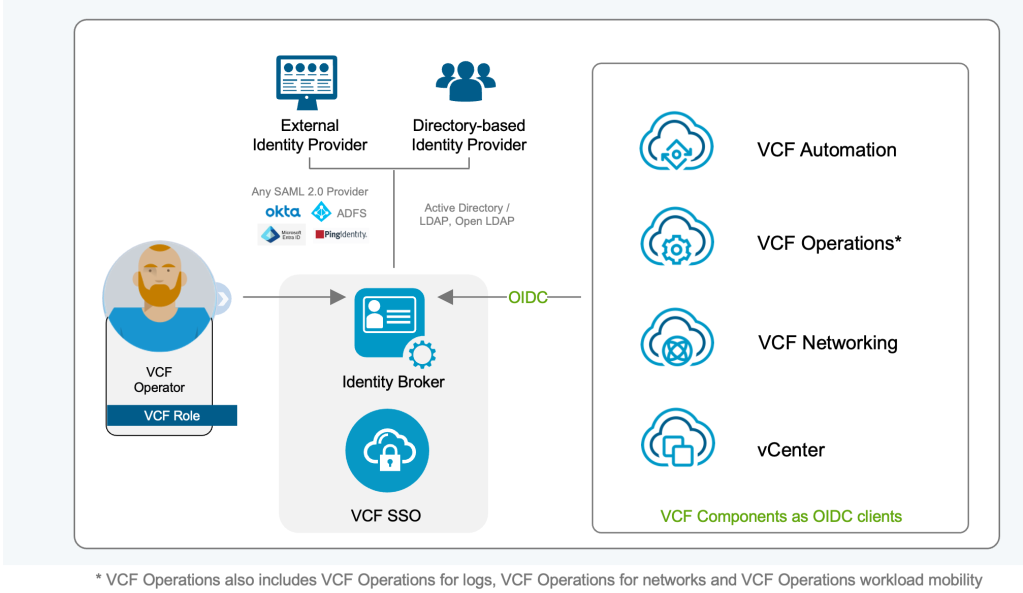
Modern Identity Providers:
- OKTA
- Microsoft ADFS
- Microsoft Entra ID
- Ping
- Any SAML 2.0 Compliant Provider
Directory-based Services:
- Active Directory/LDAP
- Open LDAP
These capabilities provide “out-of-the-box” integration with identity providers that many organizations use today. Multi-factor Authentication (MFA) can be enforced from your corporate provider and applied to your entire VCF stack.
To complete the configuration of SSO, an admin grants access to SSO users/groups by assigned roles for each VCF management component.
Doing so helps ensure VCF components are secure and compliant across the entire VCF stack.
Simpler Architecture (No More ELM for SSO)
Prior versions of VCF relied on Enhanced Linked Mode (ELM) to connect vCenter instances together for a single view. Because VCF 9.0 no longer relies on ELM, admins need to reconfigure vCenter instances in order to start using VCF SSO in VCF 9.0.
Admins can now set up private clouds with modern identity, roles, and access management. The Identity Broker for VCF provides a choice of deployment modes. Configuring the Identity Broker as a multi-node cluster prevents a single node failure. Enterprises can manage a fleet of multiple VCF instances for identity and access.
The Move to the Identity Broker for VCF
The VMware Identity Manager (VIDM) is still supported for vSphere 8.x and VCF 5.2x, allowing customers to transition to the Identity Broker for VCF. The Identity Broker for VCF is deployed as part of the process of setting up SSO for both new and upgraded VCF 9.0 environments. Once vCenter and NSX environments have been configured and tested with the Identity Broker, admins can then start migrating off VIDM and local authentication sources.
VCF 9.0 marks a pivotal shift in private cloud identity management, replacing fragmented, component-specific logins with a seamless unified experience driven by the Identity Broker. VCF 9.0 delivers a true unified SSO across the stack. By centralizing authentication across the entire fleet, VCF empowers organizations to leverage modern security standards like OIDC and OAuth 2.0 via their existing identity providers. The VCF fleet includes vSphere, NSX, VCF Operations, VCF Automation, and other components.
The Identity Broker transforms VCF 9.0 from a collection of components into a truly unified platform, setting a new standard for simplicity and security in private cloud identity management. Start using VCF 9.0 with the Identity Broker for your entire infrastructure fleet.
Resources:
Blog: Streamline Administrative Access with VMware Cloud Foundation Single Sign-On
VCF Documentation: Configure a New VCF Single Sign-On for a VCF Instance
Webpage: VMware Cloud Foundation Operations
Discover more from VMware Cloud Foundation (VCF) Blog
Subscribe to get the latest posts sent to your email.