

Encrypted vMotion has been a cornerstone of workload security in VMware environments for years. It ensures that VM data is protected in transit every time it moves between hosts, and for most production environments it is simply table stakes. With VMware Cloud Foundation (VCF) 9.1, we are making that security even more efficient by offloading the cryptographic work to Intel QuickAssist Technology (QAT), the hardware accelerator built into modern Intel Xeon processors. The feature is on by default in VCF 9.1, no configuration required. Our team wanted to understand exactly how much CPU capacity customers get back when QAT handles the encryption instead of the CPU. We ran the tests, and the results tell a clear story.
How QAT Offload Works
When a vMotion migration starts, VM data is encrypted on the source host and decrypted on the destination. With QAT offload in VCF 9.1, that encryption and decryption work is handled by the QAT hardware accelerator rather than the CPU. The CPU on both sides is freed to focus on running workloads. The feature is transparent to operators and enabled by default on supported Intel Xeon hardware. Check out this blog to learn more about Encrypted vMotion offload to Intel QAT in VCF 9.1.
Test Setup
We needed a workload sensitive to CPU availability, something that would clearly show what happens to application performance when the CPU gets cycles back from encryption work. We chose Oracle Database driven by HammerDB, an OLTP workload with a disk-heavy profile. Oracle transaction throughput (ops/second) was our primary health metric throughout.
For the migration methodology, we ran eight back-to-back vMotions during the steady-state measurement phase, with a 120-second pause between consecutive migrations. Eight runs gives you a statistically honest picture instead of a single data point.
Three configurations were tested:
- Encryption Disabled: The theoretical ceiling with no cryptographic overhead.
- QAT Off: Encrypted vMotion handled entirely in software by the CPU.
- QAT On: Encrypted vMotion offloaded to Intel QAT hardware.
Results
Median values across all eight migrations:
| Metric | Encrypted Disabled | QAT OFF | QAT ON |
| Migration Time (seconds) | 57.22 | 86.97 | 84.71 |
| Precopy Throughput (MB/s) | 10,871 | 7,592 | 7,146 |
| Source Host CPU (avg. concurrent cores) | 7.8* | 20.1 | 7.7 |
| Destination Host CPU (avg. concurrent cores) | 18.8* | 13.6 | 10.5 |
| Oracle Throughput (ops/sec) | 51,319 | 44,306 | 50,634 |
| VM Downtime (seconds)** | 0.42 | 0.33 | 0.78 |
* This configuration completes migrations in significantly less wall-clock time, so its average-concurrent-cores figure reflects the same background CPU work compressed into a shorter window, not a meaningful comparison point against QAT On/Off. Included for reference only.
** Downtime in both configurations stayed close to target, and the variation seen is driven by page-in transfer behavior on this specific workload, not by QAT. Encryption offload has no causal effect on downtime.
Source Host CPU Savings
Source host CPU usage drops from ~20.1 cores with QAT Off to ~7.7 cores with QAT On — roughly a 62% reduction in CPU capacity spent on vMotion encryption on the source side. The CPU that was handling encryption can now dedicate those cycles to running Oracle. The destination host also benefits, with about a 23% reduction in decryption overhead (~13.6 cores to ~10.5 cores). The source host sees the larger gain because encryption is the more computationally intensive of the two operations.
Oracle Throughput
With QAT Off, Oracle throughput during the migration window was 44,306 ops/second. With QAT On, it recovered to 50,634 ops/second, a 14% increase over software-only encryption. For an OLTP environment where transaction rates map directly to business output, that recovered throughput has real value.
Migration Time
QAT On and QAT Off produce nearly identical migration times, 84.71 vs. 86.97 seconds. QAT offload is not designed to speed up the migration itself. The network and memory copy operations take the same amount of time either way. What changes is how much CPU headroom remains for the running workload while that transfer is happening.
Consistency and Jitter
QAT offload decouples encryption from CPU execution timing entirely, which shows up as measurably lower variance in both migration time and guest throughput across repeated migrations. For workloads governed by SLAs, that predictability has real operational value.
Concurrent vMotion Results
Single-VM results only tell part of the story. Host evacuation scenarios involve many simultaneous migrations. We ran those tests too.
At lower concurrency (4 to 6 parallel VMs over 25 to 50 GbE links), QAT delivers 40 to 45% CPU reduction with no change in migration completion time. At higher concurrency representative of a full host evacuation, migrations complete at essentially the same speed as without QAT while source-host CPU consumption drops by up to ~39%. Planned maintenance or emergency evacuation, either way QAT returns meaningful CPU headroom to the hosts involved.
Reclaiming CPU for Workloads
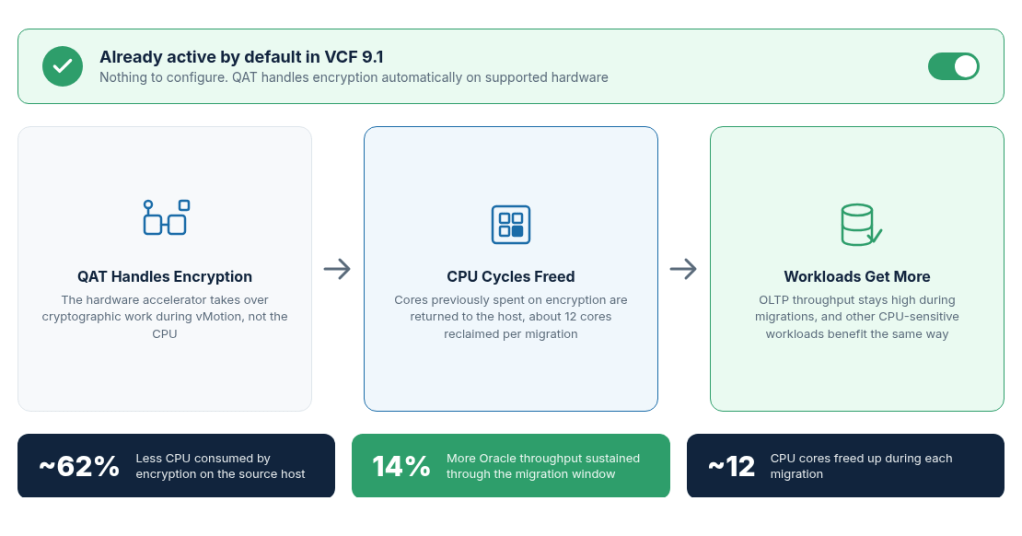
The core value of QAT offload is not about migration speed. It is about what you get back. Every core of CPU capacity that QAT keeps off encryption is a core your workload reclaims for productive work. In our tests, that translated to 14% more Oracle throughput sustained through the migration window and roughly 62% less CPU capacity consumed by encryption on the source host, the equivalent of about 12 cores freed up during migration.
For teams running dense OLTP environments, those recovered cycles can mean the difference between maintaining transaction throughput during maintenance windows or seeing it dip. For broader mixed-workload environments, the benefit profile is similar. The host CPU can dedicate more of its attention to running workloads while QAT handles the encryption.
There’s also an operational angle. Because QAT keeps most of the CPU tax off the source host during migrations, hosts running frequent vMotion activity, active DRS clusters or evacuation-heavy maintenance schedules retain more CPU headroom for production workloads throughout those events, rather than needing to budget extra slack for encryption overhead.
What This Means for You
If you are running VCF 9.1 on supported Intel Xeon hardware, QAT offload is already active. Nothing to configure in your virtualization environment. The practical question is what those recovered CPU cycles unlock for your environment. For OLTP-heavy workloads like Oracle, the answer is straightforward: transaction throughput that QAT reclaims for the application. For other CPU-sensitive workloads, the benefit profile is similar.
Summary
QAT offload in VCF 9.1 delivers approximately 62% less CPU overhead on the source host, 14% more Oracle throughput sustained through the migration window, and lower variance in migration time and application performance across repeated runs. It happens transparently at the infrastructure layer, on hardware most Intel Xeon deployments already include. Encrypted vMotion continues to do exactly what it has always done: protect your workloads in transit. QAT offload simply lets it do that while returning CPU resources to the workloads that need them.
If you are not yet on VCF 9.1, this is a concrete, quantified reason to move. If you are already there, this work is already happening in your environment. Check your Intel Xeon SKU at http://ark.intel.com to confirm QAT support and start reclaiming those CPU cycles today.
Special Thanks
A big thank you to Sreekanth Setty, and the performance engineering team for their contributions, testing work, and feedback that made this post possible.
If you are going to VMware Explore 2026, make sure to attend the following sessions about Intel QAT on VCF 9.1.
- Breakout Session: Accelerating Workloads and Infrastructure with Intel QuickAssist Technology [CLOB1883LVS]
- Quick Talk: Accelerating Workloads with Intel Built-in Accelerators [CMTYQT1745LV]
Discover more from VMware Cloud Foundation (VCF) Blog
Subscribe to get the latest posts sent to your email.