
Updated: 04/01/2026
Since the launch of VMware Cloud on AWS, VMware (now Broadcom) and AWS have collaborated to deliver customers an expanding portfolio of purpose-built bare-metal instances, from the original i3.metal and i3en.metal to the high-density i4i.metal. Today, we are excited to announce the launch of the i7i.metal-24xl instance type for VMware Cloud on AWS.
Powered by 5th Generation Intel® Xeon® Scalable processors (Emerald Rapids), third-generation AWS Nitro SSDs, and high-speed DDR5 memory, the i7i.metal-24xl delivers a step-change improvement in storage I/O throughput and compute efficiency without any changes to your existing VMware operational model.
As more customers migrate their most demanding workloads to the cloud, the new i7i instance delivers the best compute and storage performance among x86-based storage-optimized Amazon EC2 instances. VMware Cloud on AWS customers benefit from meaningfully better I/O throughput, lower latency, and improved price-performance compared to the previous generation.
Key Specifications
The i7i.metal-24xl is a general-purpose bare metal instance engineered for I/O-intensive enterprise workloads that require the highest possible random IOPS performance with predictable, sub-millisecond latency.
| Specification | i7i.metal-24xl |
|---|---|
| Processor | 5th Gen Intel Xeon (Emerald Rapids) |
| vCPUs | 96 |
| Physical Cores | 48 |
| Memory | 768 GiB DDR5 (5600 MT/s) |
| Local NVMe Storage | 6 x 3.75 NVMe SSDs |
| Usable Capacity* | vSAN OSA ~ 13 TB* vSAN ESA ~ 20 TB* |
| Network Bandwidth | 56.25 Gbps |
Source: Amazon EC2 I7i Instances — aws.amazon.com/ec2/instance-types/i7i
* Usable capacity is an estimate only. For vSAN-optimized configurations on a 3-node cluster, actual usable capacity will vary depending on workload profile, FTT/RAID policy, and compression/deduplication settings applied by VMware vSAN.
Regional Availability
The i7i.metal-24xl instance type is available today for purchase in the following AWS Regions:
| Geography | AWS Regions |
|---|---|
| Americas | US East (N. Virginia), US East (Ohio), US West (Oregon), US West (N. California), Canada (Central) |
| Europe | Europe (Ireland), Europe (London), Europe (Frankfurt), Europe (Stockholm), Europe (Milan) |
| Middle East | Middle East (Bahrain) |
| Asia Pacific | Asia Pacific (Singapore), Asia Pacific (Sydney), Asia Pacific (Melbourne), Asia Pacific (Tokyo), Asia Pacific (Seoul), Asia Pacific (Osaka), Asia Pacific (Mumbai), Asia Pacific (Hyderabad) |
For more information, visit AWS Regions and Availability support.
Cluster Configuration and Flexibility
VMware vSAN runs natively over the local NVMe drives on each i7i.metal-24xl host. With vSAN compression enabled, a 3-node cluster can deliver meaningful usable capacity depending on workload characteristics, FTT/RAID policy, and data reduction ratios. Mileage will vary, so customers should validate sizing against their specific data profile.
Hyper-threading is enabled by default on the i7i.metal-24xl, providing 96 logical cores per host which is well suited for applications that benefit from increased CPU thread parallelism.
For customers with specific application performance or software licensing requirements, VMware Cloud on AWS supports a Custom CPU Core Count option, giving you control over the physical cores exposed per host. The following configurations are supported for i7.metal secondary clusters:
- 3+ node clusters: 8, 16, 24, 30, or 36 physical cores per host
- 2-node clusters: 16, 24, 30, or 36 physical cores per host
This flexibility is particularly valuable for per-core licensed software such as Oracle Database and Microsoft SQL Server, where reducing active core count can significantly lower licensing costs without sacrificing the memory and storage capacity of the host.
Customers can also opt-in for a multi-availability zone Stretched Cluster deployment for new SDDCs with i7i.metal-24xl instances, providing high availability for their workloads across two AWS availability zones within a single region. Note that Stretched Cluster SDDCs are enabled with vSAN OSA by default.
Purchasing i7i.metal-24xl Subscriptions
You can contact your Broadcom account representative to learn more about i7i pricing, region availability, and purchasing options. If you do not know who your account representative is you can reach out to Broadcom sales.
Remember that i7i requires existing deployments to be upgraded to SDDC version 1.26v2 for cluster conversions and new secondary cluster deployments. To request an early upgrade, open up a support request with your organization and SDDC details as well as a requested upgrade date, and the VMC support team will coordinate the next steps.
Deploying and Migrating to i7i.metal-24xl
Customers can choose to deploy a new SDDC with the i7i.metal-24xl instance or migrate their workloads from existing i3.metal, i3en.metal, and/or i4i.metal nodes to the new i7i.metal-24xl instance. The i7i instance type is only available for SDDCs on version 1.26v2.
Deploy a New SDDC
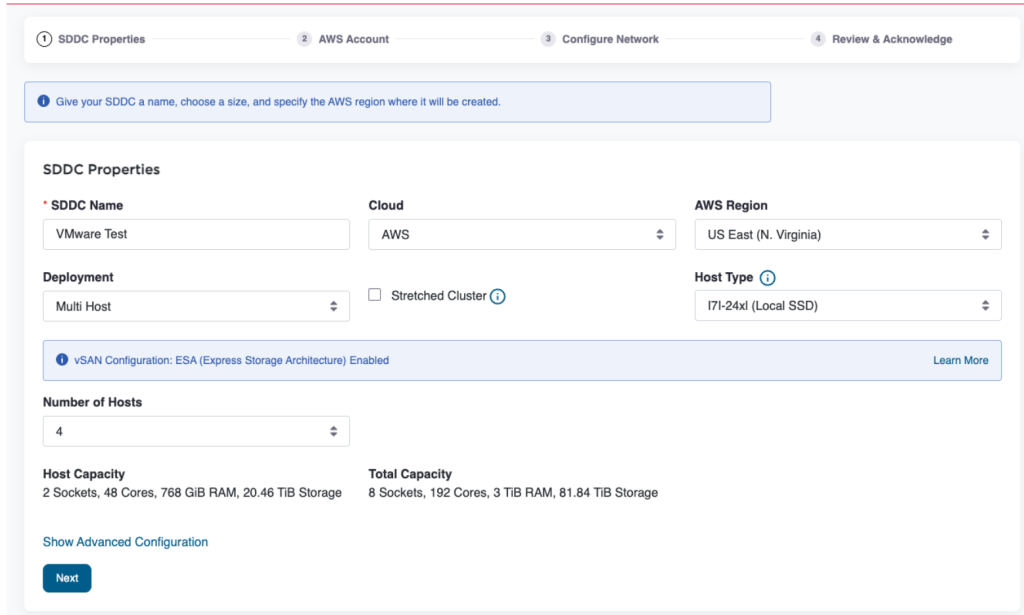
Any newly deployed SDDCs will be on the latest SDDC Version 1.26v2 and will have vSAN ESA by default. For detailed instructions, see how to Deploy an SDDC from the VMware Cloud Console.
- Log in to the VMware Cloud Console at vmc.broadcom.com.
- Choose Create SDDC and select i7i.metal-24xl as your host instance type.
- Configure cluster size (minimum 2 hosts) and complete the remaining steps.
- Complete SDDC deployment. VMware handles ESXi, vSAN, vCenter, and NSX bring up automatically.
Add a Secondary Cluster to an Existing SDDC
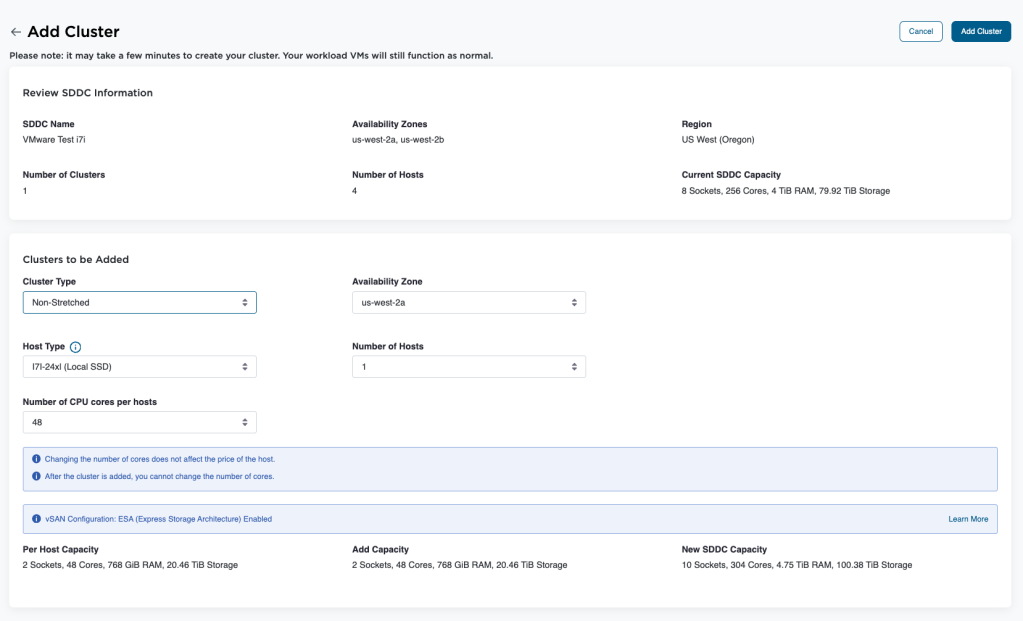
You can add a new cluster using the i7i.metal-24xl to an existing SDDC (after upgrading to 1.26v2) without disrupting running workloads. Once provisioned, vSphere vMotion can be used to migrate VMs from existing clusters to the new i7i cluster with minimal impact. The new cluster will have SDDC Version 1.26v2 and will be vSAN ESA by default. For detailed instructions, see how to Add a Cluster.
Convert from i3 / i3en / i4i Host Clusters
There are several options to migrate or convert existing i3, i3en, and i4i clusters to i7i.
- Customers running on i3.metal or i4i.metal or i3en.metal can simply migrate to i7i.metal-24xl using vSphere vMotion.
- For eligible configurations, VMware also offers a cluster conversion service upon request. For detailed instructions, see Converting Host Types in Clusters.
- Please note that clusters running virtual machines on Virtual Machine Hardware version 21 are not eligible for conversion from i4i to i7i due to hardware compatibility limitations.
For assistance with sizing and cluster conversion planning, please contact your Broadcom account team. You can also use VMC Sizer for host-based estimates, workload-based estimates, or cluster conversion estimates.
Get Started
Contact your Broadcom representative to discuss how the i7i.metal-24xl can modernize your VMware Cloud on AWS environment. Visit vmc.broadcom.com to configure a new SDDC, explore sizing options, or request a workload assessment.
Discover more from VMware Cloud Foundation (VCF) Blog
Subscribe to get the latest posts sent to your email.