
While VMware vSphere and vSAN provide a common and consistent way of delivering high availability of your applications and data through virtualization, it is not uncommon to see customers using application-level clustering capabilities in a virtualized environment. In vSAN for VMware Cloud Foundation (VCF) 9.1, we’ve made the management of these clustered applications much easier.
Let’s look at how provisioning and capacity management for clustered applications like Oracle RAC and Microsoft Windows Server Failover Clusters (WSFC) are integrated into the latest version of VCF.
Solving the Disk Expansion Maintenance Window
Applications that deliver high levels of availability using their own techniques typically consist of two or more application instances running in their own respective VMs, and one additional location to help determine quorum under various potential failure conditions. This additional location is typically a shared virtual disk or VMDK which requires each application to be able to read and write to that shared VMDK. For more information, see the post: “Application Versus Infrastructure-Level High Availability with vSAN in VMware Cloud Foundation.”
VMDKs that have been configured to be accessed concurrently are intended only for these types of clustered applications that must be able to write data to the same block volume at the same time. The sharing of a VMDK can be achieved in one of two ways:
- Multiwriter flag. This setting will toggle off vSphere’s locking mechanism that assures a VMDK can be accessed by one VM/App instance. This is used with the assumption that a clustered application has its own logic in place (e.g. locking mechanisms, write ordering, etc.) to the mechanisms in place to ensure writes are committed properly. Common clustered applications that use the multiwriter flag include Oracle RAC and Redhat Cluster Service (RHCS).
- Clustered VMDK. This newer method uses a SCSI3-Persistent Reservations (SCSI3-PR) over a shared virtual SCSI bus. Through an enhanced set of SCSI-3 commands, it can act as the arbiter of access to a shared virtual disk without having to override the locking mechanisms of vSphere using the multiwriter flag. Currently, this method only supports WSFC installations.
An operational burden existed any time the shared VMDK needed to be expanded in capacity. The entire application would need to be taken offline, expand the virtual disk, then power up the application cluster. This maintenance window was antithetical to the idea of application clustering – an implementation that is often associated with mission-critical applications. Shared disks on traditional storage arrays using RDMs typically did not have this limitation, and prevented some from adopting vSAN for applications that used clustering.
vSAN for VCF 9.1 supports the ability to dynamically expand (sometimes known as “hot-extend”) a shared VMDK used by these clustered applications. Supported in both vSAN ESA and OSA, it completely eliminates the need to take the application cluster offline to extend the capacity of the shared VMDK. This means zero downtime for the application clusters!
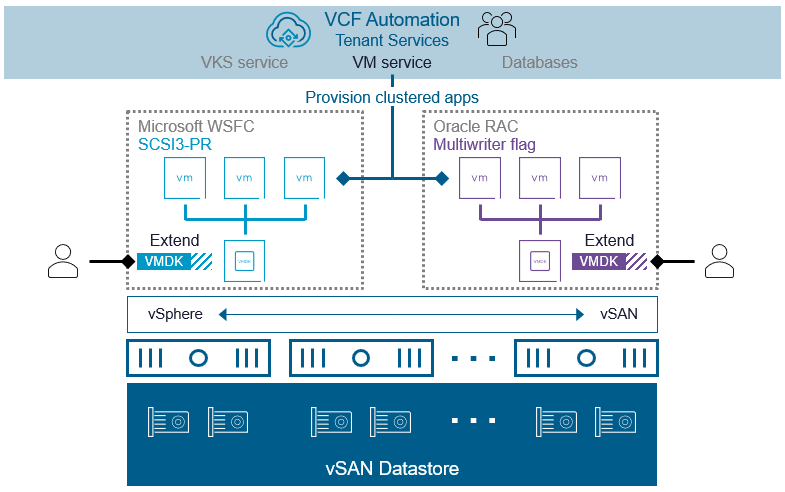
Figure 1. Dynamically expand shared VMDKs used for clustered applications in vSAN for VCF 9.1.
This process is transparent to the application, and follows three distinct phases to minimize any disruptions.
- Pre-grow the VMDK. vSAN extends the physical capacity of the virtual disk and updates the back-end metadata. The VM is not yet aware of this change, and there is zero impact on performance during this phase.
- Stun VM. To update the virtual disk’s descriptor file and vSCSI activities, the VM undergoes a brief stun. The stun during this time is designed to be minimal to reduce potential interference with the application.
- Unstun and Recognition. Once the change is finalized, the VM is unstunned, and the guest operating system transparently recognizes the expanded capacity.
Improved Deployment Flexibility
With vSAN in VCF 9.1, deployment of these clustered applications like Oracle RAC and WSFC can now be achieved through VCF Automation. Historically VCF Automation was unable to provide this ability. The Supervisor lacked the ability to provide multiwriter support as its persistent volumes were backed by CNS volumes.
VCF Automation can deploy clustered applications that use shared virtual disks. The VM service has been updated to account for the necessary fields that will provide the ability to explicitly configure the virtual storage controllers, and the necessary settings to provision a shared virtual disk. This will accommodate both Oracle RAC that uses a shared VMDK through the multiwriter flag, and WSFC that uses a shared VMDK through SCSI3-PR.
Do you have more questions on vSAN? Check out the extensive list of frequently asked questions on the vSAN FAQs document.
Summary
vSAN in VCF 9.1 ensures that your most critical applications stay online, even as their data requirements grow. If you are still running clustered applications on RDMs using legacy storage just for the sake of expansion flexibility, it’s time to take another look at vSAN.
Discover more from VMware Cloud Foundation (VCF) Blog
Subscribe to get the latest posts sent to your email.