
For networking and operations teams, a single incident can require evidence from several parts of the private cloud. Gathering that evidence often means moving between management consoles, running diagnostic commands, and checking the results against known issues.
Recent advancements in agentic AI technologies can help evolve network operations by chaining diagnostic reasoning, live telemetry verification, and policy checks into closed-loop investigation workflows. Rather than treating issues as isolated telemetry counters, agents formulate hypotheses, query APIs and CLI endpoints, evaluate evidence across components, and recommend or execute targeted remediations.
This blog explores the use of agentic AI to deliver AI-assisted diagnostics and advisory for networking across VMware Cloud Foundation (VCF). Available as a free-to-download Agentic AI Hub Fling on the Broadcom Support Portal, these specialized agentic workflows assist in investigating networks, flow analysis, and storage issues using live infrastructure tools available through Model Context Protocol (MCP) integrations.
What It Does
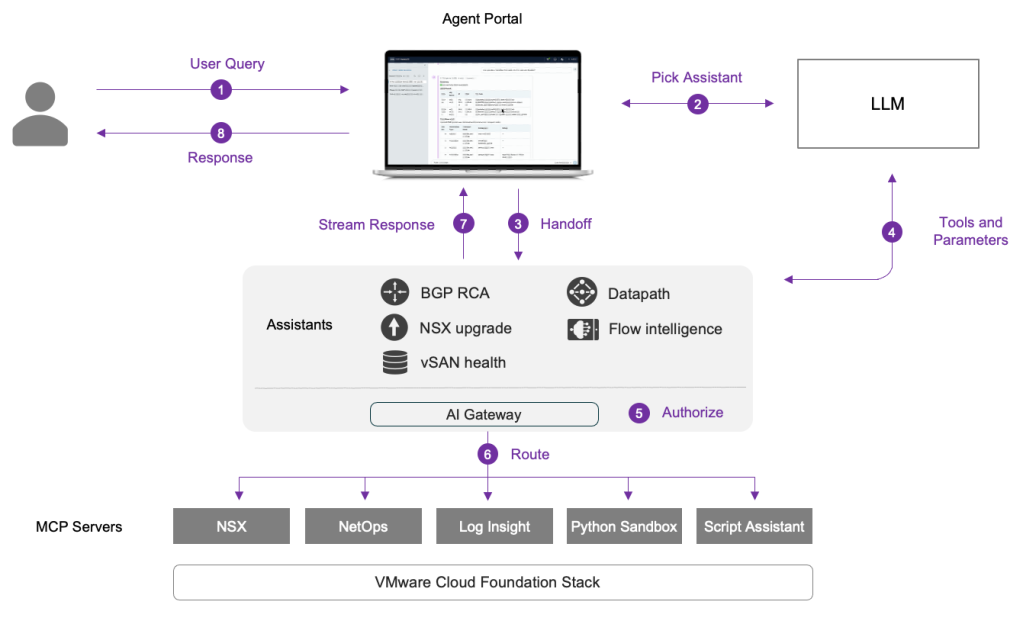
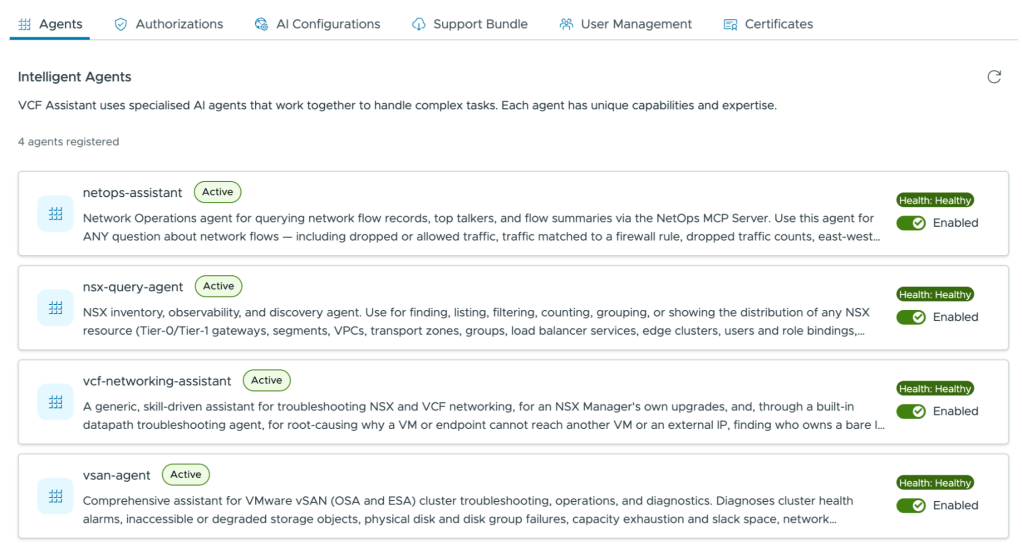
Agentic AI tools turn an operator’s question into a guided investigation. Domain skills define the checks and tools for each task, while MCP integrations retrieve live inventory, configuration, operational state, and diagnostic results. The assistant brings the findings together and recommends what to check or do next.
The Fling focuses on diagnosis and recommendations, using connectivity probes and diagnostic runbooks to help operators investigate issues. Operators review the findings and decide which configuration changes to make.
Network Diagnostics and Flow Analysis
Network investigations often span NSX Manager, Edge Node diagnostics, and VCF Operations for Networks. Agentic AI brings specialized workflows to some of the most demanding tasks:
- BGP troubleshooting – Investigate failed or flapping peering sessions using live diagnostic runbooks. Check session state, routes, connectivity, and relevant Edge evidence before recommending a next step.
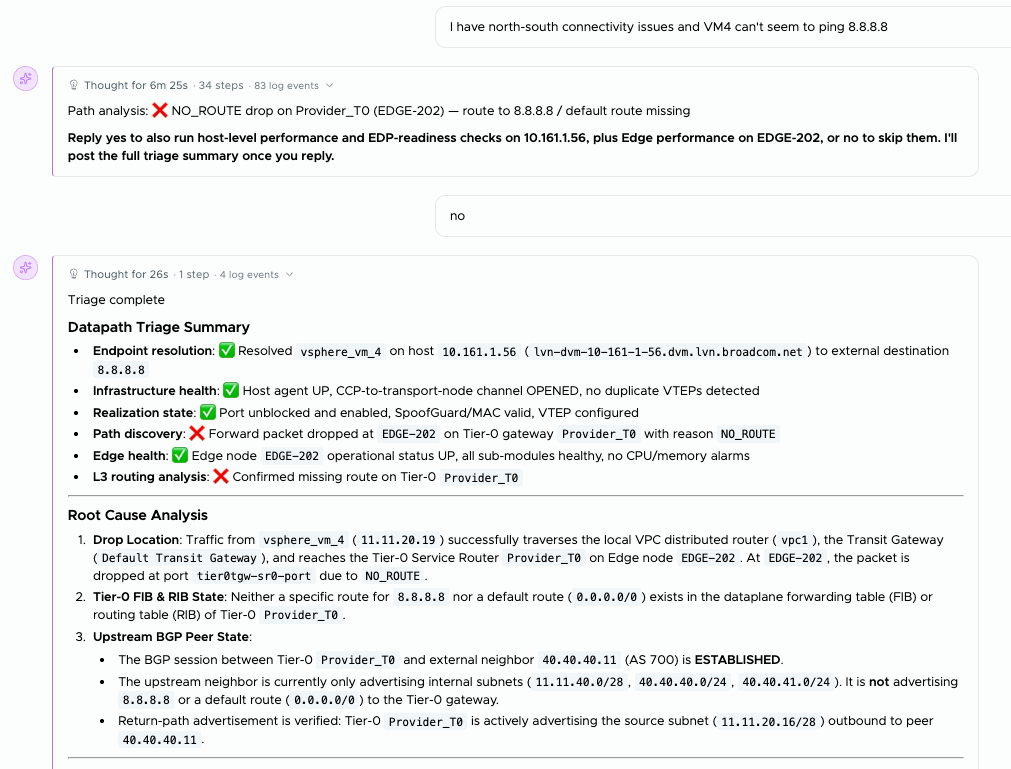
- Network Datapath troubleshooting – Investigate connectivity between a source and destination using Traceflow or LiveTrace. Review forwarding observations, identify reported drops, and use the results to guide follow-up checks.
- Edge and Virtual Network Appliance (VNA) capacity – Examine datapath CPU, memory-pool utilization, and relevant alarms to help assess capacity pressure and sizing needs.
- NSX upgrade readiness – Review supported upgrade paths, environment health, and pre-checks before a maintenance window. Findings help administrators decide what needs attention before proceeding.
- Flow analysis – Translate natural-language questions into validated queries for VCF Operations for Networks, then analyze traffic patterns, top talkers, drops, and anomalies.
Consider the question, “Why can’t App-VM-01 reach DB-VM-02 on port 5432?” Agentic AI-based diagnostics can find the endpoint VMs or VMware vSphere Kubernetes Service (VKS) pods, run the connectivity diagnostic workflow, and report the forwarding observations and any drops it finds. The operator gets evidence about the connection in question, along with follow-up checks and recommendations based on the results.
MCP Servers
The agentic AI agents connect to VCF components through MCP servers. Each server exposes tools that query live inventory, configuration, and operational state, along with prompts that give the model domain context. This grounds the assistant’s reasoning in how each product actually works and in the current state of the environment.
Here’s the list of MCP servers.
| NSX MCP Server | Connects to NSX Manager endpoints to retrieve inventory, configuration, realization state, and diagnostic results for networking investigations. |
| VCF Operations for Networks MCP Server | Connects to VCF Operations for Networks endpoints to query flow records, top talkers, and traffic patterns for flow analysis. |
| Log Insight MCP Server | Connects to Log Insight endpoints so assistants can search logs and correlate events with other findings. |
| Python Sandbox MCP Server | Runs short Python scripts in a WASM-isolated sandbox. Scripts can call other MCP tools through the AI Gateway to combine and analyze data from several sources. |
| Script Assistant MCP Server | Provides semantic search over VCF SDK documentation for PowerCLI and Python, to help with building automation scripts. |
Two Ways to Use Agentic AI for Networking
Networking teams can use agentic AI through the built-in UI or connect its MCP tools to an AI client they already work with.
Guided investigations in the UI: Operators sign in through a browser, and the Agent Portal routes each question to the appropriate assistant. The assistants bring domain skills, investigation plans, diagnostic runbooks, and validation rules to the task. Findings can include topology maps, data cards, and charts, with human approval for sensitive tool calls handled in the portal. This is the full built-in assistant experience for operators working through an investigation.
MCP access from other AI harnesses: Teams can connect an MCP-compatible client, such as Claude Code, Cursor, or Gemini CLI, to the Agentic AI MCP endpoint. This approach does not use the built-in assistants. Instead, it gives teams direct access to the MCP tools and resources, which they can build into their own diagnostic workflows and automation. The external client and its model provide the reasoning and workflow; agentic AI platform’s built-in agent skills, investigation plans, guardrail prompts, and rich UI are not included in this approach.
Both options use the same underlying MCP servers, identity framework, role-based tool authorization, and audit logging. Direct MCP access retains those platform access controls, while giving teams flexibility to build their own workflows around the tools.
What Comes Next
The Fling gives customers an opportunity to try these workflows in lab and non-production environments on problems they recognize: a flapping BGP peer, a connection that fails between two applications, or a cluster running short of capacity. Where did the assistant save time? Which checks were missing? Was the recommended next step useful? Those answers will help determine what we improve next.
Areas being explored include vSphere configuration and desired-state inspection, broader lifecycle prechecks, and investigations that connect evidence across compute, networking, and storage. The platform’s modular skills allow our engineering and domain teams to add and refine diagnostic workflows.
Our goal is to provide an agentic AI platform where operators can carry the context of an issue into the specialist diagnostics they need. What we learn through the Fling will help shape that experience and make AI assistance a more useful part of everyday private cloud operations.
Download and learn more on the Broadcom Support Portal.
Discover more from VMware Cloud Foundation (VCF) Blog
Subscribe to get the latest posts sent to your email.