
Introduction
The transition to VMware Cloud Foundation (VCF) will typically involve questions about not only new functionalities, but also functionalities and capabilities that are already in use. One of the most common use cases for vSphere is virtualizing business-critical applications (BCA). Running these applications on vSphere is a well-established, industry-validated practice with widespread adoption. With VCF, the Supervisor and its VM Service capability, the question was whether we can run BCA on top of a Supervisor VM Service. The answer is YES!
This multi-part series will focus on the design and implementation of Microsoft SQL Failover Cluster Instances (FCI) on top of VCF 9.x. From the basic Supervisor deployment to a fully fledged VCF Automation blueprint, we will go through the different requirements alongside their architectural impact and then finally walk you through the implementation steps.
- Part 1 (this article) focuses on Requirements, Topology and Methods.
- Part 2 focuses on the Supervisor direct implementation.
- Part 3 focuses on the VCF Automation manual implementation.
- Part 4 focuses on the VCFA Automation blueprint based implementation.
What will you learn from this article?
By the end of part 1, you will be able to identify what is required to build the infrastructure side of the MSSQL FCIs, including mapping the traditional VM objects to VM Service objects. In addition, you will be able to describe the topologies that will be used to build the platform, which will be covered in parts 2-4.
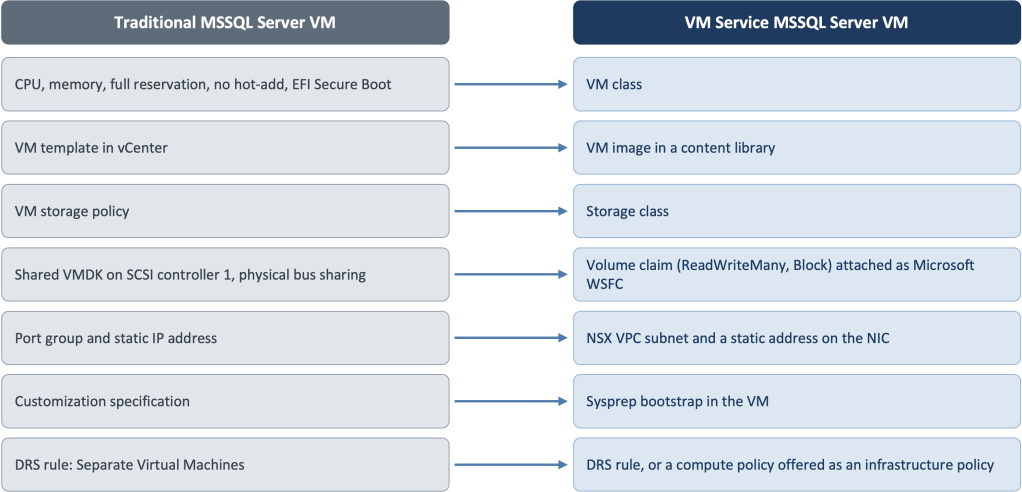
Traditional VMs Versus VM Service
Before going further, we will map out and compare a standard MSSQL VM versus a VM Service based MSSQL VM.
MSSQL FCI Cluster Requirements
A Windows Server Failover Cluster (WSFC) is a group of Windows Servers that provides logically a since service that is highly-available, where if one node fails, another takes over. For MSSQL FCI, the active node will own the shared disks, the MSSQL cluster computer object which relatively owns the MSSQL cluster listener. The following table details what will be required from the platform to achieve this:
| Requirement | Requirement Details | Mandatory/ Optional | How can it be achieved in VCF 9.x? |
| Shared Disks | Same disks shared by the two MSSQL nodes. | Mandatory | ReadWriteMany (RWX) blocks volumes on vSAN (ESA/OSA) or any storage protocol that supports multi-writer disks. |
| Networks | Two networks, primary that is reachable and routed, a heart beat / cluster network that is not necessarily routed. | Mandatory | Two Virtual Private Cloud (VPC) subnets, one that can be public and another one that is private. Do note that the public one can be private as well depending on the infrastructure services placement (within the tenant or outside of the tenant). |
| Performance Guarantee | Compute and Memory reservations, no hot-add, and UEFI with Secure Boot. | Optional | The custom class is mandatory, however reservations are not. |
| Fault Domains | An MSSQL node must reside on the same physical host at any point in time. | Mandatory | DRS VM-to-VM anti-affinity rule / compute policy / infrastructure policy. |
| Infrastructure Services | ADDS, DNS, NTP, etc. | Mandatory | Sysprep can optionally be leveraged to facilitate the configuration, however it is mandatory that those infrastructure components exist and reachable from the primary network. |
The Building Blocks (based on VCF 9.1.1)
| Component | Expected Configuration |
| Workload Domain | A VCF Workload Domain, this could be a consolidated management + resources, or a standard workload domain that is separate from management. |
| VCF Networking | A VPC with public and private subnets. Depending on the scenario this would be either created via the NSX Manager or via VCF Automation Tenant Management. |
| Storage | Within the context of this article, we are using vSAN, however any supported storage type that provides the ability to configure multi-writer VMDKs should be okay to be used as part of the storage policy configuration. |
| Supervisor | A cluster with vSphere Supervisor activated using VPC networking. |
| Supervisor VM Service | The Supervisor service that runs VMs. Its controller, VM Operator, turns a VirtualMachine object into a VM in vCenter. |
| VM Class | A custom VM Class based on the preferred MSSQL Server node requirements, in this environment we are using values to show functionality, however those values are not to be considered as a best practice. |
| vSphere Namespace | A vSphere Namespace with its own quota, permissions, VM classes, images and storage classes. From a VCF Automation perspective, this will be done via tenant management. |
| Guest OS | Within this environment we are using 2 VMs running Microsoft Windows Server 2022 (Standard), with the Failover Clustering feature enabled. Sysprep optionally can be used to automate the initial OS configuration. |
| Database | Within this environment we are using Microsoft SQL Server 2022 Failover Cluster. |
High-Level Architecture
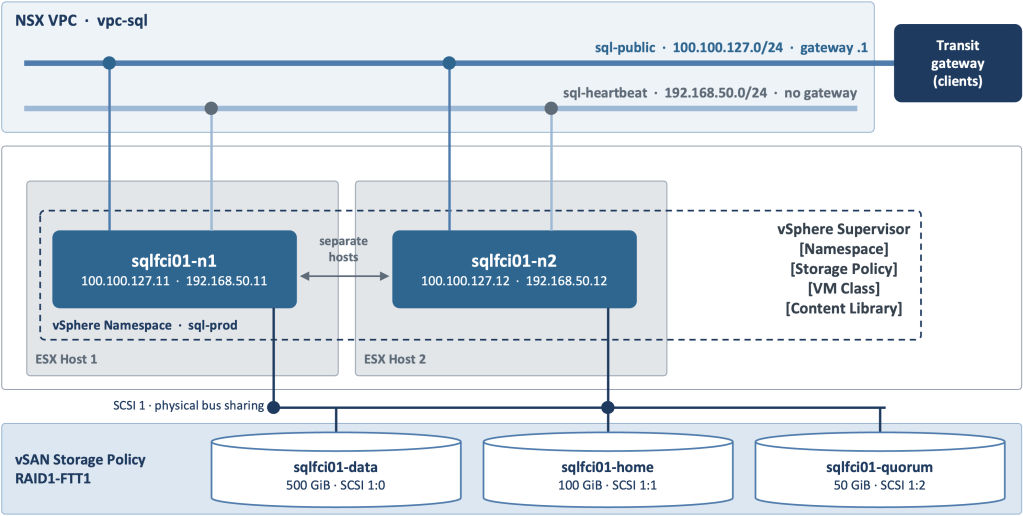
This high-level architecture includes the aspects related only to MSSQL FCI use case, and it will not cover aspects that are related to VCF Fleet, Instances or Workload Domains. In addition, the high-level architecture focuses primarily on the data plane, where the other parts of the series will cover achieving the same use case across the different management planes.
General Overview
Like any vSphere Namespace, this one has its quote allocated, storage policies defined, VM Classes and Content Library assigned. From a networking standpoint, each node has two network interfaces:
- NIC 1 is connected to sql-public which is the client-facing subnet, and its default gateway leads through the VPC’s transit gateway to the clients. The term public (which is also referred to as primary) here means client-facing, and from an NSX terminology the subnet can use the Private – Transit Gateway access mode, or Public when the addresses must be routable outside the organization.
- NIC 2 is connected to sql-heartbeat, which is the private subnet that stays inside the VPC and has no gateway.
On the storage side, both nodes reach the same three disks through SCSI controller 1 (SCSI controller 0 will be used by the OS disk(s) by default), which uses physical bus sharing (the sizes/values are just examples):
- sqlfci01-data (500 GB) is attached at SCSI 1:0 and holds the user databases.
- sqlfci01-home (100 GB) is attached at SCSI 1:1 and holds the SQL Server instance files and system databases.
- sqlfci01-quorum (50 GB) attached at SCSI 1:2 and acts as the cluster’s disk witness.
A caveat with respect to having shared volumes/disks, that they must be kept within the zone and mapped to one vSAN cluster. Although in VCF 9.1 a zone can span several clusters, a vSAN datastore belongs to one cluster, and both nodes must access the same datastore where the volumes/disks will be residing.
Shared Volumes
Since this is a core area across the entire series, we needed to go through more details around it.
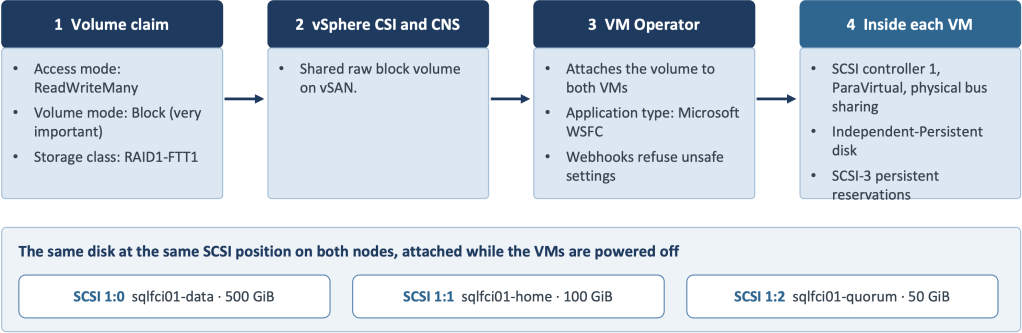
- It all starts with the volume creation, and in the Supervisor world, this is translated into a persistent volume claim where for each disk, we define:
- Access mode -> ReadWriteMany
- Volume mode -> Block
- Storage Class -> RAID1-FTT1
- Then comes the roles of the vSphere CSI driver, which acknowledges that the Supervisor has the shared-disk capability, and creates a shared raw block volume on vSAN.
- To realize the results, each Windows server will see an ordinary SCSI disk, and the cluster uses SCSI-3 persistent reservations to decide which node owns it, which is the job of the Failover Cluster mechanism.
How to build this?
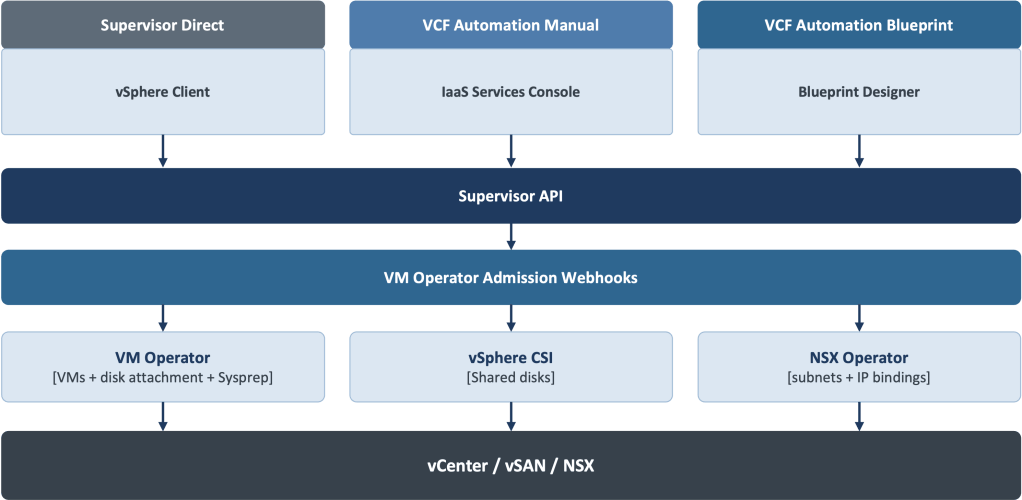
Given that the underlying consumption layer will always remain the same, we can build this using 3 methods:
| Method | Persona | Use Case |
| vSphere Client and the Local Consumption Interface, with kubectl for two gaps | vSphere Administrator | No VCF Automation, or a small platform team |
| The VCF Automation IaaS Services Console | Organization Administrator | Multi-tenant self-service with manual provisioning. |
| A VCF Automation blueprint in the catalog | Organization Administrator | Multi-tenant self-service with repeatable and reusable builds. |
Up Next
Head over to Part 2, where we will build on this topology with the vSphere Client and the Local Consumption Interface, which represents the Supervisor Direct option.
Discover more from VMware Cloud Foundation (VCF) Blog
Subscribe to get the latest posts sent to your email.