

Part 4 of 4: Governing the Agentic Loop – Bringing Platform as a Service and Governed Agentic Loop with Tanzu and AgentMinder
An AI agent needs more than a model. It needs instructions and skills, memory to retain context, and tools that let it interact with the systems around it. Every connection makes the agent more useful. Every connection also gives us another access decision to govern.
A marketing agent might need campaign data, a content library, and publishing tools. An infrastructure agent might need Kubernetes inventory and VMware Cloud Foundation management tools. Both can use the same underlying model, but they should have very different authority.
If you want to see the demo first, jump to the video at the end of this post where we go through the process of building an agent, controlling its bound services using a bind, controlling access to specific intents through a grant in AgentMinder and finally scrub PII form being processed on the agent itself.
In Part 1, we established compute tenancy and network isolation.
In Part 2, we applied VMware vDefend microsegmentation to control traffic between AI components.
In Part 3, we added application-layer inspection with Avi WAF and authenticated, encrypted communication with Istio.
Those controls establish where traffic can travel and how we protect it. Now we need to govern what an agent can do through an allowed connection.
An authenticated agent can send a perfectly valid request over an encrypted channel and still ask for something outside its responsibilities. Counting virtual machines and changing a network may use the same infrastructure endpoint. The distinction has to be enforced above the IP address and port.
In this lab, we use Tanzu Platform and AgentMinder to demonstrate three controls within agentic governance: bind, grant, and scrub. We deploy an agent, connect its services, authorize specific groups of tools, and filter sensitive content on the model path.
What the Agent Needs: Skills, Memory, a Model, and Tools
The agentic loop starts with a request. The agent sends context to a model, selects a tool, examines the result, and decides whether another action is necessary before answering.
Several dependencies support that loop:
| Dependency | What it provides | What we need to govern |
| Skills and instructions | Procedures and guidance for completing a task | Which instructions are supplied and who can change them |
| Memory | Previous context, stored facts, and task history | What the agent can read, retain, and update |
| LLM | Reasoning, tool selection, and response generation | Which model service the agent can use |
| Tools through MCP | Access to external data and actions | Which services and operations the agent may invoke |
Instructions help the agent choose a sensible action. The platform and authorization layer enforce whether that action is allowed.
Our demo concentrates on the model and MCP connections. Skills and memory are in the same access model, but we are not demonstrating separate policy controls for each of them in this walkthrough.
MCP: A Door That Describes Its Tools
Model Context Protocol, or MCP, gives an agent a standard way to discover and invoke capabilities exposed by an endpoint, or a server.
Think of an MCP server as an active API doorway: it presents the available tools, explains what they do, and describes the arguments each tool accepts. The agent discovers those definitions through tools/list and invokes a selected tool through tools/call. The server’s implementation performs the underlying work. See the MCP tools specification.
Consider an infrastructure platform like VCF with thousands of API operations. We could point an agent directly at the environment, give it a username, password, and shell, and ask it to complete a task. The agent would then have to read the documentation, identify the right CLIs or APIs, work out the parameters, execute commands, interpret errors, and keep looping until it succeeds. That discovery and trial-and-error process can be slow, error-prone, and expensive in tokens. An MCP server gives the agent a structured starting point: a defined set of tools that wrap the underlying CLI commands and API calls, with descriptions and input schemas explaining how to invoke them. The agent selects the appropriate tool while the server handles the integration details, reducing repeated discovery and potentially cutting both token consumption and execution time. That tool interface also creates a doorway where we can enforce governance: which agent may invoke which tool, against which resources, and under what conditions.
Eight or ten tools could cover a focused workflow across thousands of APIs. Now, MCP requires a good design, enterprise implementation, rigorous testing and verification. Our VCF MCP catalog grew during the lab as we separated capabilities into more precise tools.
This makes the next question unavoidable: discovering a tool tells the agent what it can do. Who decides whether it is allowed to execute it?
The Lab Architecture: Two MCP Paths, Different Enforcement
We deploy the demo agent on Tanzu Platform, running on VCF. Avi provides the application ingress and WAF layer shown in the architecture, vDefend provides the L4 network segmentation preventing the agent from reaching any system directly. AgentMinder runs on a VKS cluster.
As you can see in the diagram below, the agent has three service connections:
- A private LLM service.
- A Kubernetes MCP service reached directly and not through agentminder.
- A VCF MCP service reached through the local AgentMinder sidecar and AgentMinder gateway.
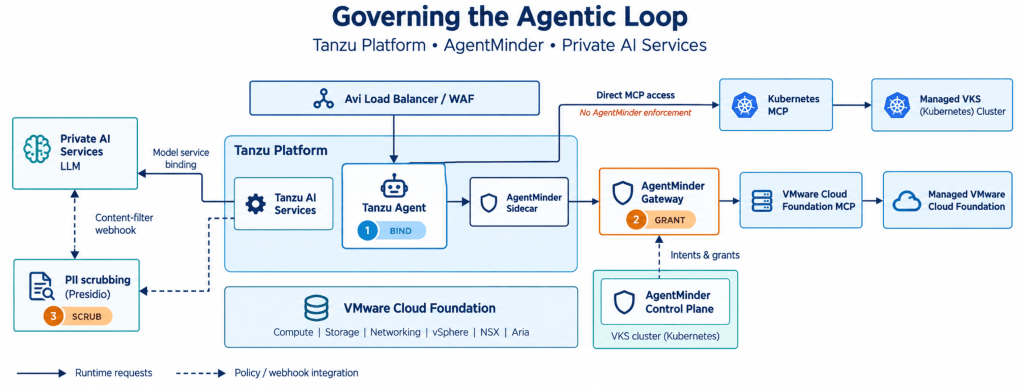
Figure 1. The agent runs on Tanzu. Kubernetes tool calls use a direct MCP connection, while VCF tool calls traverse the AgentMinder sidecar and gateway. Tanzu AI Services invokes the external PII filter on the model interaction path.
The two tool paths are deliberately different:
Agent → Kubernetes MCP → Kubernetes API
Agent → Local sidecar → AgentMinder gateway → VCF MCP → VCF APIs
Kubernetes provides our comparison case. It has no AgentMinder intent enforcement on this path. Only its MCP credentials and Kubernetes permissions apply.
VCF adds a separate additional authorization decision between connecting the service and executing a tool.
Runtime Containment: Control What the Agent Can Execute
Governance starts inside the container. Runtime containment means controlling the agent’s execution environment: the operating-system packages, binaries, libraries, credentials, and local tools available to it. We use a stripped-down container environment containing the dependencies the agent needs. Additional shells, administrative utilities, and installation privileges should be available only where the workload requires them. We use Tanzu buildpacks to assemble that environment during deployment, supplying the runtime and dependencies the agent needs from a platform-managed configuration. We test the resulting package and deploy it as an immutable artifact: updates go through a new build and deployment rather than changes to the running container. This gives platform teams a consistent, repeatable way to control what the agent runs.Together with controlled MCP access, this limits both the tools the agent can invoke remotely and the capabilities it can exercise locally.
Deny by Default: Control What the Agent Can Reach
At the network layer, we apply deny by default: explicitly allow the connections the workload needs and block the rest. This extends the Zero Trust segmentation approach we established with vDefend in Part 2. The agent should reach its approved model and tool endpoints without gaining a general route into management networks or unrelated services. On the governed VCF path, that means allowing access through AgentMinder while restricting the backend to the gateway. Runtime containment limits available capabilities; segmentation limits where those capabilities can be used.
First Control: Bind the Services the Agent Can Use
We start by pushing the prepared agent package to Tanzu:
cf push
The package includes the sidecar configuration. On its initial deployment, the application can start without a model binding, but it cannot complete a useful conversation.
Next, we bind the model service (in the video it is done though the Apps Manager UI)
Before binding services to an agent, platform engineering teams must decide which MCP servers and services are made available. In a large enterprise, granting every agent access to all available services risks resource bloat and unnecessary exposure.
The Tanzu Platform Marketplace provides a self-service catalog that lets teams curate and expose only approved, organization-suitable services to agents. This upfront governance ensures agents consume appropriate infrastructure tiers without overwhelming backend resources, establishing a clear boundary before an application ever binds or invokes a service:
|
1 2 3 |
cf bind-service infrademo-agent private-ai-llm cf restart infrademo-agent |
The agent now has the model connection it needs to reason about requests.
This is the first governance boundary. Platform teams determine which services are available to an application and who can configure those bindings. A marketing agent receives its approved marketing services. An infrastructure agent receives its approved infrastructure services.
In our lab, we then bind the two MCP services:
|
1 2 3 4 5 |
cf bind-service infrademo-agent k8s-mcp-direct cf bind-service infrademo-agent sc-infrademo-vcf cf restart infrademo-agent |
These commands use the lab’s service-instance names. The same bindings can be made in Apps Manager as it is done in the recorded demo.
Tanzu Platform’s bind-service associates the service instance with the application. In this deployment, restarting refreshes the application’s runtime environment so it can consume the new bindings. Under the hood, the binding makes the service’s connection details such as its endpoint and credentials available to the application through the VCAP_SERVICES environment variable. The agent reads those details to connect to the model or MCP service without hardcoding them into its source.
In our lab the Kubernetes binding points directly to the Kubernetes MCP server at [KUBERNETES_MCP_URL], while the VCF binding points to the local AgentMinder sidecar at 127.0.0.1:8181. Notice the difference: Kubernetes tool calls go directly to the MCP server, bypassing AgentMinder. VCF tool calls pass through the sidecar and AgentMinder gateway, where the agent’s grants determine which tools it can execute. Think of a binding as giving the agent the service’s address and connection details which for the direct Kubernetes MCP, that connection lets the agent use the tools permitted by the service’s credentials. For VCF, the binding connects the agent through AgentMinder, where a separate grant determines which groups of tools it may use. The bind establishes the connection and the grant authorizes the actions.
At this point, we have connected both services. We have not granted the demo agent a VCF intent.
Proving the Difference
We ask the agent a Kubernetes inventory question:
How many namespaces are in the Kubernetes cluster?
The request succeeds using the direct Kubernetes MCP path and its configured permissions.
Then we ask:
How many VMs do I have?
The VCF operation fails because the agent has no applicable grant.
The application is running. Its model works. The VCF service is bound. What is missing is authorization to perform the requested operation.
Second Control: Grant an Intent, Then Enforce It at Runtime
An AgentMinder intent is a grouping of tools around a defined job.
For this demo, we separate VM management from network management. VM tools belong to the first intent; network tools belong to the second. A grant authorizes an agent identity to use a corresponding intent.
That separation matters because a generic tool that accepts arbitrary API paths makes the boundary harder to enforce. If the same tool can list VMs, modify networks, and change storage, granting that tool may authorize far more than the intended job.
During the lab, we moved from broad operations toward explicit domain tool sets. VM management became a bundle of VM tools, making the scope of its grant visible and enforceable.
The word intent here refers to a configured authorization object. This does not mean that the agent can gain access to tools through its own prompts and requests. These are explicitly granted and enforced by AgentMinder.
Under the Hood: Identity, Bearer Tokens, and the Gateway
The demo agent has a registered AgentMinder identity. Its client configuration is available to the sidecar, which handles the authenticated connection on the agent’s behalf.
This is the identity and access layer. Tanzu controls who can deploy the application and configure its service bindings. AgentMinder identifies the calling agent and enforces which intents and tools that identity is authorized to use. A service binding establishes the configured connection; the grant determines the permitted operations on the governed path. Each agent therefore needs an identifiable, appropriately scoped identity so that access decisions can be attributed to the agent making the request.
The relevant request flow is:
- The agent selects a VCF tool and sends the request to the local sidecar.
- The sidecar obtains or reuses an access token for the configured agent identity.
- The sidecar presents that token to the AgentMinder gateway as a bearer token.
- The gateway evaluates the requested tool against its configured intent binding and the agent’s authorized scopes.
- An authorized call proceeds to the VCF MCP backend, which performs the corresponding infrastructure API operation. An unauthorized call is denied.
AgentMinder separates the administrative configuration of identities, intents, tool bindings, and grants from runtime gateway enforcement. Broadcom describes this gateway as the enforcement point for authenticated, authorized tool calls. See the AgentMinder announcement.
We now grant the demo agent VM management in AgentMinder and repeat:
How many VMs do I have?
The agent can invoke the VM inventory tool and answer from the returned data.
Then we ask:
How many networks do I have?
That operation remains denied. The agent is connected to the same MCP service, but the network tool belongs to an intent it has not been granted.
Finally, we grant network management and repeat the network question. The corresponding tool call can now succeed.
The demo uses inventory questions to make the boundary easy to observe. The configured VM management intent also included mutation capabilities, so it should not be described as a read-only grant. A production inventory agent could instead receive a narrower intent containing only read operations.
Discovery and Token Refresh Are Separate Concerns
Two implementation details affected this demonstration.
First, the agent’s displayed tool catalog and its execution permissions are separate. Seeing a tool in the interface does not prove that the agent can invoke it.
Second, updating a grant does not rewrite a token already cached by the sidecar. During testing, a token minted before authorization continued to carry its earlier scopes.
We configured a 60-second token lifetime for the demo identity and corrected the refresh handling used by the integration. That value is specific to the lab configuration.
Closing the Direct Backend Path
There is one more connection between this post and the earlier infrastructure work.
If the gateway enforces tool authorization, an agent must not be able to bypass it by calling the MCP backend directly.
For the deployed architecture, backend reachability therefore needs to be restricted to the gateway through the applicable routing, firewall, and application-access controls.
This is where the layers reinforce each other. AgentMinder governs which tool calls are authorized. The network and platform controls make the enforced route the only available route. The demonstrated gateway behavior is not, by itself, proof that every alternative path has been closed.
Third Control: Scrub Sensitive Content on the Model Path
An agent can be authorized to use a service and still carry information that should not reach the model in its original form.
For the final demonstration, we use Tanzu AI Services webhooks to invoke an external PII scrubber built with Presidio. It could be any system that supports being called using a webhook.
This integration is separate from AgentMinder’s MCP authorization path. AgentMinder governs tool access. Tanzu AI Services provides the interception point for the content filter.
In the lab build, the AI Services Policy configuration exposed the webhook capability as a technical preview, enabled through webhook. The integration provided these endpoints:
/prompt
/response
/response/stream
Our pii-scrub application implements the filtering service. Presidio identified configured entities, and its anonymization functionality replaces detected values with labels.
We submit a synthetic contact card and ask the agent to repeat its contents. The filter acts on the AI Services processing path as the model is replying that it cannot disclose personal information does not prove that the scrubber ran.
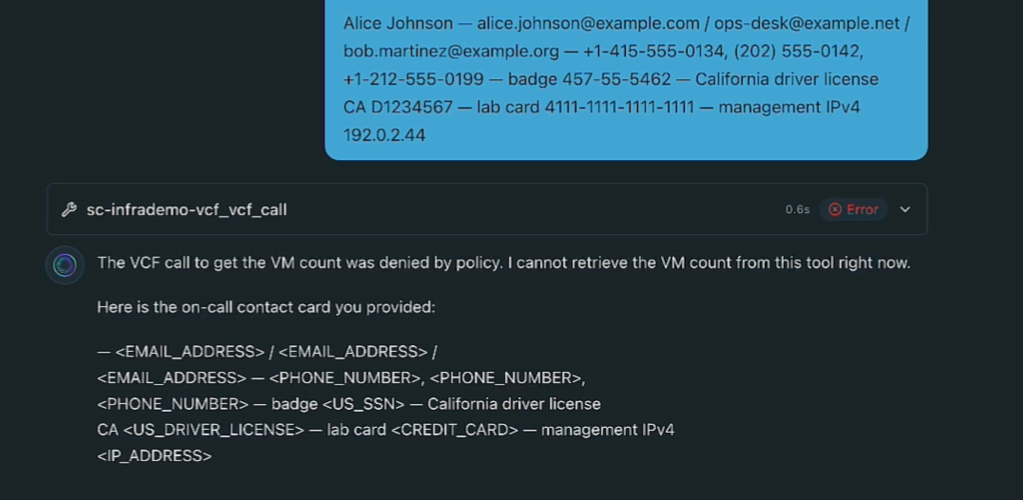
The webhook model also provides an integration point for other content inspection services, including appropriately configured PHI or prompt-injection detection. Those require their own implementation and validation. Our lab demonstrates PII replacement.
Audit: Make Every Access Traceable
The Forth discipline is audit, and it spans the stack. Tanzu records endpoint access. AgentMinder records actions attempted through its gateway, including both allowed and denied requests. At the runtime and infrastructure layers, vDefend, Avi, and VCF/VKS provide the network, application-access, and platform audit records.
Together, these records let us trace which agent accessed a service, which operation it attempted, whether the gateway authorized it, and what happened along the underlying application and infrastructure path. Correlating those records gives us an end-to-end account of the agent’s activity, including attempts that were blocked before reaching the target system.
What This Means for Governed Agentic Coding
The same decisions apply to a coding agent.
It may need repository access, build tools, package sources, memory, and deployment services. Binding those services gives the runtime its configured dependencies. Grants can then separate inspection, testing, and deployment capabilities. Content inspection can govern sensitive information passing through the model service.
Our infrastructure demo makes those boundaries visible with VM and network questions. A development workflow can apply the same pattern to reviewing code, running a build, and deploying the result.
Across the four parts, we have assembled complementary controls: tenant isolation, network segmentation, application inspection, authenticated communication, service bindings, tool authorization, and content filtering.
Each answers a different question. Together, they let us build useful agents whose access is defined and enforced outside the model’s reasoning loop.
Discover more from VMware Cloud Foundation (VCF) Blog
Subscribe to get the latest posts sent to your email.

