
Part 2 of 4: Securing GPU-Accelerated AI Workloads with VMware vDefend on VMware Private AI Foundation with NVIDIA
In Part 1 of this series, we laid the hardware and network groundwork for a secure Private AI architecture. We walked through how to enforce deep GPU tenancy, physically and logically isolating compute resources from the organizational level down to the silicon. We also established our foundational routing, demonstrating how to deploy dedicated Virtual Private Clouds (VPCs) and even fully airgapped environments to dictate strict network topologies for different business units.
We did this because enterprises are deploying AI workloads to private cloud infrastructure for compelling reasons: data sovereignty, regulatory compliance, intellectual property protection, and the assurance that proprietary documents, model weights, and inference data never leave the organization’s control. VMware Private AI Foundation with NVIDIA delivers on this promise, providing a turnkey platform on VMware Cloud Foundation (VCF) for deploying GPU-accelerated AI pipelines, from inference and embedding to full retrieval-augmented generation (RAG) workflows, all within the enterprise data center.
But bringing AI workloads on-premises solves only half of the security equation: Private AI protects data from leaving the organization. Even with robust VPCs and dedicated hardware slices, we still have to answer a critical question: What protects the AI components from each other?
In a typical Kubernetes deployment, once traffic is inside the cluster, every pod can reach every other pod. A compromised component, whether through a supply chain vulnerability in a model dependency, a prompt injection exploit, or a container escape, has a flat network path to the most sensitive assets in the pipeline: the language model serving proprietary inferences, the vector database holding your corporate knowledge base, and the orchestration layer controlling all of it. This is the lateral security gap, and for AI workloads, the stakes are uniquely high.
Before we dive in, note that we’ve included a full, real-time demo video at the very end of this post showing exactly how we close this gap in action. But don’t skip ahead just yet as the video only scratches the surface. The post serves as your comprehensive lab notes, going into much greater depth with extensive architecture breakdowns, under-the-hood configurations, and the exact Terraform code snippets you won’t see in the recording.
In this post, we walk through how VMware vDefend completes the security story for Private AI. We deployed the NVIDIA NIM RAG Blueprint v2.5.0, a production-grade, multi-model RAG pipeline consuming eight NVIDIA H100 80GB GPUs, on a VMware vSphere Kubernetes Service (VKS) cluster with an external Elasticsearch vector database Then we applied vDefend Distributed Firewall, enforced through Antrea CNI, to implement Zero Trust microsegmentation between every AI component. We wrote the firewall rules as Terraform code and used Antrea Traceflow to prove, packet by packet, that unauthorized lateral movement is blocked, including egress to the external database server.
From Catalog to Cluster: Provisioning AI Infrastructure
Built on VMware Cloud Foundation (VCF), VMware Private AI Foundation with NVIDIA leverages VCF Automation to provide self-service catalog items that eliminate the weeks of manual setup traditionally required to stand up GPU-enabled AI environments. Through the AI Kubernetes Cluster catalog item, a DevOps engineer can provision a fully configured VKS cluster, complete with GPU-capable worker nodes and a pre-installed NVIDIA GPU Operator, in minutes rather than days.
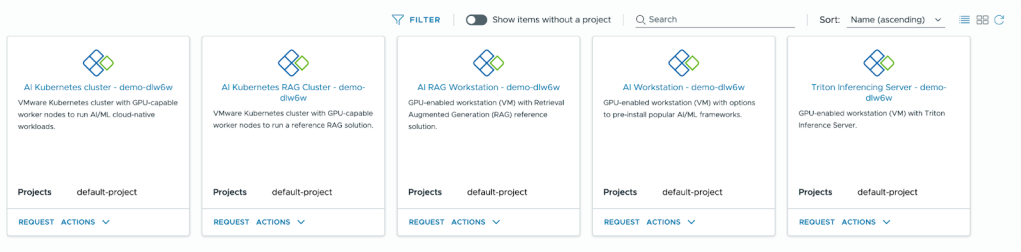
For our deployment, we provisioned an AI Kubernetes Cluster on VCF 9.0 with the following configuration:
- 3 control plane nodes running Ubuntu 24.04.3 LTS, Kubernetes v1.34.2
- 2 GPU worker nodes, each with 16 vCPU, 64 GB RAM, and a Device Group with 4x NVIDIA H100 SXM5 80GB vGPUs (H100XM-80C vGPU profile), running on a vSphere cluster with NVIDIA H100 SXM5 GPUs
- NVIDIA GPU Operator v25.10.1 with NVAIE 7 vGPU drivers (580.105.08), providing automatic driver lifecycle management, device plugin registration, and GPU monitoring
- NVIDIA NIM Operator v3.1.0 for declarative lifecycle management of NIM microservices, model caching, scaling, health monitoring, and rolling updates
- Antrea CNI with Geneve encapsulation, providing the network fabric and the integration point for vDefend security policy enforcement
- vSAN storage for persistent volumes (model caches totaling over 500 GB, application state)
The cluster was ready to accept AI workloads within minutes of the catalog request. This is the operational model Private AI Foundation with NVIDIA enables: infrastructure teams define the catalog items and governance policies once, and data science teams self-serve from there.
The NIM RAG Blueprint: A Hybrid Architecture with External Elasticsearch
On this AI Kubernetes Cluster, we deployed the NVIDIA NIM RAG Blueprint v2.5.0, a production-grade retrieval-augmented generation pipeline built entirely from NVIDIA NIM microservices. Unlike a basic RAG setup, this blueprint represents what an enterprise deployment actually looks like: specialized AI models for every stage of the document understanding and query pipeline, each running as an independent containerized microservice with its own GPU allocation.
A key architectural decision in our deployment was to replace the default in-cluster Milvus vector database with an external Elasticsearch 8.19 instance running on a dedicated Ubuntu server running as a Virtual Machine. This decouples the data persistence layer from the Kubernetes cluster, providing independent scalability, simplified backup, and a clear security boundary that the DFW must explicitly authorize.
The pipeline consists of the following interconnected components:
AI Models (7 NIM microservices):
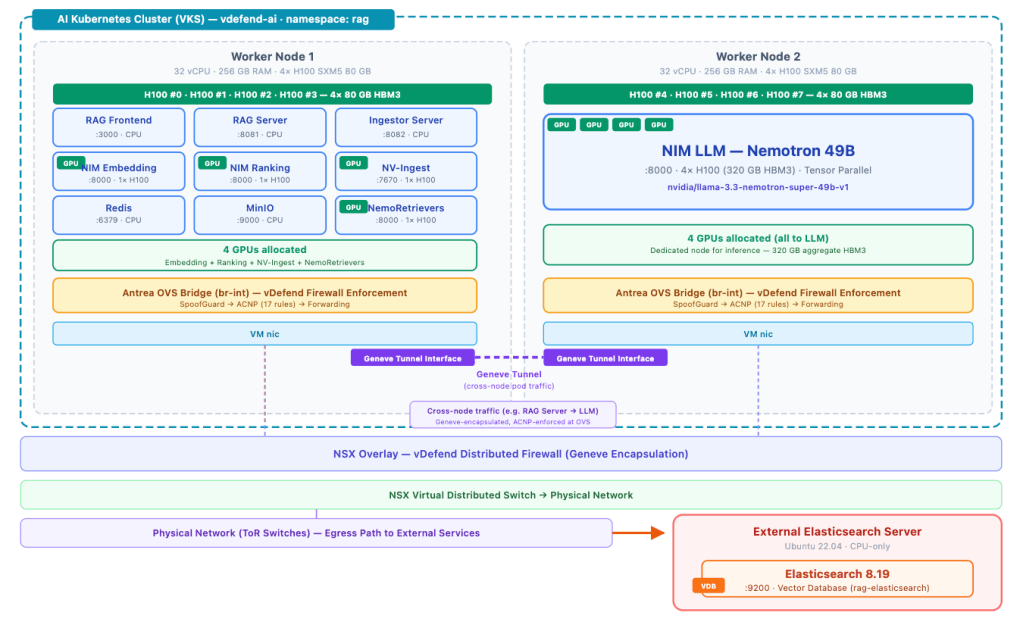
- Nemotron Super 49B LLM – The large language model for generation, running NVIDIA’s Llama-3.3-Nemotron-Super-49B-v1.5 across four NVIDIA H100 with TensorRT-LLM optimization. This generates the final answer, grounded in retrieved documents.
- Nemotron Embedding – Converts text into dense vector representations for semantic search.
- Nemotron Ranking – Re-ranks retrieved documents by relevance before they are passed to the LLM, improving answer quality.
- NemoRetriever OCR – Optical character recognition for scanned documents and images, running on GPU for high throughput.
- NemoRetriever Page Elements – Detects and classifies page layout elements (headers, paragraphs, tables, figures) in document pages.
- NemoRetriever Graphic Elements – Extracts information from charts, diagrams, and other graphic content.
- NemoRetriever Table Structure – Recognizes table structures and extracts tabular data from documents.
Orchestration and Ingestion:
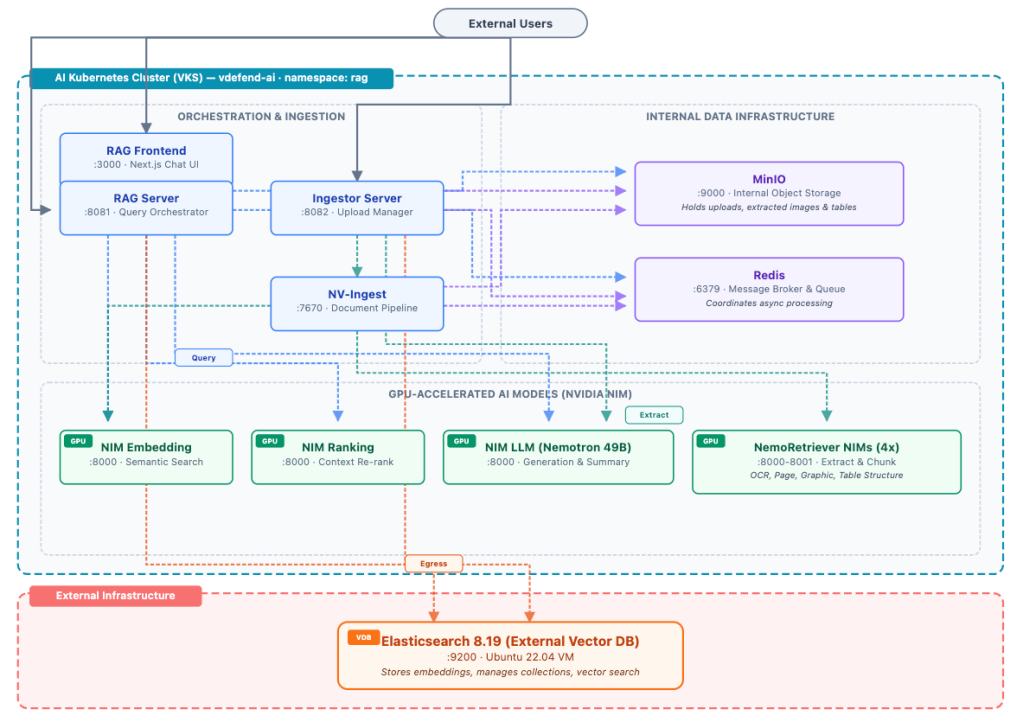
- RAG Server – The query orchestrator. When a user submits a question, the RAG Server coordinates the retrieval and generation workflow: it sends the query to the embedding model, performs vector similarity search against the external Elasticsearch instance, re-ranks results through the ranking model, constructs an augmented prompt with the retrieved context, and streams the response from the LLM. It also retrieves images, tables, and charts from MinIO to enrich citation data in responses. Exposed externally on port 8081.
- Ingestor Server – Manages document upload and collection lifecycle. It stores uploaded documents in MinIO, submits them to NV-Ingest for processing, calls the LLM for document summarization, and manages collections in Elasticsearch. Exposed externally on port 8082.
- NV-Ingest – The document processing pipeline. It reads uploaded documents from MinIO, coordinates the four NemoRetriever NIM models (OCR, page elements, graphic elements, table structure) to extract, chunk, and embed content, and stores extracted multimedia content (images, tables, charts) back in MinIO.
Data Infrastructure:
- RAG Frontend – A Next.js web application providing the chat interface and document upload UI. Exposed externally on port 3000.
- Redis – A message broker and task queue coordinating async document processing between the Ingestor, NV-Ingest, and the NIM models.
- MinIO – Internal object storage for document and multimedia content. Stores uploaded documents before NV-Ingest processes them, and holds extracted images, tables, and charts that the RAG Server retrieves for citation enrichment. Runs on port 9000.
- Elasticsearch 8.19 (External) – The vector database running on a dedicated Ubuntu 22.04 server outside the Kubernetes cluster. Stores and searches document embeddings via HTTP on port 9200.
All eight H100 GPUs are fully allocated across the seven NIM microservices and the NV-Ingest document pipeline. Cross-node traffic traverses Geneve tunnels managed by Antrea’s OVS data plane, the same data plane where vDefend enforces its firewall policies. Egress traffic to the external Elasticsearch server VM leaves the cluster through Antrea Egress with a dedicated routable IP, traversing a Public VPC child subnet that preserves pod identity across the VMware NSX fabric.
The Security Problem: A Flat Network and an External Dependency
VMware Private AI Foundation with NVIDIA ensures your data stays within the enterprise perimeter. But inside the cluster, default Kubernetes networking allows every pod to communicate freely with every other pod on any port, and with external endpoints unless explicitly restricted. With the external Elastic search architecture, the attack surface now spans two dimensions:
Lateral movement within the cluster: Any pod could reach any other pod. The LLM could reach Redis or MinIO (where uploaded documents and extracted content are stored), the frontend could reach the embedding model, and any compromised NIM container could attempt to communicate with the RAG Server or any other component.
Unauthorized egress to external services: Without egress controls, every pod in the namespace could reach the Elasticsearch server, including pods that have no business accessing the vector database. A compromised OCR model, for example, could exfiltrate processed document content directly to Elasticsearch, bypassing all orchestration controls. Or worse, a compromised LLM pod could query Elasticsearch directly to steal the entire corporate knowledge base.
Lost pod identity at the network boundary: Even with egress controls inside the cluster, the VKS cluster sits on a NSX Private VPC subnet. All outbound traffic passes through the VPC Gateway, where it undergoes Source NAT (SNAT) to the VPC’s public IP. At this point, the Elasticsearch server and any NSX firewall between them see only the SNAT IP, not the original pod. The pod identity is lost at the network boundary, and with it, the ability to enforce zero-trust at the infrastructure layer.
This dual attack surface makes the case for microsegmentation even stronger than with an all-in-cluster architecture. The DFW must control both internal pod-to-pod traffic and outbound egress to the external database.
vDefend: Zero-Trust Microsegmentation for AI Components
VMware vDefend Distributed Firewall, enforced through Antrea CNI, allows us to define granular security policies centrally in NSX Manager that are automatically realized as Antrea Cluster Network Policies (ACNPs) on the AI Kubernetes Cluster. The enforcement happens at the OVS bridge on each worker node, at the pod’s virtual interface, the very first network hop, so unauthorized traffic is dropped before it ever reaches the wire.
From NSX Manager to Antrea: The Policy Pipeline
Understanding how a DFW rule defined in NSX ends up enforcing traffic inside a Kubernetes pod requires understanding the Antrea-NSX interworking pipeline, a set of components that bridge the NSX management plane with the Antrea data plane running inside each VKS guest cluster.
On VMware vSphere 9.0, the integration is activated through an AntreaConfig custom resource on the guest cluster itself (in the vmware-system-antrea namespace). Setting spec.antreaNSX.enable: true deploys the interworking controller into the same namespace. This controller has two key adapters: the MP Adapter continuously syncs Kubernetes inventory (pods, namespaces, labels) up to NSX Manager so that ANTREA security groups can compute their effective members, and the CCP Adapter receives policy updates from NSX’s Central Control Plane and translates them into native Antrea ClusterNetworkPolicy and ClusterGroup CRDs.
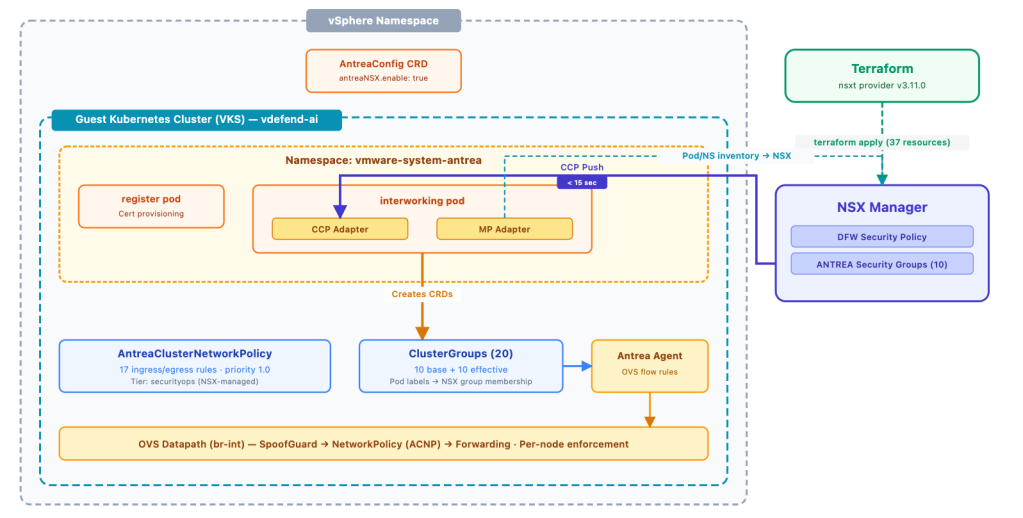
There is one additional requirement that is easy to miss: the DFW security policy must be explicitly bound to the target Antrea container cluster. In the NSX UI, this is the “Applied To: Antrea Container Clusters” selection on the policy. In Terraform, it’s a dedicated resource, nsxt_policy_security_policy_container_cluster, that links the policy to the cluster’s control plane path. Without this binding, NSX realizes the policy on its own enforcement point but never sends it to the CCP adapter; the cluster sees nothing.
With both pieces in place, the pipeline is fully operational: Terraform creates the DFW policy and binds it to the cluster, NSX Manager pushes the policy through CCP, and the interworking controller materializes it as an ACNP with the corresponding ClusterGroups. In our deployment, all twenty-one rules and eleven security groups appeared on the cluster within seconds of terraform apply. Updates propagate just as quickly, when we changed individual rule actions from ALLOW to DROP via the NSX API during testing, the ACNP was updated on the cluster within 10-15 seconds.
Security Groups Based on Workload Identity
Rather than relying on IP addresses (which are ephemeral in Kubernetes, a rescheduled pod gets a new IP), we defined 11 Antrea-type security groups in NSX, each matching pods by namespace and Kubernetes labels:
| Group | Match Criteria |
|---|---|
| nim-rag-frontend | Namespace=rag, app=rag-frontend |
| nim-rag-server | Namespace=rag, app.kubernetes.io/component=rag-server |
| nim-rag-ingestor | Namespace=rag, app=ingestor-server |
| nim-rag-llm | Namespace=rag, app=nim-llm |
| nim-rag-embedding | Namespace=rag, app=nemotron-embedding-ms |
| nim-rag-ranking | Namespace=rag, app=nemotron-ranking-ms |
| nim-rag-nv-ingest | Namespace=rag, app.kubernetes.io/name=nv-ingest |
| nim-rag-nvingest-nims | Namespace=rag, app.kubernetes.io/part-of=nim-service |
| nim-rag-redis | Namespace=rag, app.kubernetes.io/name=redis |
| nim-rag-minio | Namespace=rag, app=minio |
| nim-rag-all | Namespace=rag (all pods) |
These groups are identity-based. If the LLM pod is rescheduled to a different node with a different IP address, the security policy follows it automatically. This is essential in Kubernetes environments where pod IPs are transient by design, and particularly important for NIM services that may be rescheduled during model updates or GPU rebalancing.
The Firewall Rules: Ingress, Egress, and Default Deny
We mapped every legitimate communication path in the NIM RAG pipeline and defined twenty ALLOW rules (eighteen ingress, two egress) plus a default-deny rule that drops and logs everything else:
| Seq | Rule | Source | Destination | Port | Dir | Action |
|---|---|---|---|---|---|---|
| 100 | any→frontend:3000 | Any | nim-rag-frontend | TCP 3000 | IN | ALLOW |
| 110 | any→rag-server:8081 | Any | nim-rag-server | TCP 8081 | IN | ALLOW |
| 120 | any→ingestor:8082 | Any | nim-rag-ingestor | TCP 8082 | IN | ALLOW |
| 200 | rag-server→llm:8000 | nim-rag-server | nim-rag-llm | TCP 8000 | IN | ALLOW |
| 210 | rag-server→embedding:8000 | nim-rag-server | nim-rag-embedding | TCP 8000 | IN | ALLOW |
| 220 | rag-server→ranking:8000 | nim-rag-server | nim-rag-ranking | TCP 8000 | IN | ALLOW |
| 230 | rag-server→elasticsearch:9200 | nim-rag-server | 10.160.68.55 (external) | TCP 9200 | OUT | ALLOW |
| 235 | rag-server→minio:9000 | nim-rag-server | nim-rag-minio | TCP 9000 | IN | ALLOW |
| 240 | rag-server→redis:6379 | nim-rag-server | nim-rag-redis | TCP 6379 | IN | ALLOW |
| 300 | ingestor→nv-ingest:7670 | nim-rag-ingestor | nim-rag-nv-ingest | TCP 7670 | IN | ALLOW |
| 310 | ingestor→elasticsearch:9200 | nim-rag-ingestor | 10.160.68.55 (external) | TCP 9200 | OUT | ALLOW |
| 315 | block-all→elasticsearch | nim-rag-all | 10.160.68.55 (external) | TCP 9200 | OUT | DROP |
| 320 | ingestor→redis:6379 | nim-rag-ingestor | nim-rag-redis | TCP 6379 | IN | ALLOW |
| 325 | ingestor→minio:9000 | nim-rag-ingestor | nim-rag-minio | TCP 9000 | IN | ALLOW |
| 330 | ingestor→embedding:8000 | nim-rag-ingestor | nim-rag-embedding | TCP 8000 | IN | ALLOW |
| 335 | ingestor→llm:8000 | nim-rag-ingestor | nim-rag-llm | TCP 8000 | IN | ALLOW |
| 400 | nv-ingest→nims:8000-8001 | nim-rag-nv-ingest | nim-rag-nvingest-nims | TCP 8000, 8001 | IN | ALLOW |
| 410 | nv-ingest→embedding:8000 | nim-rag-nv-ingest | nim-rag-embedding | TCP 8000 | IN | ALLOW |
| 415 | nv-ingest→minio:9000 | nim-rag-nv-ingest | nim-rag-minio | TCP 9000 | IN | ALLOW |
| 420 | nv-ingest→redis:6379 | nim-rag-nv-ingest | nim-rag-redis | TCP 6379 | IN | ALLOW |
| 600 | redis→redis:6379 | nim-rag-redis | nim-rag-redis | TCP 6379 | IN | ALLOW |
| 999999 | default-deny | Any | nim-rag-all | Any | IN | DROP |
The two egress rules are the most security-critical addition in this architecture. They restrict which pods can reach the external Elasticsearch server to exactly two: the RAG Server (for query retrieval) and the Ingestor Server (for document ingestion and collection management). Every other pod, including the LLM, the embedding model, NV-Ingest, the four NemoRetriever NIMs, Redis, MinIO, and the frontend, is blocked from reaching Elasticsearch. If any of those components were compromised, the attacker could not exfiltrate or tamper with the vector database.
The MinIO object storage rules demonstrate another dimension of least-privilege segmentation. MinIO holds uploaded documents and extracted multimedia content (images, tables, charts). Only three components have access: the Ingestor (to store uploads), NV-Ingest (to read documents for processing and write extracted content), and the RAG Server (to retrieve images and tables for citation enrichment in query responses). The remaining components, including the LLM, embedding model, ranking model, frontend, and Redis, have no path to MinIO.
Every rule specifies a source group, a destination group, and a specific TCP port. The policy is stateful, so return traffic for established connections is automatically permitted. The default-deny rule catches any traffic that does not match an explicit ALLOW, and logs it, giving security teams visibility into unauthorized communication attempts.
Microsegmentation as Code with Terraform
The entire security posture is defined as Terraform code — nine nsxt_policy_service resources, eleven nsxt_policy_group resources, one parent security policy, one container cluster binding, and twenty-one firewall rules — forty-three resources total, all version-controlled, reviewable, and repeatable. A single terraform apply creates the complete microsegmentation policy in NSX Manager and binds it to the VKS cluster, which triggers automatic realization as an ACNP on the AI Kubernetes Cluster within seconds.
|
1 2 3 4 5 6 7 8 9 10 11 12 13 14 15 16 17 18 19 20 |
resource "nsxt_policy_security_policy_rule" "rag_server_to_elasticsearch" { display_name = "rag-server->elasticsearch:9200" description = "RAG Server performs vector similarity search against external Elasticsearch" policy_path = nsxt_policy_parent_security_policy.nim_rag.path sequence_number = 230 action = "ALLOW" direction = "OUT" logged = true source_groups = [] services = [nsxt_policy_service.tcp_9200.path] scope = [nsxt_policy_group.rag_server.path] } # Bind the policy to the VKS cluster — required for NSX to push ACNPs resource "nsxt_policy_security_policy_container_cluster" "nim_rag_cluster_binding" { display_name = "nim-rag-vdefend-ai-binding" policy_path = nsxt_policy_parent_security_policy.nim_rag.path container_cluster_path = var.container_cluster_path } |
This aligns security with the same infrastructure-as-code workflow that Private AI Foundation with NVIDIA uses for provisioning. The container cluster binding ensures the policy is not just defined in NSX but actively pushed to the target cluster’s Antrea data plane. When a new AI pipeline is deployed from the catalog, the corresponding firewall rules can be applied as part of the same automation. No tickets, no manual configuration, no drift.
Extending Zero Trust to the Network Boundary: Antrea Egress with NSX VPC
The 21 ACNP rules provide strong East-West microsegmentation inside the cluster. But there is a fundamental limitation with the egress rules to Elasticsearch: they are enforced at the OVS bridge inside the worker node VM, before the packet leaves the guest cluster. Once the packet exits the VKS cluster and reaches the NSX VPC Gateway, it undergoes Source NAT to the VPC’s default SNAT IP. At that point, the pod identity is lost, the Elasticsearch server and any NSX DFW or Gateway Firewall rule on the path see only the VPC SNAT IP, not the original pod.
To close this gap, we deployed Antrea Egress with EgressSeparateSubnet, a feature that assigns dedicated routable IPs to specific pods and routes their traffic through a Public VPC child subnet that bypasses the VPC Gateway SNAT. This preserves pod identity on the NSX fabric and enables DFW and Gateway Firewall rules to enforce the same zero-trust posture at the infrastructure layer.
How It Works: From Pod to Public Subnet
The mechanism involves four layers, from the Kubernetes pod all the way down to the NSX fabric:
Inside the Worker Node VM:
- The authorized pod sends a packet destined for Elasticsearch.
- The Antrea OVS bridge intercepts the packet and performs SNAT to a dedicated Egress IP allocated from an ExternalIPPool.
- The packet is sent through a VLAN sub-interface on the VM’s vNIC, tagged with a specific 802.1Q VLAN tag (VLAN 100 in our deployment).
At the NSX Virtual Distributed Switch:
- The frame arrives at the VPC Segment Port. NSX performs Subnet Connection Binding inspection based on the VLAN tag.
- VLAN 100 traffic is matched to the Public VPC child subnet. This traffic is routed natively through the VPC Gateway without SNAT, preserving the Egress IP as the source address.
- Untagged traffic continues through the Private subnet and undergoes the standard VPC SNAT.
On the NSX Fabric:
- The packet arrives at the Elasticsearch server with the Egress IP as the source.
- In NSX Manager, a Generic Group with member type “Antrea Egress” automatically resolves to the Egress IP. DFW rules referencing this group enforce pod-identity-aware security at the infrastructure layer.
Defense in Depth: Two Independent Enforcement Points
With Antrea Egress configured, we defined DFW rules at the NSX infrastructure layer, applied to the Elasticsearch VM, that enforce the same zero-trust posture:
- ALLOW traffic from the rag-server-egress Group to Elasticsearch on TCP 9200.
- ALLOW traffic from the ingestor-egress Group to Elasticsearch on TCP 9200.
- DROP all other traffic to Elasticsearch (including traffic from the default VPC SNAT IP).

The result is a defense-in-depth architecture with two independent enforcement points for traffic to the external Elasticsearch server. The in-cluster ACNP restricts which pods can send egress traffic, and the NSX DFW restricts which Egress IPs can reach the database VM. Each operates independently; a misconfiguration or bypass of one does not compromise the other.
Proving It Works: Antrea Traceflow
Defining rules is one thing. Proving they work, packet by packet, is another.
Antrea Traceflow injects a synthetic TCP SYN into the OVS data plane and traces its entire path: SpoofGuard validation, policy evaluation, tunnel encapsulation, and final verdict. No simulation, this is the switch telling us what it did.
We picked a lateral movement scenario: what happens if a compromised LLM tries to reach the vector database directly? The LLM generates text, it should never query the document store. Only the RAG Server and Ingestor are authorized for that path.
First, we create the Traceflow object to inject a TCP SYN from the LLM pod to the vector database on port 9200:
|
1 2 3 4 5 6 7 8 9 10 11 12 13 14 15 16 17 18 |
$ kubectl apply -f - <<EOF apiVersion: crd.antrea.io/v1beta1 kind: Traceflow metadata: name: tf-deny-llm-to-vectordb spec: source: namespace: rag pod: nim-llm-<suffix> destination: namespace: rag pod: rag-server-<suffix> packet: transportHeader: tcp: dstPort: 9200 flags: 2 EOF |
Then we retrieve the result:
|
1 2 3 4 5 6 7 8 9 10 11 12 13 14 15 16 17 18 19 20 21 22 |
$ kubectl get traceflow tf-deny-llm-to-vectordb -o yaml status: phase: Succeeded results: - node: gpu-node-2 # ── sender ── observations: - action: Forwarded # 1. SpoofGuard: source IP validated component: SpoofGuard - action: Forwarded # 2. Forwarding: encapsulate in Geneve tunnel component: Forwarding componentInfo: Output # ═══ Geneve Tunnel (node 2 → node 1) ═══ - node: gpu-node-1 # ── receiver ── observations: - action: Received # 3. Forwarding: packet arrived from tunnel component: Forwarding - action: Dropped # 4. NetworkPolicy: DROPPED ✗ component: NetworkPolicy componentInfo: IngressMetric networkPolicy: AntreaClusterNetworkPolicy:nim-rag-microseg networkPolicyRule: default-deny-nim-rag # ← catch-all deny (seq 999999) |
Four hops, no fifth. The packet left the LLM pod on node 2, passed SpoofGuard, crossed the Geneve tunnel to node 1, and hit the NetworkPolicy evaluation stage. No allow rule matched LLM-to-vector-database traffic, so the catch-all default-deny-nim-rag rule (sequence 999999) destroyed the packet at the OVS bridge. It never reached the destination pod.
If the LLM were compromised through a prompt injection or model manipulation attack, the attacker could not reach the vector database to exfiltrate the proprietary documents stored there. The firewall enforcement happens at the first hop inside the OVS data plane, there is no network path to exploit.
This is not a diagram of how we designed the policy. This is the data plane telling us how it processed the packet.
Blocked Path: Frontend to Elasticsearch (Infrastructure Layer DFW)
We also tested what happens if a pod that lacks an Antrea Egress IP attempts to reach Elasticsearch. When the frontend pod attempts to connect, its traffic is not intercepted by Antrea Egress. It leaves the cluster through the standard path and undergoes VPC SNAT to the default gateway IP.
When this traffic arrives at the Elasticsearch VM, the NSX Distributed Firewall evaluates it against the infrastructure rules. Since the source IP does not match the authorized Antrea Egress generic groups, the default-deny rule at the infrastructure layer drops the connection.
Below is the live Distributed Firewall packet log from the ESXi host running the Elasticsearch VM, captured at the exact moment the frontend pod attempted to connect. The log shows the infrastructure firewall (Rule ID 5098) explicitly dropping the TCP SYN packets originating from the VPC SNAT IP (10.192.134.36), confirming the network boundary successfully enforces zero-trust:
|
1 2 3 4 5 6 |
2026-04-03T19:28:43.251Z No(13) FIREWALL-PKTLOG[2103265]: 8a172581 INET match DROP 5098 IN 60 TCP 10.192.134.36/54164->10.160.68.55/9200 S 2026-04-03T19:28:44.252Z No(13) FIREWALL-PKTLOG[2103265]: 8a172581 INET match DROP 5098 IN 60 TCP 10.192.134.36/54164->10.160.68.55/9200 S 2026-04-03T19:28:45.276Z No(13) FIREWALL-PKTLOG[2103265]: 8a172581 INET match DROP 5098 IN 60 TCP 10.192.134.36/54164->10.160.68.55/9200 S 2026-04-03T19:28:46.300Z No(13) FIREWALL-PKTLOG[2103265]: 8a172581 INET match DROP 5098 IN 60 TCP 10.192.134.36/54164->10.160.68.55/9200 S 2026-04-03T19:28:47.324Z No(13) FIREWALL-PKTLOG[2103265]: 8a172581 INET match DROP 5098 IN 60 TCP 10.192.134.36/54164->10.160.68.55/9200 S |
This proves that even if an attacker bypasses the in-cluster ACNP, the external firewall provides a secondary, identity-aware enforcement layer.
The Complete Picture: Private AI with Lateral Security
VMware Private AI Foundation with NVIDIA is a joint platform for deploying AI workloads on-premises, protecting data sovereignty, ensuring regulatory compliance, and keeping intellectual property within the organization’s control. VMware vDefend extends that protection inside the cluster and beyond, enforcing zero-trust microsegmentation between every AI component and controlling egress to external services so that a compromise of one service cannot cascade to the rest of the pipeline or reach the enterprise knowledge base.
Together, they provide:
Data sovereignty and lateral security. Private AI keeps data on-premises. vDefend ensures that even within the private cloud, each AI component can only communicate through explicitly authorized paths. The proprietary documents in your Elasticsearch vector database are protected not only from leaving the building, but from unauthorized access by components that have no business reaching them, including the seven GPU-accelerated NIM models that process those documents.
Security at scale across managed VPCs. Virtualization abstracts the underlying physical infrastructure, making this entire zero-trust architecture highly repeatable. Security policies, VPC configurations, and Antrea Egress rules can be seamlessly stamped out across dozens of isolated tenant environments, allowing organizations to securely scale AI infrastructure across different business units without manually re-cabling or deploying hardware firewalls.
Egress control for hybrid architectures. Enterprise AI deployments often span Kubernetes clusters and traditional infrastructure. In our architecture, the vector database runs on a dedicated Linux server outside the cluster. vDefend egress rules ensure that only the RAG Server and Ingestor Server can reach it, the LLM, NV-Ingest, the four NemoRetriever NIMs, Redis, MinIO, and the frontend are all blocked from reaching the external server.
Workload-identity-based segmentation. The integration between vDefend and Antrea uses pod labels and namespace selectors, not ephemeral IPs, to define security groups. When a NIM pod is rescheduled during a model update, scaled horizontally for inference throughput, or recreated after a GPU driver upgrade, the firewall rules follow it automatically.
Enforcement at the first hop. ACNP Policies are enforced at the OVS bridge level, on the pod’s virtual network interface. Unauthorized traffic is dropped before it traverses any physical or virtual network, fundamentally different from a perimeter firewall. This is especially critical for GPU workloads, where a compromised model container has direct access to GPU memory and could attempt network-based exfiltration.
Scalable policy for complex AI pipelines. The NIM RAG Blueprint with external Elasticsearch requires twenty-one rules covering ingress, egress, and internal storage flows. The same Terraform-driven approach scales seamlessly — the security model is defined once, versioned alongside the application, and applied in seconds.
Centralized management, distributed enforcement. Security teams define policies in NSX Manager using the familiar DFW interface. The Antrea-NSX interworking pipeline automatically translates those policies into native Kubernetes ACNPs, no kubectl access required. Policy changes propagate in seconds, and the inventory sync ensures group membership stays current as pods are rescheduled, scaled, or updated.
Unified VM and container policy. In our deployment, the Elasticsearch vector database is a traditional VM while the AI pipeline runs in Kubernetes. vDefend applies the same policy model to both VMs and Kubernetes pods through a single management console, a single pane of glass for security across the entire AI stack.
Security as code, at the speed of AI. Both the AI infrastructure (via VCF Automation catalog) and the security policies (via Terraform) are fully automated, version-controlled, and repeatable. Security is provisioned alongside the workload, not bolted on after the fact.
Significant cost savings through infrastructure consolidation. Virtualization allows AI and traditional workloads to securely share the same underlying hardware, and vDefend provides proven logical isolation; organizations do not need to build physically separated hardware silos for sensitive AI data. This software-defined security approach eliminates the need for expensive physical firewall appliances, optimizing hardware utilization and dramatically lowering the total cost of ownership (TCO) for enterprise AI initiatives.
Here is the full live demo of this solution:
Conclusion
By deploying VMware Private AI Foundation with NVIDIA and VMware vDefend on VCF, customers can confidently build and deploy enterprise-scale AI workloads, on their own infrastructure, knowing that their data never leaves the organization and that every component inside the cluster is protected from unauthorized lateral access. VMware Private AI Foundation with NVIDIA provides the platform; vDefend provides the protection. Together, they deliver a secure foundation for enterprise AI on VMware Cloud Foundation.
Discover more from VMware Cloud Foundation (VCF) Blog
Subscribe to get the latest posts sent to your email.