
By Sue Ulintz
Every IT manager understands the pattern. You start with a handful of MS SQL Server instances, each one manageable enough. Then applications multiply across departments—finance, HR, analytics—and before long, managing dozens or hundreds of MS SQL Server instances consumes the engineers hired for higher-value innovation.
SQL Server isn’t the problem; the operational overhead surrounding it is. Provisioning takes hours, high availability setup is complex, backups vary across instances, and monitoring remains reactive. This is where VMware Cloud Foundation (VCF) paired with Data Services Manager (DSM) shifts the paradigm.
The newly released white paper, Architecting Microsoft SQL Server on VMware Cloud Foundation with Data Services Manager, distills more than two decades of enterprise expertise across the VMware spectrum into practical guidance. In this post, we focus on how DSM simplifies the operational lifecycle, administration, and management of Microsoft SQL Server environments. Below is a breakdown of the core recommendations and business advantages.
What DSM Actually Does
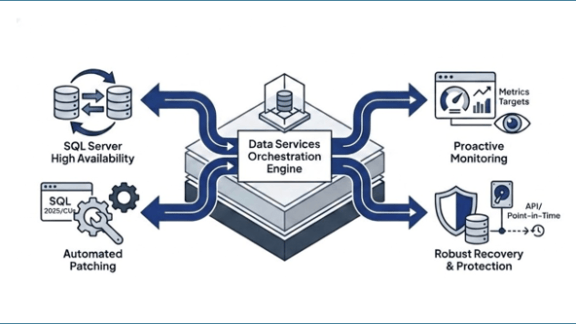
Data Services Manager is the centralized management layer within VCF that automates deployment, configuration, and lifecycle operations for SQL Server workloads. Instead of DBAs spending afternoons clicking through installation wizards and manually configuring service accounts, DSM handles provisioning, image management, directory services integration, and cluster topology from a single interface.
In DSM 9.1.1, integration as a first-class VCF Service in VCF Automation allows administrators to provision SQL Server instances and Active Directory domains directly within VCF Automation, significantly reducing context switching and streamlining infrastructure delivery.
How SQL Server Fits Into the DSM Architecture
DSM supports multiple SQL Server deployment models, including traditional single-instance deployments and Always On Availability Groups (AGs) for high availability.
The architecture relies on key core components:
- Image Registry: A centralized repository for standardized, validated SQL Server images and templates.
- Directory Service Integration: Automates Active Directory domain join, authentication, and service account management.
- Cluster Management: Streamline SQL Server Always On Availability Group with DSM native Cluster Manager orchestration.
This architecture helps ensure every deployment begins with an approved image, follows a compliant configuration path, and delivers predictable performance at scale aligning directly with distinct business SLA requirements for SQL Server deployments.
Getting Compute and Memory Right
Proper right-sizing balances cost with performance. Over-provisioning compute and memory wastes expensive licenses, while under-provisioning starves critical database workloads.
Best practices emphasize aligning virtual CPU and memory allocations directly with the underlying hardware’s NUMA topology rather than relying solely on physical socket counts. Furthermore, memory allocation should be guided by SQL Server-level performance metrics rather than hypervisor-level counters like Active Memory. Proper NUMA alignment and memory sizing avoid unnecessary VM overhead and resource contention.
DSM further simplifies the compute and memory sizing of SQL Server with infrastructure policy and pre-defined VM classes. Administrators can easily scale compute capacity up by adjusting the VM class with desired vCPU and memory allocations to adapt to shifting workload demands.
Standing Up SQL Server Without the Manual Grind
DSM automates the end-to-end provisioning workflow—moving seamlessly from template selection in the image registry through VM creation, OS configuration, SQL Server installation, and post-deployment hardening.
Security and directory integration are further streamlined in DSM 9.1.1 with Group Managed Service Account (gMSA) support. gMSA automates password rotation and Service Principal Name (SPN) management, reinforcing security hygiene without adding manual administrative tasks. Standardized automation reduces deployment timelines from hours to minutes while eliminating human error.
High Availability Without the Complexity Tax
Deploying SQL Server Always On Availability Groups (AGs) has traditionally been one of the most labor-intensive tasks for database administrators. DSM automates the setup of AG resources, network listeners, and failover topologies while integrating directly with VCF underlying infrastructure.
According to Principled Technologies benchmark testing, setting up high availability (HA) using DSM is 79% faster than traditional manual methods, and scaling out an HA configuration is 85% faster. These efficiency gains translate directly into reduced project timelines, lower operational costs, and higher uptime.
Day-2 Operations: Streamlining Ongoing Lifecycle Management
Initial deployment is only the first step; ongoing operational maintenance consumes the majority of administrative effort. DSM provides centralized tooling for patching, configuration drift detection, and capacity planning.
DSM 9.1.1 introduces automated major and minor SQL Server upgrades, including support for SQL Server 2025 and cumulative updates. By standardizing Day-2 operations, patching, and routine maintenance runbooks, organizations achieve up to a 75% increase in Day-2 operational productivity.
Backups and Point-in-Time Recovery
A robust recovery strategy relies on aligning backup frequencies and retention policies with business Recovery Time Objectives (RTOs) and Recovery Point Objectives (RPOs).
DSM 9.1.1 enhances data protection with:
- API-Driven On-Demand Backups: Flexible, programmatic control over snapshot and backup creation.
- Native SQL Server Backup Encryption: Secure backup files directly via API integrations.
- Transparent Data Encryption (TDE): TDE certificate import support to maintain end-to-end data security.
These capabilities ensure precise point-in-time recovery to mitigate data loss during operational incidents.
Proactive Estate-Wide Monitoring
Effective database administration requires proactive monitoring. DSM integrates deep performance telemetry across both virtual machine and SQL Server metrics.
With global metrics target integration in DSM 9.1.1, operational teams aggregate CPU, memory, storage I/O, and NUMA metrics across the entire database fleet into centralized dashboards. Correlating hypervisor telemetry with SQL Server engine metrics allows teams to identify potential performance bottlenecks before end users are impacted.
Summary and Next Steps
Deploying Microsoft SQL Server on VMware Cloud Foundation with Data Services Manager transforms database administration by bringing cloud-like agility, governance, and automation to enterprise infrastructure. From automated provisioning and policy-driven storage to streamlined HA and automated Day-2 patching, VCF and DSM deliver a highly scalable, secure, and cost-effective database platform.
Architecting Microsoft SQL Server on VMware Cloud Foundation with Data Services Manager
For even more detailed information, check out the following:
Newly Updated Technical Guides: MS SQL Server and ADDS on VMware Cloud Foundation
Discover more from VMware Cloud Foundation (VCF) Blog
Subscribe to get the latest posts sent to your email.