
A new Principled Technologies benchmark tested VMware Data Services Manager 9.1 against manual PostgreSQL operations across five real world scenarios.
It’s Tuesday afternoon. A developer submits a ticket requesting a new PostgreSQL HA cluster for a pre-production environment. Your DBA opens vCenter, deploys three VMs from the gold template, SSHs into each node, regenerates machine IDs so each one gets a unique DHCP lease, configures SSH, updates hostnames, edits /etc/hosts on all three nodes, installs repmgr, writes postgresql.conf and pg_hba.conf on each node, sets up .pgpass for non-interactive authentication, registers the primary, clones the replica, registers the witness, starts the repmgrd daemon on all three nodes, validates the cluster, and runs a smoke-test query to confirm everything is actually working.
That’s the job. Done right, it takes about 45 minutes and requires getting more than 100 configuration details correct across three machines at once. Done with a single typo in a pg_hba.conf entry (the kind of thing that easily happens at 2 p.m. on a Tuesday, let alone at 2 a.m. during an incident), it becomes a P2.
We set out to quantify exactly how much better automation could make this. And we wanted someone independent to do the measuring.
Quick background on what DSM actually does
Before the numbers: if you haven’t worked with VMware Data Services Manager (DSM) 9.1 yet, here’s the short version.
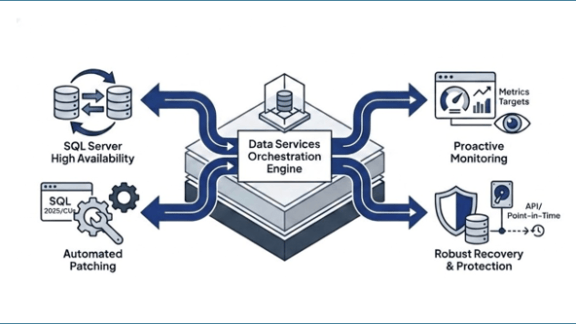
VMware Data Services Manager is a Database-as-a-Service layer built natively to work with VMware Cloud Foundation (VCF). It automates the full lifecycle of PostgreSQL, MySQL, and Microsoft SQL Server on your private cloud infrastructure: provisioning, patching, scaling, HA cluster deployment, and major version upgrades. Your DBAs manage databases through DSM’s interface without ever touching the underlying Kubernetes orchestration. Your developers can provision and clone databases on demand through a governed self-service catalog, without opening a ticket and waiting. IT keeps full policy control over who gets what and when.
For organizations in regulated industries, DSM is FIPS 140-2 certified. Data never leaves your infrastructure. Audit logging is built in. The compliance posture you get with a public cloud DBaaS, but without the shared-responsibility gaps or the egress fees.
That’s the platform behind these benchmark results.
The Study
Principled Technologies, a third-party testing firm that runs hands-on, reproducible benchmarks for enterprise technology, tested VMware Data Services Manager 9.1 against manual PostgreSQL operations across five real-world scenarios. Not simplified demos. Five operations that DBAs and infrastructure teams actually perform, timed from start to verified completion, executed three times each, with the median result reported.
The manual baseline wasn’t built to make manual operations look bad. Principled Technologies built it to be accurate: complete, production-appropriate procedures that a knowledgeable administrator would actually use. The HA cluster setup used repmgr with full streaming replication configuration and automatic failover. The version upgrade included pre-upgrade backup, global object capture, package installation, cluster upgrade, statistics refresh, log review, and old cluster cleanup. Real work.
Here’s what they found.
The Numbers
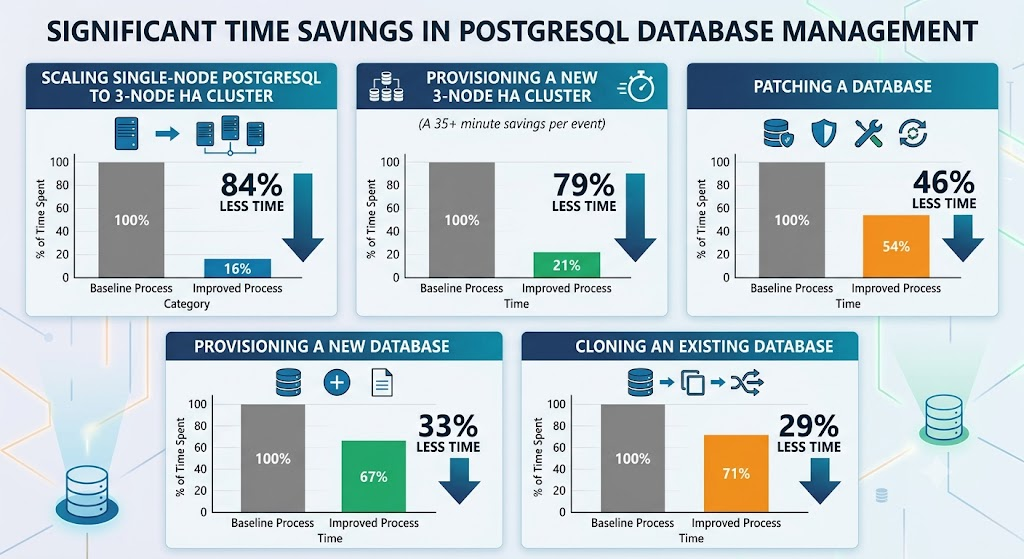
Provisioning a new PostgreSQL 16 database: DSM finished in 5:10 (median). Manual: 7:47.
DSM was 33.6% faster, and the DSM workflow also included automated backup destination and schedule configuration that wasn’t part of the manual baseline. Add backup setup to the manual side and the gap widens further.
Cloning an existing PostgreSQL database: DSM finished in 7:29. Manual: 10:41.
DSM was 29.9% faster. For developers waiting on a test environment that mirrors production, that’s the difference between unblocked this afternoon and unblocked tomorrow. If that clone is triggered through DSM’s self-service catalog rather than a helpdesk ticket, the developer doesn’t wait at all.
Major version upgrade (PostgreSQL 16 to 17): DSM finished in 2:44. Manual: 5:04.
DSM was 46.0% faster. Two clicks versus a 19-step process involving package installation, pg_upgradecluster, statistics refresh, log validation, and old cluster cleanup. This result didn’t make the summary report. It should have.
Provisioning a new three-node PostgreSQL HA cluster: DSM finished in 9:10. Manual: 44:52.
DSM was 79.5% faster, saving more than 35 minutes.
Scaling a single-node PostgreSQL instance to a three-node HA cluster:
DSM finished in 5:41. Manual: 37:43. DSM was 84.9% faster, saving more than 32 minutes.
That last scenario deserves a moment. Scaling an existing database to HA is one of the most common inflection points in a database’s operational lifetime: a dev/test instance that needs to become production-ready, a workload that’s grown beyond single-node reliability. Manually, it means deploying two new nodes, repeating every repmgr configuration step from scratch, and integrating the existing primary into a new cluster topology. In DSM 9.1, it’s a dropdown selection and a Save button.
What the clock doesn’t capture
Speed is the headline. But if you’ve spent any time in database operations, you know that the real cost of manual multi-node configuration isn’t the minutes. It’s the exposure. Every manual step is a place where configuration can diverge between nodes. A max_wal_senders value that didn’t get updated on the replica. A pg_hba.conf entry that got copied incorrectly. A repmgrd daemon that starts successfully but wasn’t enabled at boot.
Automation doesn’t just compress those 100+ steps. It eliminates the variability between them.
That’s the core of what DSM is designed to deliver: consistent provisioning, not just faster provisioning. HA setup that produces the same configuration state every single time, validated against the same completion criteria, with no room for node-to-node drift.
The version upgrade result adds something else. Major version upgrades are high-ceremony events. Maintenance windows, rollback plans, application team notifications, change management tickets. DSM can’t eliminate the governance overhead. It can compress the execution window nearly in half, and it can make the technical execution reliable enough that the ceremony is about policy compliance, not anxiety about whether every step ran correctly.
Organizations running DSM on VMware Cloud Foundation also get these gains without adding a new platform to manage. DSM is a VCF Advanced Service, which means it runs natively on infrastructure you already own, integrates directly with VCF Automation for self-service database provisioning, and shares the same support model as the rest of your VCF stack.
Why we commissioned this study
We wanted to understand exactly where DSM creates operational lift, and we wanted the methodology transparent enough that customers could evaluate the results against their own environments.
The full 27-page methodology document is available alongside the report. It contains every step of every manual procedure, every software version used, every VM configuration, and every individual run time, not just the medians. If you want to know whether the test conditions reflect your environment, you have everything you need to make that call.
Read the report
The full Principled Technologies report is available now. If you’re a DBA, an IT operations manager, a platform engineer, or a CTO thinking about database automation on private cloud, this is the data you need for a grounded conversation about what DSM 9.1 can actually deliver.
[Download the Report] [Read the Full Methodology]
The next post in this series will take each of these results and translate them into what they mean for your specific team: what changes for your DBAs, what changes for your developers, and what changes for the person whose phone rings when a database goes down at midnight.
VMware Data Services Manager 9.1 is a VCF Advanced Service delivering production-ready Database-as-a-Service with automated lifecycle management for PostgreSQL, MySQL, and Microsoft SQL Server. FIPS 140-2 certified. No Kubernetes expertise required.
Discover more from VMware Cloud Foundation (VCF) Blog
Subscribe to get the latest posts sent to your email.