
Introduction
The security of every private cloud relies on trust, and that trust is established through digital certificates. When certificates are valid and properly configured, operations run unnoticed. When they expire, integrations break, and administrators are left troubleshooting trust relationships across the environment. As private cloud environments scale across more domains, instances, and appliances, manual tracking of certificate lifecycles becomes unsustainable. Enhancements introduced in the VMware Cloud Foundation (VCF) 9.1.1 release take a significant step forward in fleet management, providing a simpler, broader, and smarter approach to certificate management.
Certificate Authorities Are Configured at the Fleet Level
From VCF 9.1, Certificate Authorities (CAs) are configured at the fleet level directly from VCF Operations. When VCF is first deployed, a VMware Certificate Authority (VMCA) provides secure communication between VCF components.
By replacing all of the certificates from a Fleet configured CA or external CA, admins can help ensure all internal traffic is encrypted with certificates that belong to a broader organizational trust chain. Additionally for Standalone vCenters, you can even replace local (VMCA) with a subordinate CA.
This matters because it aligns your private cloud’s trust model with the rest of your IT estate — one chain, one policy, one place to manage it.
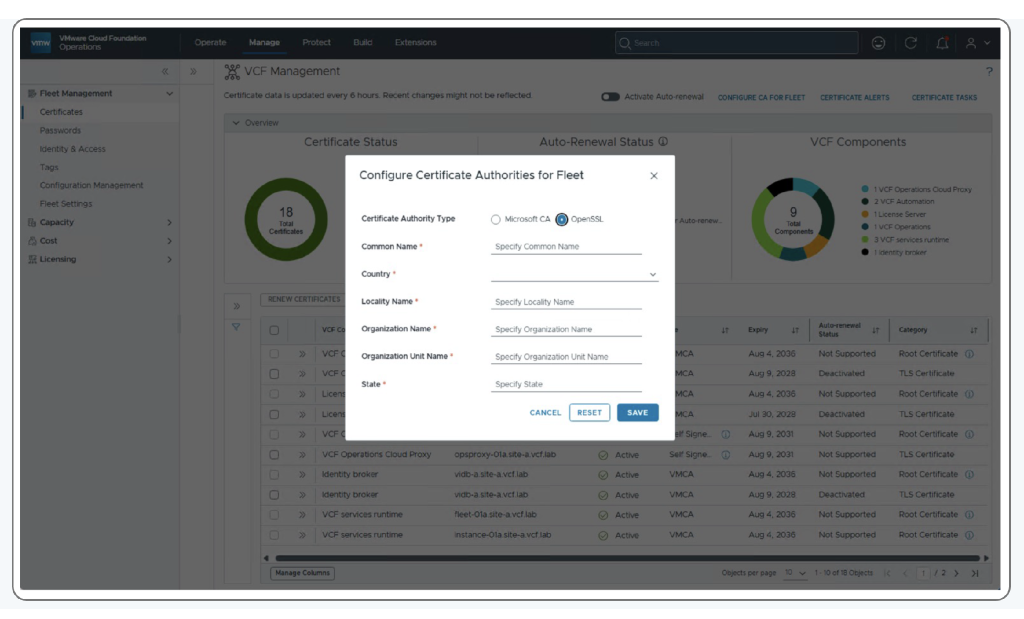
VCF 9.0 offers support for Microsoft CA and OpenSSL for VCF instance components (VMware vCenter, VMware NSX, VMware ESX, and SDDC Manager), while management components can only use Microsoft CAs. VCF 9.1 expands this in important ways:
- Both Microsoft CA and OpenSSL can be used across VCF instances and management components.
- VCF Operations workflows for generating certificate signing requests (CSRs), replacing certificates, and enabling auto-renewal can now be run across both instance and management components.
- From VCF 9.1, OpenSSL runs on the VCF Operations appliance and can be enabled in just a few clicks in VCF 9.0 it ran on SDDC Manager.
- Administrators can now view running certificate management tasks at a fleet level from within VCF Operations.
For organizations using other third-party external CAs, VCF Operations acts as the orchestration engine — generating CSRs, downloading, and importing returned certificates — so you avoid manual command-line intervention on every individual host.
Manage Certificates Consistently During VCF Adoption and Lifecycle Operations
We understand that it is not always possible to deploy and upgrade your entire environment to the latest release all at once. VCF 9.1 extends certificate management to cover VCF 5.2 and standalone vSphere 8.0 U3 and above, so you get consistent infrastructure operations while transitioning to VCF and while upgrading between releases. This means your team can start bringing the certificate lifecycle under centralized control without waiting for every workload domain to be on the same version.
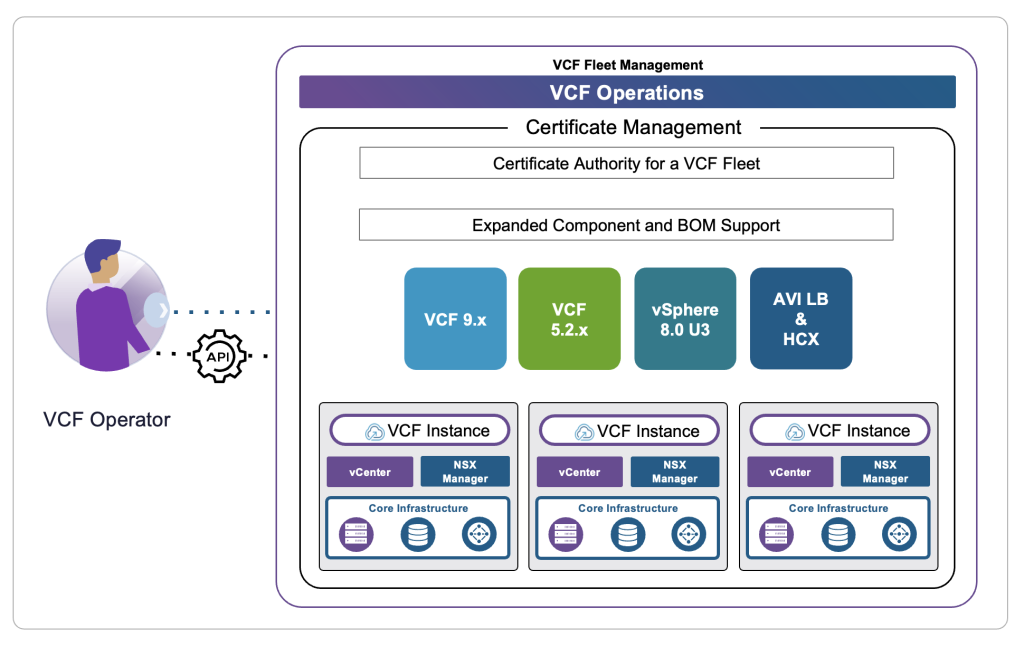
From the VCF Operations in the VCF 9.1 console, you can perform centralized certificate, password, operations, and license management for:
- VCF fleets with a mix of VCF 9.1 and VCF 5.2.x+ instances.
- Mixed VCF deployments where workload domains run a combination of VCF 5.2.x and VCF 9.x infrastructure components.
- Standalone vCenter environments outside of VCF, integrated via the inbuilt workflow in the Integrations menu.
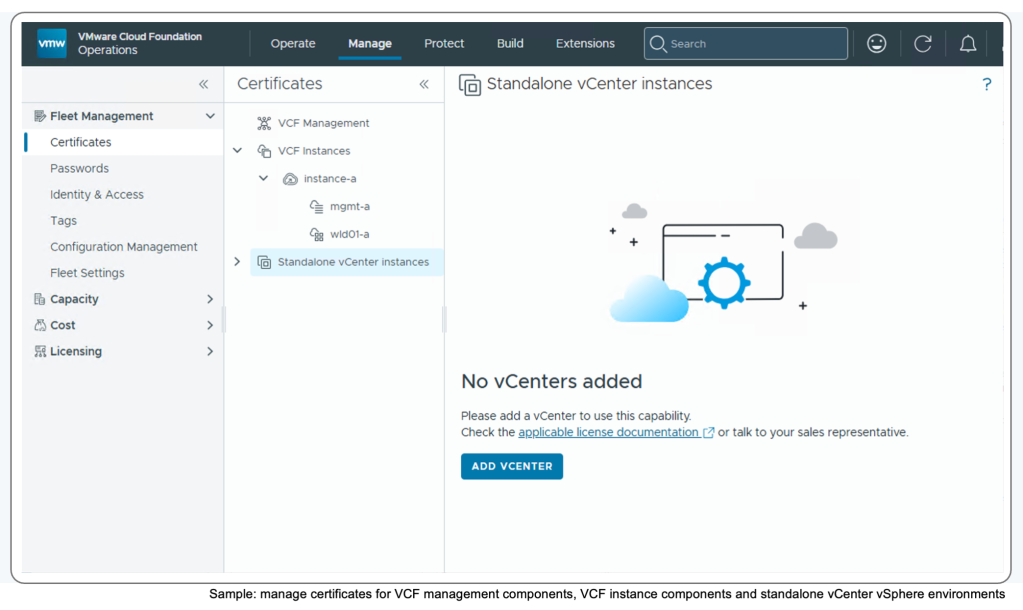
VCF Operations in VCF 9.1 also adds certificate and password management for the VMware AVI load balancer and VCF Operations workload mobility (HCX) instances. These components need to be running version 9.1, and each requires a management pack and adapter.
VCF Operations in VCF 9.1.1 extends this further to include vCenter Security Token Service (STS) and VMware Certificate Authority (VMCA) root certificates, in addition to root and Transport Layer Security (TLS) certificates. Certificate management across NSX Edge, Supervisor, License Server, VCF Operations Unified Cloud Proxy, and VCF Operations for networks collector components now means that VCF provides comprehensive certificate management coverage.
All NSX certificates are viewed from within VCF Operations under NSX Manager, and you can search for specific components by their common name. For example, NSX Edges are identified using the common name “transport node.”
Bulk Certificate Operations Save Time
VCF 9.1 introduces the ability to perform certificate management operations in bulk, a first for VCF. You can now run CSRs, certificate renewals, and certificate imports across multiple VCF components in a single operation. This saves time and helps maintain uniform compliance across your fleet.
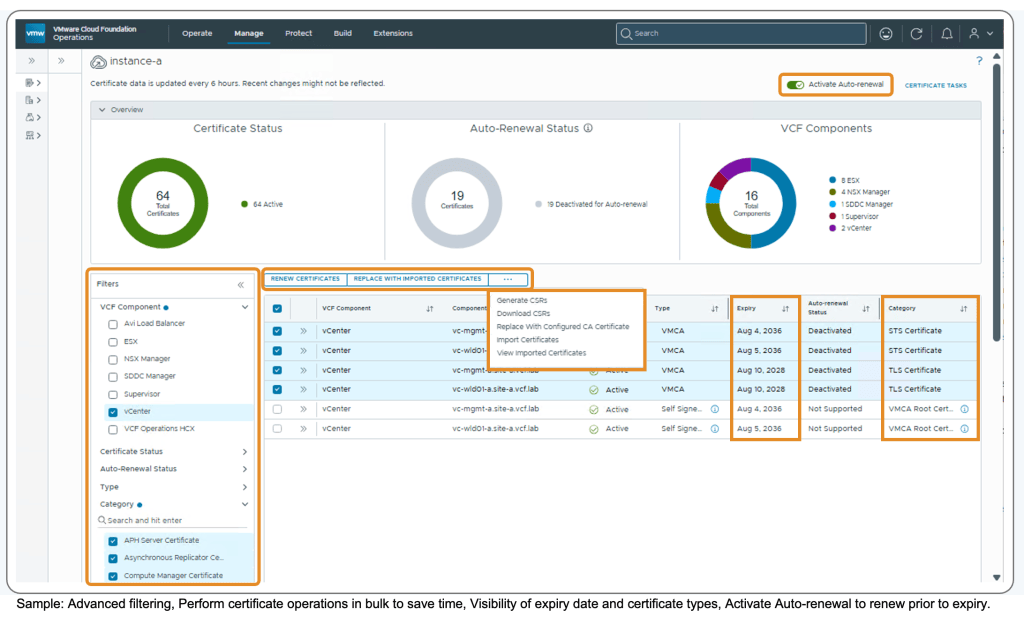
- When you select multiple components, VCF Operations performs the requests one at a time, in sequence. This avoids system instability while re-trust operations between dependent components are being performed.
- Bulk operations support up to 10 operations of the same type (for example, 10x CSRs or 10x certificate imports). If you need to process 50 certificates, simply run the operation 5 times – 10 certificates per batch.
This sequential approach to performing bulk certificate operations is by design and prioritizes stability over speed to ensure components stay healthy throughout the process.
Better Visibility into Certificate Expiry
VCF Operations in VCF 9.0 provided visibility into VCF components (vCenter and ESX) configured using certificates signed by the VMware Certificate Authority (VMCA). VCF 9.1 takes this further by letting you track the expiry of intermediate certificates for vCenter and ESX, helping you manage and secure your environment proactively.
Tracking certificate expiry is crucial for maintaining security, ensuring service availability, and complying with regulatory standards. It helps prevent the disruptions that come from certificates expiring unnoticed.
This capability complements the existing ability for Admins to Activate Auto-renewal of management and instance-level certificates prior to their expiry.
Managing Non-TLS Certificates
VCF Operations in VCF 9.1.1 lets admins view, manage, and filter VCF components configured with non-TLS certificates. This expanded visibility helps minimize disruption between configured components when third-party certificates expire. VCF also helps you meet security requirements by replacing self-signed certificates for VCF components with certificates issued from a CA, which is recommended for production deployments.
VCF Operations includes built-in workflows to generate CSRs, replace component certificates with CA-signed certificates, and enable auto-renewal. For leading third-party CAs (such as DigiCert, Google, or Sectigo), VCF Operations provides the ability to import and replace with 3rd-party CA signed certificates.
Operational Insight: Staying Ahead of Component-Managed Certificates
VCF environments are made up of many components that can be deployed and scaled differently depending on the use-case. Across VCF, there are three categories of certificates, and understanding them is key to keeping your environment running smoothly.
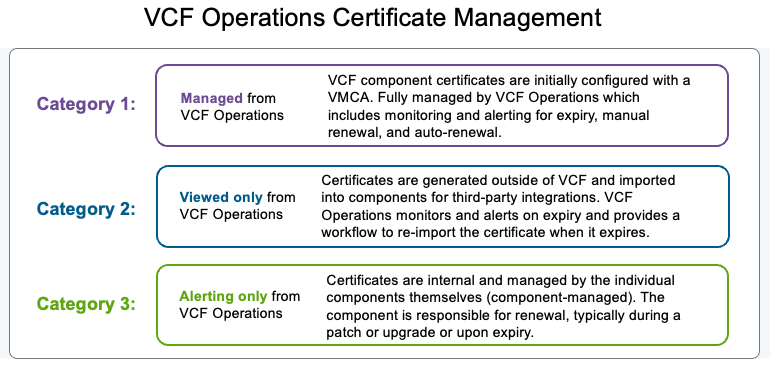
In prior VCF versions, not all component-managed certificates could be renewed by their components before they expired. VCF Operations 9.1.1 changes this and now provides built-in alerting when a component-managed certificate renewal fails. Alerts include a link to a knowledge base article with guidance on how to fix the expired certificate.
This helps improve operational efficiency. By giving you proactive visibility into component-managed certificate renewals — and the guidance to resolve failures quickly — VCF reduces the risk of unexpected disruptions and improves the overall reliability of your private cloud environment. Your team can diagnose and resolve issues before they impact services, rather than reacting after the fact.
Automate at Scale with the VCF Operations API
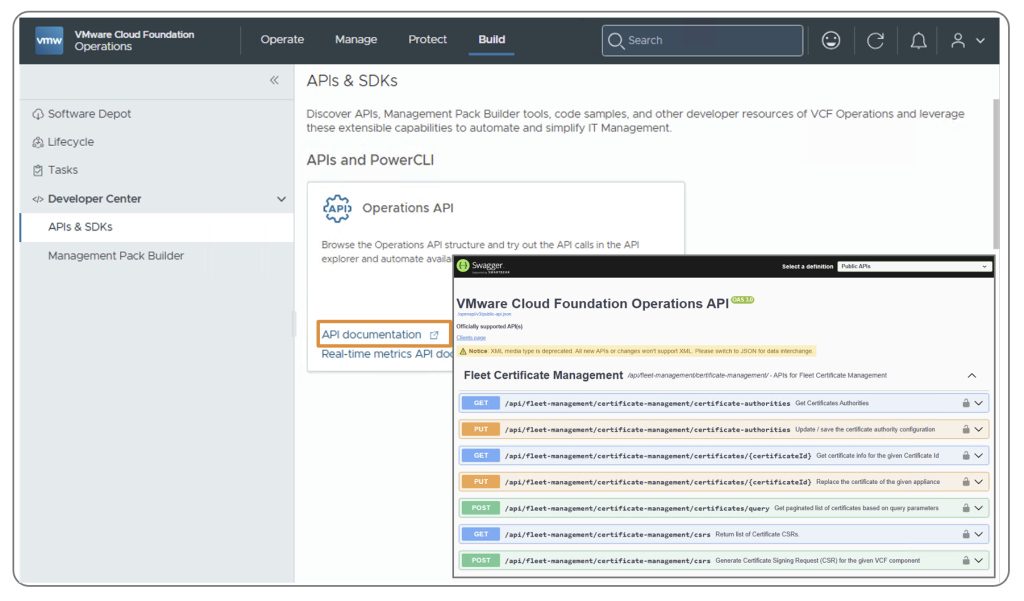
VCF Operations in VCF 9.1 introduces the ability to use the VCF Operations API for integration of 3rd-party CA and certificate lifecycle management of VCF components. Developers can use the REST API to build interactive clients and automate repetitive certificate workflows at scale. The VCF Operations console provides a reference link to the Certificate Management APIs from the Developer Center menu for easy lookup.
Two clarifications worth noting:
- The VCF Operations API is not the same as the SDDC Manager API; the SDDC Manager API is being deprecated.
- To view task progress when using the API, use the separate Workflow request API.
Summary
The future state of certificate management in VCF is clear: a private cloud where certificate lifecycle through fleet management is proactive, automated, and visible from one console. With VCF 9.1 and 9.1.1, we’ve centralized certificate authority configuration, management, monitoring, renewal, and replacement of certificates in VCF Operations — across mixed VCF and standalone vSphere environments, with bulk operations, API automation, and deeper visibility into intermediate and component-managed certificates. Your team can spend less time firefighting expired certificates and more time delivering value. Enhancements delivered since VCF 9.0 provide a simpler, more secure, and scalable approach to certificate management.
If you’re adopting VCF or planning your upgrade, now is the time to explore these capabilities in VCF Operations. Go to the Developer Center to explore the Certificate Management APIs, configure your fleet-level CA, and start bringing your certificate lifecycle under centralized control.
Resources
References and Documentation:
- Certificate Management Documentation — Certificate Management configuration steps
- Certificate Management API Reference — Available from the Developer Center menu in the VCF Operations console
Blogs:
- Automatic Certificate Renewal in VMware Cloud Foundation 9 – Certificate Management for VCF 9
Discover more from VMware Cloud Foundation (VCF) Blog
Subscribe to get the latest posts sent to your email.