
Disaster recovery (DR) has challenged IT operations for as long as the business has depended on the data center. That landscape has changed over the past decades, and operations teams face new problems that require them to adjust their recovery practices.
Traditionally, DR solutions were designed to get the business back into service as quickly as possible after a data center level disaster. These disasters were usually physical problems with the production environment that could not be mitigated with better production infrastructure; for example, loss of power, loss of site (natural disasters), or unplanned catastrophic human error or negligence.
Although complex, the framework and procedures for recovering from these data center disasters were straightforward and well understood. We will get into those in a bit more detail in this article.
With today’s cyber attacks and ransomware threats, IT organizations still have the same operational objective to restore service as quickly as possible. However, the path and processes to recover from these types of attacks are very different.
Let’s look at the following key areas and examine the differences between data center recovery and cyber-attack recovery solutions when it comes to planning and processes for either:
- Recovery Site
- Backups
- Networking
- Recovery Workflows
- Operations Team Actions
Recovery Site
For either type of disaster, you will need a secondary recovery site to help restore operations. The recovery site use is often temporary. Dedicating permanent physical resources can be a costly and complex measure.
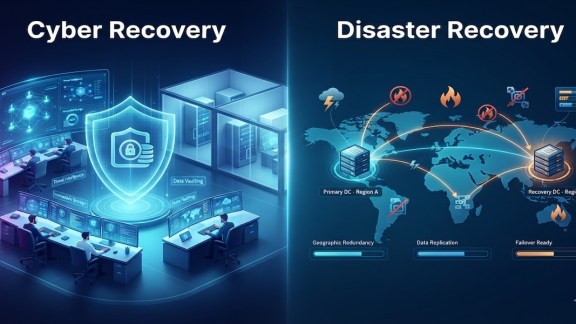
- With a data center disaster, there is usually something “failed” at the original production site preventing normal business operations. The DR site is used to run the business applications while the original site is repaired or replaced.
- With a cyber attack, your production site is usually still intact and could be used to run applications, but the applications have been compromised and unable to run. In this case, your DR site serves as an isolated clean room recovery environment. The objective with this isolation is to provide a place to safely repair (or clean) the application VMs so they can resume safe operations back in their original location once it is ready.
Backups
Protecting business application data with backups makes logical sense in either case. This practice has been in effect for a very long time. We won’t get into the specifics of the backup methods, but the location of the data is important as it can be costly and time-consuming to move the data to the recovery site when needed. The backup data should reside in the recovery site region. Also, the restoration of the data — think recovery points or point in time copies — should also be expedient as you do not want to wait for lengthy data restore cycles even if the backups are at the recovery location.
There is another key distinction when contrasting these two types of disasters: which recovery point in time is best? In business Service-Level Agreements (SLA), a common measure for the backups is defined by the Recovery Point Objective (RPO).
- For data center disasters, there is typically a single recovery point of interest – the latest, best usable backup copy. In this case, RPO SLAs are important and the shorter or more recent the better. For example, data from just 30 minutes ago might be fine. Bringing these recent copies online quickly in the DR site and getting the applications up and running is the primary objective.
- For cyber-attack or ransomware situations, your data has been infected by malware at some point, and you are potentially dealing with a prolonged and unknown dwell time on the application systems involved. The latest copy of protected data may also be compromised. You will want a deeper inventory of recovery points to choose from as your team will likely be iterating over the copies looking for the ideal base copy to begin the recovery. Having other recovery points of the same application VMs to examine and extract data from can help minimize overall data loss during the necessary remediation tasks.
An often-overlooked consideration about your backups or recovery points relates to the inherent data characteristics of the multiple point in time (PIT) copies. Having simple visibility into the change rate (how much) and the data composition (entropy / compression) of each copy can provide valuable insight into the selection process when reviewing the inventory for ideal starting points.
Networking
Connecting application systems to each other and to their users – internal or external – is critical to any recovery operation. We won’t go into specific networking practices here but instead let’s examine the networking management needs.
- For data center disasters, the networks at the production and DR sites are typically similar and easily mapped in the plans and ready to run and access the applications as soon as they are recovered. The networks may already be connected as the two sites — or parts of production and DR — may still need to communicate during recovery.
- For cyber-recovery situations, the recovery site networking is more controlled, keeping applications isolated and turning network access on or off to prevent reinfection. It’s important to note that some forms of cyber-attack malware, such as unwanted lateral movement, can only be discovered and remediated under certain network access conditions. Being able to move in/out of specific network configurations with “push button” ease during the recovery tasks is crucial.
Recovery Workflows
The orderly following of a well-defined and tested set of task steps is critical to restoring business services while dealing with the unexpected “disaster.”
- Data center disaster workflows tend to be fairly linear, grouped, and programmatic, following a well-defined run book based on the scope of the disaster at hand and the systems affected.
- Cyber recovery workflows tend to be more iterative and focused as the recovery team begins to hunt for the intruder malware, identify the breadth of the problem, and determine the best recovery point(s). This iteration needs to be conducted in a controlled environment and as quickly as possible from the available backups. Applying the steps to individual application VMs or groups of related VMs is a natural part of the typical divide-and-conquer remediation.
Operations Team Actions
In any of these disaster recovery situations, the operations team needs to focus on getting the business services back up and running.
- For data center disasters, responsibility falls primarily on infrastructure and applications teams. Infrastructure — is the application available at the DR site? Applications — is it running as expected after restarting? Both need to agree on the “good to go” outcome. Regular (and non-disruptive) testing of recovery plans prior to requiring them for an actual disaster helps bring these two operations closer and more prepared for the recovery task when needed.
- With cyber recovery situations, the operations team must expand to include the cybersecurity team as well as the broader networking (security) team. The infrastructure team brings candidate application recovery points online in the isolated clean room and applies the appropriate malware tools and network controls to make sure the selected version is healthy and clean. At the same time, they must work with the networking team to make sure the application isn’t compromised or compromising other systems. Once these tasks are done, then the applications team can get involved to determine the operational state of the application.
Summary
In this blog, we have covered just a couple of the key differences between data center disaster recovery and cyber recovery. Your protection and recovery solution(s) should be evaluated for readiness to handle basic data center disaster recovery as well as cyber recovery. If possible, a common platform that handles both can simplify processes and increase the likelihood of success in either case.
The table below summarizes much of the information in this article and is available in the product documentation. It is followed by links to some additional resources.
| Recovery Type | Disaster | Cyber |
|---|---|---|
| Recovery Site Use | Production Failover | Isolated Clean Room |
| Recovery Points Used (backups) | One – singular event – very recent RPO from best known state | Multiple – combining data sets, minimize data loss – deeper retention |
| Networking Setup | Production Access | Isolation Control |
| DR Plan Workflow | Linear – step-by-step runbooks – bring apps online | Iterative – evaluation of good state – divide and conquer |
| Special Actions | Application / environment startup – good to go | EDR – static + live malware (behavioral) analysis |
Resources
- Advanced Cyber Compliance
- VMware Resource Center
- Protection and Recovery – Product Documentation
- Blogs – Advanced Cyber Compliance
- Blogs – VMware Live Recovery
Discover more from VMware Cloud Foundation (VCF) Blog
Subscribe to get the latest posts sent to your email.