
If there is one thing we hear consistently from the field, it is this: moving Kubernetes workloads onto VMware vSphere Kubernetes Service (VKS) is the single most important step in the VMware Cloud Foundation (VCF) adoption journey. For a long time, it was also the hardest one to explain. Migration kept showing up as the number-one blocker for their VCF journey across a large number of our customers. The concerns were real and consistent: long cutover windows, data-loss risk, and backup/restore methods that simply could not keep up with the scale of large datasets. In a few cases, customers had to completely abandon their old environment and stand up net-new VKS clusters instead, just to avoid the complexity.
That is the problem we set out to solve. Over the past several months, our Professional Services, Solutions, and Engineering teams validated four distinct migration paths against a wide range of source topologies from Tanzu and OpenShift on vSphere, to bare-metal Kubernetes, to cloud-managed distributions like EKS, GKE, and AKS. The result is a repeatable, four-path playbook with scripts, runbooks, and white papers behind it. This post summarizes the four documents that codify that playbook and gives you a practical framework for choosing the right path for your situation. You can find the full list of documents by following the links below.
White papers: VMware vSphere Kubernetes Service White Papers
Migration scripts and runbooks: VKS-Migrations on GitHub
The Four Migration Situations
Most migration conversations collapse into one of four buckets. The white papers map cleanly onto them:
| Your Situation | White Paper | Source Platform |
| Kubernetes already running on vSphere (with the vSphere CSI driver) | Migrating vSphere-Based Kubernetes Workloads to VKS Using Zero-Copy FCD Adoption | Tanzu Kubernetes Grid, OpenShift, Rancher, upstream K8s — all on vSphere |
| Already on VKS, moving between VKS clusters | Migrating Workloads Between VKS Clusters Using Cross-vCenter vMotion | VKS guest cluster → another VKS guest cluster (same or different Supervisor) |
| Kubernetes on vSphere but using a non-vSphere CSI for storage backends (NFS, Ceph, external arrays) | Migrating non-vSphere Kubernetes Sources to VKS Using Filesystem Replication | Any K8s on vSphere with non-vSphere CSI storage (NFS, Ceph, external SAN/NAS) |
| Kubernetes running off vSphere (cloud-managed, bare-metal, non-vSphere storage) | Migrating Kubernetes Workloads to VKS Using Velero and S3-Compatible Storage | OpenShift on bare metal, cloud-managed K8s, any non-vSphere CSI |
Migration Framework for Multiple Scenarios
All four papers share the same backbone: a four-phase methodology that keeps migrations auditable and reversible:
- Discover — inventory everything: Kubernetes API objects, network topology, RBAC and secrets (values never exported), and a vSphere FCD cross-reference that maps every PVC → PV → FCD UUID.
- Analyze — translate platform-specific objects to VKS equivalents (OpenShift Routes → Ingress, SCCs → Pod Security Admission, Rancher Projects → namespaces) and decide the storage path.
- Blueprint — capture the plan in a Solution Definition File (SDF) with three written approval gates (Sponsor, Platform, Compliance). No wave executes until all three are signed.
- Execute — wave-based migration with dry-runs, validation gates, and a rehearsed rollback.
What differs between the situations is the storage path chosen in phase 2, which determines downtime, data-loss risk, and tooling.
Options for Migrating Persistent Data
This is the single most important decision in any VKS migration, and it comes down to one question: does the persistent volume’s backing disk already live in vSphere?
Path 1: Zero-Copy (Metadata-Only) FCD Adoption
Used when the source uses the vSphere CSI driver and the First Class Disk (FCD) exists in the vCenter database. No application data is copied. Velero transports the Kubernetes manifests (PV/PVC/snapshots excluded); the actual FCD is detached from the source and re-registered on the target with CnsRegisterVolume. The volume stays physically on the datastore the whole time.
- Downtime: Bounded by API synchronization, not bandwidth — under 2 minutes for a 100 GB volume.
- Data-loss risk: Low (no copy), but operational risk is real — split-brain is the danger. Both clusters must never mount the FCD at once, or you get immediate corruption. The source must be scaled to zero before the target attaches.
- Prerequisites: vSphere CSI source storage; FCD resolvable in vCenter; PV reclaim policy changed to Retain before releasing the source claim; FCD UUID integrity verified (cross-datastore Storage vMotion can alter UUIDs); let the CSI driver, not govc disk.attach, control attachment.
Path 2: Data-Copy
Used when storage is non-vSphere CSI (AWS EBS, Ceph, NFS, cloud block storage) or no FCD exists in vCenter. Data is physically moved through an S3-compatible object store using Velero’s CSI snapshot Data Mover (the node agent’s embedded Kopia engine dedupes, compresses, encrypts, and uploads blocks; the target provisions a fresh vSphere CSI volume and downloads).
- Downtime: Scales with volume size and bandwidth — 45–90 minutes for a 100 GB volume; measured at ~24 min for a single 450 GiB PVC with the operator-managed engine, ~86 min for 4×450 GiB (1.8 TiB) in parallel.
- Data-loss risk: Higher, because data is actively copied. But the source is never mutated, so rollback is cheap (delete the target namespace and re-provisioned volumes; the source stays authoritative until cutover).
- Prerequisites: Velero + CSI Data Mover (or file-system backup for drivers lacking snapshot support); a shared S3 BackupStorageLocation verified Available from both clusters; network reachability; Immediate-binding storage class on target; MinIO/S3 sized at ≥1.2× the largest batch.
A note on tooling: the data-copy path uses Velero + Restic/Kopia (or Velero’s CSI snapshot Data Mover). For non-vSphere sources the papers also describe pv-migrate (rsync-based) as a more direct point-to-point data mover. And for VKS-to-VKS moves across vCenters, vMotion carries the FCD blocks natively, which is preferred over either Velero or pv-migrate because it is already part of vSphere.
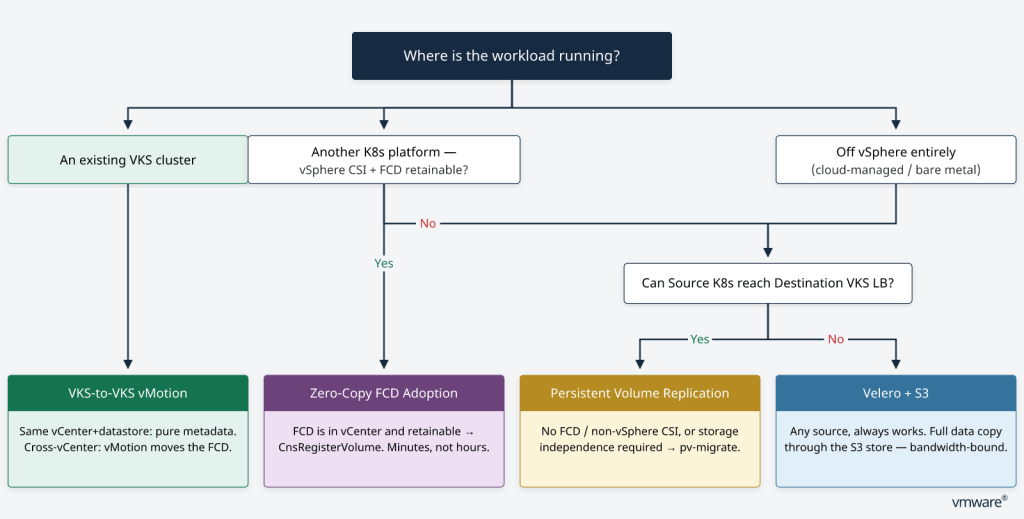
Which Path Should You Use? A Decision Guide
Here is the practical recommendation, by situation.
Situation 1: You Are on vSphere Already (TKG, OpenShift, Rancher, Upstream)
This is the sweet spot, and it is where most of the field demand sits today; over 300 clusters on vSphere CSI are waiting to make this move. You almost certainly qualify for zero-copy FCD adoption, which turns a multi-hour downtime window into minutes. The paper’s decision framework is as follows:
- Storage driver is csi.vsphere.vmware.com and FCD is in vCenter → zero-copy via CnsRegisterVolume.
- Any other CSI driver, or no FCD in vCenter → data-copy via Velero + Restic/Kopia.
Be sure to change the PV reclaim policy to Retain before deleting the source PVC, verify the FCD UUID after any Storage vMotion, and never let both clusters mount simultaneously. Handle Helm state explicitly. Migrating namespaces without exclusion filters preserves Helm release secrets (sh.helm.release.v1) on the target and blocks helm upgrade. The methodology’s Stage 6.5 reconciles or reconstructs the release with –take-ownership.
Recommendation: Default to zero-copy. Reserve data-copy for the small set of volumes on non-vSphere storage. Expect a sub-10-minute rollback SLA if anything goes wrong.
Situation 2: You Are Already on VKS, Moving Between VKS Clusters
This looks like Situation 1 but the nuance is where the Supervisors and vCenters sit.
- Same vCenter, same datastore → zero-copy: retain the Supervisor objects, create a new VKS PV, done in under 2 minutes per 100 GB.
- Cross-vCenter → data-copy, but carried by vMotion (not Velero, not pv-migrate). vMotion transfers the FCD blocks natively through a powered-off helper VM transport envelope, then CnsRegisterVolume adopts the disk on the destination. Budget 45–90 min per 100 GB.
- Velero volume backup/restore is explicitly not the chosen path here — S3 staging adds latency vMotion avoids.
Two cross-vCenter rules matter most. First, the FCD UUID is retained across migration but must always be re-discovered after vMotion, never assume it matches the source ID, and never submit the source UUID to CnsRegisterVolume. Second, the destination Supervisor namespace needs the storage policy assigned to the FCD and exposed to that namespace, plus image-registry and ingress translation (e.g., AKO → Contour) via Velero ConfigMap plugins.
Recommendation: If both clusters share a vCenter and datastore, zero-copy is trivial. If they don’t, lean on vMotion and treat the FCD UUID as something you re-verify, never assume. Rollback is vMotion-duration-bound, so rehearse the RTO.
Situation 3: You Are on vSphere, but Storage Is Not vSphere CSI (NFS, Ceph, External Arrays)
This is the scenario that trips people up the most. Your Kubernetes cluster is running on vSphere, so you might assume you qualify for zero-copy FCD adoption. But your persistent volumes are backed by a non-vSphere CSI driver — NFS, Ceph, an external SAN or NAS array, or any third-party storage plugin. There is no FCD in vCenter to adopt, so zero-copy is off the table. The white paper is explicit on this: the source storage implementation is not relevant to the transfer method, as long as the source PVC is a filesystem-based volume that the migration job can mount and read.
The recommended path is data-copy via pv-migrate (rsync over SSH), with Velero handling the Kubernetes manifests. Because the transfer operates at the filesystem level over the network, the source and destination do not need to share a storage platform, CSI driver, or even a vCenter. This is the same paper that covers fully non-vSphere sources — the methodology is identical because the storage abstraction is the same.
- Downtime: scales with dataset size, file count, and available network bandwidth — 45–90 minutes for a 100 GB volume.
- Data-loss risk: higher than zero-copy because data is physically copied, but the source PVC is never deleted until the wave is signed off — full rollback boundary maintained.
- Prerequisites: source PVC is a filesystem-based volume; pv-migrate (rsync over SSH) for data; Velero for manifests; Helm for reconciliation; network reachability between source and VKS via TCP 22 to a VKS LoadBalancer; target StorageClass on VKS.
- Key principle: The source and destination volumes are independent storage objects. They do not need to share a vCenter, CNS domain, storage array, CSI driver, or Kubernetes distribution. The original source PVC remains in place to support rollback until the migration wave has been accepted.
The nuance versus Situation 1 is worth stressing: being on vSphere is not enough. The deciding factor is whether the persistent volume backing is a vSphere FCD managed by the vSphere CSI driver. If it is not, even though the cluster itself runs on vSphere VMs, you are in data-copy territory.
Recommendation: Use pv-migrate for the data copy and Velero for manifests. Budget the bandwidth window, run an incremental sync before cutover to minimize the final delta, and retain the source PVC until the VKS workload is validated. Rollback is clean — delete the target PVC and re-provision; the source is untouched.
Situation 4: You Are off vSphere (Cloud-Managed, Bare-Metal, Non-vSphere Storage)
You cannot use zero-copy because there is no FCD in vCenter to adopt. Data-copy is your only path, and the Velero + S3 reference architecture is the validated way to do it. The key insight from this paper is that non-vSphere sources force you to confront data gravity head-on, so the work is in classification and tuning, not in clever storage tricks.
- Classify every object into one of three fates before cutover: MIGRATE_AS_IS (portable, restore unchanged), REVIEW_REQUIRED (needs a transform overlay — Route→Ingress, DeploymentConfig→Deployment, SCC→Pod Security Admission), or BLOCK_MIGRATION (missing CRD/operator on target — install it first, or exclude). Scripts are validated against recorded expected verdicts, so a wrong classification surfaces as a tooling defect before cutover, not a broken app after.
- Prefer the operator-managed install: Prefer the operator-managed install on the source (OADP on OpenShift). Validation measured it at roughly 4× faster than native Velero for a single 450 GiB PVC (24 min vs ~90 min) because the CSI plugin, Data Mover, and node agent stay version-matched and upgrade as a unit. The VKS target always runs native Velero.
- Gate on DataUpload/DataDownload CRs, not on Backup/Restore phase: The data CRs are the source of truth. PartiallyFailed is the normal terminal state for a restore; only the postflight scan and acceptance checklist decide whether a batch passes.
- Capacity asymmetry: non-vSphere filesystems (e.g., CephFS) report full nominal capacity as usable, but vSphere CSI/ext4 targets pre-allocate inode tables (~1.7%) and reserve 5% for root. Fill source PVCs no higher than 90%, and size target PVCs larger for pathologically full volumes.
Recommendation: Plan around data-copy from the start. Budget the bandwidth window, classify objects upfront, prefer the operator-managed Velero install, and run a delta batch immediately before cutover so the source’s final writes land on the target. Rollback is cheap — the source is never mutated — so commit only at cutover.
Putting It Together: A Quick Decision Table
| If Your Source Is… | And Your Storage Is… | Use This Path | Downtime (100 GB) | Primary Tooling |
| vSphere K8s (TKG/OpenShift/Rancher/upstream) | vSphere CSI + FCD in vCenter | Zero-copy | < 2 min | Velero (manifests) + CnsRegisterVolume |
| VKS → VKS, cross-vCenter | vSphere CSI | Data-copy via vMotion | 45–90 min | vMotion + CnsRegisterVolume |
| vSphere K8s | Non-vSphere CSI / no FCD | Data-copy | 45–90 min | Velero + Restic/Kopia or pv-migrate |
| Non-vSphere K8s (cloud/bare-metal) | Any non-vSphere storage | Data-copy | 45–90 min | Velero + CSI Data Mover + S3 |
A Few Rules That Apply to All Four Methods
Whatever path you take, these hold across the board:
- Decouple stateless config from stateful storage. Velero moves the manifests; the storage path moves the data. Don’t entangle them.
- Never serve traffic from both sides at once. Quiesce or scale down the source before the final batch (or run a delta batch right before cutover). Two divergent live copies is the fastest way to corruption.
- Preserve application-owned PVC metadata (labels/annotations for Helm and operators) but never copy Kubernetes-generated binding/provisioning metadata. It will not match the reconstructed target.
- Handle Helm state explicitly. Don’t blindly delete Helm release secrets; extract source values and chart version pre-cutover and reconcile with –take-ownership.
- Validate before you promote. The promotion gate checks PVC Bound, replicas ready, and application health endpoint returning healthy. All four must pass before a wave is promoted to stable.
- Rollback is always rehearsed. Zero-copy gives you a sub-10-minute RTO; data-copy gives you a cheap rollback because the source is untouched. Either way, know your RTO before you cut over.
The Bottom Line
The right migration strategy is the one that matches where your data already lives. If your volumes are already vSphere FCDs, zero-copy adoption turns migration into a metadata operation measured in minutes. If they are not, a well-tuned Velero + S3 data-copy pipeline — with disciplined object classification and a rehearsed rollback — gets you there safely, just on a bandwidth-bound schedule. And if you are already on VKS, vMotion plus CnsRegisterVolume lets you move between clusters without ever copying at the Kubernetes layer.
Share Your Feedback
These four migration paths are validated, but they are not frozen. As more of you run them against real production workloads, your experience is what will sharpen the next revision of the playbook. We would genuinely like to hear from you. You can contact Broadcom for more details by using this form.
Discover more from VMware Cloud Foundation (VCF) Blog
Subscribe to get the latest posts sent to your email.