
Broadcom Global Support has created this essential guide for customers adopting VMware Cloud Foundation (VCF) 9. It aims to offer critical insights into the complete requirements, considerations, and pathways for planning an adoption or upgrade to VCF 9.0. This resource addresses some of the most frequent and crucial questions gathered before the 9 release, throughout the BETA program, and from direct engagements at events such as Explore.
Why VCF 9
VCF 9 is a unified platform that supports all application types – traditional, modern, and AI. It provides consistent operations, governance, and controls throughout the private cloud environment.
- Learn more about the new features and benefits in the official announcement:
Announcing VMware vSphere Foundation 9.0 – Smarter Operations, Better Performance, Stronger Security - Discover what’s new in detail: What’s New in VMware Cloud Foundation 9.0
- Before you deploy, watch this video for essential tips: Top Five Things to Know Before Deploying VMware Cloud Foundation
Why upgrade/ adopt now
- Understand the key benefits of transitioning from vSphere to VCF 9: The Journey from vSphere to VMware Cloud Foundation 9.0 – Top 5 Outcomes
Adoption Path
VCF 9 provides several deployment pathways to modernize your infrastructure:
- Deploy a new VCF Instance.
- Expand an existing VCF Fleet.
- Convert an existing vCenter deployment to VCF.
- Import a vCenter deployment into VCF.
Reference: Deployment Pathways for VMware Cloud Foundation 9
- Existing Environments
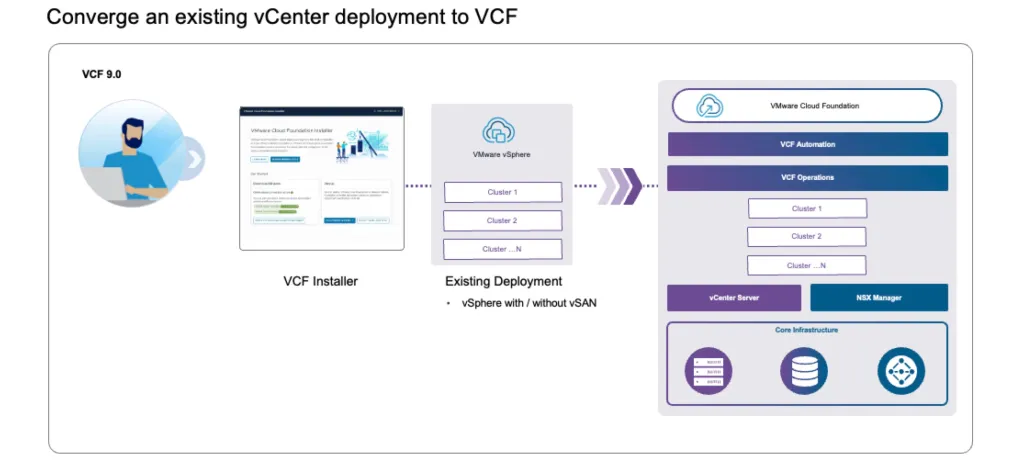
- How to Implement VMware Cloud Foundation without Starting Over
- Import an Existing vCenter to Create a Workload Domain
- VCF 9 – Converting Brownfield Deployment
- Upgrade VMware Aria Operations to VCF Operations 9.0
- New deployment

- The VCF 9 design guide is a comprehensive document that provides architectural options, design blueprints, and best practices for deploying and managing a VCF 9 private cloud infrastructure
https://techdocs.broadcom.com/us/en/vmware-cis/vcf/vcf-9-0-and-later/9-0/design.html
- You can use the VCF 9 Planning and Preparation Workbook as a dynamic VCF environment specification, calculating size, updating requirements according to your design, and more. https://techdocs.broadcom.com/us/en/vmware-cis/vcf/vcf-9-0-and-later/9-0/planning-and-preparation.html
- Planning – Install a New VMware Cloud Foundation Deployment
Getting Started with VCF 9
Private Cloud Maturity Model
Broadcom has developed the Private Cloud Maturity Model, this framework provides for an analysis of the environment and results in a prescriptive collection of actionable guidance to achieve your desired private cloud vision.
- Cloud Modernization Program to Guide Customers’ Cloud Journey with VMware Cloud Foundation
- Set Your Implementation Up for Success with VCF Jumpstart Workshop
- Building a Modern Private Cloud using the Cloud Maturity Model Framework
- Link to the assessment: Private Cloud Maturity Model Assessment Tool
What’s New / Core functionality specific information.
Licensing
The licensing model in VCF 9 introduces a simplified and more flexible approach to capacity management:
- New Default License Structure: Starting with VCF 9.0, each purchased product is issued a single, default license.
- Capacity Splitting and Management: The core feature allows you to break down this default license into multiple ‘split’ licenses provided you stay within your total purchased capacity.
- Dynamic Capacity Reclamation: Freed-up capacity is automatically returned and added back to the pool of the default license, ensuring centralized and efficient resource management.
- Resource Guide: For a step-by-step guide on managing your licenses, refer to: Managing Licenses in the VCF Business Services console
VCF Operations
Operational improvements focus on deployment flexibility and automation, especially in environments without direct internet access: Air-Gapped Environments
VCF 9 provides robust support and documented procedures for air-gapped deployments:
- Offline Depot Setup: Establish an internal web server to manage patches without external connectivity: Set Up an Offline Depot Web Server for VMware Cloud Foundation
- Automating Licensing in Air-Gapped Deployments: Manage VCF 9.0 Operations Licenses within isolated environments: Automating VCF 9.0 Operations License Registration & Import for Air-Gapped Environments
VMware vSphere / vCenter
- New Features in vSphere: A deep dive into the specific advancements and updates as part of the VCF 9 release: What’s New with vSphere in VMware Cloud Foundation 9.0?
Networking
- VMware Virtual Private Cloud: Explore how VPC transforms and simplifies consumption of network services: VMware Virtual Private Cloud in VMware Cloud Foundation 9.0: A New Era of Private Cloud Networking
Storage
- Core Storage Updates: An essential look at the new and improved core storage features within the VCF 9 stack: vSphere and VMware Cloud Foundation 9.0 Core Storage – What’s New
VCF Automation
- Accelerate service delivery by leveraging VCF’s built-in automation capabilities:
- The Journey to Automation: This comprehensive guide outlines the holistic path to automation, detailing how to integrate and orchestrate services within VCF: The Journey to Automation
- Private Cloud Consumption and Unified Experience:
- Design and Architect: Designing private cloud consumption models using VCF Automation tools: Design and Architect: Private Cloud Consumption with VMware Cloud Foundation Automation
- Unified Cloud Consumption: VCF 9 redefines the private cloud, enabling a consistent and unified consumption experience across various services: Private Cloud Redefined: Deliver a Unified Cloud Consumption Experience with VMware Cloud Foundation 9.0
- Kubernetes Management for Platform Engineers: VCF’s native Kubernetes multi-cluster management capabilities provide powerful tools for platform engineers: Empowering Platform Engineers with native Kubernetes Multi-Cluster Management in VMware Cloud Foundation
VMware vSphere Kubernetes Services (VKS)
- Integrated Kubernetes Runtime: VCF offers a single, cohesive platform with a built-in Kubernetes runtime that orchestrates both management and application workloads and allows modern applications to run alongside traditional workloads.
- Security and Simplified Operations: VCF 9 ensures a secure, simplified operational model for running all workloads, including those deployed on its upstream conformant certified Kubernetes distribution: Kubernetes on VMware Cloud Foundation 9.0: A Single Platform to Run Workloads Securely with Simplified Operations
Private AI Foundation (PAIF)
- AI-Native Capabilities: VCF is optimally configured for AI, leveraging GPU precision for models. It enables organizations to run, migrate, and govern AI models from fine-tuning to inference.
- AI as a Governed Service: Offer Private AI capabilities to users as a managed, governed, and secure service: Broadcom Makes VMware Cloud Foundation an AI Native Platform and Accelerates Developer Productivity
Gaining Practical Experience with VCF 9
- Explore 2025 Hands-On Labs (HOL): Evaluate VCF 9 features without necessitating dedicated infrastructure deployment. The labs are continuously updated to reflect the latest use cases and capabilities.
- Access: Explore 2025 Hands On Labs
- The Ultimate Lab Resource for VCF 9: A detailed, authoritative technical guidance for individuals committed to establishing a permanent, dedicated VCF 9 laboratory environment.
- Reference: Ultimate Lab Resource for VCF 9.0
- VMware Holodeck: This robust, open-source toolset assists technical professionals in the automated and reproducible deployment and experimentation with complex VMware solutions, including VCF.
- Tool Access: VMware Holodeck
Engaging Broadcom Support Services
When technical challenges arise, proper engagement with Broadcom Support is critical for timely resolution.
- Creating and Managing Broadcom Support Cases: Guidance for initiating a new support request, monitoring its status, and providing essential diagnostic information.
- Guidance: Engaging Broadcom
- Case Submission Protocol: It is imperative to categorize support requests accurately. For matters that do not pertain to technical, hardware, or deployment issues—such as licensing inquiries, contractual matters, renewals, or general administrative topics—the Non Technical category must be selected. This action significantly accelerates routing to the specialized Customer Care or Licensing departments.
- Diagnostics Log Assist streamlines support by automatically collecting, bundling, and transferring logs to Broadcom for troubleshooting. It significantly cuts down manual effort and speeds up log transfer (often 30-40% faster), while providing a secure, centralized library to track these transfers for better support management. Diagnostics Log Assist for Broadcom Cases
Achieving VCF Professional Certification
Certification serves as an objective validation of expertise, enhancing professional credibility and confirming the necessary foundational knowledge for the competent deployment, management, and operation of a VCF environment.
- VCF Certification Updates: The provided link contains the most current information regarding the certification journey.
- Reference: VCF Certification
Advanced Troubleshooting and Best Practices
Proactive adherence to best practices and advanced troubleshooting capabilities are fundamental requirements for maintaining the health and operational stability of your VCF environment.
- Full Stack Troubleshooting with Application Awareness: A detailed analysis of issue resolution across the VCF stack, emphasizing the methodology for correlating infrastructure performance metrics with application behavior.
- Networking Operations and Troubleshooting Best Practices: This resource focuses on the vital networking components of VCF, assisting with configuration, monitoring, and resolving network-related anomalies.
- VCF 9 Known Issues Review (Mandatory): This step ensures compatibility verification, identifies potential risks, and allows for the preparation of necessary workarounds. This reference must be consulted before finalizing the adoption strategy.
- Reference: VCF 9.0 Known Issues
Key Resources and the VCF Community
- VCF Blog: Get the latest announcements, technical articles, feature highlights, and roadmap insights directly from the VCF product management and engineering teams.
- Official Blog: VMware Cloud Foundation Blog
- Official Blog: VMware Cloud Foundation Blog
- VCF 9 Frequently Asked Questions (FAQ): Questions and answers covering features, architecture, deployment, and day-to-day operations.
FAQ Document: VCF 9 Frequently Asked Questions
—————————————————-
Co-authored with Daniel Quirke (Global Support)
—————————————————-
Discover more from VMware Cloud Foundation (VCF) Blog
Subscribe to get the latest posts sent to your email.