In the last installment of our GitOps blog series, titled Streamline your Network Operations using GitOps with VMware Telco Cloud Platform, we detailed the process of deploying and instantiating containerized network functions (CNFs) on CaaS clusters. We emphasized how the GitOps capability of VMware Telco Cloud Platform empowers Communication Service Providers (CSPs) to manage the full lifecycle of platform customizations and network functions. By adopting GitOps, CSPs achieve significant enhancements in Day 0 (platform configuration) and Day 1 (service instantiation) operations, leading to improved efficiency, fully automated lifecycle management, and a faster time-to-market.
Building upon that foundation, we now focus on the critical aspect of Day 2 operations. In the demanding telecommunications landscape, these operations are paramount for maintaining the long-term health, optimal performance, and necessary evolution of CNFs, which are often distributed across hundreds or even thousands of geographically dispersed sites. While Day 0 and Day 1 focus on initial deployment, Day 2 operations—such as seamless CNF upgrades, elastic scaling (up or down), security patching, or infrastructure customizations or reconfigurations—are absolutely essential for sustained business agility and operational efficiency. Managing this massive, distributed footprint with traditional methods is inherently complex, error-prone, and resource-intensive. It necessitates high levels of automation to minimize costly manual intervention, reduce operational expenses, ensure stringent regulatory compliance, and facilitate seamless rollback procedures.
CSPs have traditionally invested countless hours and engineering effort to build custom automation frameworks to orchestrate and consistently implement these operations across numerous sites. However, the inherent declarative and auditable nature of GitOps allows CSPs to radically simplify their Day 2 operational model. By treating the desired state of the network (including scaling parameters, CNF versions, infrastructure customizations, and configurations) as code stored in a central Git repository, essential operations like scaling a CNF up or down, or initiating a CNF upgrade, become simple, traceable, and highly automated processes.
Let’s explore what the GitOps-driven Day 2 operation process looks like in detail. We assume the Open5GS CNFs have been successfully deployed using the GitOps capability of Telco Cloud Platform, as detailed in the previous installment of this blog series.
Upgrades
In a GitOps workflow, CNF upgrades are typically achieved by updating the container image version within the application’s configuration, often stored in a Helm chart values file. The following example includes updating the helm chart values file to manage the upgrade of the UPF pod in Open5GS CNF. While this example demonstrates an upgrade to a single pod within the entire CNF, the same principles can be applied to upgrade a group of pods or all CNF pods simultaneously.
- Update Image Version in the values file: Log into the Git repository, navigate to the config folder and edit the file values.yaml and modify it to specify the updated container image version for the Open5GS UPF pod, and push this change to the Git repository.
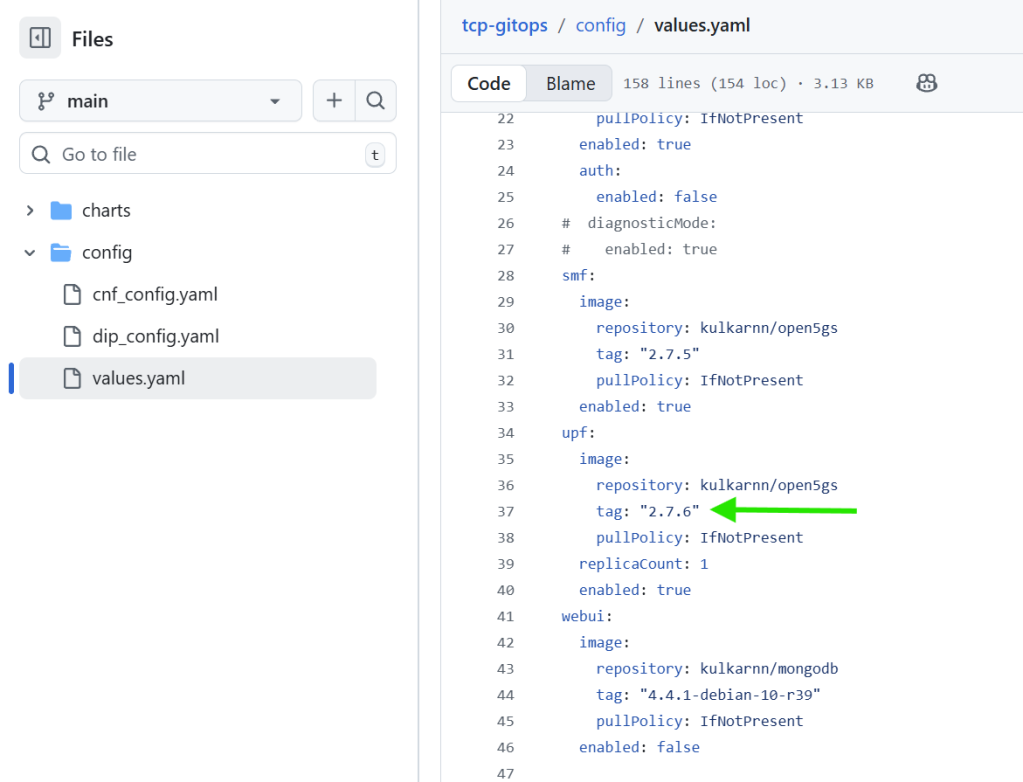
- Rolling update: The GitOps controller will detect the changes, initiating the CNF upgrade process. Telco Cloud Automation polls the content from the Git repository periodically and starts synchronizing with the configuration changes or drifts within 3 minutes at max.
- Verification: Log into the Telco Cloud Automation UI, navigate to GitOps -> Network Functions, and verify that the Open5GS CNF has been automatically upgraded. You can also log into the appropriate CaaS workload cluster and verify that the UPF pod is using the updated image.


Scaling
CNFs are scaled in GitOps by adjusting the desired replica count. Similar to upgrades, the scaling example outlined below includes updating the helm chart values file to scale up or down the UPF pod in Open5GS CNF by changing the replica count parameter. Note that while this example targets a single pod in the CNF, Telco Cloud Platform also supports scaling a group of pods or all the pods of the CNF simultaneously.
- Modify the Replica Count in values file: In values.yaml file in the config folder, set the replicaCount to the desired number (e.g. 4) for the Open5GS UPF pod, and commit this file to the Git repository.
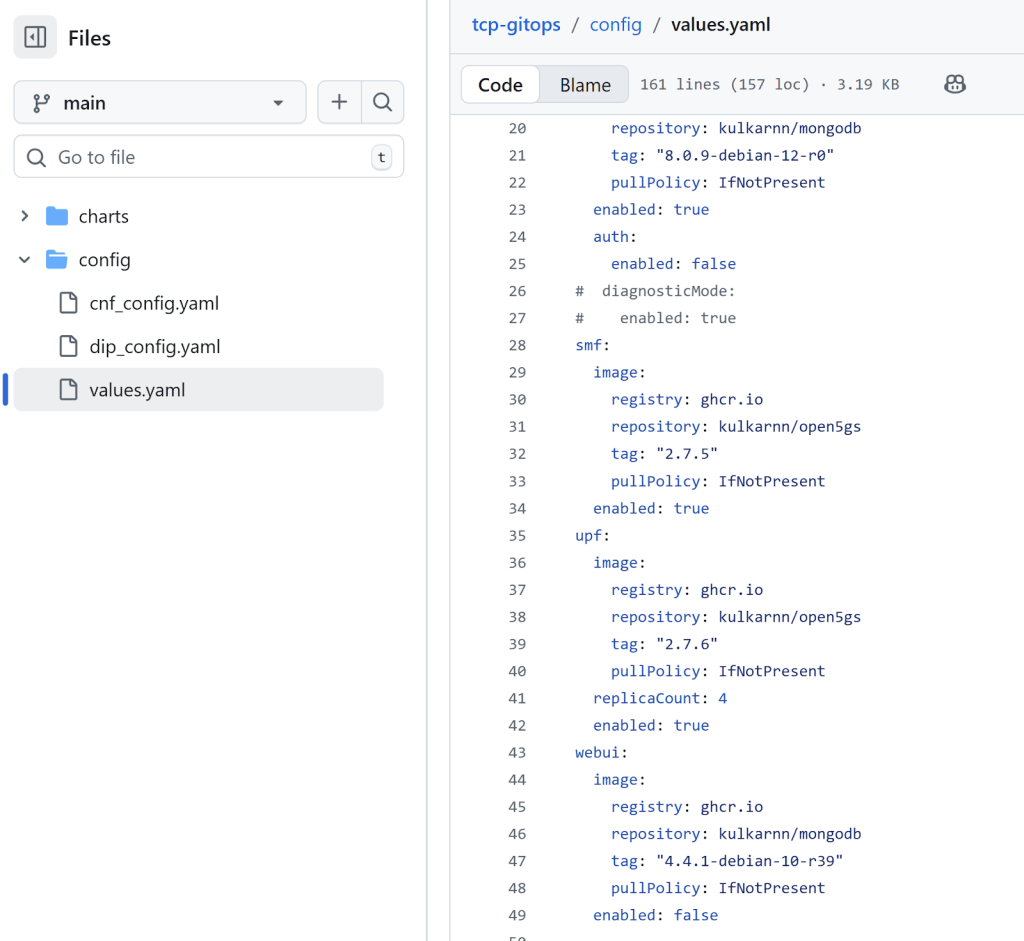
- Automated scaling: The GitOps controller will recognize the desired state change, and the CNF scaling process will commence, resulting in the Open5GS UPF pod being scaled to 4 replicas.

Infrastructure Requirements Update
If a CNF upgrade necessitates infrastructure modification, CSPs should update the Dynamic Infrastructure Policy (DIP) configuration with the desired settings in the dip_config.yaml file. This action automatically triggers the necessary infrastructure reconfiguration or customization for the CNF upgrade. The following example illustrates updating the linux-rt kernel version, which an upgraded UPF might require:
- Modify the linux-rt version in the DIP configuration: Update the linux-rt kernel version to the desired value in the dip_config.yaml file located in the config folder. Then commit this file to the Git repository.
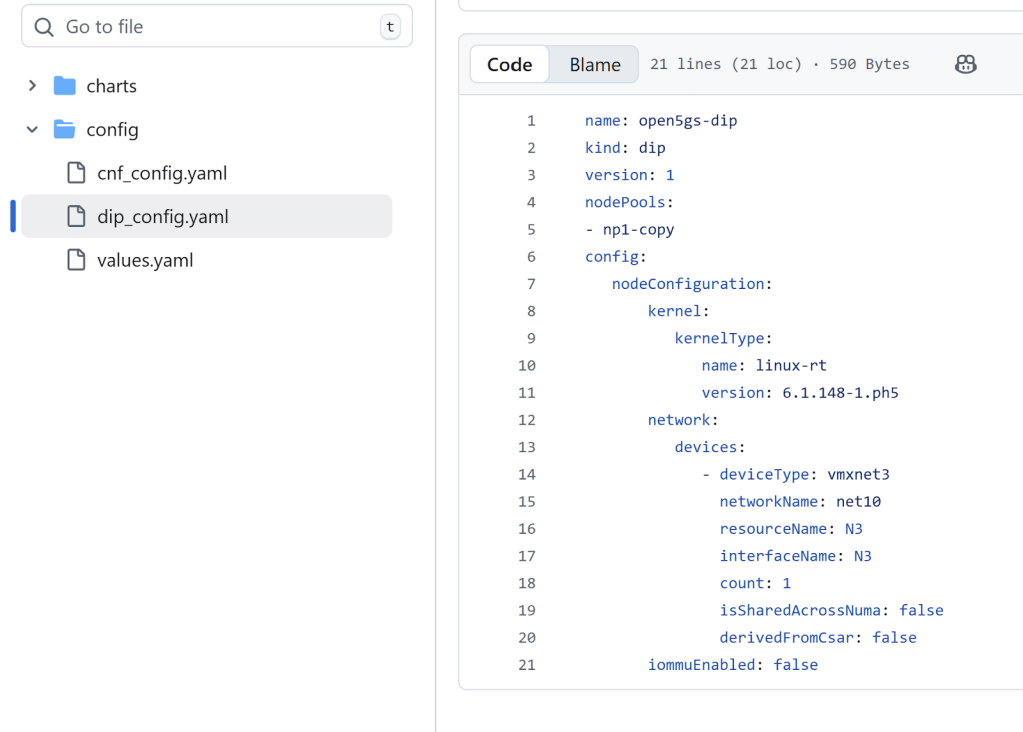
- Automated Upgrades: The GitOps controller will detect the desired state change and initiate the infrastructure customization, in this case, the kernel upgrade process. Log into the Telco Cloud Automation UI to verify the kernel upgrade.

Troubleshooting and Monitoring
Once the configuration is updated, the GitOps controller in the Telco Cloud Automation Control Plane synchronizes the changes with the CaaS cluster or the CNF. To monitor this process or gather logs:
- Log into the Telco Cloud Automation UI, navigate to GitOps -> Network Function, and click on the CNF (e.g., open5gs). Note the CNF’s ID.
- SSH into the Telco Cloud Automation Control Plane:
ssh root@<telco_cloud_automation_cp>
- Gather the status, events, logs, details, and composition of the GitOps application. The application name is formatted as gitops-cnf-<id_of_the_cnf_from_ui>. For example, gitops-cnf-dff73f85-8f64-4c7d-98ef-046eaa370414.
<em>kubectl describe applications gitops-cnf-<id_of_the_cnf_from_ui> -n argocd-system</em>
- If the GitOps application has progressed, SSH into the CaaS cluster. The CaaS cluster IP details can be found under the CaaS Infrastructure section for the specific cluster in the Telco Cloud Automation UI.
ssh capv@<caas_cluster_ip>
- Gather the status, logs, and details of the CNF’s pods. The logs can then be used for further troubleshooting and issue resolution.
kubectl get pods -n <cnf_namespace><br>kubectl describe pods <pod_name> -n <cnf_namespace><br>kubectl logs <pod_name> -n <cnf_namespace>
In conclusion, leveraging the declarative and auditable nature of GitOps with Telco Cloud Platform is crucial for mastering CNF Day 2 lifecycle operations. By centralizing the desired network state as code in a Git repository, CSPs can radically simplify complex, distributed tasks. This approach enables enhanced efficiency, fully automated lifecycle management, and a faster time-to-market. Essential operations, including CNF upgrades, elastic scaling, and infrastructure reconfigurations, become simple, traceable, and highly automated. CSPs gain the crucial ability to perform simple, traceable rollbacks to a stable state following any unsuccessful operation. Ultimately, this GitOps-driven model moves CSPs beyond manual methods, ensuring sustained business agility and the long-term health and necessary evolution of CNFs.
For more information on VMware Telco Cloud Platform and GitOps, refer to the documentation here.
Discover more from VMware Telco Cloud Blog
Subscribe to get the latest posts sent to your email.