
Today’s enterprises expect modern private clouds to deliver the same simplicity, agility, and self-service capabilities as the public cloud. However, as organizations pivot toward AI-ready infrastructure and prepare for a massive Kubernetes adoption, legacy hardware load balancers and their silo’d operational model have become a major bottleneck. The solution lies in the seamless integration of VMware Avi Load Balancer (Avi) – an enterprise grade software defined load balancing – within VMware Cloud Foundation (VCF), delivering a complete plug-and-play experience while adhering to application velocity.
Through how-to videos in this blog, we demonstrate how plug-and-play Avi with VCF 9.1 represents a foundational shift:
- From a device-centric, manual operating model taking days and weeks to a software-defined, self-service automation model.
- Instead of dealing with fragmented operations, deliver consolidated and zero-touch Kubernetes ingress required for next-generation workloads.
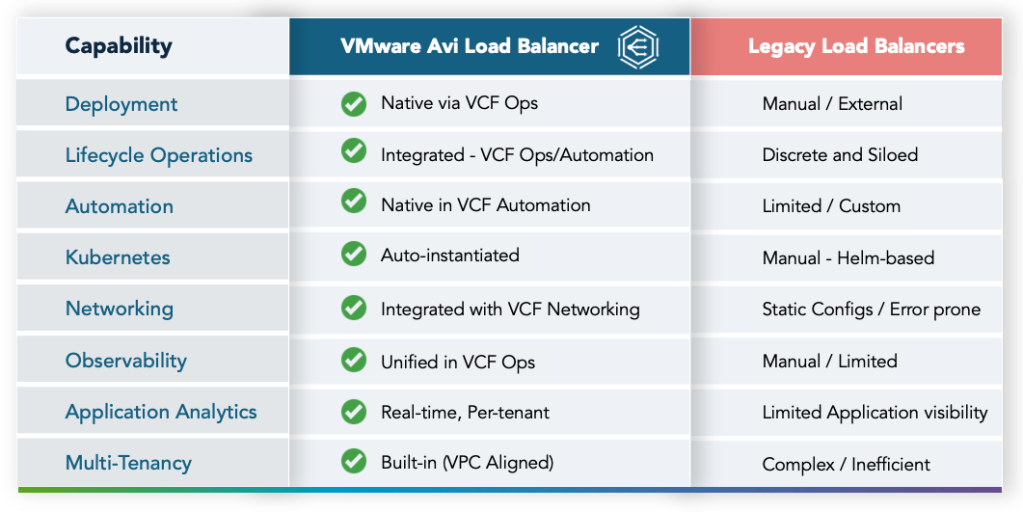
Here is a quick side by side comparison of Avi and traditional legacy load balancing platforms:
Plug-and-Play Load Balancing for VCF 9.1
Avi release for VCF 9.1 delivers deep integration spanning three critical areas:
- Control Plane : Seamless deployment, lifecycle management, and unified observability (via VCF Operations).
- Consumption Plane : True self-service Load Balancing as a Service (LBaaS) and API-driven delivery (via VCF Automation).
- Application Plane (VKS): Out-of-the-box Kubernetes integration (via AKO – Avi Kubernetes Operator), Ingress, and Gateway API (with VKS – vSphere Kubernetes Service).
Zero-Touch Avi Deployment: From Weeks to Minutes
The Avi controller is deployed and commissioned through a unified workflow within VCF Operations in VCF 9.1. This integration automates backend tasks such as creating the cloud connector and registering with the VCF (vSphere supervisor).
Here is a detailed description of how the Avi controller is deployed in minutes through VCF Operations:
- Access the Unified Depot: Start in VCF Operations Build section, into the Image Bundle.
- Install Binaries: Install the qualified Avi binaries from the unified depot.
- Initiate Deployment: Select to deploy the Avi within the VCF Operations UI.
- Configure Controller Settings: Specify controller size, nodes (= 3) and their IP addresses.
- Automated Backend Operations: VCF then initiates automated background operations, including:
- Creating the Cloud Connector to connect to VCF..
- Registering with the VCF supervisor.
- Creation of Avi service accounts.
Unified Observability & Day-2 Automation
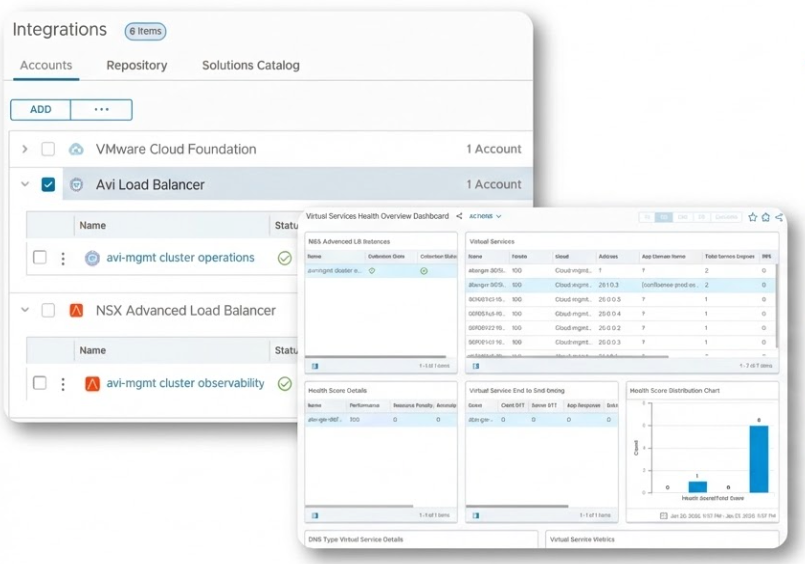
Avi leverages two distinct management packs within VCF Operations to provide unified visibility and lifecycle management. This provides IT admins a centralized hub for unified observability.
Avi Operation Management Pack
This management pack automates Avi infrastructure and maintenance tasks, such as password management, certificate rotation, and overall lifecycle management. In addition to cohesive operational experience, admins also get enhanced security (“break glass” account for emergencies, such as when passwords are lost or displaced).
Avi Observability Management Pack
This pack is dedicated to health monitoring and real-time performance visibility, and its key functions include aggregating Avi-specific dashboards, metrics, and alerts into a single view. In addition to the centralized health monitoring benefit, administrators can also formulate proactive alerts for faster issue identification and resolution.
Self-Service LBaaS: Agility Meets Control
Self-Service Load Balancing as a Service (LBaaS) is evolving to combine agility with control, moving beyond simple catalog-based deployment. While teams can use catalog to publish pre-configured services for end-users to deploy approved Avi configurations in production environments, the latest integration with VCF enables DevOps-Delegated workflows. This new approach empowers development teams with controlled self-service through the VCF Automation UI. Platform teams maintain governance by defining guardrails and DevOps teams gain the flexibility to customize and deploy load balancing services specifically tailored for pre-production environments.
Here is the workflow for the respective personas:
Provider or Load Balancer Admins:
- Verify Connection Health: Navigate to the VCF Automation Connections page to verify Avi’s health status, ensuring that it is up and running.
- Onboard Organization & Setup LB: Create a new Organization and select the Avi Load Balancer Setup. Avi is a native part of the organization creation process.
- Select Consumption Mode: Choose between Shared (multiple Orgs per LB) or Dedicated (one LB per Org) modes. Shared Mode offers better resource utilization and additional flexibility.
- Allocate Quota: Define license assignments and capacity quotas for the specific Organization, which prevents resource exhaustion and ensures fair licensing across tenants.
Tenant or Load Balancer Admin:
- Create Service Engine Group (SEG) Template: Create an SEG by filling out a declarative form in VCFA defining Avi load balancer formulation parameters. This eliminates the need to access the external Avi controller.
- Configure Namespace and bind SEG to namespace: Create a Namespace by defining the project, class, region, and associated VPC networking. This results in automatic networking based on the selected VPC. Then bind the SEG to Namespace by assigning the previously created SEG to the new Namespace, which readies the load balancers specifically for that namespace’s applications.
End-Users or Load Balancer User:
- Create Gateway API & Load Balancer: Create a load balancer by defining a name, IP (public/private), listeners, and secrets. This is a simple, self-service creation of the entry point for application traffic.
- Select Pool Members: Create a Pool and use selectors to add specific VMs or applications as members, which directly ties existing compute resources in VCFA to the load balancing service.
- Customize Health Monitors: Access Custom Resources to edit YAML for specific health monitor ports or timeouts, providing granular, low-level control over application health checks via the UI.
- Activate Service: Create an Application Virtual Service by tying the LB, host name, pools, and health monitors together. The virtual service is immediately ready to consume application traffic.
- View Multi-Tenant Analytics: Click the Avi Analytics tab within the VCF Automation page. This provides per-virtual-service visibility that is strictly partitioned so tenants only see their own data.
Zero Touch Kubernetes Ingress (VKS + AKO)
By eliminating the manual complexities associated with container networking, VCF 9.1 establishes Kubernetes readiness as a cornerstone for modern workloads.
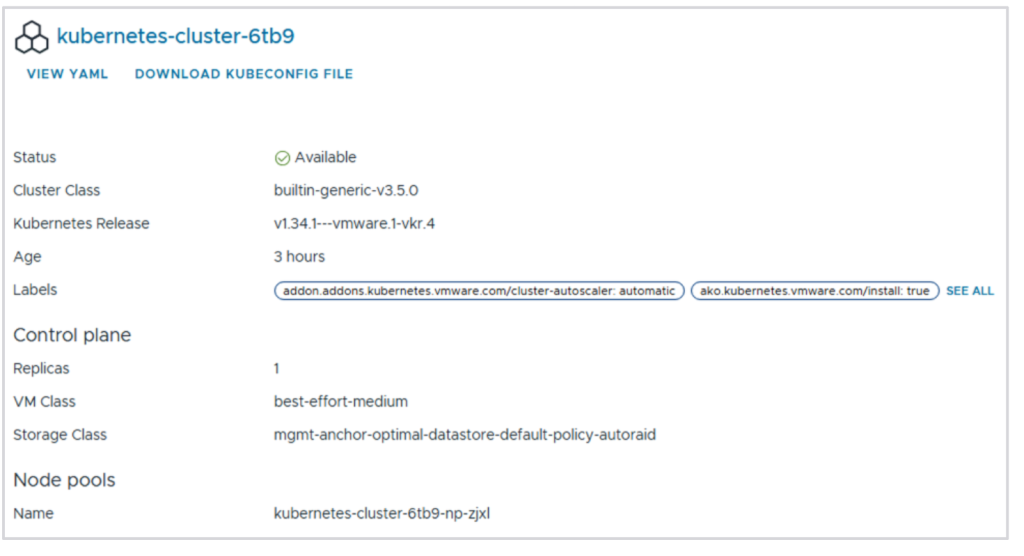
Central to this is the automated instantiation of the Avi Kubernetes Operator (AKO), which integrates newly provisioned VKS clusters with the Avi Controller. This out-of-the-box readiness eliminates manual Helm installations and input errors. Our demo covers following steps:
- Deploy VKS Cluster: Establishes the foundation for modern application workloads using a consistent administrative interface.
- Automated AKO Realization: Eliminates the manual, 10–20 minute process of Helm chart installation.
- Zero-Touch Configuration: Removes manual input errors by automatically mapping the ingress controller to its specific environment.
- Integration Verification: Delivers an immediate, production-ready ingress service unique to the Avi and VKS integrated stack.
- Declarative Management: Enables DevOps teams to manage load balancing within existing Kubernetes workflows via API, removing the need for an external controller.
Key Takeaway
For deploying modern VKS-based applications, Avi’s plug and play integration in VCF 9.1 is a foundational shift. Eliminate the legacy LB mindset – no boxes, no silos, no blind spots, no days/weeks of delays. Deploy load balancing at the speed of applications with Avi and VCF 9.1.
Ready to dive deeper? Check out our latest webinar to learn how VMware Cloud Foundation 9.1 and Avi Load Balancer work together to simplify application delivery, accelerate automation, and modernize networking services across your VCF private cloud environment.