
This is Part 2 of the series The VCF 9.1 VPC Networking Mental Model. Part 1 gave the build order. This part explains what each object does and how they relate.
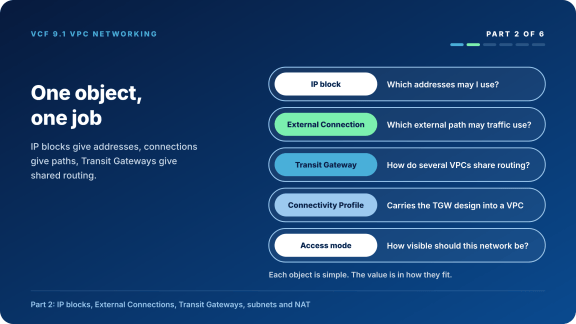
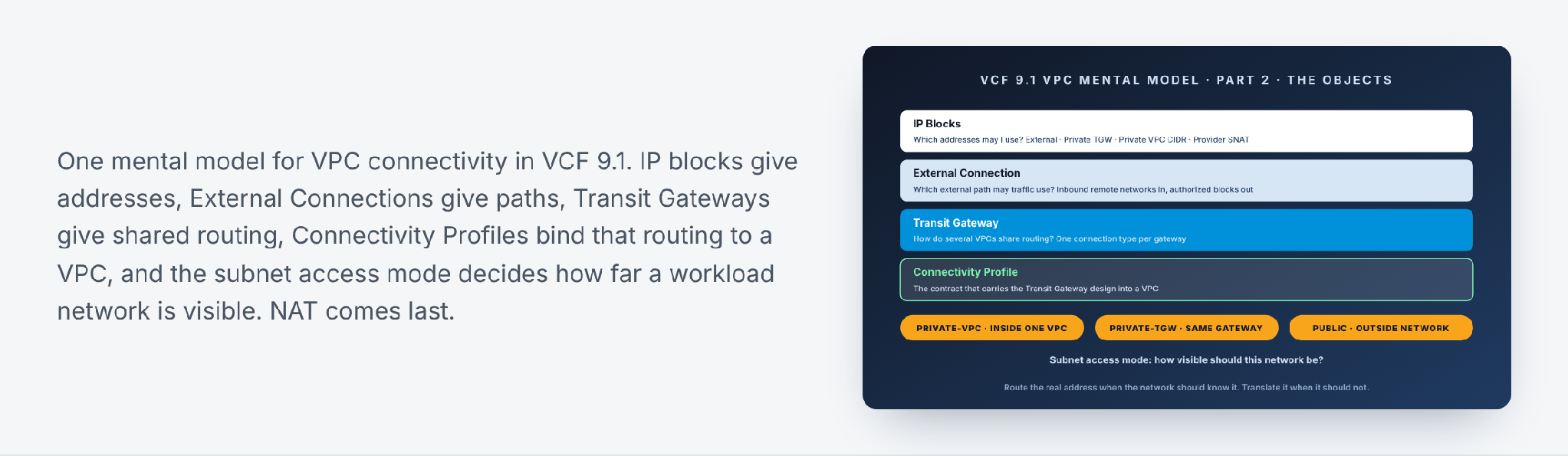
VMware Cloud Foundation (VCF) 9.1 puts a cloud-style Virtual Private Cloud (VPC) model on top of NSX. Each object is simple on its own. The value is in seeing how they fit: IP blocks provide addresses, External Connections provide paths, Transit Gateways provide shared routing, Connectivity Profiles bind that routing model to VPCs, and subnet access modes decide how far a workload can talk.
 Core idea
An IP block answers “which addresses may I use?” An External Connection answers “which external path may traffic use?” A Transit Gateway answers “how do several VPCs share routing?” A Connectivity Profile carries that Transit Gateway design into a VPC. The subnet access mode answers “how visible should this workload network be?”
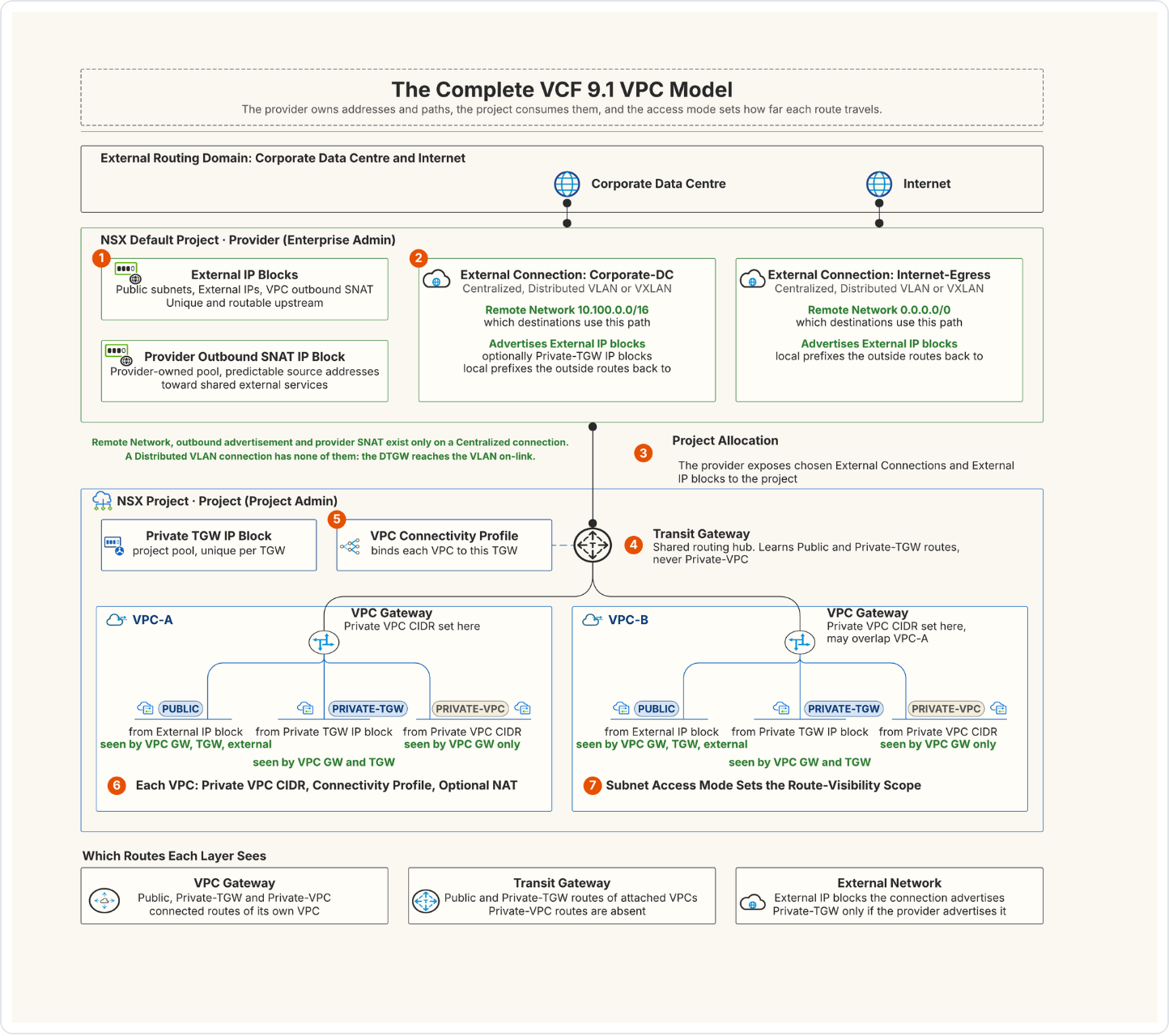
In everyday terms, think of an office phone system. Private subnets are internal extensions. Anyone in the building can dial 4021, but nobody outside can. Public subnets are direct-dial numbers listed in the phone book. NAT is the switchboard that places your outside call from the main number, so the person you ring sees the company number, not your extension. The IP blocks are the number ranges the company owns for each kind of line.
 1. Start with visibility, not with NAT
Before you pick a subnet type, decide how far its routes must be visible.
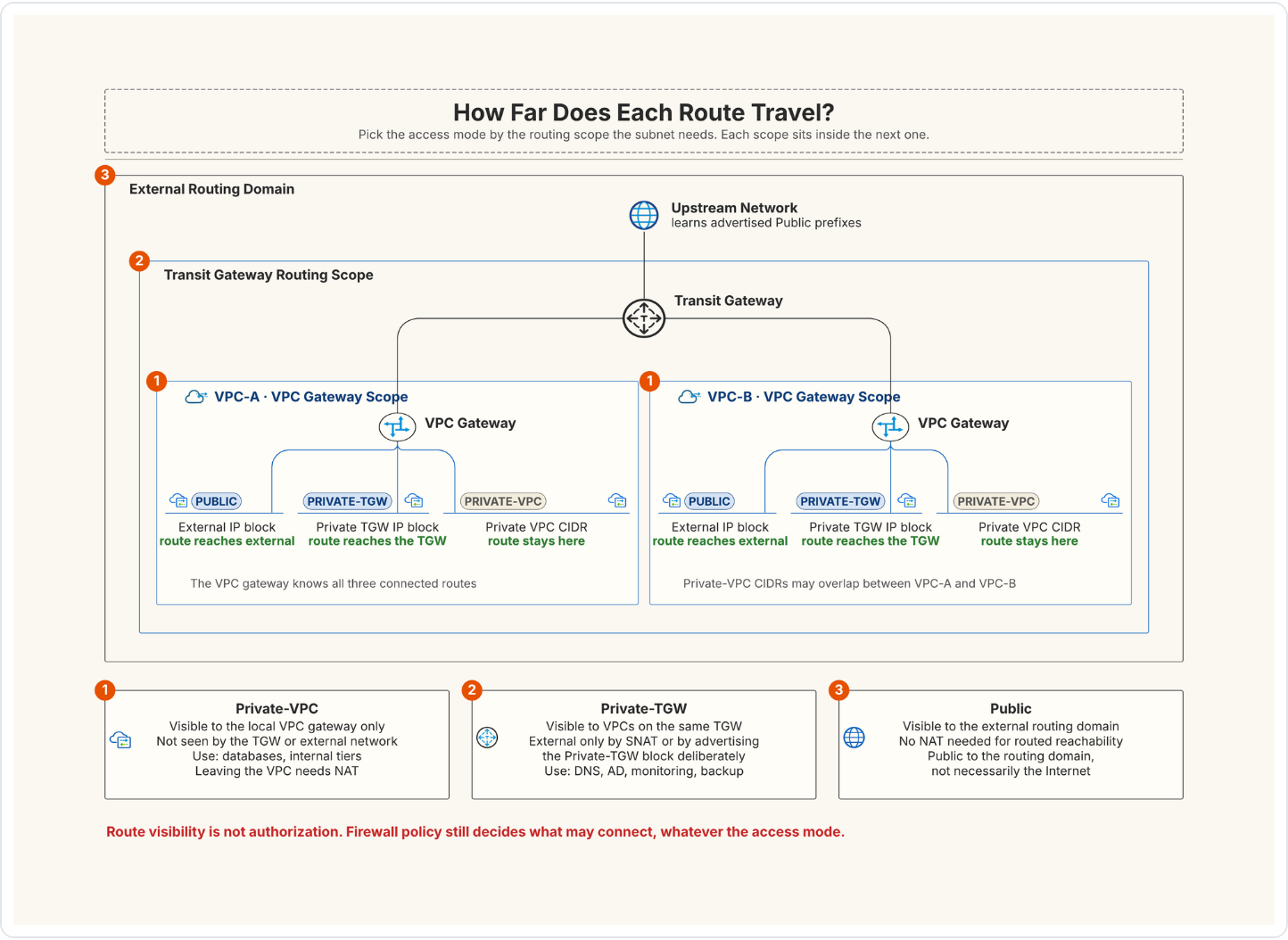
This routing scope is the basic design decision. NAT is an extra translation service. It is not a substitute for knowing where routes exist.
 2. Why are there several IP blocks?
VCF separates address ownership by the routing scope each block serves.

 External IP blocks
An External IP block supplies the addresses that give outside connectivity to VPC workloads. The docs list three uses:
- Public subnets
- External IPs
- Translated IPs for the system-created and user-defined NAT rules, including default outbound NAT
External means outside the VPC, not necessarily the Internet. In the same way, a Public subnet means reachable from the outside data centre network, not necessarily exposed to the Internet.
Two rules apply. External IP blocks must not overlap each other within a project or on the same Tier-0 gateway. They should not overlap with any other CIDR in use.
 Private TGW IP blocks
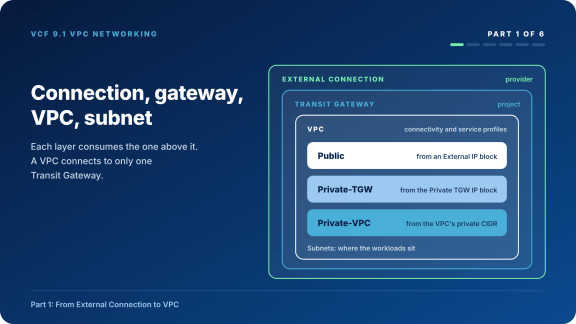
A Private TGW block creates Private-TGW subnets. These addresses are for inter-VPC communication through the Transit Gateway. The usual example is application VPCs reaching DNS, Active Directory, or monitoring in a shared services VPC.
By default the Transit Gateway does not advertise them to the outside data centre. On a centralized connection the provider can turn on Advertised Private IP Blocks. You must then also add the TGW_PRIVATE route advertisement rule to the Transit Gateway attachment before the blocks are advertised.
 Private VPC CIDR
The Private VPC CIDR is set on the VPC itself. It supplies addresses to Private-VPC subnets. A Private-VPC subnet is reachable only from inside its VPC.
Private VPC CIDRs may overlap between VPCs. That is useful for repeatable application blueprints and labs. Traffic from these subnets that leaves the VPC goes through NAT.
 Provider Outbound SNAT IP block
This block belongs to a provider setting on a centralized connection, Provider Outbound SNAT. It works like this:
- With the toggle on, the provider controls outgoing traffic, whatever the subnet type.
- The SNAT IP Block holds the ranges or CIDRs used as the translated IP. It must also be listed in Authorize External IP Blocks.
- With the toggle on, Authorize External IP Blocks becomes mandatory. Only the blocks listed there are advertised.
- Any other NAT rule on a Transit Gateway uplink has a higher priority than the provider outbound SNAT rule.
 3. What does an External Connection define?
An External Connection is the path from a Transit Gateway to the outside network. The provider shares it with a project. The project attaches it to a Transit Gateway.
 Connection type
- A Centralized connection links the Transit Gateway through a Tier-0 gateway on NSX Edge nodes, which provides the link to the physical fabric. You deploy the Edge nodes and manage their lifecycle. The Transit Gateway has its own HA mode.
- A Distributed VLAN connection gives lightweight connectivity to the data centre fabric with no NSX Edge nodes and no dynamic routing. Stateful services use Virtual Network Appliances (VNAs).
- A Distributed VXLAN connection is listed for 9.1.1 and later. It needs EVPN Route Controller nodes and a standards-based EVPN-VXLAN fabric.
A Transit Gateway can have more than one External Connection, for example to separate Internet and intranet paths. All of them must be the same type: all centralized or all distributed. A VPC connects to only one Transit Gateway.

 Inbound Remote Networks
A centralized connection has an advanced setting called Inbound Remote Networks. These are the destination networks that VPCs reach through that connection. When a Transit Gateway has several connections, the default route can sit on only one of them. Every other connection needs inbound remote networks to carry traffic.
For example:
- 10.100.0.0/16 behind the Corporate-DC connection.
- The default route, 0.0.0.0/0, behind the Internet-Egress connection.
Inbound remote networks must be unique per connection. ECMP networks are not supported. If none is set, the default route is used. They answer “which destinations use this connection?” They are not address pools for VMs.
 Authorize External IP Blocks and Advertised Private IP Blocks
The other direction is what the connection advertises:
- Authorize External IP Blocks sets which external IP blocks the connection may advertise. Left empty, all external IP blocks are advertised. Traffic from these blocks is routed to the external network without NAT.
- Advertised Private IP Blocks is a toggle that also advertises the Private TGW IP blocks, together with the TGW_PRIVATE route advertisement rule.
Keep the two directions apart. Inbound Remote Networks are destinations outside VCF that VPCs reach through this connection. Authorized and advertised blocks are local VCF prefixes the outside network learns, so it can route back to them.
 4. Why must resources be shared with a project?
The Default project can use external connections, external IP blocks and Edge nodes without defining them as shared resources. A user-defined project cannot. You have to share those resources with it.
So the Enterprise Admin shares the External Connections and External IP blocks a project may use. The Project Admin builds Transit Gateways and VPCs from them. This is the boundary between provider governance and tenant self-service.
One limit showed up in the lab. A centralized connection that a Transit Gateway in one project already uses cannot be shared with a second project. The share fails with “TGW external connection … already used in another project” (error 500157). Plan one centralized connection per project, or check the Broadcom docs for the supported sharing options.
 5. Transit Gateway: the shared routing hub
The Transit Gateway provides inter-VPC communication and the connection to the outside network through External Connections. Its southbound side connects to VPC Gateways. Its northbound side connects to the External Connections attached to it.
The connection choices are:
- None: the Transit Gateway has no external connection.
- Centralized: northbound traffic uses a Tier-0 gateway on NSX Edge nodes.
- Distributed VLAN: northbound connectivity from the hosts to a VLAN.
- Distributed VXLAN: northbound connectivity into an EVPN-VXLAN fabric (9.1.1 and later).

Two VPCs on the same Transit Gateway can reach each other’s Private-TGW subnets through it. Private-VPC subnets stay inside their own VPC.
 Private-TGW route advertisement
Keep two scopes clear:
- A Private-TGW subnet is available for inter-VPC communication on its Transit Gateway.
- Advertising it to the outside network is off by default. It needs the Advertised Private IP Blocks toggle on the connection and the TGW_PRIVATE route advertisement rule.
Only turn on external advertisement when the outside network has a return path and the wider visibility matches the security design.
 6. The VPC Connectivity Profile is the contract
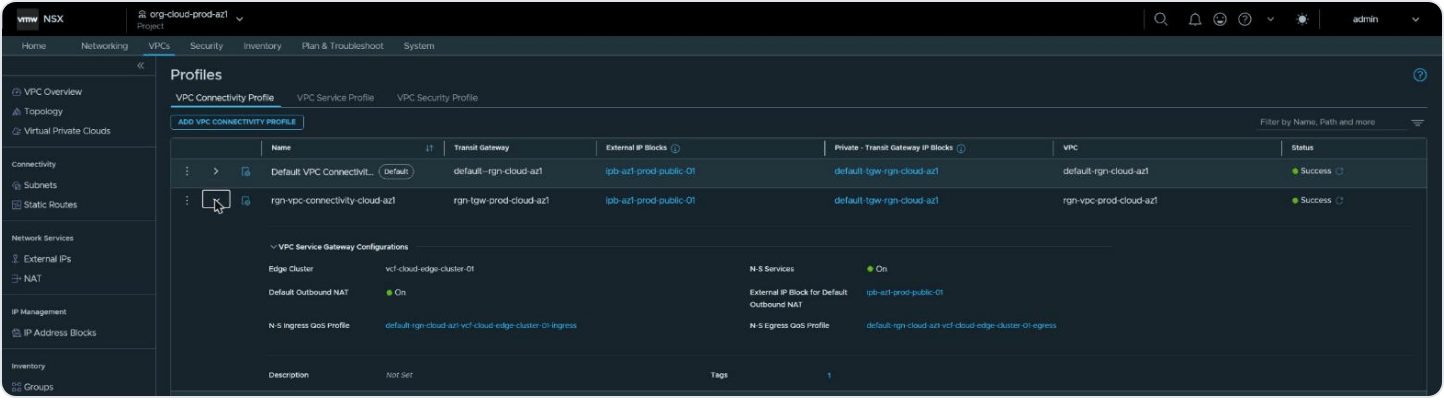
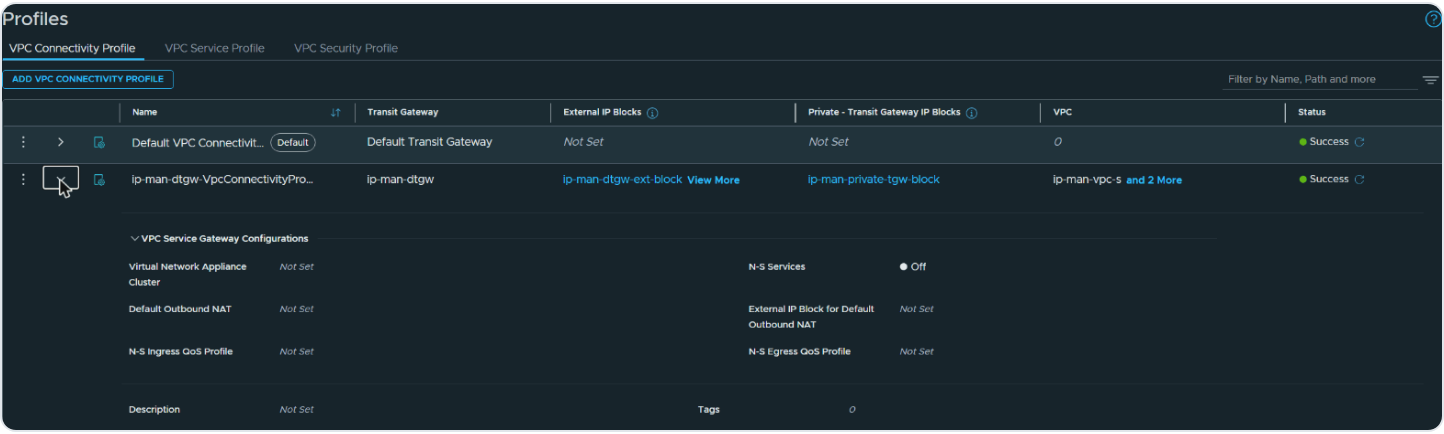
A VPC Connectivity Profile ties a VPC to a Transit Gateway. It carries the External IP Blocks and Private TGW IP Blocks the VPC can use, and switches such as N-S Services and Default Outbound NAT. When you create a Transit Gateway, NSX creates a default connectivity profile for it. In the lab it did this for a distributed Transit Gateway as well as a centralized one.
Each VPC uses one Connectivity Profile. Many VPCs can share the same profile. To move a VPC to another Transit Gateway, change its connectivity profile.
Public and Private-TGW subnets in the VPC take their addresses from the blocks in that profile.
 7. What is configured on the VPC?
The VPC is the tenant’s logical application boundary. At creation time the important inputs are:
- The Private VPC CIDR used by Private-VPC subnets.
- The VPC Connectivity Profile linking the VPC to the Transit Gateway.
- The VPC Service Profile, which holds DHCP server or relay settings and subnet profiles.
- Optional VPC static routes.
- The Enable for Avi Load Balancer toggle. It lets the Avi Load Balancer Controller discover the VPC and needs at least one private IP block and one edge cluster assigned to the VPC.
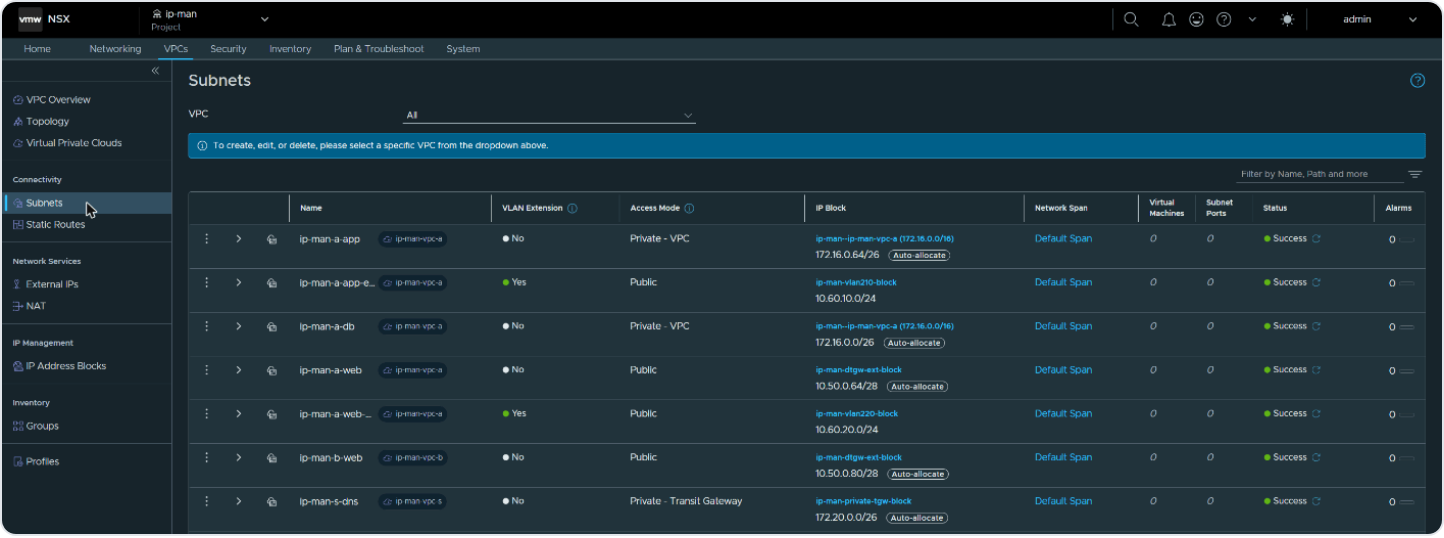
The VPC Gateway routes between the subnets inside the VPC and northbound toward the Transit Gateway. It is also the default gateway for every subnet. NSX gives each subnet a gateway address, the first usable address in its CIDR, and that address lives on the VPC Gateway. In the lab the Public subnet 10.50.0.64/28 gets 10.50.0.65, and the Private-VPC subnet 172.16.0.0/26 gets 172.16.0.1.
 8. The three subnet access modes
 Private VPC
Use Private VPC for workloads that should be reachable only from inside one VPC.
- Address source: the VPC’s Private VPC CIDR
- Reachable from: inside the same VPC only
- Private VPC CIDRs can overlap between VPCs
- Typical use: back-end tiers such as database and application servers
- Outside access: through NAT
 Private TGW
Use Private TGW when workloads in different VPCs must talk through the same Transit Gateway.
- Address source: the Private TGW IP block
- Reachable from: VPCs on the same Transit Gateway
- Typical use: shared services such as DNS, Active Directory and monitoring
- Outside access: through NAT, or by advertising the Private TGW block (Advertised Private IP Blocks plus the TGW_PRIVATE rule)
 Public
Use Public when the subnet must be reachable from outside the VPC.
- Address source: an External IP block
- Reachable from: inside the VPC and from the outside data centre network
- NAT: not needed for this reachability
- Typical use: front-end web servers that users or management reach directly from the corporate network
Public does not remove the need for firewall policy. Route visibility and security authorization are different controls.
 9. NAT: what problem does it solve?
NAT changes the source or destination address at a routing boundary. In this design it does three jobs:
- Give private subnets outbound access outside the VPC.
- Map a single private workload to an External IP, instead of making its whole subnet Public.
- Let the provider control outgoing traffic with provider outbound SNAT.
 Default Outbound NAT
 is a toggle in the VPC Connectivity Profile. You can also set it when you create a Transit Gateway. It gives workloads on private subnets outbound access outside the VPC. One SNAT rule per VPC is created automatically. The translated IP comes from the profile’s External IP Blocks, or from the block set in External IP Block for Default Outbound NAT.
Because the rule is per VPC, each VPC’s outbound traffic leaves with its own translated address, and the private subnets stay hidden.

 External IPs and your own NAT rules
An External IP is a stateless 1:1 NAT for one workload, with the address taken from the External IP block. You can also add your own NAT rules to a VPC. Two limits apply. For SNAT, the source network must not overlap with external IP blocks. For DNAT, the translated network must not overlap with external IP blocks.
 Provider Outbound SNAT
Provider outbound SNAT is set on a centralized connection, as described in section 2. It translates outgoing traffic into the provider’s SNAT IP Block, whatever the subnet type. Any other NAT rule on the Transit Gateway uplink has a higher priority.
 NAT decision table
 10. VLAN extension and access mode
VLAN extension connects a VPC subnet to an existing VLAN. A VLAN-extended subnet uses access mode Public, and DHCP does not apply to it. The form also offers L2 Only once VLAN extension is on, but that mode is for the TEP-less VLAN-backed VPC, where the Transit Gateway has no external connection.
VLAN extension is not another way to connect Private-VPC or Private-TGW routing. It serves a different purpose, which Part 4 will cover in detail.
 11. Design checks before production
- With more than one connection on a Transit Gateway, does only one carry the default route? Do the others have unique inbound remote networks?
- Are External IP blocks free of overlap within the project, on the Tier-0 gateway and with other CIDRs in use?
- Are all External Connections on each Transit Gateway the same type?
- Are Private-TGW prefixes meant to stay inside the Transit Gateway, or be advertised outside?
- If advertised, are both the toggle and the TGW_PRIVATE rule in place? Does the outside network have a return route?
- If not advertised, which NAT provides the translated source?
- If Provider Outbound SNAT is on, is the SNAT IP Block also in Authorize External IP Blocks?
- Does each VPC use the intended Connectivity Profile?
- Is VLAN extension needed, or would routed connectivity be simpler?
Once route visibility is clear, the NAT decision is simple. Route the real address when the network should know it. Translate the address when it should not.
 What’s next
Part 3, coming soon, opens the hood on the Distributed Transit Gateway: how a VPC reaches the physical network with no NSX Edge and no routing protocol, and the three paths traffic takes out of a VPC.
Discover more from VMware Cloud Foundation (VCF) Blog
Subscribe to get the latest posts sent to your email.