

Every time a new vulnerability is discovered, a silent clock starts ticking. It signals the start of a race between your infrastructure team and global threat actors. Does your organization have the technology and processes in place to resolve or mitigate a vulnerability in your environment before an attacker can compromise? And not just once. Not on a schedule. Whenever and whatever technology happens to have been impacted this time. Adding to the fun, these clocks are starting to tick a lot more often. According to Zero Day Clock, year to date 2026 we’re on track to have double the number of Common Vulnerabilities and Exposures (CVEs) issued than in 2025.
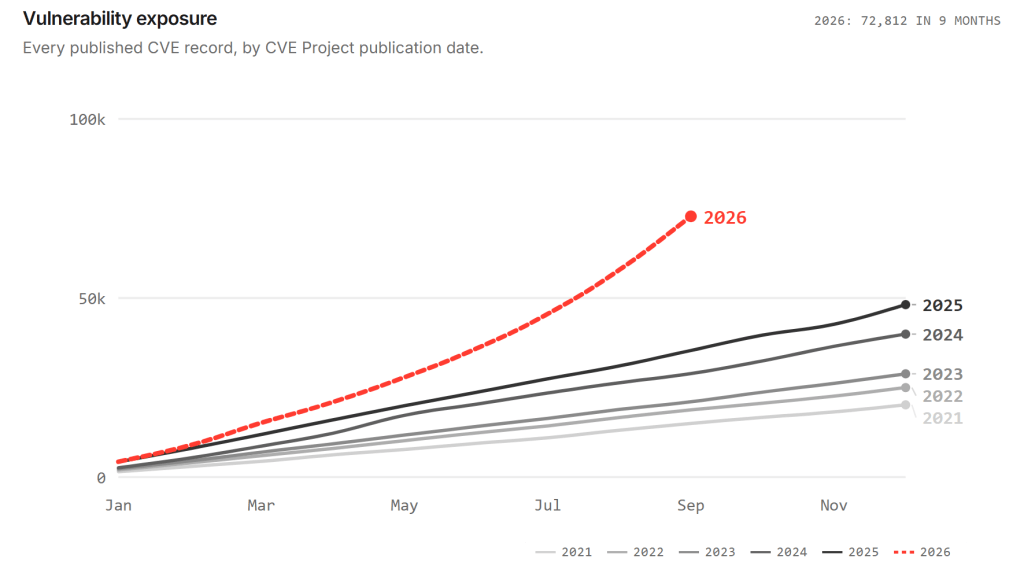
Figure 1. Source: Zero Day Clock (https://zerodayclock.com)
This massive acceleration isn’t a fluke; it is the direct result of Frontier AI. Advanced AI models are now routinely weaponized by threat actors to ingest vast codebases, identify deep architectural flaws, and automate the creation of exploit code in record time. This AI-driven exploit engine has fuelled a massive explosion in the sheer number of published CVEs, fundamentally lowering the barrier to entry for attackers. As one of my Engineering professors often said, “Once the smoke has left the diode you can never get it back in.” This is our brave new world; there’s no going back.
You cannot win an AI-accelerated footrace if you are weighed down by traditional IT operations. If applying a critical hypervisor security update requires three weeks of change-control meetings, navigating maintenance windows, large scale vMotion events, and coordinating time consuming server reboots, you have already lost the race. Your infrastructure remains critically exposed while the organization negotiates precious downtime.
To beat attackers today, your defensive speed must outpace their offensive automation. Staying current on patches can no longer be a disruptive, high-friction event. It must be immediate, painless, and completely invisible to the workloads running on top of it. VMware Cloud Foundation (VCF) 9.1.1 removes the massive headache of scheduling downtime, letting you patch vulnerabilities the same day patches drop. That’s how you stand a chance to actually win the race.
Rapid and Seamless Patching
Zero-Downtime ESXi Live Patching
The most significant weapon in the new lifecycle arsenal is the dramatic expansion of ESXi Live Patching. VCF 9.1.1 allows administrators to update core vmkernel components and user-space daemons, including vital vSAN and storage libraries, without rebooting the host or entering maintenance mode. This extends even to TPM-enabled servers. The hypervisor can seamlessly swap out vulnerable code for patched code while virtual machines continue running smoothly, entirely unaware that the underlying hypervisor has just been updated and secured. This is a massive win from a security perspective. Critical hypervisor zero-days can now be remediated in hours rather than weeks.
Patching vCenter in Under a Minute
This zero-downtime approach doesn’t stop at the hosts. It now applies to vCenter too. Historically, patching vCenter required taking the vSphere management plane offline, temporarily blinding administrators and halting automated provisioning pipelines. With vCenter Quick Patch in VCF 9.1.1, the platform targets only the specific binaries containing code changes rather than replacing the entire appliance image.
This surgical approach drops management plane patching downtime to under a minute and in many cases, achieves true zero downtime. API endpoints remain responsive, infrastructure-as-code deployments continue uninterrupted, and the control plane is secured without causing a disruption to the business. Even in cases where vCenter Quick Patch isn’t available, vCenter Reduced Downtime Upgrade is still available to minimize the impact to the management plane.
Continuous Security
By eliminating the operational friction of patching, infrastructure teams no longer have to push back on security mandates. Security delivery becomes a continuous, non-disruptive background process rather than a high-stress, anxiety inducing, 2 a.m. outage-required event after defending the need for these patches to yet another Change Advisory Board. The combination of vCenter Quick Patch and ESXi Live Patch nearly eliminates the technical friction of patching the vSphere management plane. Don’t forget to modernize your organization’s operational policies to take advantage of these game changing technologies.
Streamlined Centralized Lifecycle Management
Historically, applying a security patch to a complex virtualization environment meant waiting for a massive, monolithic update. When a critical vulnerability was disclosed, security teams were often forced to wait while vendors bundled the fix into a larger maintenance release, which then required extensive regression testing across the entire stack. VMware Cloud Foundation 9.1.1 changes this paradigm entirely with the introduction of Express Patches, decoupling critical security fixes from heavy feature releases.
Agile, Targeted Remediation
Express Patches are lightweight, highly targeted updates designed specifically for rapid CVE remediation. Rather than deploying gigabytes of updated binaries that touch every part of the system, Express Patches deliver only the precise code needed to close a security gap. This dramatically reduces the testing burden on IT Operations and shrinks the Time-to-Remediate (TTR) from weeks or months down to days.
Removing the Patch Sequencing Bottleneck
In previous architectures, patching required strict adherence to a validated upgrade sequence. If you wanted to patch one component, you often had to upgrade several others in a specific order to maintain compatibility. VCF 9.1.1 eliminates this friction for management components. Unless specifically noted in the release notes, Express Patches for VCF Management Services can be applied independently and in any order, completely removing the sequencing overhead that traditionally delayed emergency patching.
Centralized and Intelligent Patch Deployment
This new agile patching model is driven entirely through the centralized Build > Lifecycle dashboard in VCF Operations. The platform automatically checks for, downloads, and stages available patches, including Express Patches. More importantly, the system’s intelligent automation evaluates the incoming patch payload for the entire VCF Stack. If a patch contains fixes that are Live Patch or Quick Patch Eligible, VCF automatically routes it through the non-disruptive patching technologies discussed earlier.
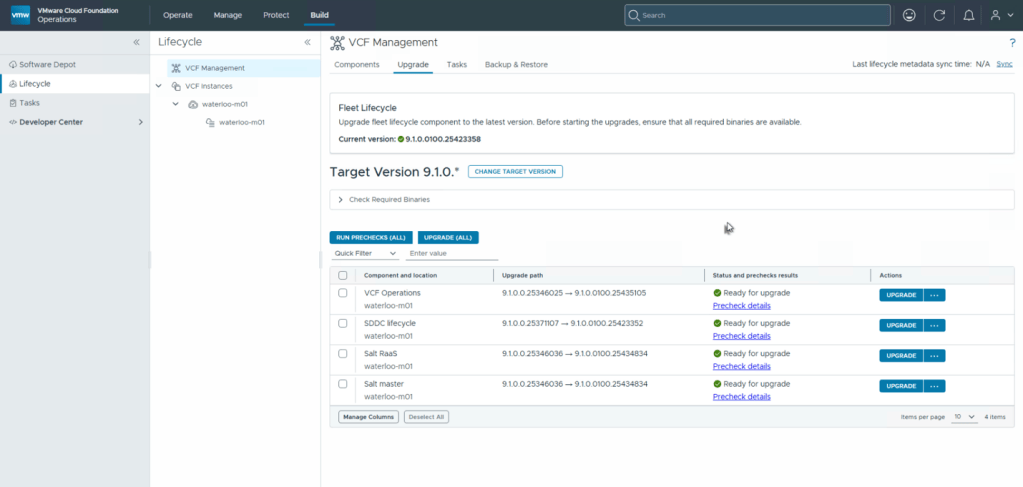
Figure 2. VCF Management Services Patching
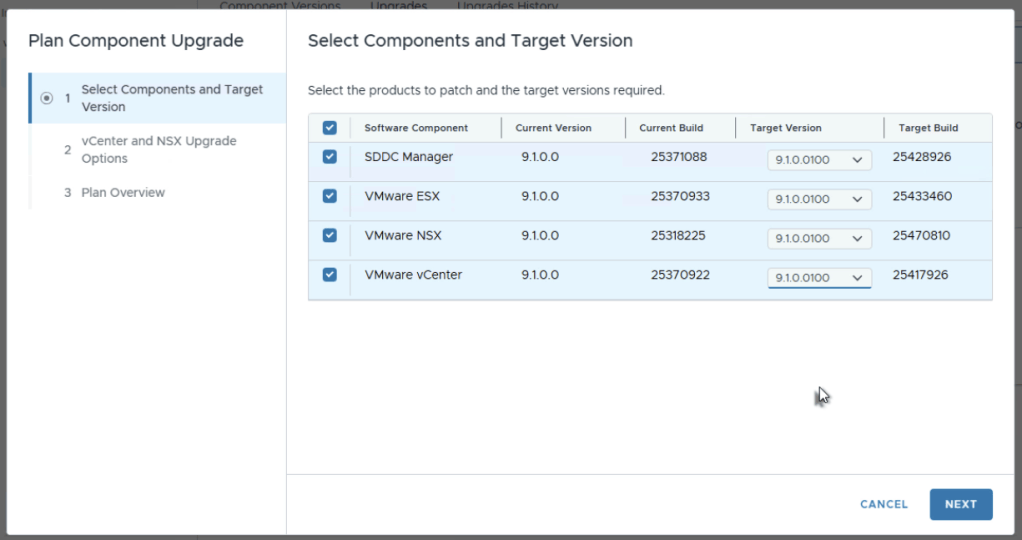
Figure 3. VCF Component Upgrade Planning
The result is a patching lifecycle where emergency security updates are pulled down automatically, require no complex sequence planning, and are applied surgically without taking down workloads or the management plane.
Core Security Enhancements
While rapid patching closes newly discovered vulnerabilities, a truly secure infrastructure requires a hardened baseline that refuses to degrade over time. VCF 9.1.1 bakes security hygiene directly into the platform’s day-two operations, automating the tedious tasks that traditionally lead to configuration drift and operational outages.
Managing Certificates Without the Spreadsheets
Expired certificates are one of the most common causes of preventable infrastructure outages and security warnings. VCF 9.1.1 takes the manual labor—and the human error—out of this critical process. By default, during management plane upgrades, the platform automatically evaluates the VMCA root certificate and subsequent solution user certificates. If they are within a year of expiration, VCF automatically renews them in the background. This helps ensure the trust boundary remains intact without requiring administrators to track spreadsheets of expiration dates or execute manual key rotations.
Secured Down to the Physical Infrastructure
Physical security and boot integrity are no longer manual checklist items. VCF 9.1.1 deeply integrates secure cluster lifecycle management with Secure Boot and TPM architectures. When new hosts are added or existing nodes are restarted, the platform automatically validates the hardware configuration and boot state. This ensures that no unauthorized hypervisor modifications or bootkits can compromise the underlying infrastructure before workloads are even deployed, enforcing zero-trust principles at the bare-metal layer.
Continuously Secure Configurations
A secure deployment is only secure until an administrator tweaks a setting for troubleshooting and forgets to revert it. To combat configuration drift, VCF 9.1.1 embeds desired state management directly into the cluster lifecycle using vSphere Configuration Profiles. Whenever a cluster receives an update or a host is rebooted, the system automatically enforces the defined desired state – including the ability to set advanced hypervisor security parameters, locking down SSH, and validating vSAN settings. This guarantees that your secure baseline is actively maintained, remediating drift automatically without relying on external day-two scripting.
Staying Secure
The AI-driven threat landscape will only continue to accelerate, but defending your infrastructure no longer has to be a disruptive, organizational battle. VMware Cloud Foundation 9.1.1 has advanced enterprise security by removing the top sources of friction that have historically paralyzed IT operations.
By eliminating the operational penalties of patching—maintenance windows, host evacuations, and the risks of rebooting—ESXi Live Patching, vCenter Quick Patches, and VCF Express Patches empower your security and infrastructure teams to remediate zero-days at the actual speed of the modern threat cycle. Coupled with automated certificate management and strictly enforced configuration profiles, the platform ensures that once your secure baseline is established, it remains permanently hardened against drift.
You no longer have to compromise between continuous uptime and continuous security. Upgrading to VCF 9.1.1 is more than an infrastructure modernization effort; it is the strategic pivot that gives your organization the speed, agility, and automation required to finally win the race against modern threat actors.
Discover more from VMware Cloud Foundation (VCF) Blog
Subscribe to get the latest posts sent to your email.