
A VCF Operations alert that detects new Services Runtime node VMs by name and IP address.
VMware Cloud Foundation (VCF) management services in VCF 9.1.x run on VCF services runtime, a Kubernetes-based layer whose worker nodes are ordinary virtual machines in your management domain. When you scale out, perform upgrade operations, or when a node fails and is recovered, VCF services runtime deploys new worker node virtual machines for you. That is convenient, but it leaves operations teams with a question that sounds simple:
How do you know a new node was deployed, and which VM is it?
Until you can answer that reliably, everything downstream is manual. Nobody updates the Configuration Management Database (CMDB), nobody adds the virtual machine to the right vSphere DRS group, and nobody tells the monitoring team there is something new to watch. In this post we show how to build a precise, event-driven alert for worker node creation based on only the data collected by VCF Operations. Then we look at a number of different use cases, where we can perform various actions based on the alert being triggered.
What the alert gives you
When a new control plane or worker node virtual machine appears, VCF Operations will raise an alert against that virtual machine. The alert consists of the following details:
- The VM name, exactly as it appears in vCenter
- The guest IP address, reported by VMware Tools
- A timestamp, and an alert object you can attach any notification to
Once the alert is triggered, any response or action depends on your organization’s specific needs. The rest of this post explains how the alert works, then covers use cases.
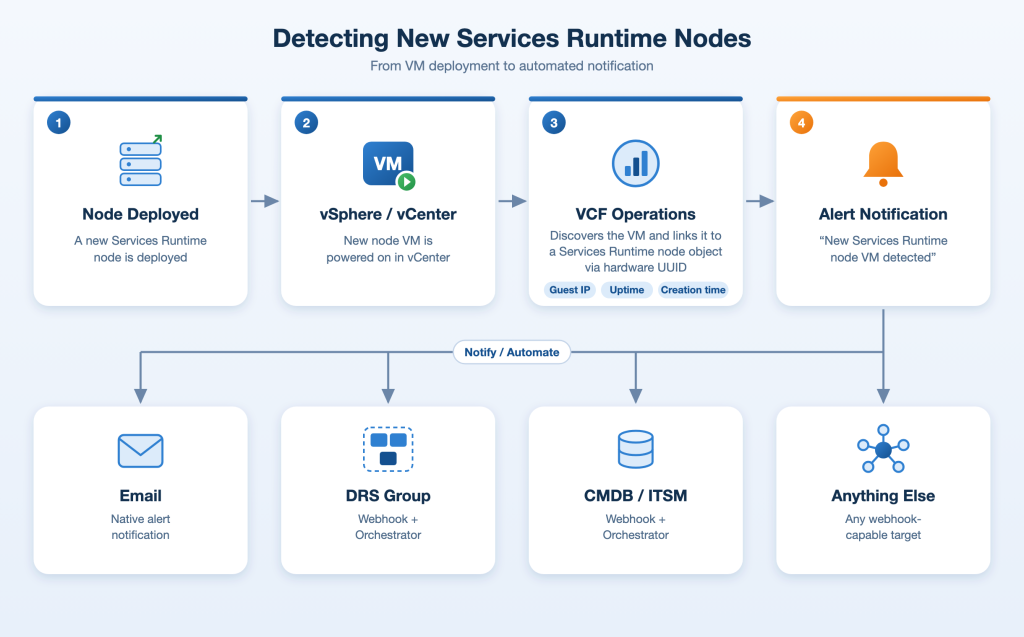
The vCenter adapter tracks each VM’s creation time, guest IP address, and uptime. The VCF management services adapter creates a vmsp-platform-node object for every real Kubernetes node and links it to its VM. So VCF Operations alerts on properties and relationships.
How the alert works
The alert is defined on the VM object type. It combines symptoms from the VM with a symptom from a related object, and all of them must be true at once.
On the VM:
| Symptom | Condition | Why |
|---|---|---|
| Created after baseline | config|createDate is greater than a fixed time | Ignores VMs that already existed |
| Has an IP | summary|guest|ipAddress matches an IPv4 pattern | VMware Tools is up, and the IP appears in the alert text |
| Recently booted | sys|osUptime_latest is less than 7200 seconds | The VM started in the last two hours |
On a related object (at least one child):
| Symptom | Condition | Why |
|---|---|---|
| Node object exists | A vmsp-platform-node object related to the VM has a registered node type | The Services Runtime adapter confirms this VM is a real cluster node |
Identity comes from a relationship, not a name
A fair question is whether an ordinary VM, deployed by a user at the same moment, could be mistaken for a node. The first three conditions would not stop it. The fourth does.
The adapter links a node object to its VM using the node’s UUID, not its name or IP address. On a live node, the nodeUUID on the vmsp-platform-node object is identical to the summary|smbiosUUID on the vCenter VM object. A VM that was not provisioned as a cluster node would have a different hardware UUID and no vmsp-platform-node child, so the alert stays inactive for it, whatever it is called. A plain clone of a node VM gets a new SMBIOS UUID by default, so it does not match either.
Use case 1: Notify the team by email
The simplest response is a notification rule on the alert that sends email through your existing SMTP outbound plugin. Because of the “has an IP” symptom, the alert text contains both the VM name and its address, so the message is useful on its own: “a new node, sfo-sr01-abcde, is live at 10.11.x.x.”
Send it to the platform team, the monitoring team, or a shared mailbox that feeds a ticket queue. It is also the fallback: whatever else you automate, the email still tells a human what happened.
Two coarser alerts on the VCF services runtime cluster object, based on the new_resources and not_existing_resource_count counters, can complement it. They count every object under the cluster, including pods and volumes, so they fire on upgrades and do not name a node. Treat them as “something changed, take a look.”
Use case 2: Place the VM in a DRS VM group
In many environments VCF services runtime nodes are spread across availability zones with VM-Host rules. A new VM that is not in the right vSphere DRS VM group is a VM vSphere DRS may be placed anywhere, and someone has to remember to add it.
A second notification rule on the same alert can call a webhook that starts a VCF Operations orchestrator workflow. Ours does the following:
- Ignores cancel notifications. Operations also notifies when an alert clears.
- Finds the cluster and fails loudly if there is not exactly one match.
- Finds the VM by name as vCenter reports it, ignoring the request if it is not found and refusing to act if more than one VM has that name.
- Checks the VM runs on a host in the target cluster. This is the scope guard.
- Checks if the DRS VM group exists and whether the VM is already a member. If it is, nothing happens.
- Runs the built-in “Add virtual machines to DRS group” workflow and waits for it to finish.
Step 5 makes the workflow idempotent. Notifications repeat, and a node that reboots can raise the alert again, but the second run finds the VM already in the group and changes nothing. The workflow also supports a dry run: if the alert ID starts with dryrun, it runs every check and reports what it would do. Use it to test against a real VM without touching the group.
Because the workflow takes the VM name exactly as vCenter reports it and applies no naming filter, it works for any Services Runtime cluster, not just one. and applies no naming filter, it works for any Services Runtime cluster, not just one.
Use case 3: Keep your CMDB current
New infrastructure that never reaches the CMDB is a familiar audit finding. The alert already contains what a CMDB’s Configuration Item (CI) record needs: the VM name and the IP address. The same webhook pattern that adds a VM to a vSphere DRS group can create or update a configuration item instead, or as well:
- Call your ITSM tool directly. An orchestrator workflow can call the REST API of ServiceNow or a similar platform to create a CI with the name, IP, platform and discovery time, using the alert as the trigger.
- Open a ticket first. For environments where CI creation needs approval, create a change or task record from the alert and let the CMDB process take over.
- Reconcile rather than create. Look up the CI by name, update it if it exists and create it if not, so repeated notifications do no harm.
The idempotent design from the vSphere DRS workflow carries over. The alert identifies a node, the workflow checks whether the record already exists, and it acts only when something is missing.
More use cases
- Tag the VM in vCenter (for example with its platform and owner) so reporting policies pick it up.
- Post to chat. Send the name and IP to the platform team’s channel through a webhook.
- Confirm capacity. Compare the new node count against what you planned, and flag scale-outs nobody expected.
- Start a compliance check. Trigger a baseline scan or a security review on each new node.
You wire these up exactly as the DRS rule is: a notification rule on the alert, pointing at an outbound plugin.
Wiring the webhook
A webhook outbound plugin in VCF Operations posts a JSON payload to the workflow’s REST endpoint. The payload carries values from the alert:
|
1 2 3 4 5 6 |
<code>{"parameters":[ {"name":"alertName", "type":"string","value":{"string":{"value":"${ALERT_DEFINITION}"}}}, {"name":"resourceName", "type":"string","value":{"string":{"value":"${RESOURCE_NAME}"}}}, {"name":"alertId", "type":"string","value":{"string":{"value":"${ALERT_ID}"}}}, {"name":"alertStatus", "type":"string","value":{"string":{"value":"${ALERT_STATUS}"}}} ]}</code> |
What to take away
- Alert on what the platform already knows. When logs cannot be tied to an object, properties, metrics, and relationships usually can.
- Use a relationship, not a name, to prove identity. Linking the VM to its node object through the hardware UUID is what stops a look-alike VM from triggering anything.
- Treat the alert as a platform event. One reliable signal, with a name and an IP, can feed email, DRS placement, your CMDB, and more. Build the signal once, and add responses as you need them.
- Make every action idempotent, and give it a dry run. Notification systems repeat themselves. An action that is safe to run twice, and can be tested without consequences, removes most of the fear from automation.
If you already run VCF Operations 9.1.x with the VCF management services adapter, you can build the alert in an afternoon: three symptoms on the VM, one on its child node object, and an email rule. Add a webhook and a workflow when you are ready to act on it. The harder, and more valuable, work is deciding what should happen automatically when platform changes occur.
Discover more from VMware Cloud Foundation (VCF) Blog
Subscribe to get the latest posts sent to your email.