(Day 9 of 22 in our Cybersecurity Awareness Month series. Today: what makes up an AI)
AI, AI, AI. As I said in the first post in this series, it feels like a decade has passed since October 2025, and that’s because of AI. For all the talk of AI, though, it seems like people don’t really understand it that well. That’s a problem if you’re responsible for any part of AI security. People talk about AI as one thing, a magic box of sorts, but it’s really a stack of parts. Those parts are data, a model, hardware, software that runs the model, and the applications and tools wrapped around it. Each part does a different job, and as such, each part has its own security concerns.
Most AI security concerns are familiar, though. They are about data, access, and software supply chains, which security teams have dealt with for decades. A few are new, though. This post takes AI apart one piece at a time: what each part does, and what to watch for from a security point of view. It assumes you know more about infrastructure than data science.
Where an AI Gets Its Intelligence
Training Data
A model learns from examples. For the large language models (LLMs) behind most AI tools, those examples are enormous amounts of text, and often code and images, too. The model doesn’t store that data the way a database does. It learns patterns from it, so what goes in shapes what comes out. There is an old term in computers, “Garbage In, Garbage Out,” that is applicable here. A data poisoning attack is where someone deliberately slips garbage into the training data to change how the model behaves. Sensitive data in a training set can resurface in the model’s answers. Someone can also bias its answers on purpose.
Training data raises intellectual property questions, too. Public models learn from huge amounts of text and code collected from the internet. Courts are still working out when the law allows that. A model can sometimes reproduce copyrighted text or licensed code from its training data nearly word for word. That becomes your problem if it ends up in your product. Open models come with their own licenses, and some limit commercial use or how you can use the model. Your own intellectual property is at stake as well. Some hosted AI services keep what you send them, or train on it.
If you train or adapt a model, AI security starts with the data. Know where it came from and who could have changed it. Check that you have the right to use it, and whether anyone is keeping your own data.
The AI Model
The model itself is a large file, or a set of files, full of numbers called weights. When you send a model text, it first turns that text into numbers. Those numbers flow through layers of simple math units. Each unit takes the numbers from the layer before it and multiplies each one by its own weight. Then it adds them up and passes the result on. A large weight means the number it multiplies matters a lot. A small one means that number barely matters, and a negative one pushes the result the other way. It’s the same idea as a weighted average, where some scores count more toward a final grade than others.
After the last layer, the numbers become a score for every possible next word, or piece of a word. Those scores come entirely from your text and the weights. Give a model “The capital of France is,” and the weights tip the scores toward “Paris.” Training adjusts the weights a tiny bit at a time. It keeps going until the scores reliably favor the right next word, or the right next step in a task. Models with billions of weights are common, and together those weights hold everything the model has learned.
An AI Model Is a Little Like a Brain
A model works a little like a human brain. Its designers loosely based the math units on neurons, and the weights on the connections between neurons. That’s why “neural network” is the name for models like these. A human brain can’t do much on its own. It needs external parts, like eyes and ears and hands and legs, to get things done. Same for a model. Unlike a human brain, though, a model has no persistent memory of your last conversation. It starts over every time. Text goes in and text comes out. Anything more, like looking something up, reading a file, or sending an email, comes from the software around the model. The tools and agents covered below handle that.
AI Model Files and Formats
Model files are valuable. Training a large model costs a great deal, so the weights are intellectual property worth stealing. Model files can also be a direct AI security risk. Model makers distribute models in several formats, such as GGUF, safetensors, ONNX, and pickle. Some of these formats, like pickle, can contain code or other instructions that run when the model loads. GGUF and safetensors hold weights and settings without code, which makes them safer, but not risk-free. The software that reads them can have bugs, too. In 2024, researchers found that one popular tool would run code hidden in a GGUF file’s chat template. That’s a setting that tells the model how to format a conversation.
Treat models as part of your software supply chain. Check where each one came from, and prefer safetensors or GGUF over pickle-based formats. Keep the software that loads them patched, and control who can copy them.
Fine-Tuning
Most organizations don’t train models at all. They use an existing model, often called a foundation model, as it comes. They customize its answers with prompts and with their own documents through retrieval, covered below. Some go a step further and fine-tune a model. That means training it a little more on a smaller set of their own examples.
People fine-tune to change how a model behaves more than what it knows. A fine-tuned model might learn a company’s writing style, the vocabulary of a specialized field, or how to fill out a particular form the same way every time. Fine-tuning can also teach a smaller, cheaper model to do one narrow job nearly as well as a much larger one.
The most common technique, called LoRA (low-rank adaptation), leaves the original weights alone. Instead, it trains a small set of extra weights. That often keeps the job small enough for one server instead of a data center. The training saves those extra weights as a separate file, often in safetensors or GGUF format. The name for that file is an “adapter,” or just “a LoRA.” The adapter is a fraction of the size of the original model. The software applies it on top of the original when the model loads. You can also merge it into the original to produce one new, complete model file.
Protecting Fine-Tuned Models
Fine-tuning bakes your examples into the weights. Someone can sometimes coax a fine-tuned model into repeating what it learned. That makes the model and its outputs as sensitive as the data behind them. The result is also intellectual property in its own right, built from your data and the work of preparing it. Adapters are small and easy to copy. Because the original model is often public, the adapter is the part that’s uniquely yours. Whatever you build still carries the original model’s license terms, too.
If you wouldn’t give someone the data, think carefully before giving them a model or adapter fine-tuned on it.
Running an AI Model
Hardware
Models run on accelerators, mostly graphics processing units (GPUs), because the work involves a huge number of simple calculations done in parallel. Large models need a lot of GPU memory. That’s why GPUs are often the costliest part of an AI environment, and the hardest to get time on. GPUs have their own drivers and firmware and software stacks that require upkeep and security updates, like everything else in the AI stack.
GPUs are too expensive to leave idle, so they’re often shared, and sharing calls for proper isolation. You can split some GPUs into instances, with hardware walls between them. Newer GPUs also use techniques similar to confidential computing on CPUs to protect data and models while they’re in use.
Patch GPU drivers and firmware with everything else. Decide which workloads can share a GPU and how much separation they need. Consider confidential computing for the most sensitive work.
The Inference Server
“Inference” is the name for running a trained model to get answers. An inference server is the software that loads the model onto the GPUs and answers requests, usually through an API on the network. Think of it as the application server of the AI stack. If the model were a Spring application, the inference server would be the Apache Tomcat it runs in. Tomcat loads the app, listens on the network, and handles every request. Same for the inference server. Most AI applications talk to a model this way. That makes an AI inference server a network service, with all the security needs of one. Some are easy to stand up with no authentication at all, which is a problem, of course. An exposed endpoint gives anyone free use of your expensive GPUs, and a direct way to attack the model. Answering each request also takes real GPU time, so a flood of requests can run up your costs or tie up your hardware.
Put authentication, isolation, patching, monitoring, and rate limits on every inference server before someone else finds it.
Prompts and the Context Window
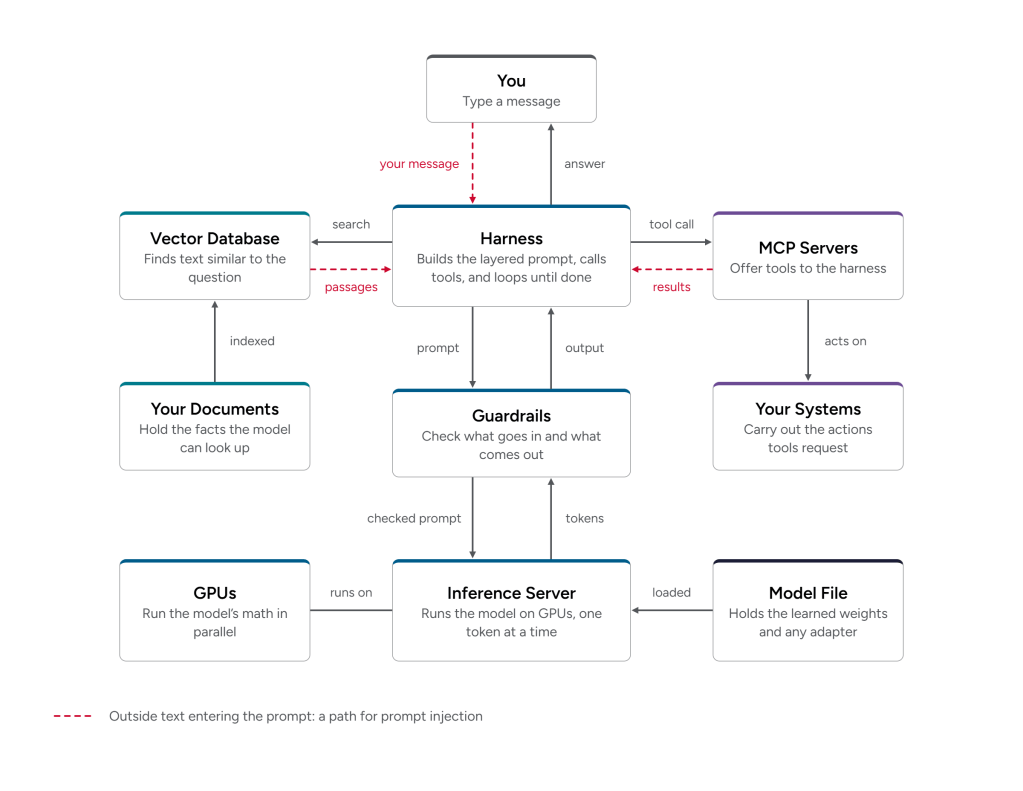
A prompt is what you send the model, and it’s often text. However, there are layers to prompts, too. You might tell a model “please check my grammar,” but what the model receives is much more. A typical request to an AI assistant stacks up something like this:
- System prompt. Instructions from whoever built the application, and sometimes from the model’s provider. They cover what the assistant is for, what tone to use, and what it should refuse.
- Tool descriptions. If the application gives the model tools, it describes each one, so the model knows what it can ask for.
- Saved context. Things the application remembers about you, like your preferences or earlier notes.
- Retrieved documents and attachments. Passages pulled from a knowledge base, plus any files you attached.
- The conversation so far. Every earlier message, from both you and the model.
- Your message. “Please check my grammar,” plus the text you pasted in.
The application stitches all of that together and sends it as one long piece of text. It uses the chat template mentioned earlier to mark which part came from whom. The “context window” is the name for everything the model can see at once. Models read and write text in small pieces called tokens, roughly three-quarters of an English word each. Each model’s context window holds a limited number of them. When a conversation runs long, applications drop or summarize the oldest parts, and the model forgets the details.
Prompt Injection
The context window is where the most important security weakness unique to AI lives. Every layer arrives as one stream of tokens. As a result, a model can’t reliably tell instructions from data, or which layer a piece of text came from. If a document or web page in the context contains text like “ignore your previous instructions,” the model may follow it. That’s called prompt injection, and nobody has a complete fix for it. System prompts aren’t secret, either, because users can often get the model to reveal them.
Plan as if any text the model reads could try to give it orders, and keep secrets out of system prompts.
Guardrails
Guardrails are the checks that keep a model’s behavior within bounds, and they usually come in layers. Model makers build some into the model itself, training it to refuse certain requests. Some live in the system prompt, where the application tells the model what it should and shouldn’t do. That’s the easiest guardrail to add and the easiest to get around. It sits in the same stream of text as anything an attacker can write.
The rest are separate filters that check what goes into the model and what comes out. Some are simple rules, like a pattern that catches credit card numbers before they leave. Others are smaller AI models trained to spot harmful requests, prompt injection attempts, or answers that wander off topic. Because they sit outside the model, they’re harder to talk past than instructions in a prompt.
All of these help with AI security, but none of them is a security boundary. Attackers probe guardrails constantly, and a determined one can often find wording that gets through.
Use guardrails as one layer among several, alongside access controls, isolation, and human review.
Outputs
All of those things, and we finally get to the output! Here’s how it comes together. The application assembles the layered prompt, and the model turns it into tokens. Those tokens flow through the weights to produce a score for every possible next token. The model picks one and adds it to the end. Then it repeats the process, a word or so at a time, until it finishes the answer. Because models build answers one token at a time, people measure output speed in tokens per second. That’s also why answers often appear on screen a few words at a time. Guardrails may check the result on its way out.
The model generates the answer instead of looking it up. Each word is the model’s best prediction of what should come next, given everything in the context window and everything it learned in training. That’s why answers read smoothly even when they’re wrong, and why models sometimes hallucinate: they state wrong things with complete confidence. It’s also why someone can steer the output. Anyone who can get text into the context window can shift those predictions. Some applications run what a model writes as code, a database query, or a command. There, an attacker who influences the model influences those, too, turning a quirk of AI into a security hole.
Treat model output as untrusted input, and check it the way you would check anything a user typed. Keep a person involved in decisions that matter.
Giving an AI Your Data and Tools
Retrieval and Vector Databases
A model only knows what it learned in training and what is in its context window. To answer questions about your own documents, many applications use retrieval-augmented generation (RAG). The application searches your documents for passages related to the question, adds them to the prompt, and the model answers using them.
That search usually runs on embeddings, which are lists of numbers that represent the meaning of a piece of text. A vector database stores the embeddings and quickly finds text with similar meaning. The vector database holds your documents, or something close to them. Researchers have shown that they can sometimes turn embeddings back into a close approximation of the original text.
The bigger AI security issue is permissions. If the retrieval step ignores who is asking, the AI will cheerfully hand a user passages from documents they never had permission to open. Retrieved documents are also a common path for prompt injection. Anyone who can edit a document the system reads can hide instructions in it.
If you use RAG, protect the vector database like the source data. Make sure your access controls carry through into retrieval, and control who can add documents to the sources it reads.
Tools, Agents, and Harnesses
On its own, that brain only produces text. Give it tools, and it can act. Tools are functions the model can ask for, such as searching the web, reading a file, sending an email, or calling another system’s API. The model never runs a tool itself. It writes a request, in a format described in its prompt, and the software around it does the work.
The “harness” is the name for that software. The harness builds the layered prompt, sends it to the model, and reads the answer. Then it runs any tools the model asked for and feeds the results back in for the next round. An AI agent is a model and a harness working through that loop over and over. Together, they plan and carry out a series of steps with less human involvement along the way. The harness decides what the model can touch, which makes it one of the most important pieces of AI security.
MCP Servers and Tool Risk
Many tools now connect through the Model Context Protocol (MCP), a widely used standard. An MCP server is a small program that offers a set of tools to any harness that speaks MCP. Those tools might reach a ticketing system, a database, or a file share. Some run on the same machine as the harness, and others run across the network. Either way, an MCP server usually holds the credentials it needs to reach those systems. It’s also software someone else probably wrote, so it belongs in your inventory and your supply chain reviews.
Tools raise the stakes. Prompt injection without tools produces a bad answer. Prompt injection with tools can produce a bad action. An agent acts with whatever permissions its tools have. That makes it a lot like a service account that takes orders from whatever text it reads. MCP servers add a risk of their own. A malicious or compromised one can hide instructions in its tool descriptions, which land in the prompt with everything else.
If you give a model tools, give them the least privilege they need, and use only MCP servers you’ve reviewed. Require a person to approve consequential actions, like deleting data or sending money. Have the harness log what agents do, so you can tell afterward what happened and why.
Putting the AI Parts Together
Where an AI system’s parts run largely influences who has to secure them, how they do it, and how much trust you need. When you use a hosted AI service, the provider runs the model, the hardware, and the inference server. Your prompts, documents, and data leave your environment to get there. After that, you have little visibility beyond what the contract says. You can’t easily see who can access your data, how long the provider keeps it, or whether it trains future models on it. The provider usually shares the infrastructure with its other customers. It can also change the model or its terms on its own schedule. And a breach or outage on its side becomes your problem, too. Hosted AI is convenient, but every part you don’t run is a part you can’t secure, audit, or recover yourself.
Running AI Yourself
When you run AI yourself, all the parts live in your environment. That might be on VMware Cloud Foundation (VCF), perhaps with tools like VMware vDefend. Your data stays with you, protected and secured along with your other workloads. You decide who can reach it, how long you keep it, and when a model changes. VMware Private AI Services, which is a native part of VCF, helps immensely with model provenance, access control, and deployment workflow. VCF Operations helps you monitor and plan capacity. Snapshots, replication, and VMware Live Recovery de-risk security patching and updating AI workloads, just as they do with all other applications.
In the end, AI is a very useful tool, and a force multiplier for organizations, but it isn’t magic. It is data, files, software, and hardware. Once you know what each one does, you can see where the attack surfaces are so you can protect them.
Discover more from VMware Cloud Foundation (VCF) Blog
Subscribe to get the latest posts sent to your email.