
Deploying containerized workloads in air-gapped environments has always required careful orchestration, especially when the platform registry you want to use cannot install itself without images it does not yet have. Consequently, streamlining the deployment of Harbor as a Supervisor Service in air-gapped VMware Cloud Foundation (VCF) environments has been a key area of focus for us. While community-supported solutions like third-party registries provided an effective bridge in the past, we are now pleased to offer an official VCF-supported solution designed specifically for this workflow.
With the General Availability of the VMware Bootstrap Registry Appliance, we now have an official, VCF-supported solution: a purpose-built OVA that gives VCF customers a clean, secure, and operationally well-defined path to bootstrapping Harbor as a Supervisor Service in air-gapped VCF 9.0 and vSphere 8.0 Update 3 environments.
What Is the VMware Bootstrap Registry Appliance?
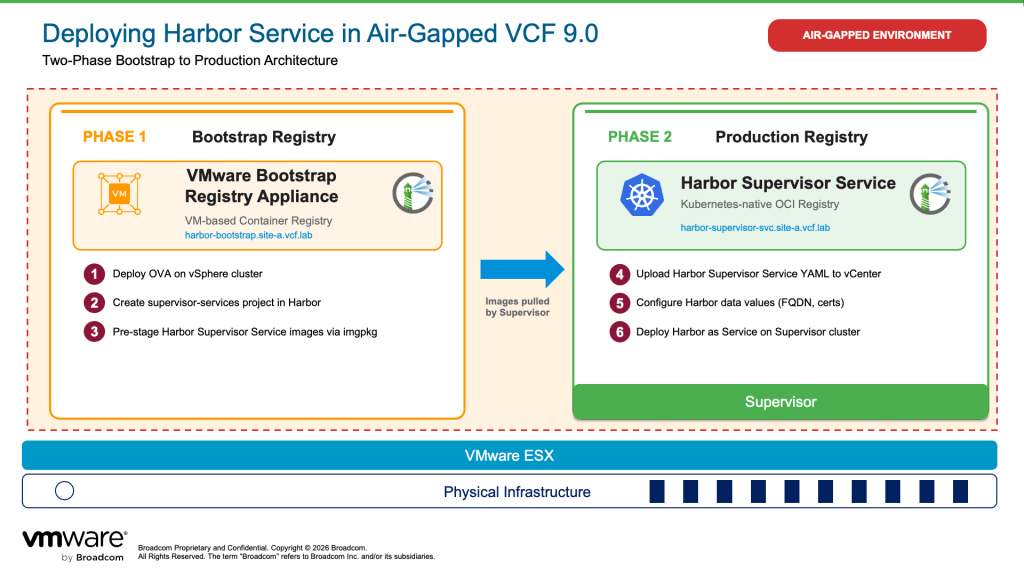
The VMware Bootstrap Registry Appliance is a hardened virtual appliance distributed as an OVA. Additionally, it ships with an OCI-compliant Harbor registry running natively on Photon OS 5.0 and is designed to host the OCI images required to enable Harbor Supervisor Service (and Contour) on the vSphere Supervisor.
However, the appliance is not a general-purpose enterprise registry and is not intended to serve workloads in production. Instead, it is Registry 0 in the air-gapped deployment sequence, a temporary bootstrapping tool that hands off responsibility to Harbor Supervisor Service (Registry 1) once that service is healthy and operational.
To maintain architectural compliance and supportability, the deployment of the VMware Bootstrap Registry Appliance is governed by the following mandatory operational constraints:
- Exclusive Bootstrap Purpose: The VMware Bootstrap Registry Appliance shall only be utilized to upload and host the OCI images necessary to enable Contour and Harbor Supervisor services on the Supervisor.
- Prohibition of Secondary Roles: The appliance must not be utilized for any other purpose within the infrastructure. Specifically, it is explicitly prohibited from serving as a permanent platform registry or enterprise workload registry.
- Version-Specific Deployment Constraint: The use of the VMware Bootstrap Registry Appliance is restricted to deployments prior to VCF 9.1. Starting with VCF 9.1, the Fleet Depot Service (FDS) serves as the officially supported solution for air-gapped environment lifecycle management.
Downloading the VMware Bootstrap Registry Appliance
The appliance is available on the Broadcom Support Portal at the following paths:
- For vSphere 8.0:
- Broadcom Support Portal > My Downloads > VMware vSphere > VMware vSphere Standard > 8.0 > Drivers and Tools > VMware Bootstrap Appliance > BOOTSTRAP_APPLIANCE-2.15.2+vmware.1-25635995.ova
- For VCF 9.0:
- Broadcom Support Portal > My Downloads > VMware Cloud Foundation > VMware Cloud Foundation 9 – 9.0.2 > VMware vCenter > Drivers and Tools > VMware Bootstrap Appliance > BOOTSTRAP_APPLIANCE-2.15.2+vmware.1-25635995.ova
Deployment Overview
Air-gapped VCF deployments follow a two-phase approach. Initially, phase 1 establishes the bootstrap registry using the VMware Bootstrap Registry Appliance. Phase 2 deploys Harbor as a Supervisor Service, which then becomes the production registry for all workloads.
For a full step-by-step walkthrough including OVA deployment, Supervisor registration, image pre-staging with Carvel imgpkg and Harbor data values configuration required for air-gapped use, refer to the updated deployment blog: Deploying Harbor Service in Air-Gapped VMware Cloud Foundation 9.0 or the VMware vSphere Supervisor GitHub Repository.
Looking Ahead: VCF 9.1 and Fleet Depot Service
The VMware Bootstrap Registry Appliance is the right solution for VCF 9.0 and vSphere 8.0 U3 environments today. Customers upgrading to VCF 9.1 will benefit from the Fleet Depot Service (FDS). This built-in registry natively handles the bootstrapping lifecycle as part of the platform. In VCF 9.1 environments, you no longer need the VMware Bootstrap Registry Appliance, as FDS takes over this role.
Conclusion
In summary, the VMware Bootstrap Registry Appliance closes a gap in the air-gapped VCF deployment story. It offers a purpose-built, supported tool for bootstrapping the Harbor Supervisor Service. This replaces the Bitnami Harbor solution with a production-ready alternative. We recommend this path whether you are deploying fresh on VCF 9.0 or migrating an existing air-gapped environment.
Download the appliance from the Broadcom Support Portal under VMware vSphere or VCF 9.0, and follow the updated air-gapped Harbor deployment guide for the full step-by-step walkthrough.
For more information on Harbor, follow our Harbor blog series:
- Blog 1 – Harbor: Your Enterprise-Ready Container Registry for a Modern Private Cloud
- Blog 2 – Reducing Harbor Deployment Complexity on Kubernetes
- Blog 3 – Making Harbor Production-Ready: Essential Considerations for Deployment
- Blog 4 – Integrating VMware Data Services Manager with Harbor for a Production-Ready Registry
- Blog 5 – Using Harbor as a Proxy Cache for Cloud-Based Registries
- Blog 6 – Securing Your Software Supply Chain with Harbor
- Blog 7 – Implementing Cross-Region Replication with Harbor in VMware Cloud Foundation
- Blog 8 – Using Harbor as an AI Model Registry
- Blog 9 – Deploying Harbor Service in Air-Gapped VMware Cloud Foundation 9.0
Discover more from VMware Cloud Foundation (VCF) Blog
Subscribe to get the latest posts sent to your email.


