
If you’re running workloads on vSphere Kubernetes Service (VKS) today, or planning to, one of the questions that comes up quickly is how container workloads interact with infrastructure-level capabilities like Memory Tiering. Can VKS take full advantage of the same memory efficiency features that VM workloads use? Does adding a Kubernetes layer on top change the performance story? We’re glad you’ve asked, because we put it to the test, and the results are worth talking about.
What we want to walk you through today is how VKS, running natively inside VMware Cloud Foundation (VCF), inherits Memory Tiering completely transparently, and what that means for your infrastructure consolidation strategy. Let’s dig in.
VKS – Kubernetes Built into VCF
VKS is a Cloud Native Computing Foundation (CNCF) conformant Kubernetes distribution that runs on top of the vSphere Supervisor. The Supervisor is the Kubernetes control plane embedded natively into each vSphere cluster, and is what enables VKS to provision and manage upstream Kubernetes clusters as first-class objects within VCF.
The same infrastructure policies, networking constructs, storage integrations, and lifecycle operations you rely on for your VMs apply equally to your Kubernetes clusters. There is no external Kubernetes management platform to stand up or maintain alongside your existing infrastructure stack, and no need to run a separate operational model for container workloads.
A few things that make VKS stand out in the VCF context.
- Lifecycle management is automated. VKS cluster provisioning, upgrades, and scaling are managed natively through VCF. No separate lifecycle tooling is required.
- Networking is integrated. VKS clusters use open-source CNI options (Antrea by default or Calico/Cilium). In NSX-enabled environments, VKS clusters leverage the same micro-segmentation, and policy controls your VMs already use.
- Storage is native. Persistent volumes leverage vSAN and the broader VCF storage stack, with no bolt-on solutions required.
- It’s included in VCF licensing. You’re not paying for a separate Kubernetes platform on top of your existing investment.
For organizations managing a mixed workload environment, VKS is the answer to the question of how to support containers without creating a second infrastructure silo. The result is a standards-conformant Kubernetes runtime with the operational consistency, storage, networking, and lifecycle integration of VCF built in.
And because VKS runs on the same vSphere infrastructure as your VMs, it also inherits every hypervisor-level capability automatically, including Memory Tiering.

Memory Tiering – What VKS Gets for Free
Memory Tiering isn’t something VKS workloads need to be configured to use. When you enable it on a VCF cluster, every workload running on that cluster benefits, whether it’s a traditional VM or a containerized application running inside a VKS-managed Kubernetes node.
Here’s how it works. vSphere manages a tiered memory pool that combines fast DRAM with a secondary tier, typically NVMe-based storage configured as a memory extension. The hypervisor handles the placement and movement of memory pages between tiers automatically, based on access patterns. Hot pages stay in DRAM. Cooler pages move to the secondary tier. If a cooled page gets accessed again, it’s promoted back. This entire process happens below the guest OS, below the Kubernetes node VM, and below the container runtime. Nothing above the hypervisor needs to know it’s happening.
There’s no driver to install, no kernel parameter to tune, and no application change required. The workload sees a single, contiguous memory address space, regardless of whether it’s a VM, a Kubernetes pod, or a containerized microservice. For VKS specifically, this means your platform team doesn’t need to manage memory tiering separately for container workloads. You configure it once at the cluster level, and VKS inherits it completely.
The practical implication is significant. You can run more VKS clusters per host, reduce the DRAM footprint required for your Kubernetes infrastructure, and drive down the cost per workload; all without touching application code, Kubernetes manifests, or container configurations. That’s a meaningful TCO lever, and it works across the entire VCF portfolio.
VKS and Memory Tiering
A question people ask is whether their workloads running in VKS can benefit from Memory Tiering. We performed several experiments to answer this question using the popular HammerDB benchmark. We compared the relative throughput achieved by the benchmark between a Memory Tiering enabled system against a baseline where Memory Tiering is not enabled. The baseline cases ran on a host that has 1 TB of DRAM. The Memory Tiering cases ran on a host that has 512 GB of DRAM and 512 GB of Tier 1 memory from an NVMe SSD device.
Different HammerDB parameters were tested to demonstrate how VKS workloads can benefit from Memory Tiering. These test parameters change the working set exercised during the measurement while following the recommended guidelines for Memory Tiering, keeping the active memory under 50% of DRAM capacity. For further details on sizing guidance, refer to the Memory Tiering performance whitepaper. The chart below shows that our VKS workloads are able to achieve close to 100% of the throughput of the baseline, while running with only half the DRAM, using Memory Tiering. This is a significant infrastructure cost advantage offered by Memory Tiering.
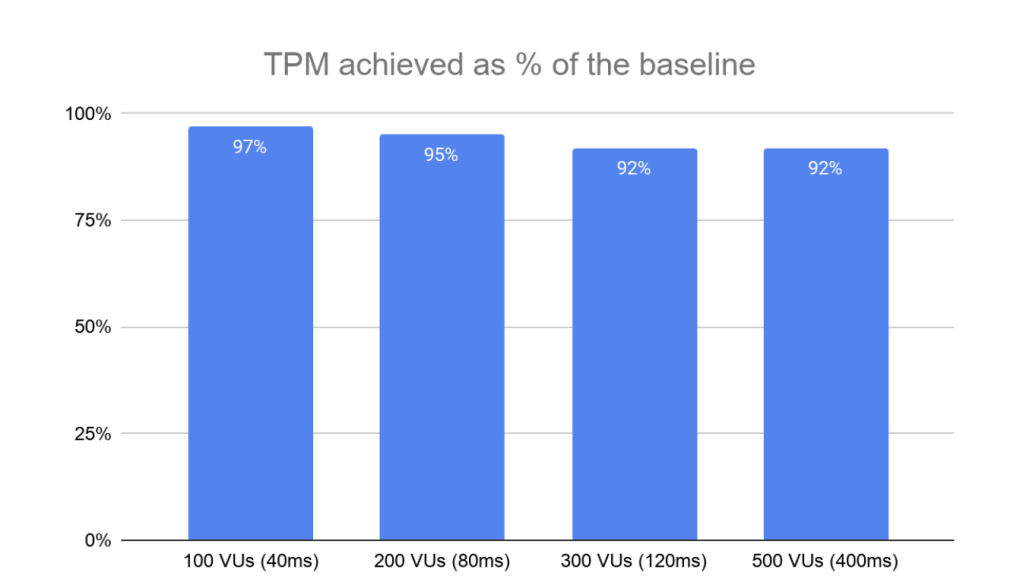
We ran a similar set of tests to check the Memory Tiering benefits for VMs using the same HammerDB parameters. The table below shows that both VM and VKS workloads see similar infrastructure benefits, achieving throughput close to that of a fully DRAM-provisioned system, using only half the DRAM.
| HammerDB Parameters | TPM achieved as % of baseline | ||
| VUs | ThinkTime+Keytime | VKS | VM |
| 100 | 40ms | 97% | 97% |
| 200 | 80ms | 95% | 97% |
| 300 | 120ms | 92% | 91% |
| 500 | 400ms | 92% | 94% |
Test Parameters
All tests were run using HammerDB against MySQL, measuring Transactions Per Minute (TPM) across four virtual user (VU) concurrency levels, with the same infrastructure and Memory Tiering configuration for both environments.
Common parameters
- MySQL innodb_buffer_pool_size set to 92GB
- MySQL VM sized at 6 vCPUs + 120GB memory
- HammerDB test with 25-minute ramp-up + 60-minute runtime
Bringing It All Together
Let’s step back and connect the dots, because this is where the VKS story gets really compelling.
VKS gives you a fully integrated, CNCF-conformant Kubernetes runtime inside VCF, without the operational overhead of a separate Kubernetes platform. And because it runs on the same vSphere infrastructure as your VMs, it inherits Memory Tiering automatically. No extra configuration, no separate capacity planning, no Kubernetes-specific memory policies to maintain.
What the test results confirm is that this inheritance is real and functionally complete. VKS workloads on Memory Tiering stay within 10% of a full DRAM baseline, matching what VMware documents for VM workloads. And when we run VKS and VMs side by side on the same Memory Tiering-enabled cluster, both showed clear benefits from memory tiering in a similar trend.
What this means practically for your infrastructure planning.
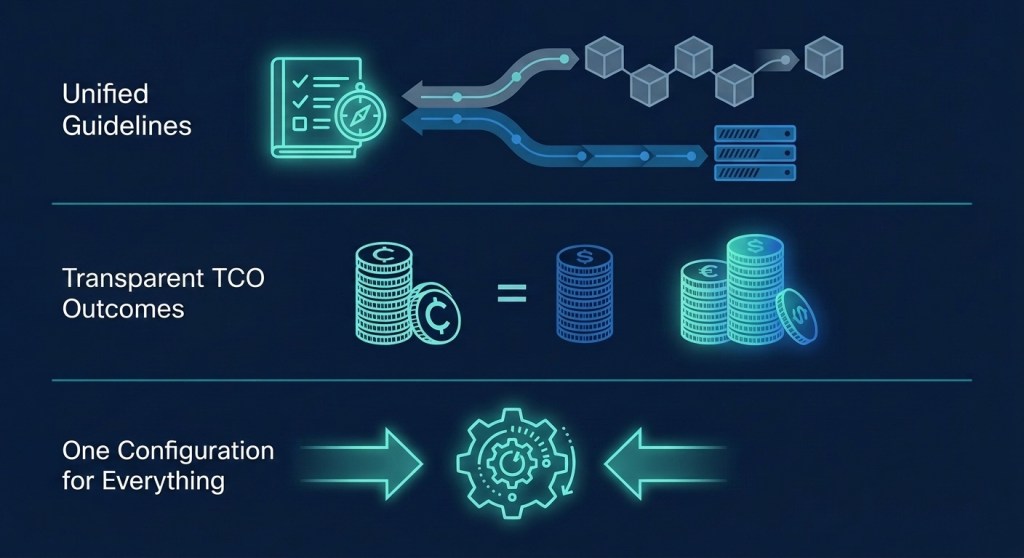
- VKS workloads can be sized and planned using the same Memory Tiering guidelines as VM workloads. One set of recommendations covers the entire VCF fleet.
- TCO projections and consolidation ratios you’ve built for VM workloads translate to VKS workloads with confidence.
- Teams running a hybrid of VMs and containers don’t need separate memory tiering policies, separate sizing guidance, or separate capacity plans. One VCF environment, one configuration, consistent results across both deployment models.
VKS in VCF already removes the operational tax of running Kubernetes alongside your VM infrastructure. Memory Tiering removes the DRAM tax of running it at scale. Together, they give you a genuinely unified platform for modern workloads, and the performance data backs it up.
Special Thanks
A big thank you to Chung-Yen Chang, and Dazhi Wang for their contributions, testing work, and feedback that made this post possible.
Discover more from VMware Cloud Foundation (VCF) Blog
Subscribe to get the latest posts sent to your email.