

In my conversations with customers over the last year, one theme consistently rose to the top: the desire for simplicity without sacrificing scale. As we continue to evolve VMware Cloud Foundation (VCF) into the industry’s premier private cloud platform, our engineering focus continues toward making the Day 2 experience—the long-term maintenance and operation of your environment—as seamless as possible.
With the release of VCF 9.1, we are taking a massive leap forward. We aren’t just adding features; we are fundamentally changing the math of maintenance windows.
Today, I want to dive into three specific lifecycle management capabilities that are quickly becoming customer favorites because they tackle one of the biggest pain points in the data center: downtime.
Eliminating the 2 AM Maintenance Window: VMware vCenter Reduced Downtime
For years, updating VMware vCenter Server was a Sunday at 2 AM kind of task. Because vCenter is the brains of your Software Defined Data Center, taking it offline meant losing management capabilities, API access, and third-party integrations for the duration of the update. Despite ever increasing CPU, memory, and networking speeds, the actual migration and data conversion could take significant time.
vCenter Reduced Downtime (introduced in VMware vSphere 8 U3 and fully integrated into VCF 9.1 workflows) changes that narrative. Instead of taking the old vCenter down and starting the clock, we use a migration-based approach behind the scenes.
The process works by deploying a new vCenter appliance in the background while the old one is still running. Data is synchronized between the two instances while your environment remains fully operational. The only actual downtime occurs during a brief switchover period—typically lasting only minutes—where the services are cut over to the new version. For our customers running global, 24/7 operations, this turns a high-risk event into a non-event.
vCenter Quick Patch: Speed is a Security Feature
While Reduced Downtime handles major updates, we realized that the frequency of security patches requires an even more surgical approach. This led to the development of vCenter Quick Patch.
In the past, even a small security patch required a full reboot of the vCenter appliance or a lengthy service restart. vCenter quick patch changes the game by allowing us to patch vCenter services in a more modular fashion with minimal, sometimes zero, downtime. While we can’t promise that every vCenter patch will be vCenter quick-patch-compatible, vCenter release notes and the patch information available in the product will confirm. For more details on vCenter quick patch, check out this blog.
The beauty of vCenter quick patch is that it integrates directly into existing VCF and vCenter workflows. It allows administrators to minimize the amount of time the management plane is unavailable (which is critical to fully automated cloud operations) while staying compliant with the latest security advisories. In a world where Zero Day vulnerabilities are a constant threat, the ability to patch quickly isn’t just a convenience; it’s a critical security requirement.
The 80% Goal: Revolutionizing VMware ESX Maintenance
It’s not just the management plane that’s getting a makeover. The biggest time-sink in any private cloud is host patching. We’ve all been there: putting a host into maintenance mode, waiting for vMotion to evacuate VMs, rebooting, waiting for hardware initialization, and then doing it all over again for every single host in the cluster.
In VCF 9.1, we are doubling down on VMware ESX Live Patch with a bold target: Up To 80% of all ESX patches will be Live Patch enabled.
What does this mean for you? It means that for the vast majority of security fixes and bug patches, the ESX hypervisor will no longer require a full hardware reboot. By patching the running memory of the hypervisor and only restarting the necessary sub-processes, we can apply updates while VMs remain running on the host.
When you combine this with VCF’s automated orchestration, the time required to patch a large cluster drops from days to hours, sometimes even minutes. It reduces vMotion churn and application impacts allowing your infrastructure and application teams to focus on adding value instead of fighting to stay current. VCF’s goal is to make ESX patching as routine and boring as a software update on your phone.
The Race Against Time: Adapting to the Shrunken AI Exploit Window
Besides operational improvements, these new capabilities reflect a changing security environment. In the current threat landscape, the race to patch has shifted from a matter of days to a matter of minutes. Zero Day Clock, a cybersecurity research initiative and live dashboard that visualizes the shrinking time gap between a software vulnerability’s public disclosure (CVE) and when it is actively weaponized and exploited in the wild, illustrates this disturbing trend well.
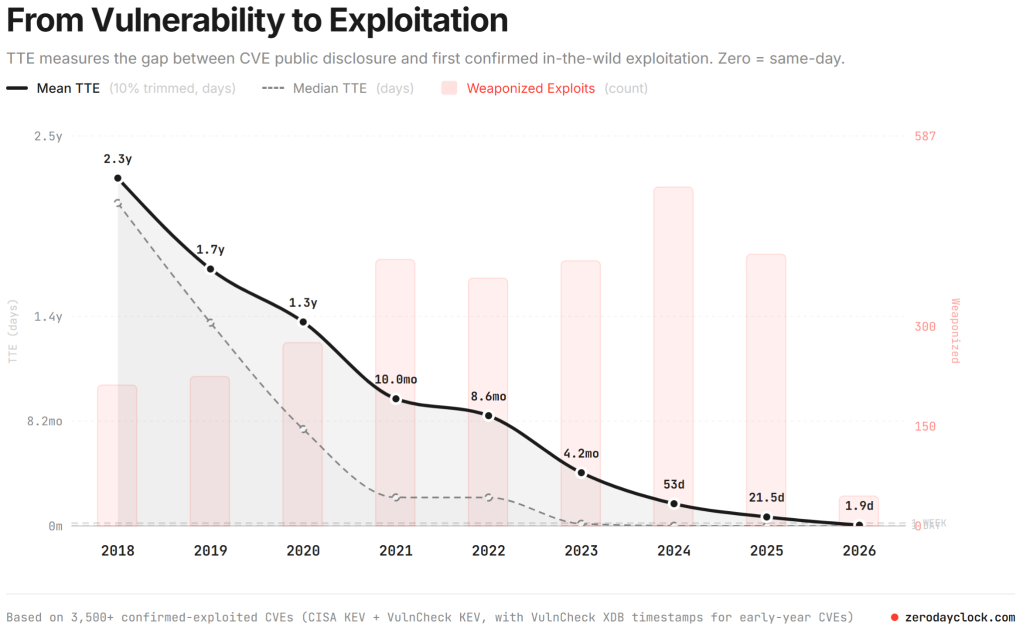
In 2020, the average time to exploit was over a year. In 2023 this fell to just over four months, and last year was down to 21.5 days. So far in 2026, this timeframe has collapsed to under two days. And this is even before the integration of frontier AI models like Claude Mythos, which will automate the process of discovering and weaponizing zero-day vulnerabilities. Attackers are no longer manually tinkering with code for weeks; instead, they are using AI-driven exploit factories to perform patch diffing and generate functional exploits nearly as soon as a vendor releases a fix.
This compression of the exploit cycle makes vCenter quick patch and ESX Live Patch essential rather than optional. When the window to compromise is measured in hours, the traditional requirement for lengthy maintenance windows or hardware reboots becomes a critical security liability. By reducing vCenter downtime to under a minute and enabling up to 80% of ESX patches without a reboot, VCF 9.1 allows organizations to apply defenses at machine speed.
This zero-disruption approach ensures that security teams can remediate high-risk vulnerabilities the moment they are released, effectively closing the gap that AI-powered adversaries rely on for mass exploitation.
Plan your transition to a secure infrastructure at scale
The feedback we’ve received on these features has been incredible. Whether it’s the 90% reduction in vCenter switchover time or the elimination of host reboots, these aren’t just incremental improvements—they are the foundation of a modern, resilient private cloud.
If you’re ready to eliminate the maintenance window and secure your infrastructure at scale, now is the time to plan your transition. Reach out to your VCF Technical Adoption Manager (TAM) to map out your upgrade path, or talk to your Account Director on how you can engage our VCF Professional Services team to upgrade your existing vSphere and VCF environments to VCF 9.1.
Let’s get your environment modernized so you can stop managing downtime and start driving innovation.
Discover more from VMware Cloud Foundation (VCF) Blog
Subscribe to get the latest posts sent to your email.