
Welcome back to the third blog post in the Automating vSphere Configuration Profile (VCP) workflows series. In the first post, we explored the VCP APIs and the set of APIs required to work with vSphere Configuration Profiles. The second post focused on consuming these APIs using PowerCLI and the Unified SDK for Python, demonstrating how they can be integrated into your Python and PowerCLI scripts. I highly recommend going through both of these posts to build the foundational understanding of VCP and its real-world use cases.
What is Infrastructure as Code (IaC)?
Maintaining infrastructure configuration is a top priority for cloud architects and administrators. While the vSphere Client gives you a great high-level view of your environment, it becomes difficult to maintain consistency when managing configurations at scale, especially across multiple locations and clusters.
Infrastructure as Code (IaC) solves this problem by allowing you to define and document infrastructure using code instead of manual UI operations. With IaC, you can:
- Version your configurations
- Apply consistent configurations across the entire SDDC
- Track configuration drifts
In short, your infrastructure becomes repeatable, auditable, and automated.
The Scenario
As a cloud administrator, you likely manage multiple VMware Cloud Foundation (VCF) instances, each with several workload domains and clusters. Your goal is simple but critical:
- Maintain a consistent desired configuration across all clusters
- Document the configuration for future reference
- Ensure changes are controlled and traceable
The Solution: GitOps Powered by VCP APIs
VCP APIs are REST-based and work with JSON configuration documents. They provide capabilities such as:
- Schema validation
- Configuration document versioning
- Import and export of workflows
- Lifecycle operations to manage configurations
When you combine these APIs with Git, you unlock a GitOps-driven workflow. To achieve this, you need reliable source control backed by a Git repository.
- GitHub repository → Stores configuration documents (version control)
- GitHub Actions → Automates workflows when changes occur
- PowerShell scripts → Interact with VCP APIs and orchestrate operations
Whenever a configuration is updated in Git, automation triggers and applies it in a controlled way. To implement a true GitOps model, the repository must clearly separate:
- Global Intent → Which vCenter servers and clusters should be managed
- Specific State → The actual vSphere configuration profile JSON for each cluster
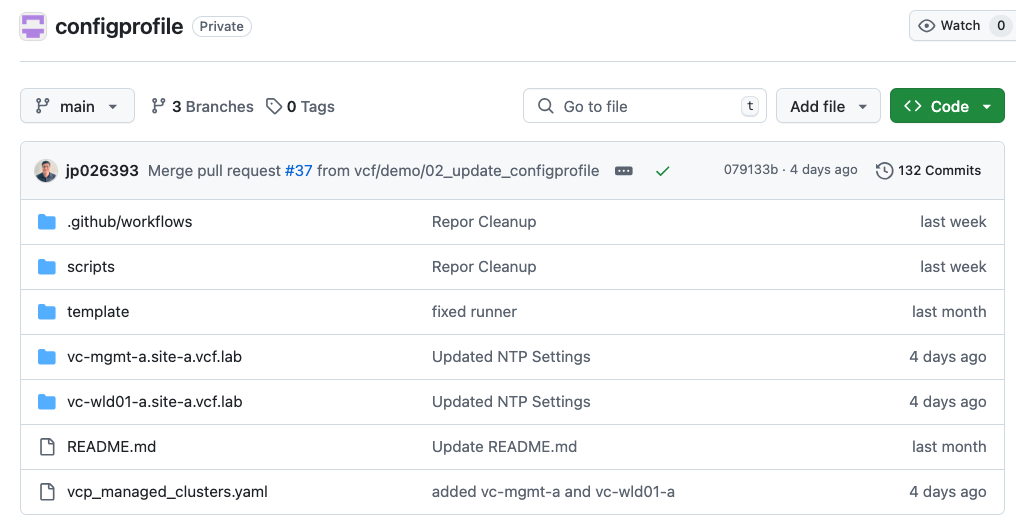
GitHub Repository Structure
|
1 2 3 4 5 6 7 8 9 10 11 12 13 14 15 16 17 18 19 20 21 22 23 24 25 26 |
/configprofile │ README.md │ vcp_managed_clusters.yaml #Add Cluster you want to manage using VCP │ ├───.github │ └───workflows #Github Action Workflows │ Initialize_Configprofile.yml #VCP Enablement Workflow │ Update_ConfigProfile.yml #Configuration Update Workflow │ ├───scripts #PowerShell Scripts used by workflow │ enable_vcp.ps1 #Script to enable VCP │ update_config.ps1 #Script to update VCP config profile │ ├───template #Template Folder │ clusterAdd.yaml #Sample Yaml Schema to add clusters │ ├───vc-mgmt-a.site-a.vcf.lab #Auto generated VC Folder │ cluster-mgmt-01a.json #Cluster Config for cluster-mgmt-01 │ cluster-mgmt-02a.json #Cluster Config for cluster-mgmt-02 │ cluster-mgmt-03a.json #Cluster Config for cluster-mgmt-03 │ cluster-mgmt-04a.json #Cluster Config for cluster-mgmt-04 │ └───vc-wld01-a.site-a.vcf.lab cluster-wld01-01a.json #Cluster Config for cluster-wld01-a-01 cluster-wld01-02a.json #Cluster Config for cluster-wld01-a-02 |
Understanding Github Repository
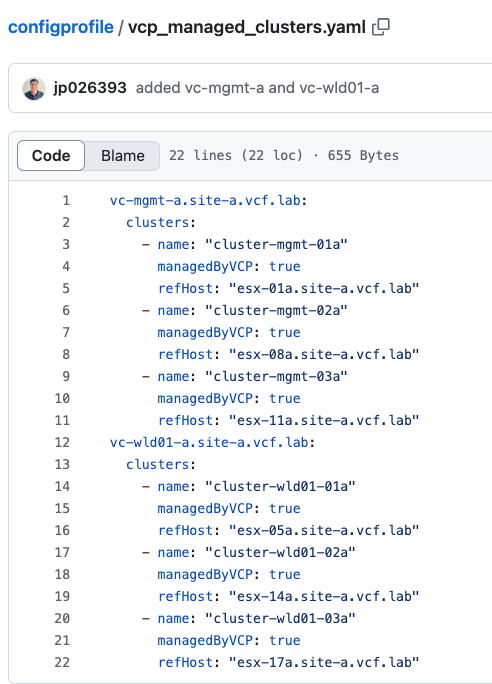
Global Intent File (vcp_managed_clusters.yaml)
This file defines high-level intent of which clusters you want to manage using VCP and GitOps.
- vCenter
- Cluster name
- Reference host
Update vcp_managed_clusters.yaml using schema defined in /template/clusterAdd.yaml as below
|
1 2 3 4 5 6 |
vcName: clusters: - name: "clusterName" managedByVCP: true refHost: "reference ESX Hostname" |
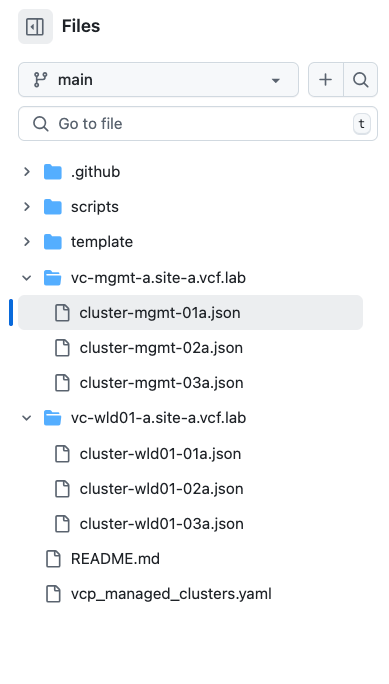
Managed Folders (vc-*/)
These folders are auto-generated and named after vCenter FQDNs for easier parsing.
Config JSON (*.json)
These are raw exports from the VCP APIs once the configuration profile is enabled.
Configuration Profile
They represent the exact configuration applied to each cluster.
Under the Hood: How Automation Works
Let’s break down what happens behind the scenes.
Smart Change Detection
The workflow is smartly tuned to only update the cluster configurations which are modified. We do it by understanding the difference in the git repository and fetch the *json files which are modified.
|
1 |
$changedFiles = git diff --name-only HEAD^ HEAD | Where-Object { $_ -like "vc-*/*.json" } |
This allows GitHub Actions to trigger Update_ConfigProfile.yaml on required clusters.
Asynchronous Lifecycle Management
VCP operations are asynchronous. The enable_vcp.ps1 script follows a lifecycle:
- Eligibility Check
Invoke-CheckEligibilityClusterConfigurationTransitionAsync - Import Configuration
Invoke-ImportFromHostClusterConfigurationTransitionAsync - Export Configuration
Pulls raw JSON and stores it in Git using:
[System.IO.File]::WriteAllText
This avoids formatting or escaping issues.
Safety First: Run Draft Validation
The safety mechanism is already built into VCP API workflows. You can not apply a draft configuration without draft configuration pre-check and validation. The update workflow executes as follows:
- Create a temporary configuration draft in vCenter
- Validate it using:
Invoke-ValidateClusterConfigurationDraftAsync - If validation fails:
- GitHub Action fails
- Production remains untouched
- If validation succeeds
- Applies the draft configuration
Sample Run: End-to-End Workflow
Onboarding a Cluster
Add a cluster entry in vcp_managed_clusters.yaml and push changes to main branch.
What happens next:
- Initialize_ConfigProfile.yaml workflow triggers
- VCP is enabled on the cluster
- A new folder for vCenter Server and Cluster configuration JSON file are auto-generated
- GitHub bot commits them back to the repository
The cluster is now under GitOps management.
Day-2 Operations – Update/Modify Cluster Configuration
Let us assume that you want to update or modify the current cluster configuration.
- Open cluster-04.json in VS Code
- Modify the configuration
- Push changes
- Raise PR and merge the code into main
Result:
- Update_ConfigProfile.yaml workflow triggers
- Draft configuration created in vCenter
- Validation runs
- Draft configuration is applied
Implementation Note
To implement GitOps this repository leverages GitHub Action Self-Hosted Runner. With a self-hosted runner, you have secure access to your VCF environment, no exposure to public internet and you can also enforce enterprise security policies to your runners.
You can set up Windows, Linux, and MacOS as a GitHub action runner. Please make sure you have the following components installed in your runner machine:
- PowerShell 7
- PowerCLI 13+
- powershell-yaml module
- Git CLI
Follow the GitHub instructions to know more about setting up the GitHub runners.
Conclusion
By applying GitOps to vSphere Configuration Profiles, we move from reactive infrastructure management to automated intent-driven operations.
With GitOps, your infrastructure becomes:
- Version controlled
- Auditable
- Consistent across environments
- Safe to update
- Fully automated
Instead of manually managing configurations, you now manage intent in Git and let the automation handle the rest. The example here demonstrates the usage of PowerCLI and GitHub Action. You can implement similar solutions in Python, Java, and Terraform since the VCP API bindings are available across all these languages and ready to use.
VCP is one such example of how VCF is delivering a modern private cloud stack with the API-first approach. You can replicate the same approach to other VCF services as well out of the box by integrating VCF APIs with the tools you are already using in your environment.
Demo
Important Links
Config Profile – GitHub Action Repository
Automating Desired State Configuration using vSphere Configuration Profile APIs – Part 1
Automating vSphere Configuration Profile APIs – Part 2 – PowerCLI and Python Sample Code
Discover more from VMware Cloud Foundation (VCF) Blog
Subscribe to get the latest posts sent to your email.