
VMware Cloud Foundation (VCF) is a unified private cloud platform designed to host cloud native, AI, and traditional enterprise workloads. VCF uses a cloud operating model that combines the scale and agility of the public cloud with the security and performance of private cloud. With VCF 9.0, the evolution of VCF Operations capabilities has solidified its transition from a standalone monitoring tool into a comprehensive and integrated management component for private cloud. Several months into the release, this shift continues to enable customers to move beyond basic oversight toward full-stack operational intelligence and automated lifecycle management across their entire private cloud environment. We want to share key operational improvements that will help you unlock the full potential of your private cloud environment.
Customers have seen that VCF Operations has become much more of a management and observability plane than just a monitoring tool. Previously, administrators needed to navigate different user interfaces to manage compute, network, storage, diagnostics, logging, and lifecycle tasks. VCF Operations in VCF 9.0 removes these silos by integrating them into a single unified workflow for performance monitoring, centralized licensing, fleet management, and holistic operations across your entire private cloud. By consolidating these essential monitoring and management functions into a single interface, VCF Operations radically simplifies the platform experience.
This integration is most evident in fleet management, which reduces operational overhead by automating critical lifecycle management tasks—such as patches, upgrades, break glass passwords, and certificate rotations. By further centralizing licensing and identity management, VCF Operations transforms complex, manual chores into streamlined, day-to-day background processes for IT teams.
We’ll work our way through all of these capabilities to show just how comprehensive VCF Operations has become, a good place to start will be the new management capabilities.
VCF Operations 9.0 Management Capabilities
License Management
In VCF 9.0, we’ve removed the long license keys in favor of a single secure license file. Gone are the days of manually entering long license keys on every individual component. VCF 9.0 introduces a single secure license file, allowing you to centrally manage consumption across the entire infrastructure from one dashboard. Details on how to generate this secure license file can be found here. This improves centrally managing licenses from VCF Operations versus putting the previous license key on each component across the infrastructure. I won’t repeat everything covered in this blog, but it’s important to note that in addition to licensing VCF Operations itself, this is how you will license your VCF 9.0 vCenters and ESX Hosts. Once done you’ll have visibility into license consumption via License Management Usage Analytics.
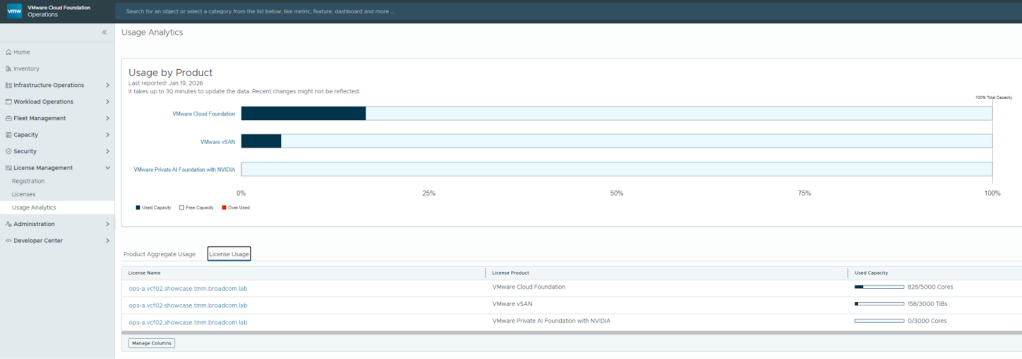
Figure 1. Dynamic license usage analytics allows admins to track capacity and consumption across the VCF estate instantly.
Lifecycle Management
VCF 9.0 introduces lifecycle management from within VCF Operations, for both management components like VCF Operations and VCF Automation as well as workload components like vCenter and ESX.
This is where you will configure your Depot (either online or offline) which will present binaries for download and subsequent application. Lifecycle management is now consolidated in a single VCF Operations screen versus managing upgrades on each individual vCenter console. Documentation for VCF Operations lifecycle management can be found here.
Certificate Management
VCF Operations gives us the ability to monitor and manage certificates across both the management components (VCF Operations, VCF Automation, and VCF Operations for networks) and workload components (vCenter, NSX Manager, and ESX Hosts).
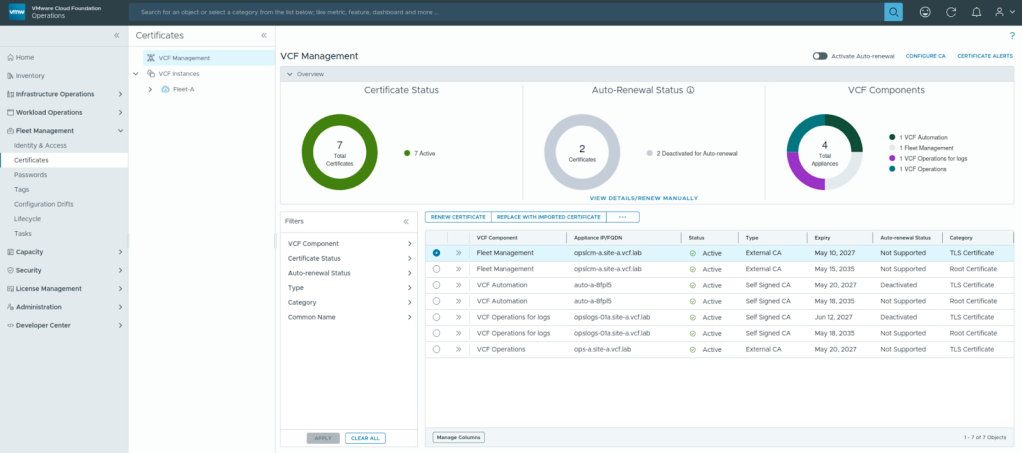
Figure 2. Users can use the dashboards to manage certificates.
Users can renew or replace certificates with imported ones, as well as generate, download, and import Certificate Signing Request (CSR). They can also activate auto-renewal through a certificate authority, such as Microsoft CA or OpenSSL CA. Documentation for VCF Operations Certificate Management can be found here.
Password Management
VCF Operations gives us the ability to monitor and manage passwords across your VCF estate as well. Alerts will be generated when passwords are expiring on root and admin accounts on all management components as well as workload components like vCenter and ESX.
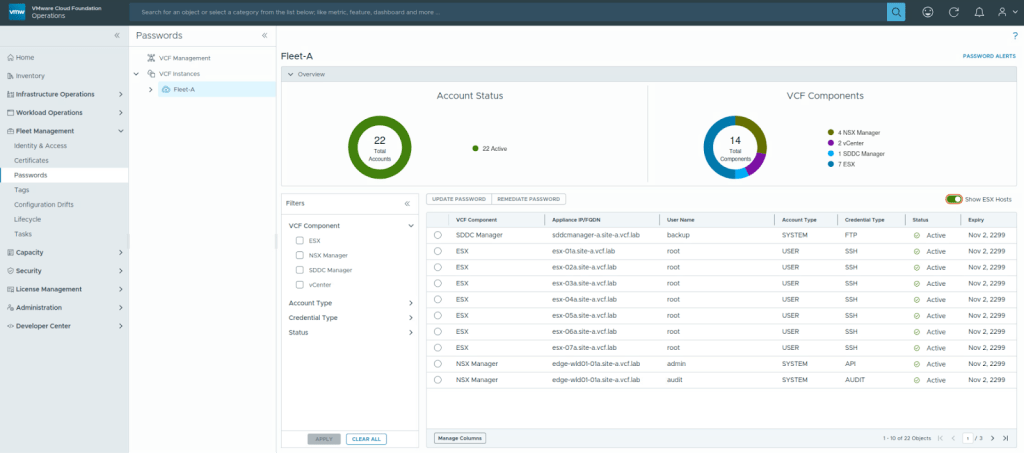
Figure 3. Users in VCF 9.0 can use fleet management to update passwords from VCF Operations without logging into each vCenter, NSX, vSAN, and management component targets.
Integrated Monitoring Capabilities
Beyond the management capabilities introduced in VCF 9.0, there are several new and updated monitoring enhancements, getting the user closer and closer to the ever-elusive single source for observability.
Diagnostic Findings
VCF Operations Diagnostics Findings provides real-time visibility into Active Findings: VMSA/CVE exposure, security vulnerabilities, issues with known KBs, trending issues, and more. A Findings Catalog is also available detailing each item we are looking for. Diagnostics in VCF 9.0 is now your single source for optimizing SecOps.
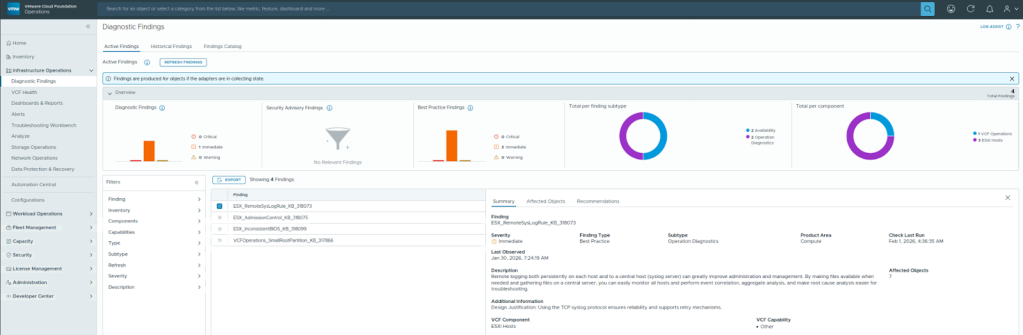
Figure 4. Users can look at diagnostic findings to help troubleshoot.
Health Visibility
VCF health gives the user visibility into their entire VCF estate at a glance, showing issues like VCF Instance Alerts, ESX host issues, and vCenter, vSAN, and NSX problems. Certificate, NTP, and DNS issues are also published here, giving the user a single source for VCF related troubleshooting. VCF health in VCF 9.0 now provides observability across all the VCF components in the infrastructure.
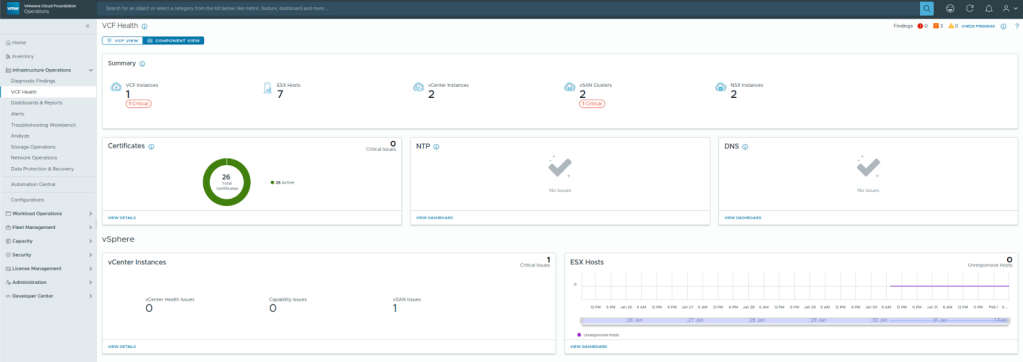
Figure 5. Users can view overall VCF health across all the components.
Logs Analysis
VCF Operations is your portal for logs too. The ability to analyze logs, compare logs, generate alerts based on logs, and configure your log collection is all done from VCF Operations now. By embedding log analysis directly into VCF Operations, we eliminate the ‘swivel-chair’ effect of toggling between a metrics tool and a logging tool during a critical outage. Take a look at this blog to use Log Assist to accelerate your support cases.
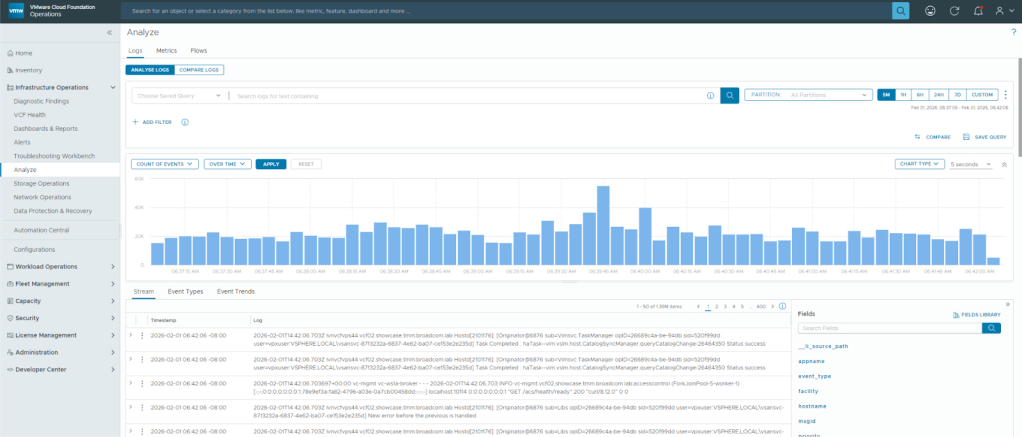
Figure 6. Users can view log analytics to help troubleshoot and correlate events.
Storage Operations
VCF Operations provides insight into storage related alerts, including both vSAN and non-vSAN related storage. Details around vSAN Cluster health are provided, including vSAN cluster types, performance (IOPS and latency), and capacity. VCF 9.0 now shows a complete view of vSAN storage within the VCF Operations dashboards versus having to go into individual vCenter screens.
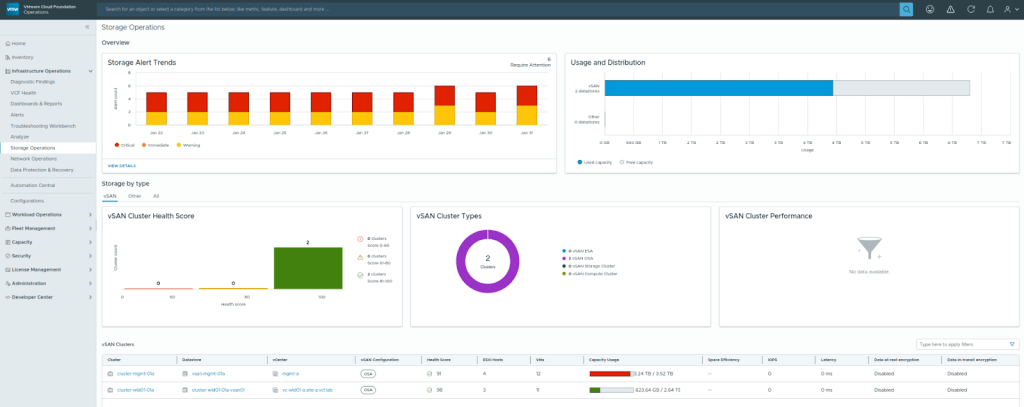
Figure 7. Users can view findings on vSAN to optimize storage operations.
Network Operations
VCF Operations is now your observability portal for network operations. We provide insight into your NSX instances, transport nodes, edge clusters, and more. VCF 9.0 now displays network metrics and properties that used to be on different user interfaces.
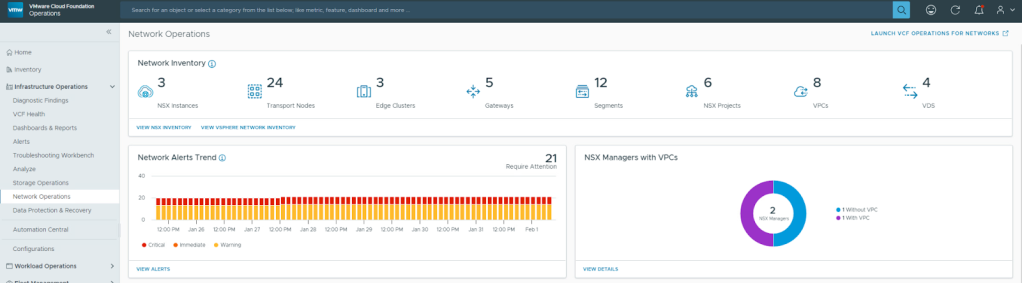
Figure 8. Users can see network operations to provide visibility to help troubleshoot network issues.
Security Capabilities
In addition to management and monitoring capabilities that were introduced in VCF 9.0, VCF Operations also provides SecOps dashboards to provide visibility on infrastructure security.
Security Operations
VCF Operations in VCF 9.0 is now your security observability plane, providing visibility into authentication, user activity, security related advisories, and more. This will help to quickly strengthen your VCF security posture.
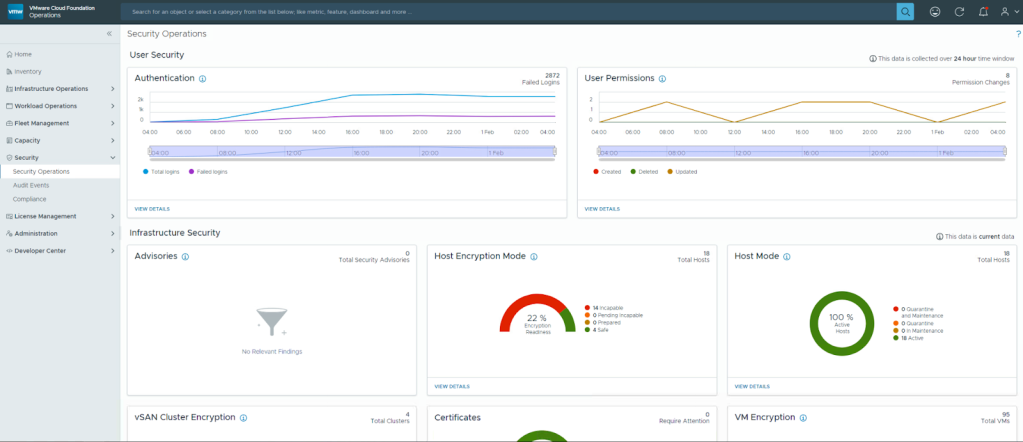
Figure 9. Users can see security operations information which includes host encryption details as well as authentication visibility.
Audit Events
Beyond the main security oerations page, VCF Operations provides detailed visibility into user activity as well. You can now see who’s logged into endpoints, when they logged out, and if their userids were valid.
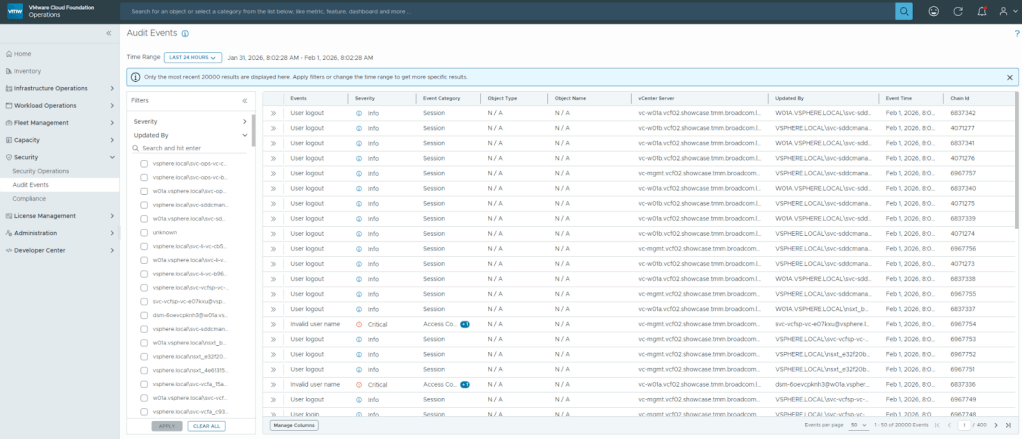
Figure 10. Users can view audit events to help secure the infrastructure with audit trails.
After licensing is enabled, these other capabilities can be adopted into your workflow incrementally, allowing you to evolve your operations efficiency improvements at your own pace without disrupting the private cloud experience. By leveraging VCF Operations, you are doing more than just ‘monitoring’—you are efficiently securing, optimizing, and maximizing the performance of your infrastructure. To learn more about how these features fit into your environment, explore the resources below.
Resources
Blogs from Brock Peterson (Principal VCF Operations and VCF Automation Architect)
VMware Hands-On Labs (explore capabilities in a lab with only a browser)
VMware Cloud Foundation Operations webpage
Blog: Diagnostics Log Assist for Broadcom Cases
Discover more from VMware Cloud Foundation (VCF) Blog
Subscribe to get the latest posts sent to your email.