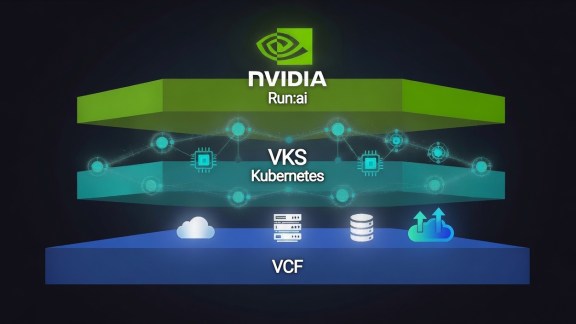

As the demand for AI applications and agents rapidly grows, providing your organization with access to GPU-enabled resources is essential. This is key to leveraging AI for accelerated business growth and minimizing security risks, particularly by keeping AI workloads within your on-premises VMware Cloud Foundation (VCF) environment.
VCF Automation is the solution that enables your organization to self-service these GPU-enabled resources. This capability is vital for increasing security, avoiding “shadow IT” costs, and speeding up the development and use of AI across your enterprise.
GPU Reservations support the needs of cloud providers and similar multi-tenant scenarios to reserve GPUs in advance of a tenant using that GPU, ensuring that the reserved GPU capacity is accessible only to that tenant within their namespace. The same approach can apply within an enterprise where one central IT organization serves vGPU capacity in a pre-reserved way to different departments. Some organizations do not need this level of reservations and want to be more flexible on scheduling at runtime: they should skip using this feature.
The following video demonstrates the steps to enable GPU-enabled resources for VCF Automation, making these valuable assets readily available for self-service within your organization.
Commands Used in the Video
|
1 2 3 4 5 6 7 8 9 10 11 12 13 14 15 16 17 18 19 20 21 22 23 24 25 26 27 28 29 30 31 32 33 34 35 36 37 38 39 40 41 42 43 44 45 46 47 48 49 50 51 52 53 54 55 56 57 58 59 60 61 62 63 64 65 66 67 68 69 70 71 72 73 74 75 76 77 78 79 80 81 82 83 84 85 86 |
#ACCESS DCLI dcli +i +show #access dcli on vCenter Server #LIST ZONE BINDINGS com vmware vcenter namespace management supervisors zones bindings list --supervisor [supervisor ID] #UPDATE ZONE BINDING WITH RESERVED VMCLASS supervisors zones bindings update --supervisor [supervisor ID] --resource-allocation-vm-reservations '[{"rese rved_vm_class": "VMCLASS NAME", "count": 1}]' --zone domain-c[##] #RETRIEVE TENANT BEARER TOKEN curl --insecure --location 'https://VCFA-FQDN/tm/oauth/tenant/YOUR-ORG/token' \ --header 'Accept: application/*' \ --header 'Content-type: application/x-www-form-urlencoded' \ --data-urlencode 'grant_type=refresh_token' \ --data-urlencode 'refresh_token=REFRESHTOKEN' #CREATE SUPERVISOR NAMESPACE CLASS curl -k -XPOST https://VCFA-FQDN/cci/kubernetes/apis/infrastructure.cci.vmware.com/v1alpha2/supervisornamespaceclasses \ -H "Authorization: Bearer <YOUR_BEARER_TOKEN>" \ -H "Content-Type: application/json" \ -d '{ "apiVersion": "infrastructure.cci.vmware.com/v1alpha2", "kind": "SupervisorNamespaceClass", "metadata": { "name": "<YOUR_CLASS_NAME>" }, "spec": { "description": "supervisor namespace class", "parameters": [] } }' #CREATE SUPERVISOR NAMESPACE CLASS CONFIG curl -k -XPOST https://VCFA-FQDN/cci/kubernetes/apis/infrastructure.cci.vmware.com/v1alpha2/supervisornamespaceclassconfigs \ -H "Authorization: Bearer YOUR BEARER TOKEN" \ -H "Content-Type: application/json" \ -d '{ "apiVersion": "infrastructure.cci.vmware.com/v1alpha2", "kind": "SupervisorNamespaceClassConfig", "metadata": { "name": "<CONFIG_NAME>" }, "spec": { "storageClasses": [ { "name": "<STORAGE_POLICY_NAME>", "limit": "<STORAGE_LIMIT_IN_Mi>" } ], "vmClasses": [ { "name": "*" } ], "contentSources": [], "limits": [], "zones": [ { "cpuLimit": "<CPU_LIMIT_IN_MHZ>", "cpuReservation": "<CPU_RESERVATION_IN_MHZ>", "memoryLimit": "<MEMORY_LIMIT_IN_Mi>", "memoryReservation": "<MEMORY_RESERVATION_IN_Mi>", "name": "domain-cXX", "vmClassReservations": [ { "count": <RESERVED_COUNT>, "vmClassName": "<YOUR VMCLASS>" } ] } ] } }' |
Additional Resources
- Official documentation on Preparing VCF for Private AI Workloads
- Set Up Your VCF Automation Organization for VMware Private AI Foundation with NVIDIA
Discover more from VMware Cloud Foundation (VCF) Blog
Subscribe to get the latest posts sent to your email.